

AI Summary
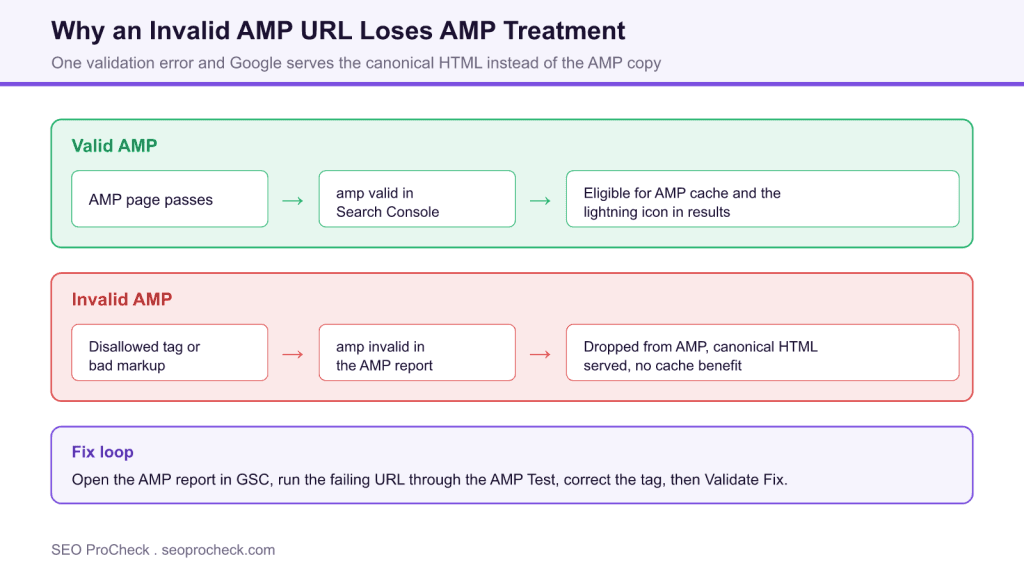
An invalid AMP URL fails AMP validation, so Google will not serve it as AMP and falls back to the canonical HTML, losing the AMP cache and any AMP features. Find the failing tag in the Search Console AMP report or the AMP Test, fix the markup, then use Validate Fix to trigger a recrawl.
- AMP is all or nothing: one error invalidates the whole document
- Invalid pages lose AMP cache eligibility but usually still rank via canonical
- Custom JavaScript, oversized CSS, and raw embeds are common causes
- Fix at the template level, then Validate Fix in Search Console
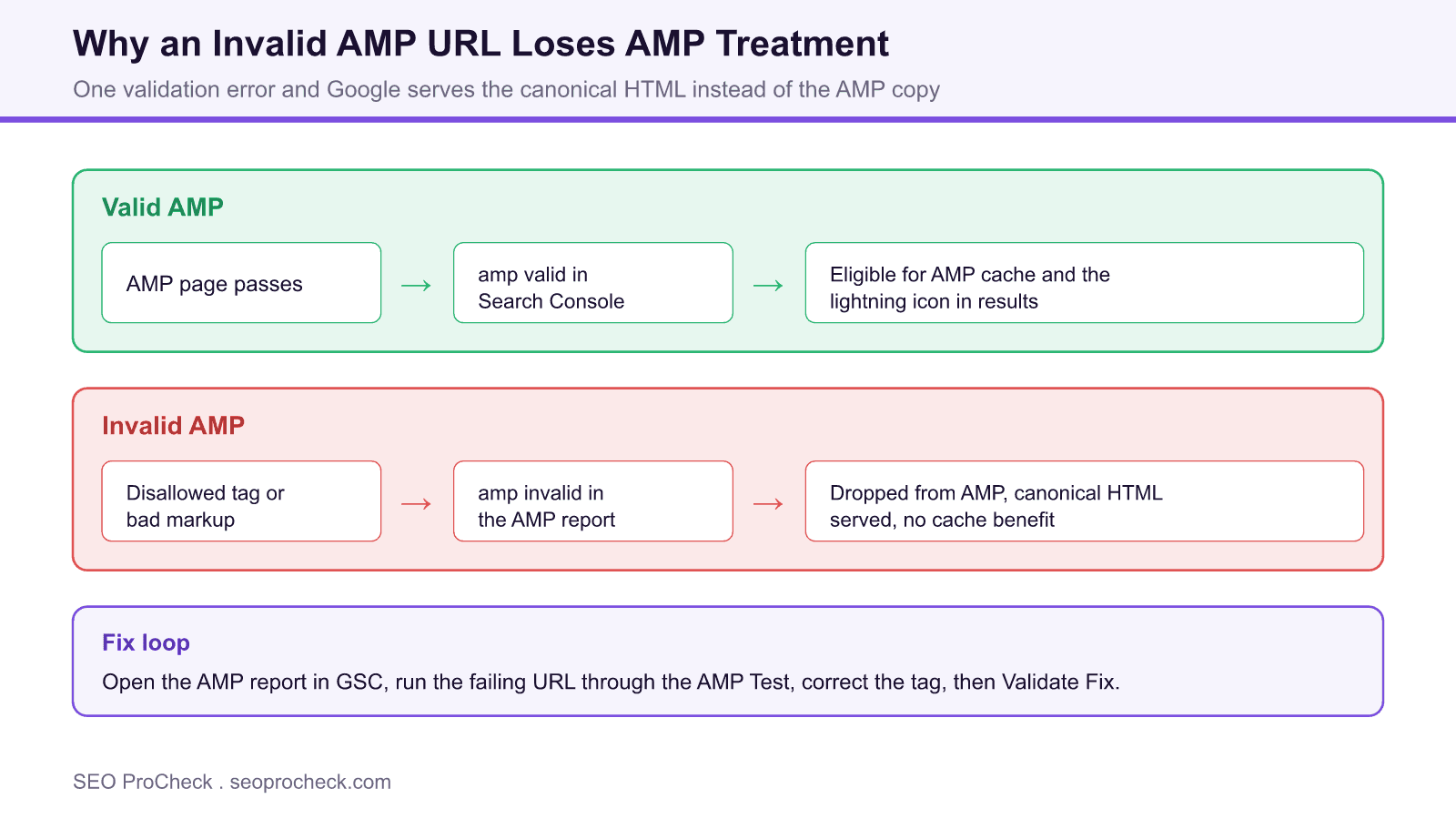
AMP is an all or nothing format. A page is either fully valid against the AMP specification or it is invalid, with no partial credit. When the audit reports an invalid AMP URL, it means the document you have linked as the AMP version failed validation, so Google will not serve it as AMP and quietly falls back to the canonical HTML.
What invalid means in practice
Every AMP page pairs with a canonical HTML page through <link rel="canonical"> and <link rel="amphtml"> tags. When the AMP copy validates, it becomes eligible for the AMP cache and any AMP specific presentation. When it fails, that eligibility is withdrawn: the page is not cached as AMP, and users are served the standard HTML version. The content is usually still indexed through the canonical, so the practical cost is the loss of the AMP performance and caching benefit, plus a maintenance signal that something in your AMP pipeline is broken.
Finding the exact error
Start in the AMP report inside Google Search Console, which groups invalid URLs by error type so you can see whether one template is responsible for many pages. To debug a single URL, run it through the AMP Test, or load the page with #development=1 appended to the address and open the browser console, which prints the failing tag and its line. Both routes point you at the precise rule that broke.
| Error class | Typical trigger | Fix |
|---|---|---|
| Disallowed tag | Custom <script> or forbidden element | Remove it or use the AMP component such as amp-script |
| Missing required markup | No amp boilerplate or canonical link | Add the required head tags for AMP |
| CSS too large | Inline styles over the byte limit | Trim unused CSS below the cap |
| Image without dimensions | amp-img missing width or height | Add explicit width and height attributes |
| Unsupported embed | Raw iframe or third party embed | Swap in the matching amp component |
The usual suspects
AMP forbids author written JavaScript outside the sandboxed amp-script component, so a stray analytics snippet or widget script is a frequent culprit. Other common failures include inline styles that exceed the byte limit, a missing AMP boilerplate block, images declared without explicit width and height, and third party embeds dropped in as raw iframes instead of their dedicated AMP components. Because AMP is strict, a single one of these invalidates the whole document.
Fix, then validate
Correct the offending markup at the template level where possible, so the fix covers every affected URL at once. Re run the AMP Test until it reports the page valid, then open the AMP report in Search Console and use Validate Fix to prompt a recrawl. Status updates over the next few days. If you have decided AMP is no longer worth maintaining, retire the AMP versions cleanly by removing the amphtml links rather than leaving broken copies in place.
Quick Reference
Element Code: OR-003
Issue: AMP pages have validation errors
Impact: AMP pages may not be served
Fix: Fix AMP validation errors in GSC
Detection: Google Search Console
What Is This Issue?
Invalid AMP pages lose AMP treatment.
Why This Matters for Your Website
AMP validation is required for AMP benefits.
How to Fix This Issue
- Check GSC: AMP status report
- Fix errors: Use AMP validator
Tools for Detection
- Search Console: AMP status report
TL;DR (The Simple Version)
Fix AMP validation errors in Search Console for proper AMP serving.
Frequently Asked Questions
What does an invalid AMP URL mean?
It means the page linked as the AMP version fails AMP validation. AMP is strict: a single disallowed tag, a missing required tag, or a broken markup rule makes the whole document invalid. Google then cannot serve that page as AMP and falls back to the canonical HTML version instead.
What actually breaks when AMP is invalid?
The page loses AMP specific treatment. It will not be stored in the AMP cache, it loses eligibility for AMP only features, and any lightning styled labelling disappears. The content usually still ranks through its canonical HTML version, so the loss is the AMP performance and caching benefit rather than the page vanishing.
How do I find the validation errors?
Use the AMP report in Google Search Console to see which URLs are invalid and grouped by error type. For a single URL, run it through the AMP Test or open the page with #development=1 appended and read the console, which lists the exact tag and line that failed.
What are the most common AMP errors?
Frequent causes are custom JavaScript, which AMP forbids outside amp-script, disallowed or unclosed HTML tags, inline styles over the size limit or a missing amp boilerplate, images without explicit width and height, and third party embeds added without their amp component. Stylesheet size overflow is also common.
Is AMP still worth fixing in 2026?
AMP is no longer required for the Top Stories carousel, and many sites have moved away from it, so the strategic question is whether to keep AMP at all. If you still serve AMP pages, invalid ones should be fixed or the AMP version retired cleanly, because a broken AMP copy wastes crawl attention and creates confusing duplicate signals.
How do I confirm a fix?
After correcting the markup, run the URL through the AMP Test again until it reports valid, then use Validate Fix in the Search Console AMP report so Google recrawls the affected URLs. Validation status updates over the following days as the pages are reprocessed.
Related SEO ProCheck Checks and Guides
Claude Vincent is a technical SEO consultant focused on crawlability, rendering, and AI-search visibility. He writes the field guides and case studies at SEO ProCheck, with a bias toward the durable, unglamorous work that decides whether search engines and AI answer engines can actually read and cite a site.
About SEO ProCheck
Technical SEO consulting and GEO strategy with 20 years of enterprise experience. Case studies, resources, and tools for search and AI visibility.
Work With Me
Technical SEO audits, GEO strategy, site migrations, and international SEO. Hourly consulting for teams who need hands-on support, not just reports.
Subscribe to our newsletter!







Recent Posts
- Can AI Crawlers Actually Read Your Site? I Measured 400 of the Biggest September 5, 2026
- The Pre-Publish Quality Gate for AI-Assisted Content August 6, 2026
- AGENTS.md vs llms.txt vs llms-full.txt: Which Agent File Does What July 18, 2026