

AI Summary
The DOM (Document Object Model) is the browser's live, in memory tree of a page after HTML parsing and JavaScript execution, not the raw file the server sent. It matters for SEO because Google indexes the rendered DOM, so any title, canonical, or body copy that only exists after a script runs depends on a rendering step that can fail or lag.
- Raw HTML from view source and the rendered DOM can be two very different documents.
- Load bearing content such as titles, canonicals, and primary copy should live in the served HTML.
- Verify what Google sees with URL Inspection View Crawled Page, not just the DevTools Elements panel.
- A JavaScript injected noindex found at render time can silently drop the page from the index.

The DOM (Document Object Model) is the browser's live, in-memory tree of a page, the structure that exists after HTML parsing and JavaScript execution, not the raw file the server sent. For SEO this gap matters because Google ranks what ends up in the rendered DOM, and if your title, canonical, or half your body copy only exists after a script runs, you are betting your rankings on a rendering step that can fail, time out, or lag days behind the crawl.
Raw HTML vs. the DOM: they are not the same document
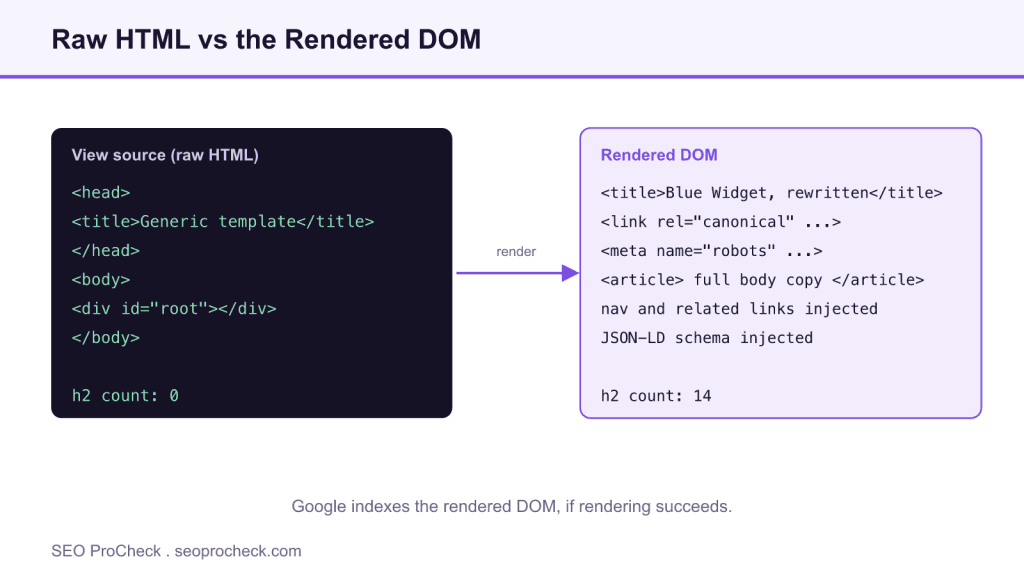
Open any React or GTM-heavy site and run these two checks side by side. First, the raw HTML as the server delivered it:
curl -s https://example.com/product/blue-widget/ | grep -c "<h2"
# 0
Then, in Chrome DevTools Console on the same URL, the rendered state:
document.querySelectorAll('h2').length
// 14
Zero subheadings in the source, fourteen in the DOM. Everything between those two numbers was built client-side. You can dump the entire rendered document for diffing with:
copy(document.documentElement.outerHTML)Paste that next to view-source output and compare. On JavaScript-dependent sites the two files barely resemble each other, and only one of them is guaranteed to be seen at crawl time.
Where raw-vs-DOM differences actually bite in SEO
Not every mutation matters. These are the ones that show up in real audits:
| Element | In raw HTML | Changed in the DOM | SEO consequence |
|---|---|---|---|
| Title tag | Generic template title | Rewritten by JS framework | Google may index the pre-render title; SERP snippets flip between versions |
| Meta robots | Absent or index | JS injects noindex | Works only after rendering, but a JS-injected noindex found at render time gets the page dropped, often by surprise |
| Canonical | One URL | JS swaps in another | Conflicting signals; Google picks its own canonical and it may not be yours |
| Body content | Empty <div id="root"> | Full article hydrated | Indexing depends entirely on the render queue; content invisible if rendering fails |
| Internal links | Few or none | Nav and related-links injected | Link discovery delayed; pages can look orphaned to the initial crawl pass |
| Structured data | None | Injected via Tag Manager | Usually picked up, but validation tools testing raw HTML report it missing |
| Node count | Lean | Thousands of wrapper divs added | Excessive DOM size drags interaction metrics and rendering cost |
That last row is its own audit item, see avoiding excessive DOM size for the thresholds and how to slim the tree.
How to check it on your own site
- View source first. Right-click → View Page Source (or
curl -s URL). This is the pre-JavaScript document. Search it for your H1, a sentence of body copy, the canonical, and the meta robots line. - Compare against DevTools Elements. The Elements panel is the live DOM. Anything you find there but not in step 1 was created by JavaScript.
- Run GSC URL Inspection → View Crawled Page. The rendered HTML tab shows what Google's Web Rendering Service actually produced for your URL, the closest thing to ground truth you'll get.
- Crawl with JavaScript rendering enabled in Screaming Frog (Configuration → Spider → Rendering → JavaScript). Then check the "JavaScript" tab for pages where content, links, or directives exist only post-render.
- Diff at scale. Screaming Frog stores both raw and rendered HTML per URL when you enable it under Extraction, export both and diff the pages that carry revenue.
Common audit mistakes
- Auditing view-source and calling it done. On client-rendered sites the source is a shell. Fix: always pull the rendered DOM before concluding content is "missing."
- Trusting the Elements panel as "what Google sees." Your browser renders with your cookies, viewport, and no timeout pressure. Googlebot renders headless, may skip requests, and doesn't scroll or click. Fix: verify with URL Inspection, not just DevTools.
- Ignoring JS-injected directives. A tag manager rule that adds
noindexor rewrites canonicals is invisible in the source and will pass a raw-HTML audit clean. Fix: grep the rendered DOM forrobotsandcanonicalspecifically. - Assuming rendering always succeeds. Blocked JS files, timeouts, and errors leave Google indexing the raw shell. If JS files are disallowed in robots.txt, rendering breaks silently. Fix: check the URL Inspection screenshot and resource-load errors.
- Treating a big DOM as a purely dev problem. Node-count bloat is measurable in an SEO crawl and correlates directly with slow interactions. Flag it in your audit, with numbers.
If your rendered-vs-raw diff turns up serious gaps, the fix paths, server-side rendering, hydration changes, or prerendering as a bridge, are covered in the JavaScript rendering diagnosis guide and the write-up on prerendering as a stopgap.
FAQ
Does Google index the DOM or the raw HTML?
Both, in sequence. The initial crawl reads the raw HTML; rendering then produces the DOM, and the rendered version is what gets indexed. Content present only in the DOM can rank, but it depends on rendering completing successfully, which is one more failure point than server-delivered content has.
Is content injected by JavaScript bad for SEO?
Not inherently. Google renders JavaScript reliably these days. The problem is fragility: anything critical (titles, canonicals, primary copy, links) that exists only post-render inherits every rendering risk. Put load-bearing content in the served HTML; let JS enhance, not create.
How large is too large for a DOM?
Lighthouse flags pages over 800 nodes as worth a look and over about 1,400 as excessive. Those are heuristics, not ranking thresholds, but past a few thousand nodes, style recalculation costs show up in interaction metrics you do get measured on.
Why does "Inspect Element" show different HTML than "View Source"?
Because they're two different artifacts. View Source is the bytes the server sent; Inspect Element is the live DOM after parsing, error correction, and every script that has run. The delta between them is exactly your JavaScript dependency, and exactly what a rendering audit measures. The JavaScript SEO FAQ goes deeper on how crawlers handle that delta.
Do browser DOM corrections affect SEO?
Sometimes. Browsers repair invalid markup while building the DOM, an unclosed tag can silently swallow the rest of the page into an unexpected element, moving content or links out of where you think they are. If a crawler's extraction of your page looks scrambled, validate the markup before blaming anything else.
Claude Vincent is a technical SEO consultant focused on crawlability, rendering, and AI-search visibility. He writes the field guides and case studies at SEO ProCheck, with a bias toward the durable, unglamorous work that decides whether search engines and AI answer engines can actually read and cite a site.
About SEO ProCheck
Technical SEO consulting and GEO strategy with 20 years of enterprise experience. Case studies, resources, and tools for search and AI visibility.
Work With Me
Technical SEO audits, GEO strategy, site migrations, and international SEO. Hourly consulting for teams who need hands-on support, not just reports.
Subscribe to our newsletter!







Recent Posts
- Can AI Crawlers Actually Read Your Site? I Measured 400 of the Biggest September 5, 2026
- The Pre-Publish Quality Gate for AI-Assisted Content August 6, 2026
- AGENTS.md vs llms.txt vs llms-full.txt: Which Agent File Does What July 18, 2026