

Why We Switched CDNs: How Google's Core Web Vitals Led Us to Cloudflare Pages
- January 1, 2023
- Web Performance
AI Summary
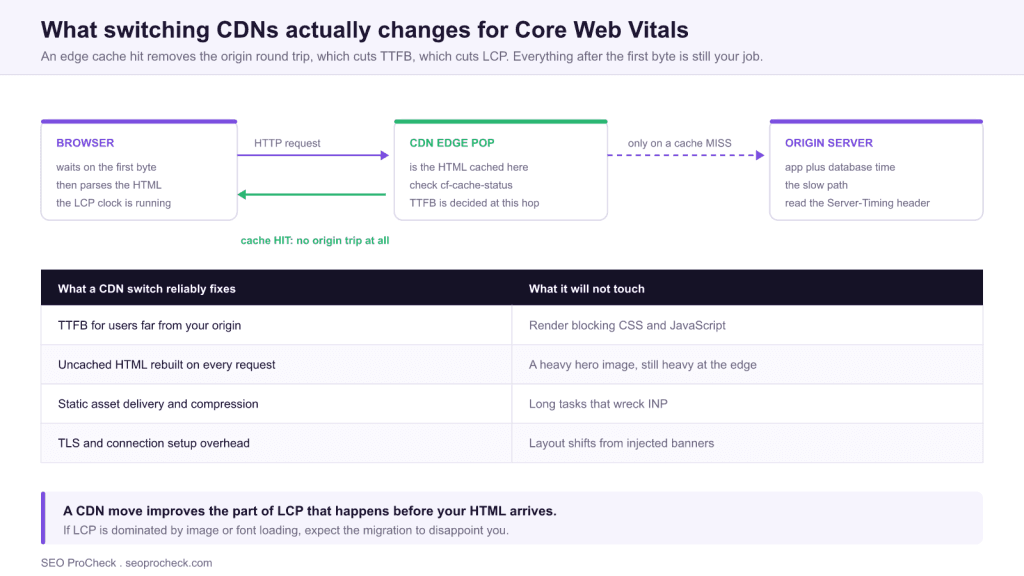
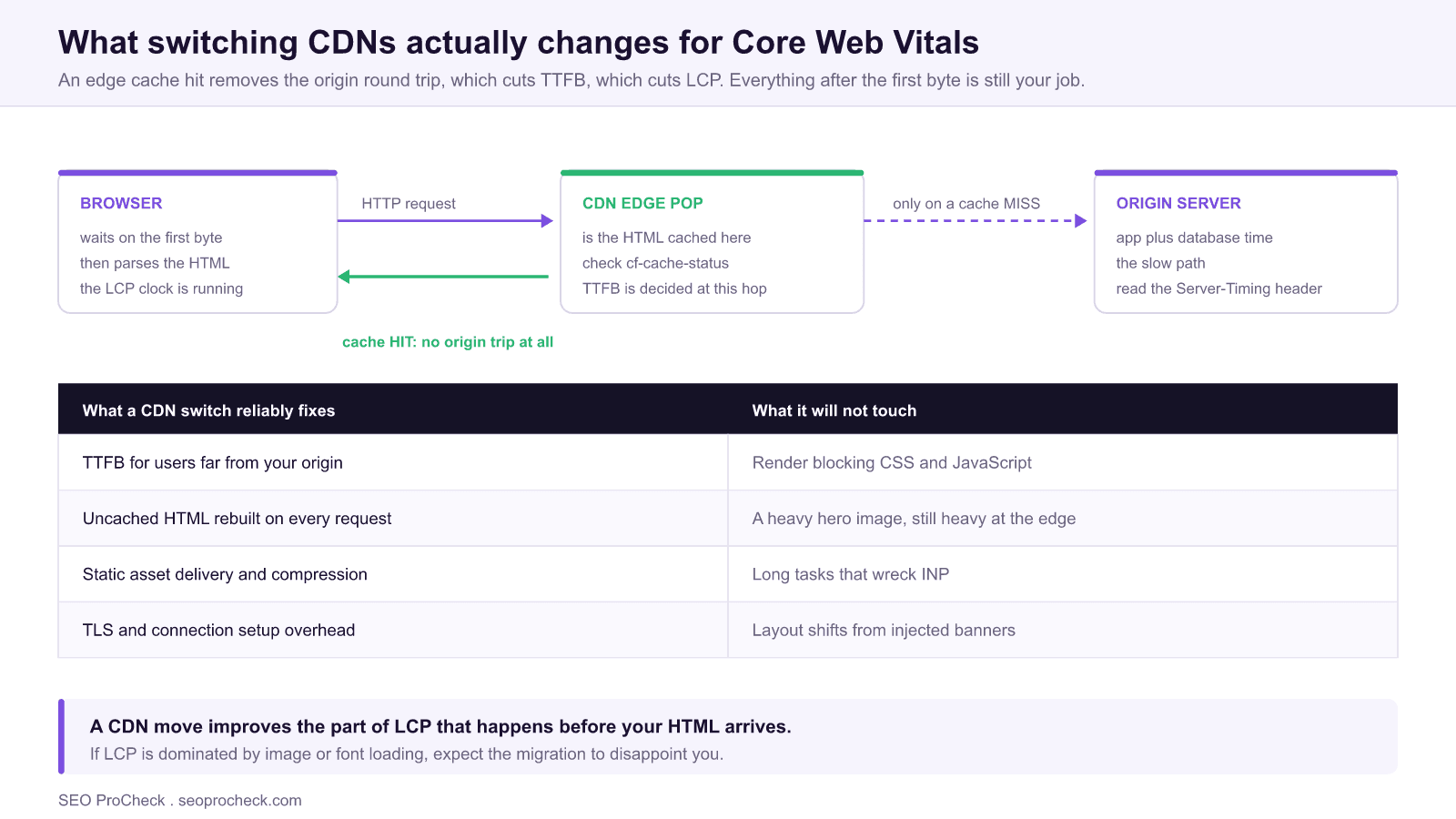
Switching CDNs is a Core Web Vitals fix only when your problem is server response time. Moving static site output to an edge platform such as Cloudflare Pages removes the origin round trip on every request, which cuts TTFB and therefore the server side portion of LCP, but it does nothing for heavy images, render blocking scripts, or layout shift.
- Diagnose first: if TTFB is already under roughly 800 ms, a CDN migration is the wrong project.
- The win comes from caching HTML at the edge, not just static assets. Most sites already do the latter.
- Verify with the
cf-cache-statusresponse header (or your provider's equivalent), not with a Lighthouse score. - Budget for the migration risks that actually bite: redirect chains, header loss, and stale cache on deploy.
This technical SEO case study demonstrates how resolving technical issues and optimizing site infrastructure directly impacts organic visibility. The documented approach provides a template for technical optimization initiatives.
Technical Challenge
Technical SEO issues often create invisible barriers to ranking potential. This case study identifies the specific technical challenges addressed, from crawlability issues to performance bottlenecks. Understanding the problem scope helps practitioners diagnose similar issues.
When a CDN switch is the right diagnosis
Infrastructure migrations are expensive and disruptive, so the bar for choosing one should be high. The honest test is simple: break your LCP into the part that happens before the HTML arrives and the part that happens after. If most of the time is spent before the first byte, hosting is your bottleneck and a platform move can pay off. If most of it is spent after, you have a front end problem and no CDN on earth will fix it.
Run this check on a representative URL rather than the homepage. In Chrome DevTools, open the Network panel, click the document request, and read the Timing tab. The value you care about is "Waiting for server response," which is TTFB. Google's rough guidance is that TTFB should sit under 800 milliseconds for a page targeting a good LCP, because LCP has to fit inside 2.5 seconds and the browser cannot start any work until the HTML lands.
You can also read it straight from the command line, which is the faster way to sample several URLs and several regions:
curl -o /dev/null -s -w \
  "dns: %{time_namelookup}s  connect: %{time_connect}s  tls: %{time_appconnect}s  ttfb: %{time_starttransfer}s  total: %{time_total}s\n" \
  https://example.com/a-real-content-page/
Three patterns point at hosting rather than front end code. First, TTFB that scales with distance: fast from your own city, slow from another continent. Second, TTFB that is consistently high everywhere, which usually means the HTML is being rebuilt per request by an application server. Third, a large gap between the first visit and a repeat visit to the same URL, which suggests the origin is doing work that a cache should have absorbed.
Diagnostic Process
Identifying technical issues requires systematic analysis using crawling tools, log file analysis, and Search Console data. This case study documents the diagnostic methodology that uncovered actionable issues. The process itself provides value for practitioners building technical audit capabilities.
Reading the cache, not the marketing
Nearly every site that believes it "already has a CDN" is caching images, CSS and JavaScript at the edge while still sending every HTML request back to the origin. That configuration leaves the entire TTFB problem in place, because the document request is the one on the critical path. The header tells you the truth in one line:
curl -sI https://example.com/a-real-content-page/ | grep -iE 'cf-cache-status|age|cache-control|x-cache|server-timing'

cf-cache-status: DYNAMIC     (HTML is NOT cached at the edge)
cache-control: private, no-store
DYNAMIC or BYPASS means the edge is forwarding to your origin every time. HIT means the edge served it without touching the origin, which is the state you are migrating toward. Run the same check against a static asset and you will usually see HIT there, which is exactly how teams convince themselves the CDN is doing its job.
| Header value | What it means | Effect on TTFB | What to do |
|---|---|---|---|
HIT | Served from the edge, origin untouched | Best case, near network latency only | Nothing, this is the goal |
MISS | Cacheable, but not in this PoP yet | Full origin round trip for this user | Normal after a purge, investigate if constant |
DYNAMIC | Provider decided not to cache it at all | Origin round trip every single time | This is the one worth fixing |
BYPASS | A rule or cookie forced a bypass | Origin round trip every time | Audit page rules and session cookies |
EXPIRED | Was cached, TTL ran out, revalidating | Origin round trip on the unlucky request | Raise the TTL, add stale while revalidate |
The most common single cause of BYPASS on a content site is a session or analytics cookie that the CDN treats as a signal of personalized content. On WordPress in particular, a stray cookie set on every visitor will silently disable full page caching for the entire site while the dashboard still reports a healthy cache hit ratio for assets.
For the wider picture of how edge caching interacts with crawling and rendering, see the guide on CDN SEO and edge caching. If you are considering doing logic at the edge rather than just caching, edge SEO with CDN workers covers what is realistic.
Implementation and Solutions
Each identified issue required specific technical solutions implemented within development constraints. The case study details solutions for rendering issues, performance optimization, crawl management, and indexation improvements. Implementation approaches balance ideal solutions with practical constraints.
What actually breaks during a CDN migration
The performance upside of moving to a static edge platform is fairly predictable. The SEO downside is where migrations go wrong, and it is almost always one of the same five items. Put each of these on the pre launch checklist and verify them again within an hour of the cutover.
| Risk | How it shows up | Check before and after cutover |
|---|---|---|
| Redirect rules lost | Old platform held them in .htaccess or nginx config that does not migrate | Crawl your live URL list, confirm every 301 still resolves in one hop |
| Trailing slash flip | New platform normalizes URLs differently, creating a redirect on every internal link | Request 20 known URLs both ways, compare status codes and canonicals |
| Headers dropped | X-Robots-Tag, hreflang headers, or HSTS silently disappear | curl -sI a sample of URLs, diff the header set against the old host |
| Preview or staging indexed | Edge platforms expose per branch preview URLs on a public subdomain | Return noindex on preview hostnames, and search for the preview domain in Google |
| Stale HTML after deploy | Aggressive HTML TTL serves old content, sometimes old canonicals | Confirm the deploy pipeline purges the edge, then spot check with a cache buster |
The preview URL item deserves emphasis because it is specific to this class of platform and did not exist on traditional hosting. Branch deploys are a genuine productivity gain, and they also publish a complete, crawlable duplicate of your site on a hostname you did not choose. If anything links to one, it can be discovered. The fix is a rule at the edge that returns X-Robots-Tag: noindex for any hostname that is not your canonical domain, applied before the first preview goes live rather than after.
Measurable Impact
Technical improvements demonstrate value through measurable outcomes: improved crawl stats, faster indexation, better Core Web Vitals scores, and ultimately improved rankings and traffic. This case study quantifies the impact of technical optimization.
Measuring the migration honestly
Set the baseline before you touch anything, because after the cutover you cannot recreate it. Capture the p75 for LCP and TTFB on your main templates, the cache status distribution, and a crawl of status codes and canonicals. Then expect the following sequence.
- Immediately: TTFB in your own synthetic checks and RUM. This is the number the migration was supposed to move, and if it has not moved within hours, the cache is not configured the way you think it is.
- Within days: your first party field data for LCP on the affected templates.
- Around 28 days: CrUX and Search Console, which aggregate a rolling 28 day window and therefore cannot show a clean before and after any sooner.
- Weeks later, and cautiously: crawl rate changes. Googlebot does adapt its crawl rate to server responsiveness, so a faster origin can earn more crawl over time, but this is a slow secondary effect and easily confused with unrelated changes.
Be disciplined about the counterfactual. A CDN migration usually ships alongside a build system change, a template refresh, or an image pipeline upgrade, and then nobody can say which one produced the result. If you can, cut over the infrastructure alone, hold everything else for two weeks, and take the clean reading. That patience is what turns a migration into a documented case study rather than an anecdote.
For the metric this work targets most directly, the complete LCP guide breaks down the four sub parts of Largest Contentful Paint so you can see exactly how much of it TTFB owns, and the field versus lab data guide explains why your synthetic checks will move weeks before Search Console does.
FAQ
Only the parts driven by server response time. If TTFB is a large share of your LCP, moving to an edge platform that caches HTML can produce a real improvement. If your LCP is dominated by a large hero image, blocking scripts, or slow fonts, the migration will change very little and the effort is better spent on the front end.
Under roughly 800 milliseconds is the working target if you want a good LCP, since the whole LCP budget is 2.5 seconds and everything the browser does begins after the first byte. Sites serving cached HTML from an edge network routinely land far below that, which is why the ceiling is worth chasing.
Request the page with curl -sI and read the cache status header, which on Cloudflare is cf-cache-status. A value of HIT means the edge served it without contacting your origin. DYNAMIC or BYPASS means every visitor is still paying for a full origin round trip.
It can, but the cause is almost never the CDN itself. The damage comes from redirect rules that did not migrate, trailing slash behaviour that changed, response headers that were silently dropped, and preview deployments that got indexed. Audit those four before cutover and the risk drops sharply.
Yes. Modern edge platforms publish a fully crawlable copy of the site for each branch or pull request on a public subdomain. Add an edge rule that returns X-Robots-Tag: noindex for any hostname other than your canonical domain, and do it before the first preview is created rather than after you find duplicates in the index.
Roughly a month. The Core Web Vitals report is built on CrUX, which aggregates a 28 day rolling window, so the days before your cutover keep dragging the average down until they age out. Your own monitoring will show the change within hours, which is the number to report internally in the meantime.
Technical SEO case studies like this one help practitioners understand the tangible value of investing in site infrastructure.
Source: https://electricui.com/blog/switching-to-cloudflare-pages
Claude Vincent is a technical SEO consultant focused on crawlability, rendering, and AI-search visibility. He writes the field guides and case studies at SEO ProCheck, with a bias toward the durable, unglamorous work that decides whether search engines and AI answer engines can actually read and cite a site.
About SEO ProCheck
Technical SEO consulting and GEO strategy with 20 years of enterprise experience. Case studies, resources, and tools for search and AI visibility.
Work With Me
Technical SEO audits, GEO strategy, site migrations, and international SEO. Hourly consulting for teams who need hands-on support, not just reports.
Subscribe to our newsletter!







Recent Posts
- Can AI Crawlers Actually Read Your Site? I Measured 400 of the Biggest September 5, 2026
- The Pre-Publish Quality Gate for AI-Assisted Content August 6, 2026
- AGENTS.md vs llms.txt vs llms-full.txt: Which Agent File Does What July 18, 2026