

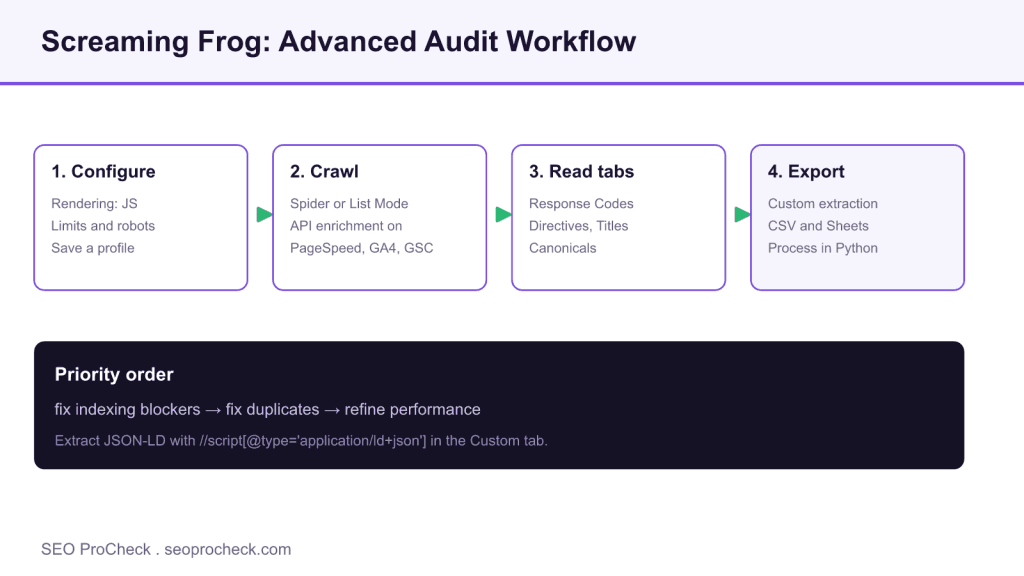
AI Summary
Screaming Frog turns a technical SEO audit into a repeatable workflow: configure rendering and API enrichment, crawl the site, read the priority tabs, then export enriched data. Custom extraction with XPath and CSS selectors lets it pull schema, canonicals, and any element at scale.
- Configure JavaScript rendering, crawl limits, and API access, then save a reusable profile.
- Read tabs in priority order: Response Codes and Directives before titles and performance.
- Custom extraction (XPath or CSS) pulls JSON-LD, canonicals, and meta robots into exportable columns.
- List Mode audits a specific shortlist of URLs without recrawling the whole site.

Screaming Frog Fundamentals
Screaming Frog SEO Spider is the industry-standard desktop crawler for technical SEO audits. It crawls websites like a search engine, collecting data about URLs, status codes, meta data, links, images, and more. While the free version crawls up to 500 URLs, the paid license unlocks unlimited crawling, JavaScript rendering, custom extraction, and advanced features. Understanding Screaming Frog's capabilities transforms audit efficiency and enables deeper technical analysis than browser-based tools typically allow.
Configuration for Different Audits
Proper configuration ensures useful crawl data. For standard audits, crawl in "Spider" mode respecting robots.txt. For comprehensive audits, consider ignoring robots.txt to see everything (but only on sites you control). Configure JavaScript rendering (Configuration > Spider > Rendering) when auditing JavaScript-heavy sites. Set crawl limits appropriately for large sites. Configure extraction of custom elements using CSS selectors or regex. Enable API connections for PageSpeed, Analytics, and Search Console data enrichment. Save configuration profiles for different audit types.
| Audit Type | Key Configuration | Tabs to Focus On |
|---|---|---|
| Quick Technical | Default settings, 500 URL limit | Response Codes, Directives |
| Full Technical | Ignore robots (staging), JS rendering | All tabs, custom extraction |
| Content Audit | Extract word count, headings, custom | Page Titles, H1, H2, Content |
| Link Audit | Store/render all links | Links, Inlinks, Outlinks |
| International | Hreflang validation enabled | Hreflang tab |
Essential Reports and Exports
Export data strategically for analysis. The "All Inlinks" export shows complete internal linking with anchor text. "Crawl Overview" provides executive summary statistics. Custom exports filter specific issues like pages missing meta descriptions or with duplicate titles. Use the "Compare" feature to diff crawls over time, identifying changes between audits. Schedule crawls for regular monitoring. Export to Google Sheets or Excel for further analysis, filtering, and visualization. The built-in reports (Issues, Directives, Canonicals) quickly identify common problems.
Custom Extraction and XPath
Custom extraction pulls specific data from crawled pages using CSS selectors, XPath, or regex. Extract product prices, review counts, author names, schema data, or any page element for analysis at scale. Use CSS selectors like "h1.product-title" for simple extraction. Use XPath for complex selections like "//script[@type='application/ld+json']" for JSON-LD schema. Extract multiple elements to columns for comprehensive content audits. Combine with List Mode to audit specific URLs rather than full crawls. Custom extraction transforms Screaming Frog from crawler to data extraction tool.
Integration with Other Tools
Screaming Frog integrates with external APIs for enriched data. Connect Google Analytics to see sessions, bounce rate, and conversions per URL. Link Search Console for impressions, clicks, and position data. Enable PageSpeed Insights API to gather Core Web Vitals and performance scores during crawl. Connect Ahrefs or Majestic for backlink metrics per page. These integrations create comprehensive datasets combining crawl data with performance, search, and link metrics. Export combined data for advanced analysis in spreadsheets or BI tools. API integrations require appropriate accounts and API keys.
A Configuration Recipe for a First Full Audit
Configuration decides whether a crawl produces signal or noise. Before crawling a site you own, open Configuration > Spider > Rendering and switch the rendering mode to JavaScript so the spider sees what a modern browser renders. Under Configuration > Spider > Limits, raise or remove the URL cap for a full site. Under Configuration > API Access, connect PageSpeed Insights, Google Analytics, and Search Console so metrics attach to each row during the crawl rather than in a later join. Finally, save the profile through File > Configuration > Save As so the same setup is one click away next time. The recipe below is a dependable starting point.
| Setting | Menu path | Recommended value |
|---|---|---|
| Rendering | Configuration > Spider > Rendering | JavaScript for modern sites |
| Crawl limit | Configuration > Spider > Limits | Remove cap for full audits |
| robots.txt | Configuration > robots.txt | Respect on live, ignore on staging you own |
| API enrichment | Configuration > API Access | PageSpeed, GA4, Search Console |
| Save profile | File > Configuration > Save As | One profile per audit type |
Ready to Paste Custom Extractors
Custom extraction (Configuration > Custom > Extraction) is where Screaming Frog stops being a crawler and becomes a data platform. Add an extractor, choose XPath or CSS Path, and paste an expression. The extracted value lands in the Custom Extraction tab, one column per extractor, exportable alongside every other field. These four cover most technical audits.
| What you want | Type | Expression |
|---|---|---|
| JSON-LD schema blocks | XPath | //script[@type='application/ld+json'] |
| Canonical target | XPath | //link[@rel='canonical']/@href |
| Meta robots directive | XPath | //meta[@name='robots']/@content |
| H1 text | CSS Path | h1 |
Run these in List Mode (Mode > List) against a specific set of URLs when you only need to audit a shortlist, for example a batch of new product pages, rather than recrawling the entire site.
Reading the Results: Which Tab Reveals Which Problem
A crawl is only as useful as your ability to read it. Move through the tabs in priority order: fix what blocks indexing before what merely refines it.
| Symptom | Tab and filter | Typical fix |
|---|---|---|
| Pages returning errors | Response Codes, Client Error 4xx | Redirect or restore, update internal links |
| Accidental noindex | Directives, Noindex | Remove the tag from pages meant to rank |
| Duplicate or missing titles | Page Titles, Duplicate and Missing | Write unique, intent matched titles |
| Canonical conflicts | Canonicals, Canonicalised | Point canonicals at the indexable version |
| Slow templates | PageSpeed, LCP and TTFB columns | Optimize the worst scoring template first |
Export the raw crawl and process it further in a scripting environment when you need custom joins or scheduled reporting, our Python for SEO guide shows how to load these CSV exports into pandas, and the PageSpeed columns feed directly into the fixes in our Core Web Vitals optimization guide.
Frequently Asked Questions
Is the free version of Screaming Frog enough for a real audit?
For a small site under 500 URLs the free version covers status codes, titles, and directives. Beyond that limit, or when you need JavaScript rendering, custom extraction, scheduling, or API enrichment, the paid license is required and pays for itself on the first mid sized audit.
Should I let Screaming Frog ignore robots.txt?
Only on sites you own or have permission to audit, and usually only on staging. Ignoring robots.txt reveals blocked areas so you can confirm the blocking is intentional, but on a live third party site you should respect the rules the owner set.
How do I extract structured data with Screaming Frog?
Open Configuration then Custom then Extraction, add an XPath extractor, and paste //script[@type='application/ld+json']. The JSON-LD from each page appears in the Custom Extraction tab, ready to export and validate at scale.
Why is my JavaScript site showing empty pages in the crawl?
By default the spider reads raw HTML. If the site renders content client side, switch to JavaScript rendering under Configuration then Spider then Rendering so the spider executes scripts and sees the same content a browser would.
Can Screaming Frog pull Core Web Vitals data?
Yes. Connect the PageSpeed Insights API under Configuration then API Access, and LCP, INP, CLS, and performance scores attach to each URL during the crawl, letting you sort templates by their worst field metrics.
What is the fastest way to audit a specific list of URLs?
Switch to List Mode under the Mode menu and paste or upload your URLs. The spider crawls only that set, which is ideal for checking a batch of new pages or verifying fixes without recrawling the whole site.
Claude Vincent is a technical SEO consultant focused on crawlability, rendering, and AI-search visibility. He writes the field guides and case studies at SEO ProCheck, with a bias toward the durable, unglamorous work that decides whether search engines and AI answer engines can actually read and cite a site.
About SEO ProCheck
Technical SEO consulting and GEO strategy with 20 years of enterprise experience. Case studies, resources, and tools for search and AI visibility.
Work With Me
Technical SEO audits, GEO strategy, site migrations, and international SEO. Hourly consulting for teams who need hands-on support, not just reports.
Subscribe to our newsletter!






