

AI Summary
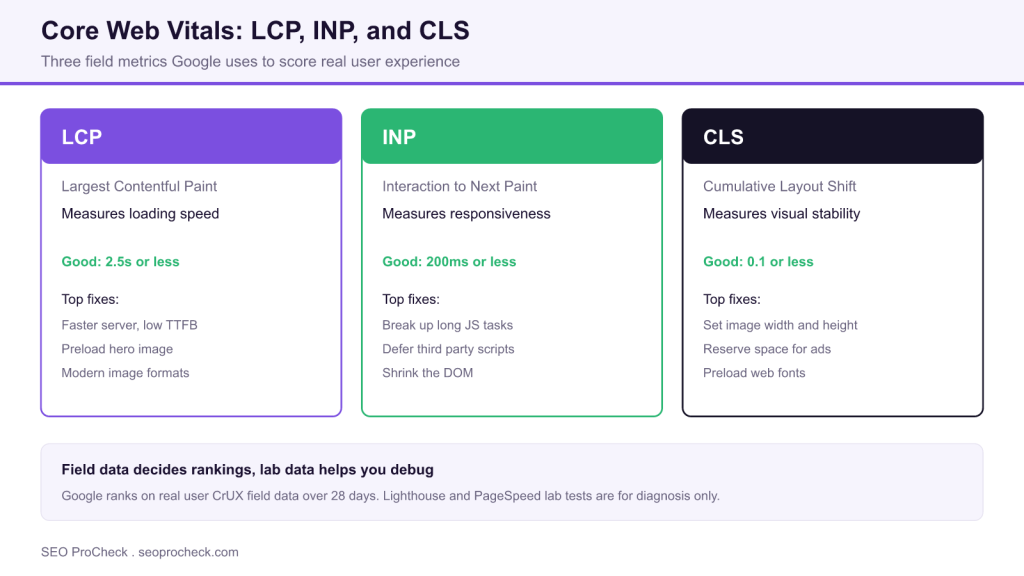
Core Web Vitals are three metrics Google uses to measure real user experience: LCP for loading, INP for responsiveness, and CLS for visual stability. They act as a ranking tiebreaker rather than a primary factor, so they help good content edge out competitors but will not rescue weak content.
- Good scores are LCP 2.5 seconds or less, INP 200ms or less, and CLS 0.1 or less.
- Google ranks on field data from the Chrome UX Report over 28 days, not on Lighthouse lab scores.
- INP replaced First Input Delay in March 2024 and measures every interaction, not just the first.
- Fix any metric marked Poor first, and prioritize mobile, where issues and ranking impact are larger.

Everything you need to know about Core Web Vitals for SEO. Covers all three metrics, measurement, optimization, and the ranking impact. Direct answers to all common questions.
Table of Contents
- Core Web Vitals Basics
- Largest Contentful Paint (LCP)
- Interaction to Next Paint (INP)
- Cumulative Layout Shift (CLS)
- Measurement Tools
- Optimization Strategies
Core Web Vitals Basics
What are Core Web Vitals?
Three specific metrics measuring real-world user experience: LCP (loading), INP (interactivity), and CLS (visual stability). Google uses them as ranking signals. They're part of the broader Page Experience signals.
Do Core Web Vitals affect rankings?
Yes, but as a tiebreaker, not primary factor. Content relevance matters more. CWV won't make bad content rank, but may help good content outrank competitors. Bigger impact on mobile than desktop.
What are good Core Web Vitals scores?
LCP: under 2.5 seconds (good), 2.5-4s (needs improvement), over 4s (poor). INP: under 200ms (good), 200-500ms (needs improvement), over 500ms (poor). CLS: under 0.1 (good), 0.1-0.25 (needs improvement), over 0.25 (poor).
What's the difference between field and lab data?
Field data: real user measurements collected via Chrome UX Report (CrUX). Lab data: simulated tests via Lighthouse, PageSpeed Insights. Google uses field data for rankings. Lab data helps diagnose issues.
What is CrUX data?
Chrome User Experience Report: anonymized performance data from real Chrome users. Collected from opted-in users over 28 days. This is what Google uses for Page Experience ranking signals. Available in Search Console.
What if my site doesn't have enough traffic for CrUX?
Pages need sufficient Chrome traffic for field data. Without it, Google may group pages or use origin-level data. Low-traffic sites may not show CWV in Search Console. Focus on lab optimization.
What happened to FID?
First Input Delay (FID) was replaced by INP in March 2024. INP is more comprehensive: measures all interactions throughout page lifecycle, not just first input. INP better represents real interactivity.
Core Web Vitals Thresholds
| Metric | Good | Needs Improvement | Poor |
|---|---|---|---|
| LCP | ≤2.5s | 2.5s-4s | >4s |
| INP | ≤200ms | 200ms-500ms | >500ms |
| CLS | ≤0.1 | 0.1-0.25 | >0.25 |
Largest Contentful Paint (LCP)
What is LCP?
Largest Contentful Paint measures when the largest visible content element finishes rendering. Could be an image, video poster, or text block. Represents perceived loading speed. Target: under 2.5 seconds.
What elements count for LCP?
Images (img, image inside svg, poster image of video), block-level text elements, and background images loaded via CSS. Excludes elements with zero opacity, elements covering full viewport, or low-entropy images.
What causes slow LCP?
Slow server response (TTFB), render-blocking resources (CSS, JavaScript), slow resource load times, client-side rendering delays. The critical path to your largest element determines LCP timing.
How do I improve LCP?
Optimize server response time, remove render-blocking resources, preload critical resources, optimize images (compress, use modern formats), use CDN, inline critical CSS, defer non-critical JavaScript.
How do I optimize images for LCP?
Use modern formats (WebP, AVIF), properly size images for viewport, use responsive images (srcset), compress appropriately, preload hero images with fetchpriority="high", avoid lazy loading above-fold images.
Should I preload the LCP image?
Yes, for hero images. Add:. This tells browser to prioritize the image early. Significant LCP improvement for image-heavy above-fold areas.
What if my LCP element is text?
Ensure fonts load quickly: preload key fonts, use font-display: swap or optional, consider system fonts for critical text. Server-side rendering helps text appear faster than client-side rendering.
Interaction to Next Paint (INP)
What is INP?
Interaction to Next Paint measures responsiveness to user interactions throughout the page lifecycle. Captures time from click/tap/keypress to next visual update. Replaced FID in March 2024. Target: under 200ms.
How is INP different from FID?
FID measured only first interaction delay, ignoring event processing and rendering. INP measures all interactions and reports the worst (or 98th percentile). INP is more comprehensive and harder to optimize.
What causes poor INP?
Long JavaScript tasks blocking main thread, heavy event handlers, excessive DOM size, too many third-party scripts, complex rendering after interactions. Any delay between input and visual feedback hurts INP.
How do I improve INP?
Break up long tasks (yield to main thread), defer non-critical JavaScript, reduce DOM size, optimize event handlers, use web workers for heavy computation, minimize third-party script impact, optimize rendering.
What are long tasks?
JavaScript tasks taking over 50ms. They block the main thread, preventing response to user input. Break into smaller chunks using setTimeout, requestIdleCallback, or the Scheduler API. Measure with Long Tasks API.
How do third-party scripts affect INP?
Third-party scripts often run expensive JavaScript on main thread. Analytics, ads, chat widgets, and social embeds can block interactions. Audit third-party impact; defer, lazy-load, or remove non-essential scripts.
How does DOM size affect INP?
Large DOMs (over 1,400 elements) slow rendering after interactions. Each interaction that changes DOM triggers style recalculation and layout. Smaller DOM means faster visual updates. Simplify markup.
Cumulative Layout Shift (CLS)
What is CLS?
Cumulative Layout Shift measures visual stability: how much page content moves unexpectedly during loading. Calculated by impact fraction times distance fraction. Target: under 0.1 for good user experience.
What causes layout shifts?
Images without dimensions, ads/embeds without reserved space, dynamically injected content, web fonts causing FOIT/FOUT, late-loading content above existing content. Anything that pushes visible content.
How do I improve CLS?
Set explicit width/height on images and videos, reserve space for ads/embeds, avoid inserting content above existing content, use font-display properly, preload fonts, use contain-intrinsic-size for lazy content.
Why are image dimensions important for CLS?
Without dimensions, browser doesn't know space to reserve. When image loads, content below shifts. Use width and height attributes; browser calculates aspect ratio and reserves space before image loads.
How do I prevent ads from causing CLS?
Reserve fixed space with min-height on ad containers. Use CSS aspect-ratio or padding-bottom hack. Load ads into reserved space. Accept that some shift may occur; minimize with proper placeholders.
How do fonts cause CLS?
FOIT (Flash of Invisible Text) and FOUT (Flash of Unstyled Text) cause shifts when custom fonts load and text rerenders. Use font-display: optional or swap, preload fonts, or use system fonts to avoid shifts.
Does CLS measure the entire page lifetime?
Yes, but uses session windows. Groups shifts within 5 seconds, with max 1 second gap between shifts. Reports largest session window. User-triggered shifts (after click/tap) don't count toward CLS.
How does CLS work for single-page apps?
CLS accumulates across route changes in SPAs. Can become very high on long sessions. Page transitions should avoid layout shifts. Consider how navigation and content loading affects cumulative score.
Measurement Tools
What does PageSpeed Insights show?
Both field data (CrUX, real users) and lab data (Lighthouse simulation). Field data shows actual user experience; lab data helps diagnose. Focus on field data for rankings, lab data for optimization.
What is Lighthouse?
Google's open-source tool for auditing web pages. Runs simulated tests on simulated devices. Provides performance score and specific recommendations. Good for development; not representative of real users.
Where do I see CWV in Search Console?
Search Console > Experience > Core Web Vitals. Shows mobile and desktop separately. Groups URLs by similar issues. Uses 28-day rolling average of CrUX data. Updates may take days to reflect changes.
What is the Web Vitals extension?
Chrome extension showing real-time CWV as you browse. Displays LCP, INP, CLS for current page. Useful for quick checks during development. Shows your personal experience, not aggregate field data.
Can I access CrUX data programmatically?
Yes. CrUX API provides field data access. Also available in BigQuery for large-scale analysis. PageSpeed Insights API combines CrUX with Lighthouse. Useful for monitoring many pages programmatically.
Why do my scores vary between tests?
Lab tests vary due to network, server response, test location, and random factors. Run multiple tests and average. Field data is more stable (28-day aggregate) but updates slowly. Don't obsess over single tests.
Optimization Strategies
Which CWV should I fix first?
Fix the one with "Poor" status first. Among equals, prioritize: LCP has biggest perceived impact, INP often requires architectural changes, CLS is usually quickest to fix. Address low-hanging fruit first.
Does server-side rendering help CWV?
Yes, significantly. SSR improves LCP by delivering visible content faster. Reduces INP by minimizing JavaScript needed for first render. Can help CLS by rendering final layout server-side. Worth investment.
Does a CDN help Core Web Vitals?
Yes. CDN improves TTFB by serving from edge locations closer to users. Faster TTFB means faster LCP. Also caches static resources for faster subsequent loads. Essential for geographically distributed users.
Does lazy loading help or hurt CWV?
Helps below-fold content (saves bandwidth, improves initial load). Hurts if applied to LCP image (delays critical content). Never lazy load above-fold images. Strategic lazy loading improves overall performance.
How does JavaScript affect CWV?
Excessive JavaScript hurts all three metrics. Delays LCP through render blocking. Hurts INP by blocking main thread. Can cause CLS through dynamic DOM insertion. Minimize, defer, and optimize JavaScript.
Are mobile and desktop CWV measured separately?
Yes. Search Console shows separate reports. Mobile typically has more issues due to slower devices and networks. Mobile rankings use mobile CWV; desktop rankings use desktop CWV. Prioritize mobile. For discovery and indexing questions beyond speed, see our crawl budget FAQ.
Why are pages grouped in Search Console?
Google groups similar pages when lacking individual page data. Uses URL patterns to aggregate. Fixing issues on one page may improve the group. Focus on template-level fixes for grouped pages. Site structure matters too: our internal linking FAQ explains how templates share signals.
Common CWV Fixes
| Issue | Metric Affected | Quick Fix |
|---|---|---|
| Large hero image | LCP | Compress, preload, modern format |
| Render-blocking CSS | LCP | Inline critical, defer rest |
| Heavy JavaScript | LCP, INP | Defer, code split, remove unused |
| Third-party scripts | INP | Lazy load, defer, or remove |
| Images without dimensions | CLS | Add width and height attributes |
| Ads without space | CLS | Reserve container space |
| Font loading | CLS | Preload, font-display: optional |
Frequently Asked Questions
What counts as a good Core Web Vitals score?
A URL passes when all three metrics are in the good range at the 75th percentile of real visits: LCP of 2.5 seconds or less, INP of 200 milliseconds or less, and CLS of 0.1 or less. Scores between those thresholds and the next tier are Needs Improvement, and anything worse is Poor. Because the measurement is at the 75th percentile, three quarters of your visits must hit the good mark.
What is the difference between field data and lab data?
Field data is measured from real Chrome users through the Chrome UX Report and is what Google uses for ranking. Lab data comes from simulated tests in tools like Lighthouse and PageSpeed Insights and is useful for diagnosing problems in development. When they disagree, trust field data for whether you pass and use lab data to find the cause.
What happened to First Input Delay?
FID was retired in March 2024 and replaced by Interaction to Next Paint. FID only measured the delay before the first interaction was processed, while INP measures every interaction across the page lifecycle and reports one of the worst. INP is a more complete picture of responsiveness and is generally harder to optimize than FID was.
Which Core Web Vital should I fix first?
Start with any metric showing a Poor status, since that is where you lose the most. Among metrics at the same level, CLS is usually the quickest win because it often just needs image dimensions and reserved space, LCP tends to give the biggest perceived improvement, and INP frequently requires deeper JavaScript and architecture changes.
Do Core Web Vitals really affect Google rankings?
Yes, but as a tiebreaker rather than a dominant signal. Relevance and content quality matter far more, so strong vitals will not push thin content up the results. Where two pages are otherwise comparable, better vitals can help one outrank the other, and the effect is larger on mobile than on desktop.
Why don't my Core Web Vitals show up in Search Console?
Search Console only reports field data when a page or group has enough real Chrome traffic in the Chrome UX Report. Low traffic pages may be grouped by URL pattern, rolled into origin level data, or not shown at all. If that is your situation, optimize using lab tools like Lighthouse and the PageSpeed Insights API instead.
Take this with you
The assistant links open with a question about this page already written. Nothing is sent until you press enter.
Claude Vincent is a technical SEO consultant focused on crawlability, rendering, and AI-search visibility. He writes the field guides and case studies at SEO ProCheck, with a bias toward the durable, unglamorous work that decides whether search engines and AI answer engines can actually read and cite a site.
About SEO ProCheck
Technical SEO consulting and GEO strategy with 20 years of enterprise experience. Case studies, resources, and tools for search and AI visibility.
Work With Me
Technical SEO audits, GEO strategy, site migrations, and international SEO. Hourly consulting for teams who need hands-on support, not just reports.
Subscribe to our newsletter!








Recent Posts
- Most Top Sites Never Say Who They Are in Structured Data October 14, 2026
- Homepage Titles Are Mostly Too Short, Not Too Long October 8, 2026
- Who Actually Serves an llms.txt? 184 Top Sites Measured September 29, 2026