

AI Summary
The title tag is both a ranking signal and the headline searchers click; the meta description is not a ranking factor but is the copy that earns the click. Google rewrites a large share of both, so the job is not to control the snippet but to give Google material good enough that any rewrite still works in your favour.
- Target roughly 50 to 60 characters for titles, about 580 to 600 pixels on desktop, since Google truncates on pixel width, not character count.
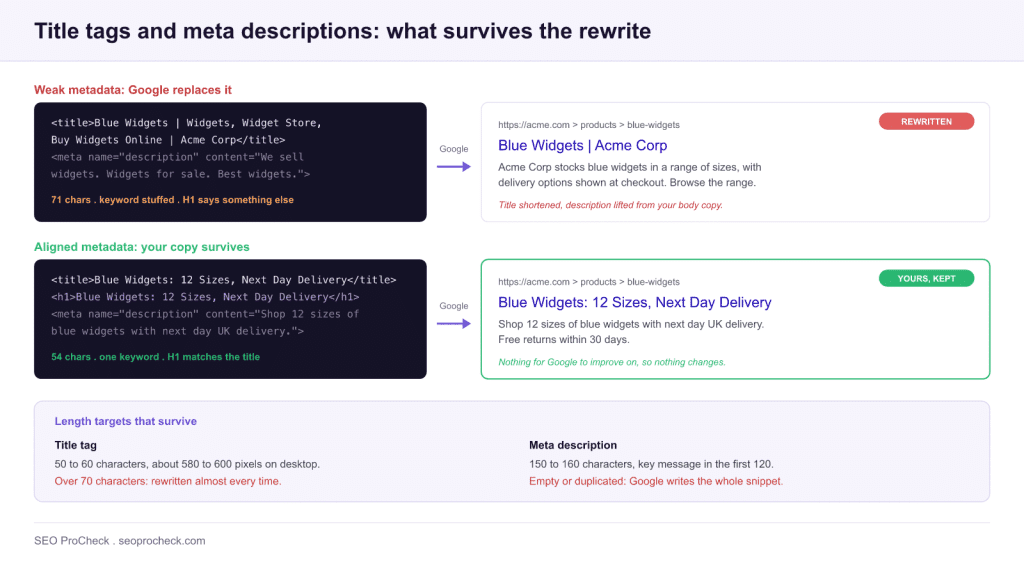
- Aligning your H1 with your title is the single most effective way to cut rewrites, because Google usually pulls replacement title text from the H1.
- Write unique descriptions of about 150 to 160 characters, with the key message inside the first 120 so it holds up on mobile.
- Zyppy analysed 80,959 titles across 2,370 sites and found Google rewrote 61.6 percent of them; titles over 70 characters were rewritten almost every time.
- Leaving a description empty hands the entire snippet decision to Google.

TL;DR
Your title tag is both a ranking signal and the headline searchers click. Your meta description is not a ranking factor, but it is your sales pitch in the result and it drives click-through. Google rewrites a large share of both, so the goal is not to control the snippet perfectly. The goal is to give Google a clear, accurate, intent-matched title and description so the rewrite, when it happens, still works in your favor. Keep titles near 50 to 60 characters, write unique descriptions around 150 to 160 characters, lead with the primary keyword, match search intent, and align your H1 with your title to cut rewrites sharply.
The title tag and meta description are the two pieces of metadata that decide whether your page earns a click. They sit at the top of every search result, they shape first impressions, and they quietly influence how both traditional search and AI-driven answer surfaces present your content. Get them right and you raise click-through on rankings you already hold. Get them wrong and you leave traffic on the table even when you rank well. This guide covers what each element does, how and why Google rewrites them, the practices that hold up in 2026, and how to keep more of your own copy intact.
What Title Tags and Meta Descriptions Actually Do
It helps to separate the two clearly, because they play different roles and Google treats them differently.
The Title Tag: A Ranking Signal and a Click Factor
The title tag lives in the head of your HTML and tells search engines what the page is about. Google has long confirmed that titles are used as a ranking signal, which makes the title one of the few on-page elements that influences both whether you rank and whether someone clicks. It is the bold, clickable headline in the result, it shows in the browser tab, and it is what people see when they share your link. Because it does double duty, the title carries more weight than any other single snippet element.
The Meta Description: Not a Ranking Factor, but a CTR Lever
The meta description is the short paragraph beneath the title in the result. Google has stated repeatedly that meta descriptions are not used as a ranking factor. That does not make them unimportant. The description is your free advertising copy in the result, and a compelling one can lift click-through on a ranking you already hold. More clicks on the same position means more traffic without moving up a single spot. Treat the description as persuasion, not as a place to stuff keywords.
How and Why Google Rewrites Titles and Descriptions
Here is the part that surprises most site owners. The title and description you write are suggestions, not guarantees. Google frequently replaces them with text it considers a better match for the query.
The scale is well documented. A study by Zyppy analyzed 80,959 title tags across 2,370 sites and found that Google rewrote 61.6 percent of them. Meta descriptions are rewritten even more often, and notably, keeping a description within the recommended length did not meaningfully reduce the odds of a rewrite in that data. In other words, Google rewrites snippets because of relevance and clarity, not simply because something ran too long.
Google has explained the why in its own guidance. It generates an alternative title or description when it judges the original to be a poor fit for the query, too vague, half empty, keyword stuffed, or duplicated across many pages. When Google rewrites a title, it usually pulls replacement text from your own page, most often the H1 heading, on-page text, or the anchor text of links pointing to the page. For descriptions, it tends to lift a sentence or two from the body that directly answers the searcher's query, which is why the snippet often changes from query to query.
The lesson is not to fight rewrites. It is to make sure the raw material Google draws from is already strong, so a rewrite lands on something you would have been happy to write yourself.
Title Tag Best Practices
Mind the Length, and Think in Pixels
Aim for roughly 50 to 60 characters. Google truncates titles based on pixel width rather than a hard character count, and desktop results typically cut off somewhere around 580 to 600 pixels. Different characters take different widths, so a title of capital letters and wide characters can truncate sooner than the count suggests. The Zyppy data also found that medium-length titles, in the 51 to 60 character range, were the least likely to be rewritten, while titles over 70 characters were rewritten almost every time. Length is not just cosmetic. It correlates with whether your title survives.
Lead With the Primary Keyword
Place your primary keyword near the front of the title. It signals relevance to search engines and it reassures the searcher that your page answers their query before the line gets cut off. Front-loading also helps on mobile, where titles can wrap or truncate more aggressively.
Include Your Brand, Usually at the End
A brand name builds recognition and trust in the result. The common pattern is Primary Topic, then a separator, then the brand. On the home page or for strong brands, leading with the brand can make sense. Just do not let it crowd out the keyword on deep pages where the topic matters more than the name.
Make Every Title Unique
Duplicate titles confuse both users and crawlers and are a common trigger for rewrites. Every indexable page should have its own descriptive title. Templated sites are the usual offenders, so audit your templates to be sure they produce distinct titles at scale.
Write Compelling Copy That Matches Intent
A title that reads like a real headline, not a keyword list, earns more clicks. Numbers, clear benefits, and specificity help. Above all, match the intent behind the query. If someone is comparing options, a title that promises a comparison will outperform a generic one. For a deeper look at aligning content with what searchers actually want, see our guide to search intent.
Meta Description Best Practices
Keep descriptions around 150 to 160 characters, with the most important message in the first 120 so it survives on mobile. Write a unique description for every important page, summarize the value the page delivers, and include the primary keyword naturally because Google bolds matching terms in the snippet. Most of all, write it as a pitch. A clear benefit and a reason to click will do more for your traffic than any keyword density. Avoid leaving descriptions blank on key pages, since an empty tag hands the entire snippet decision to Google.
Title and Description Patterns by Page Type
Different templates have different jobs, and a pattern that works on a product page will read as boilerplate on a blog post. These are the formulas that hold up at scale, with the angle the description should take on each template.
| Page type | Title pattern | Description angle | Watch out for |
|---|---|---|---|
| Home page | Brand, then what you do: Acme: Industrial Widgets for UK Manufacturers | Who you serve and the single strongest proof point | Vague slogans that could belong to any company in the sector |
| Category / collection | Plural head term plus a qualifier: Blue Widgets: 40 Sizes in Stock | Range, price band, delivery or returns promise | Templated titles that differ only by one word across hundreds of URLs |
| Product | Exact product name, key attribute, brand: Widget Pro 3, 12mm, by Acme | The differentiating spec plus availability | A description that contradicts on-page stock status, which invites a rewrite |
| Blog post / guide | The question or promise, as a headline: How to Size a Widget for Load | What the reader will be able to do after reading | Titles written for the author rather than the searcher |
| Comparison | A vs B, then the deciding axis: Steel vs Alloy Widgets: Cost and Lifespan | The criteria compared, so the searcher knows the verdict is reasoned | Burying the second option past the truncation point |
| Local / service area | Service plus location plus brand: Widget Repair in Leeds, Acme | Coverage area, hours, and how fast you respond | One description reused across every town page |
How to Reduce Rewrites
You cannot eliminate rewrites, but you can lower the odds and improve the result when they happen.
- Align your H1 with your title. This is the single most effective lever. Because Google often pulls replacement title text from the H1, matching or closely aligning the two gives Google fewer reasons to swap and a better fallback when it does. In the Zyppy data, alignment drove rewrite rates down dramatically.
- Stay within length limits. Overlong titles get truncated or rewritten. Keep them tight.
- Match the query. Vague or off-topic titles invite rewrites. Be specific about what the page delivers.
- Avoid keyword stuffing. Repetition is a classic rewrite trigger and reads as spam to users.
- Kill duplication. Unique titles and descriptions across the site reduce the confusion that prompts Google to intervene.
- Put a clear answer in your on-page copy. Since descriptions are often pulled from the body, a clean, quotable sentence that answers the query gives Google good material to surface.
Rewrite Triggers at a Glance
This table condenses the rewrite and truncation triggers we see most often in audits, element by element, with the fix that actually works.
| Element | Google rewrite / truncation trigger | How to avoid it |
|---|---|---|
| Title tag | Length beyond roughly 60 characters / 580 to 600 px on desktop | Keep titles in the 50 to 60 character range; check pixel width, not just character count |
| Title tag | Title and H1 say different things, so Google trusts the H1 instead | Align H1 and title closely; identical or near-identical wording is fine |
| Title tag | Keyword repetition or a pipe-separated keyword list | One primary keyword, phrased as a headline a human would click |
| Title tag | Boilerplate or duplicate titles across templated pages | Audit templates so every indexable page renders a distinct, specific title |
| Title tag | Vague wording that does not match the dominant query intent | Name the specific thing the page delivers (comparison, price, how-to, list) |
| Meta description | Empty, too short, or duplicated tag hands the snippet entirely to Google | Write a unique 150 to 160 character pitch for every important page |
| Meta description | Description does not address the query, so Google lifts body text instead | Cover the page's core question in the description and keep a clean, quotable answer sentence in the body |
| Meta description | Key message placed after ~120 characters gets cut on mobile | Front-load the benefit and keyword in the first 120 characters |
Common Mistakes to Avoid
- Leaving the title or description empty on important pages.
- Reusing the same title and description across many pages.
- Writing a title and a description that say the exact same thing, wasting the description's chance to add information.
- Stuffing keywords instead of writing for a human.
- Ignoring search intent and writing titles that describe the page to yourself rather than to the searcher.
- Burying the keyword and brand so deep they get truncated.
- Treating the meta description as a ranking play instead of a click play.
The AI Snippet Angle
Two shifts matter as search moves toward AI-driven answers. First, Google has been testing AI-generated headline rewrites that produce entirely new title text rather than selecting from words already on your page, which means phrasing and framing you never wrote can appear in results. Second, AI Overviews and AI Mode summarize pages in conversational language, and your title and description help these systems understand and frame your content.
Google's own guidance on AI features is reassuring here. There are no special tricks required to appear in AI Overviews, and the same fundamentals that earn strong snippets also help your content surface in AI answers. Clear, accurate, intent-matched titles and a body that answers the question directly remain the foundation. For more on positioning content for these surfaces, see our work on featured snippets and on structuring content for AI.
Finding the Pages Worth Fixing in Search Console
Do not rewrite titles site-wide on instinct. Pull the shortlist from Search Console first. In Performance → Search results, enable the Impressions, CTR, and Position columns, set the date range to the last 3 months, then sort by impressions. Pages with high impressions, a position between roughly 4 and 15, and CTR visibly below their neighbors are your candidates: the ranking is already there, and the snippet is what is underperforming. Click into each page, switch to the Queries tab, and compare the top queries against the current title. When the dominant query and the title use different vocabulary, that mismatch is usually both the CTR problem and the rewrite trigger.
Then verify what searchers actually see: run a site: query for the URL, or check it in an incognito search for its main keyword, and compare the displayed title against your tag. If Google is already rewriting it, fix the H1 alignment before touching anything else. After changing a title, request indexing via URL Inspection and give it two to three weeks before judging the CTR change: snippet updates are fast, but stable CTR data is not. While you are in Search Console, the type-specific Enhancements reports are worth a glance too, since a page losing a rich result will show a CTR drop that has nothing to do with its title.
Want to know which titles are costing you clicks?
An advanced SEO audit pinpoints the pages where weak or rewritten titles and descriptions are suppressing your click-through, and gives you a prioritized plan to fix them.
Frequently Asked Questions
Are meta descriptions a ranking factor?
No. Google has confirmed meta descriptions are not used for ranking. They influence click-through rate, which can indirectly affect traffic, but they do not directly move your position.
Why does Google change my title tag?
Google rewrites a title when it judges yours a poor match for the query, too long, too vague, keyword stuffed, or duplicated. It usually replaces it with text from your H1, on-page content, or anchor text pointing to the page.
How long should a title tag be?
Roughly 50 to 60 characters, or about 580 to 600 pixels on desktop. Pixel width matters more than the raw character count because characters vary in width.
How long should a meta description be?
Around 150 to 160 characters works well, with your key message in the first 120 so it holds up on mobile. Google may show shorter or longer snippets depending on the query.
Can I stop Google from rewriting my snippets?
Not entirely. You can lower the odds by aligning your H1 with your title, staying within length limits, matching search intent, avoiding keyword stuffing and duplication, and giving your page a clear answer Google can quote.
Do title tags and meta descriptions matter for AI search?
Yes. They help AI systems understand and frame your content, and Google says the same SEO fundamentals that earn strong snippets also support visibility in AI Overviews and AI Mode. No special optimization is required beyond clear, accurate, intent-matched metadata.
Take this with you
The assistant links open with a question about this page already written. Nothing is sent until you press enter.
Claude Vincent is a technical SEO consultant focused on crawlability, rendering, and AI-search visibility. He writes the field guides and case studies at SEO ProCheck, with a bias toward the durable, unglamorous work that decides whether search engines and AI answer engines can actually read and cite a site.
About SEO ProCheck
Technical SEO consulting and GEO strategy with 20 years of enterprise experience. Case studies, resources, and tools for search and AI visibility.
Work With Me
Technical SEO audits, GEO strategy, site migrations, and international SEO. Hourly consulting for teams who need hands-on support, not just reports.
Subscribe to our newsletter!








Recent Posts
- Most Top Sites Never Say Who They Are in Structured Data October 14, 2026
- Homepage Titles Are Mostly Too Short, Not Too Long October 8, 2026
- Who Actually Serves an llms.txt? 184 Top Sites Measured September 29, 2026