

Which is better for SEO: dynamic prices or static prices in title tags?
- February 23, 2022
- Metadata
AI Summary
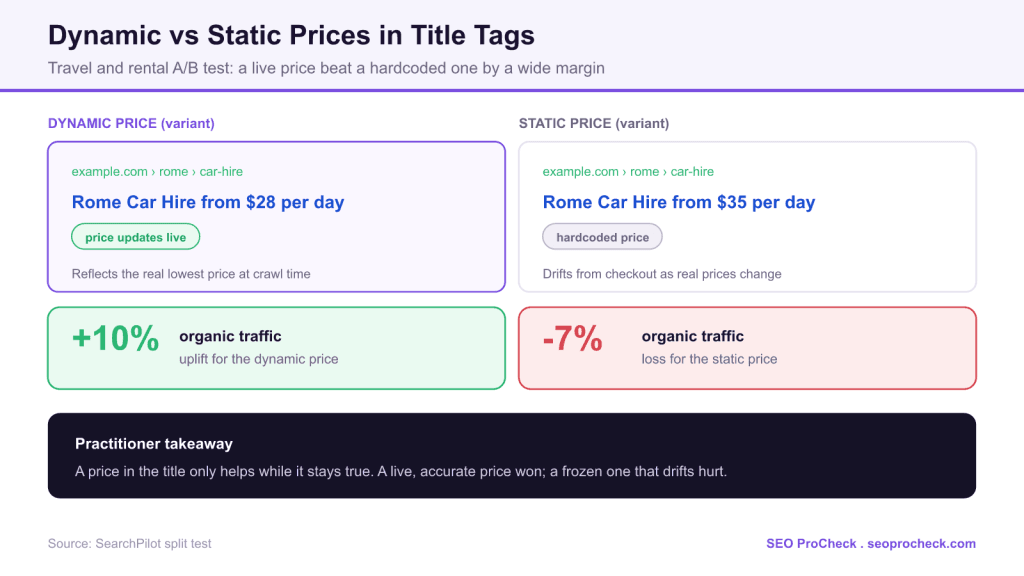
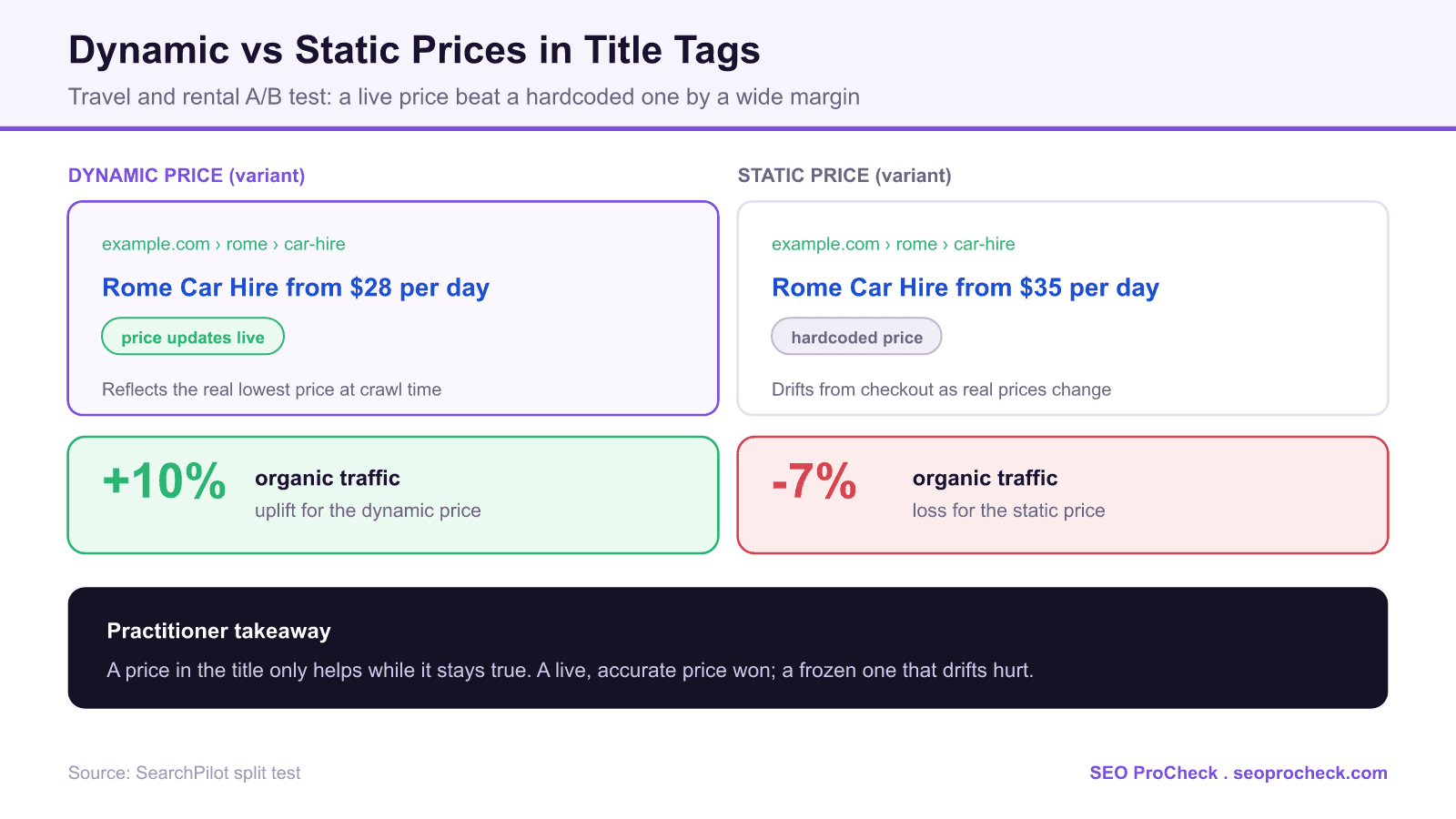
For price-driven pages, a dynamic price in the title tag beats a static one by a wide margin. On a travel and rental site, SearchPilot reported that adding a live, automatically updated price to titles lifted organic traffic by about 10 percent, while adding a hardcoded static price lost about 7 percent.
- A live price stays accurate and specific, which improves both click-through and trust.
- A hardcoded price drifts away from the real price and can contradict the landing page.
- Only add a price token you can keep genuinely current at crawl time.
- Always build a graceful fallback for when the price is missing or zero.
Putting a price in the title tag is a classic click-through lever for ecommerce, travel, and rental pages: a searcher scanning results sees a concrete number and a reason to click. The open question is how to source that number. Do you inject a live price that updates as inventory changes, or hardcode a representative price into the template? This case study answers it directly, and the two options do not just differ in degree, they point in opposite directions.
Initial Situation
The test ran on a customer's travel and rental website, the kind of inventory where prices move constantly with demand, season, and availability. Titles are prime real estate for a price because they are the first thing a searcher reads and they influence the click before the page even loads. The risk is equally obvious: a price shown in search that does not match what the user finds on the page is a fast way to lose trust and the click.
Strategy and Approach
SearchPilot examined two related variants. One added a dynamic price to the title, pulled from live data so the number reflected the real lowest price at crawl time. The other added a static price, a fixed number written into the title template. Each was validated with a full-funnel SEO A/B test that splits comparable pages into control and variant groups, so the traffic effect of the title change is isolated from seasonality and ranking movement rather than guessed at from a noisy before and after.
Implementation
A dynamic price token is populated server-side from your pricing or inventory source, then written into the title format for a template. The pattern looks like this, with a fallback for missing data:
if lowest_price > 0:
    title = f"{route} from {currency}{lowest_price} per day | Brand"
else:
    title = f"{route} | Brand"   # graceful fallback, never show a broken price
Three implementation rules decide whether this helps or hurts. First, render the price in the initial HTML so Googlebot sees it without executing JavaScript. Second, keep the value fresh: if your crawl-time price lags real inventory by days, you have effectively built a slow static price. Third, match the title price to the price on the page, because a mismatch between the SERP promise and the landing page is worse than showing no price at all.
Dynamic vs static price in the title
| Factor | Dynamic price | Static price |
|---|---|---|
| Accuracy | Tracks the real lowest price at crawl time | Drifts from reality as prices change |
| Searcher trust | Title matches the landing page | Risks a mismatch that loses the click |
| Maintenance | Automated once wired to a live source | Needs manual updates that rarely happen |
| Main risk | Broken output if the data source fails | Showing a price that is simply wrong |
| Reported result | About a 10 percent organic uplift | About a 7 percent organic loss |
Results and Learnings
SearchPilot reported that implementing dynamic prices in the title tag produced roughly a 10 percent uplift in organic traffic, compared with a roughly 7 percent loss when a static price was added instead. The swing between the two is the real lesson: the same idea, a price in the title, wins decisively when the number is true and backfires when it is not. Accuracy and specificity drive the click; a stale or generic number does the opposite. This mirrors the pattern in freshness signals, where an honest "Updated Daily" claim outperformed a stale date: in titles, truth is the multiplier.
Should you add a price to your titles
- Only if you can keep it live. If you cannot wire the title to a current price source, do not add a price at all rather than hardcode one.
- Build the fallback first. Decide what the title shows when the price is missing, zero, or the feed is down, so you never render a broken or misleading number.
- Keep SERP and page in sync. The price in the title must match what the user sees on arrival; test this on real URLs, not just in a template preview.
- Split test, do not switch. Prices interact with seasonality, so an A/B split is the only reliable read. If you lack a platform, hold back a control group and compare in Search Console.
What has changed since this test
Two developments matter in 2026. Google now rewrites titles more aggressively and may drop or reformat a price you add, so confirm on the live SERP that your price is actually showing. And structured data has become the more durable home for pricing: a correct Offer with price and priceCurrency feeds rich results and increasingly feeds the price data that AI Overviews and shopping surfaces read. Treat the title price as a click-through lever and back it with accurate Offer markup so the same number is available to every surface that consumes it.
Common mistakes
- Hardcoding a price to save engineering time. The test suggests a static price actively cost traffic, so the shortcut is worse than doing nothing.
- Letting the title price drift from the page. A mismatch between search and landing page erodes trust and click-through.
- Injecting the price with client-side JavaScript only. If it is not in the initial HTML, the crawler may never see it.
- No fallback. A null or zero price that leaks into the title as "from $0" is a credibility hit on every affected URL.
FAQ
Dynamic. On a travel and rental site, SearchPilot reported that a live, automatically updated price lifted organic traffic about 10 percent, while a hardcoded static price lost about 7 percent. A price in the title only helps when it stays accurate.
A hardcoded price drifts away from the real price over time and can contradict what the user sees on the page. That mismatch undermines trust and click-through, which is why the static variant tested negative while the live price tested positive.
Populate a price token server-side from your live pricing or inventory source and write it into the title format for that template, with a fallback title for when the price is missing or zero. Render it in the initial HTML so the crawler sees the number without running JavaScript.
Not always. Google rewrites titles more often than it used to and may drop or reformat a price. Check the live search results and the Search Console Performance report to confirm your price is the version being shown.
The title itself is mainly a click-through lever. The more durable place for pricing is structured data: a correct Offer with price and priceCurrency feeds rich results and the price data that AI and shopping surfaces read. Use both, and keep the numbers consistent.
That is exactly where a dynamic price wins, as long as your crawl-time value reflects current inventory. If your pipeline only refreshes the title price occasionally, you have built a slow static price and should expect the weaker result.
Wondering whether your titles are helping or hurting?
Prices, dates, and keyword order in title tags all move organic traffic, and the wrong choice can cost clicks. An audit shows which of your templates to test first.
Claude Vincent is a technical SEO consultant focused on crawlability, rendering, and AI-search visibility. He writes the field guides and case studies at SEO ProCheck, with a bias toward the durable, unglamorous work that decides whether search engines and AI answer engines can actually read and cite a site.
About SEO ProCheck
Technical SEO consulting and GEO strategy with 20 years of enterprise experience. Case studies, resources, and tools for search and AI visibility.
Work With Me
Technical SEO audits, GEO strategy, site migrations, and international SEO. Hourly consulting for teams who need hands-on support, not just reports.
Subscribe to our newsletter!







Recent Posts
- Can AI Crawlers Actually Read Your Site? I Measured 400 of the Biggest September 5, 2026
- The Pre-Publish Quality Gate for AI-Assisted Content August 6, 2026
- AGENTS.md vs llms.txt vs llms-full.txt: Which Agent File Does What July 18, 2026