

Fixing A Google Images Indexing Problem Caused By Redirect Chains and Robots.txt Directives
- November 8, 2019
- Crawling and Indexing
AI Summary
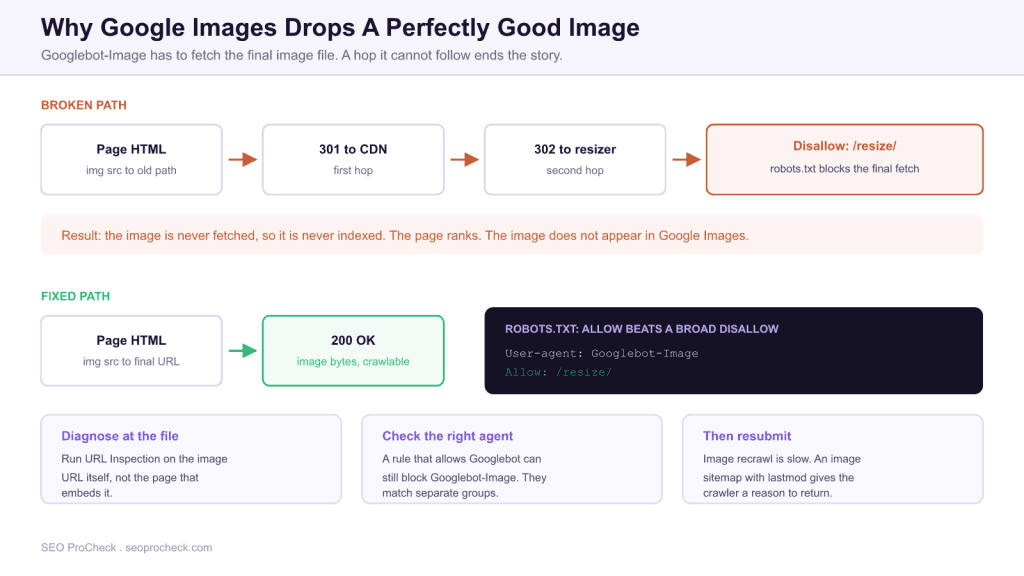
Images disappear from Google Images when Googlebot-Image cannot fetch the image file itself, most often because the image URL redirects into a path that robots.txt disallows. The page keeps ranking normally, which is why this failure goes unnoticed: nothing on the HTML side looks broken.
- Diagnose at the image URL, not the page that embeds it. They are separate crawl targets with separate outcomes.
- Googlebot-Image obeys only the most specific matching robots.txt group, so a rule that allows
Googlebotcan still block it. - A redirecting image URL is fine on its own. It breaks when the final destination is disallowed.
- Image recrawl is slow. Fix the block, then give the crawler a reason to return with an image sitemap and updated
lastmod.
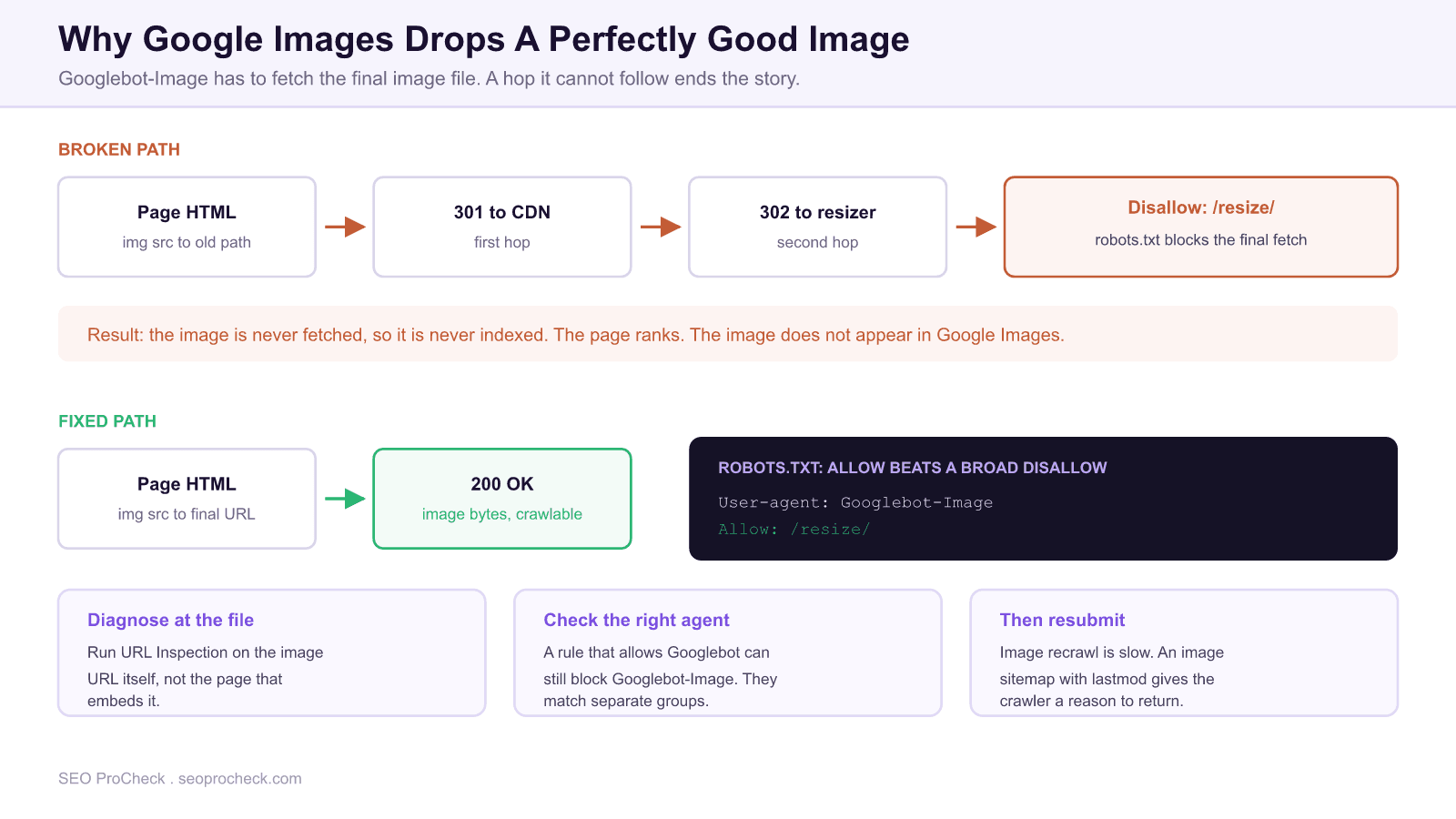
This case study documents a failure pattern that is common, quiet, and almost always misdiagnosed as a content problem: images vanishing from Google Images while the pages that contain them continue to rank perfectly well. The cause is usually not the alt text, the file name, or the image quality. It is that Googlebot-Image was never able to fetch the file.
The reason this is hard to spot is that a page and the images on it are separate crawl targets. Googlebot fetches the HTML and indexes the page. Googlebot-Image has to make its own request for each image URL, and that request can fail entirely without producing any symptom in the page level reporting anyone actually looks at.
Problem Context
The pattern has three ingredients that individually look harmless.
First, the site serves images through some transformation layer: a CDN, an image resizing service, or a path that rewrites dimensions into the URL. Second, the HTML references an older or canonical image path that redirects to that layer, sometimes through more than one hop as infrastructure has changed over time. Third, at some point somebody added a robots.txt rule disallowing the transformation path, usually with an entirely reasonable motive such as stopping crawlers from requesting thousands of generated size variants and burning server resources.
Individually each decision is defensible. Combined, they mean the redirect chain that starts at the image URL in your HTML terminates at a path Googlebot-Image is forbidden to request. The crawler follows the hops, hits the disallowed destination, and stops. No image bytes are ever retrieved, so there is nothing to index, and the image cannot appear in Google Images no matter how good the surrounding page is.
Two things make this durable rather than self correcting. The page level signals stay healthy, so no alert fires. And because image recrawling happens on a much slower cadence than HTML, the gap between introducing the block and noticing the traffic loss is often months, by which point the robots.txt change is no longer the obvious suspect.
Optimization Approach
The diagnosis has to happen at the file, and the sequence below isolates the cause in a few minutes. Run it against one affected image before doing anything at scale.
- Get the actual image URL from the rendered HTML. Not the URL in the CMS, and not the one in the source template. Lazy loading and responsive markup mean the URL that is finally requested often differs from the one in
src, so checksrcsetand any data attributes your lazy loader uses. - Trace the full response chain for that URL. Every status code and every
Locationheader, all the way to the end. - Check the final URL against robots.txt as Googlebot-Image, not as Googlebot. This is the step that is usually skipped, and it is where the answer usually is.
- Run URL Inspection on the image URL itself in Search Console, provided the image is on a verified property. It reports whether the URL is indexed and whether crawling is allowed.
- Confirm the image is not blocked in a way that only affects one variant. If
srcsetoffers several sizes and only some resolve to disallowed paths, behaviour will look intermittent across your library.
curl -sIL "https://example.com/img/hero.jpg" | grep -i "^HTTP/\|^location:"Reading the result: if the final line is a 200 and the final URL is crawlable, the image is not blocked and the cause lies elsewhere. If the chain ends at a path matched by a Disallow rule that applies to Googlebot-Image, you have found it.
The robots.txt rule that catches people out
Googlebot-Image obeys exactly one group in robots.txt: the most specific one whose user agent token matches it. It does not combine groups. If your file contains a group for Googlebot-Image, that bot reads only that group and ignores everything under User-agent: *, including any Allow rules you put there.
| Situation | What happens to Googlebot-Image | Why |
|---|---|---|
Disallow: /resize/ under User-agent: *, no image specific group | Blocked | It falls back to the wildcard group and obeys the disallow |
Same, plus an Allow: /resize/ added under User-agent: Googlebot | Still blocked | Googlebot and Googlebot-Image are separate tokens. The image crawler never reads that group |
Allow: /resize/ under an explicit User-agent: Googlebot-Image group | Allowed | The most specific matching group wins, and it is the only group that bot reads |
Both Allow: /resize/hero/ and Disallow: /resize/ in the group that applies | Allowed for that subpath | Google applies the longest matching rule; ties resolve to the less restrictive one |
The correct fix therefore is not to add an Allow wherever seems convenient. It is to add an explicit group for the image crawler, and to remember that once that group exists it becomes the only thing that crawler reads, so any other rules you want it to follow must be repeated inside it. The precedence rules in full are covered in the robots.txt complete reference, and the specific diagnostic is described in disallowed image checks.
Implementation Details
Two changes resolve the problem, and doing both is worthwhile because they fail independently.
Unblock the final destination. Add a group for Googlebot-Image that permits the transformation path. If the original motive for the disallow was crawl load from generated size variants, the better instrument is to stop exposing every variant as a linkable URL, rather than to block the path that your canonical images resolve to. Blocking is a blunt tool that removed the images from a surface you wanted to be in.
User-agent: Googlebot-Image
Allow: /resize/
Disallow: /private/
Point the HTML at the final URL. Even with the block removed, referencing an image through two redirects means every crawl and every user request pays for hops that serve no purpose. Update the templates so src and srcset emit the URL that returns 200 directly. This also removes the possibility of the same failure recurring the next time somebody edits a redirect rule, since there will no longer be a chain for a rule to break.
Keep the redirects in place for external references and old inbound links, but stop routing your own pages through them. This is the same principle that applies to page URLs: a redirect is a safety net for traffic you do not control, not a way to reference your own assets.
Indexing Results
Recovery is slower than the fix, and setting that expectation prevents a second round of unnecessary changes. Image URLs are recrawled far less frequently than HTML, so removing the block does not produce a quick return. The crawler has to come back, fetch the file, process it, and only then can the image become eligible to appear.
You can shorten the wait, but only somewhat. An image sitemap listing the affected image URLs with an updated lastmod on the containing pages gives the crawler an explicit reason to revisit. Requesting indexing on a sample of the containing pages helps confirm the fix is being seen. Beyond that it is a matter of waiting, and of resisting the urge to keep changing things while you wait, since further changes only make attribution harder.
Verify recovery in the right report. Search Console performance data filtered to the Google Images search type is the measurement that matters here, not total clicks, because image traffic is a small enough share on most sites that a full recovery can be invisible in the headline number. Compare the image search type against the same period before the block was introduced. Setting up the sitemap side of this is covered in the image sitemap entry, and the broader set of factors that determine whether an image can rank at all is in the image SEO complete guide.
How to stop it happening again
- Treat robots.txt edits as deployments. Every
Disallowshould be reviewed against what currently resolves into that path, including redirect destinations, not just what is directly linked from the HTML. - Monitor the image search type separately. A standing view of image impressions and clicks makes this class of failure visible in weeks instead of months.
- Include image URLs in technical crawls. Many crawl configurations skip images by default, which is exactly why the problem survives audits.
- Check the image path after any CDN or infrastructure migration. This is the change that most often introduces the extra hop that later collides with an existing rule.
FAQ
A page and its images are crawled separately. Googlebot indexes the HTML while Googlebot-Image must make its own request for each image file, and that request can fail without affecting the page at all. The most common cause is that the image URL redirects to a path robots.txt disallows, so the file is never fetched.
Not by themselves. Googlebot-Image follows redirects, so a hop or two will normally resolve fine. The problem arises when the final destination is blocked by robots.txt or returns an error, because then the chain ends without any image bytes being retrieved.
No. They are separate user agent tokens and each bot obeys only the most specific group matching its own name. If your file has a group for Googlebot-Image, that crawler reads only that group and ignores rules elsewhere, including under the wildcard. Any rule you want it to follow has to be repeated inside its own group.
Take the image URL from the rendered HTML, trace its full redirect chain to the final destination, then test that final URL against robots.txt as Googlebot-Image. If the image sits on a verified Search Console property, URL Inspection on the image URL itself will also report whether crawling is permitted.
Longer than page recovery, because image URLs are recrawled much less frequently than HTML. Expect weeks rather than days. An image sitemap and an updated modification date on the containing pages give the crawler a reason to return sooner, but the process cannot be forced.
Only if you are certain your canonical images do not resolve into that path, which is frequently untrue on sites using a transformation layer. If the concern is crawlers requesting many generated size variants, the better fix is to avoid exposing every variant as a distinct linkable URL rather than to block the path your indexed images depend on.
Source: https://www.gsqi.com/marketing-blog/fixing-a-google-images-indexing-problem-case-study/
Claude Vincent is a technical SEO consultant focused on crawlability, rendering, and AI-search visibility. He writes the field guides and case studies at SEO ProCheck, with a bias toward the durable, unglamorous work that decides whether search engines and AI answer engines can actually read and cite a site.
About SEO ProCheck
Technical SEO consulting and GEO strategy with 20 years of enterprise experience. Case studies, resources, and tools for search and AI visibility.
Work With Me
Technical SEO audits, GEO strategy, site migrations, and international SEO. Hourly consulting for teams who need hands-on support, not just reports.
Subscribe to our newsletter!






