

A case of Server Side Rendering (SSR) and Googlebot not being able to crawl
- November 4, 2019
- JavaScript SEO
AI Summary
Server side rendering is the standard fix for JavaScript that search engines cannot see, yet a misconfigured SSR setup can block Googlebot just as thoroughly as pure client side rendering. This case study documents that failure: the page renders fine in a browser, but Googlebot receives an error, an empty shell, or a stripped down version, and the page does not get indexed.
- SSR helps only when Googlebot gets a 200 response with the full HTML.
- Resources blocked in robots.txt leave the render incomplete.
- Bot specific paths or user agent logic can serve Googlebot a broken or different page.
- Server code that calls browser only APIs throws and falls back to an empty shell.
There is a painful irony in this case. Server side rendering is the remedy teams reach for when Googlebot cannot see JavaScript built content, and here it is the thing standing between Googlebot and the page. The site rendered perfectly in a browser, which is exactly why the problem went unnoticed: humans got the full experience while the crawler got something else entirely. SSR is only a fix when the crawler actually receives the rendered HTML, and several ordinary misconfigurations quietly break that promise.
What SSR is supposed to do
With server side rendering, the server runs the application and returns fully formed HTML in the initial response. The first crawl wave then sees the real content and the real links immediately, with no dependency on a later rendering pass. That is the whole value: it removes JavaScript from the critical path to indexing. The catch is that this only holds if the response the crawler gets is complete, successful, and identical to what a user gets.
The ways a working SSR still blocks Googlebot
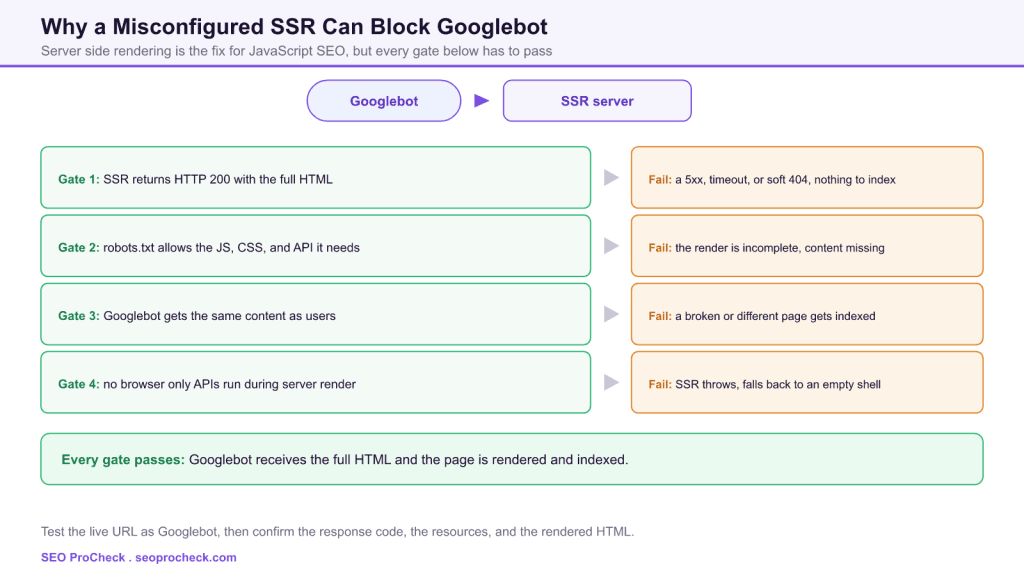
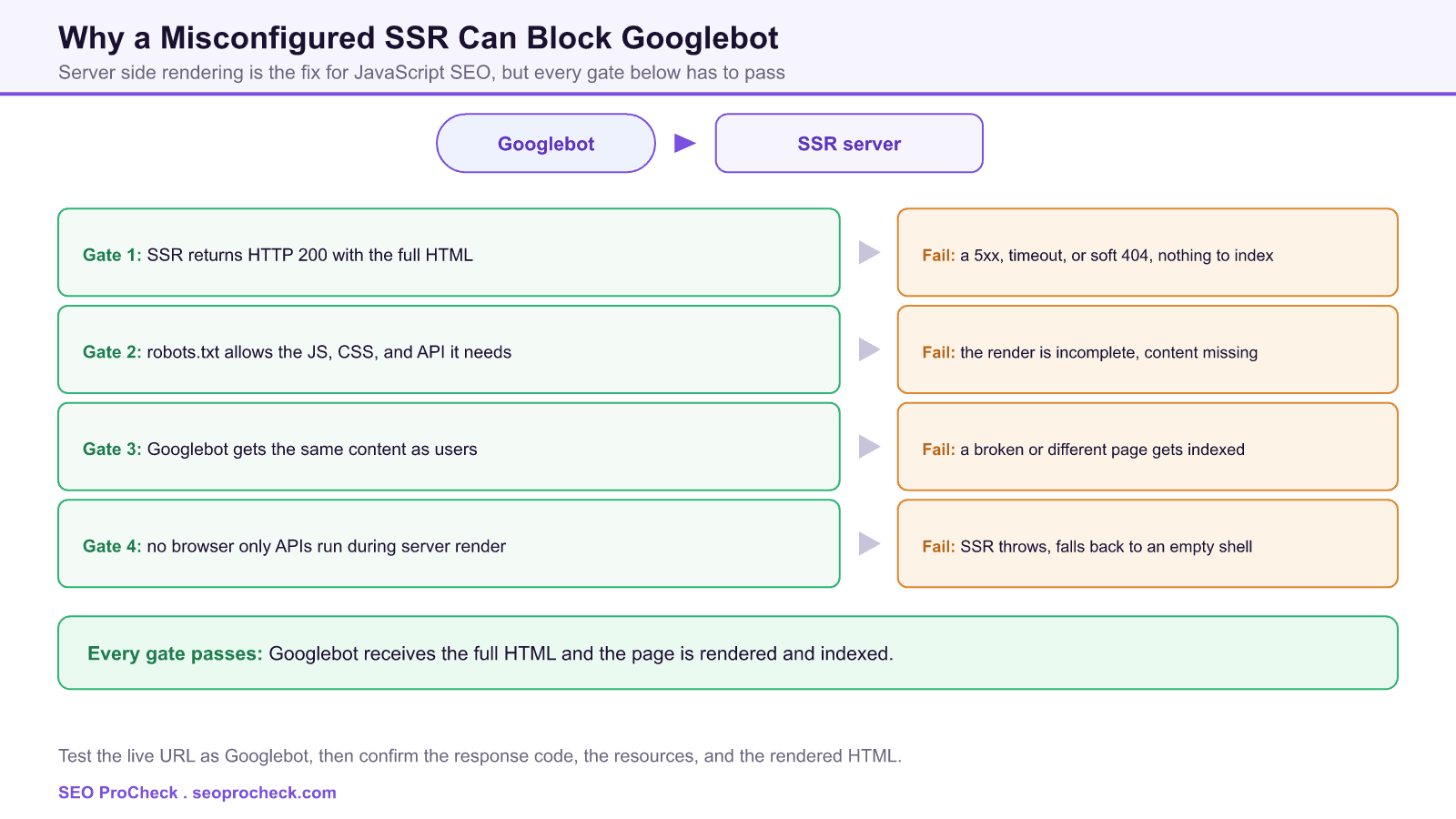
The diagram above frames it as a series of gates, and a failure at any one of them is enough. The first is the response itself: if the SSR service times out under crawl load, throws a 5xx, or returns a soft 404, there is nothing to index no matter how good the markup would have been. The second is resource access: if the JavaScript, CSS, or data endpoints the page needs are blocked in robots.txt, the render Google attempts comes back incomplete.
The third gate is parity. Setups that branch on the user agent, including older dynamic rendering arrangements, can send Googlebot down a path that is stale, broken, or simply different from what users see, which is both a crawl problem and a cloaking risk. The fourth is the server environment itself: SSR code that reaches for browser only globals such as window, document, or localStorage throws during the server render, and many frameworks then fall back to shipping an empty shell that depends on the client, undoing the SSR entirely.
SSR crawl failures and where to look
| Symptom | Likely cause | Where to look |
|---|---|---|
| Indexed, but content is missing | Resources blocked in robots.txt, or partial SSR | URL Inspection rendered HTML, robots.txt tester |
| URL not indexed at all | SSR returns a 5xx, timeout, or soft 404 to bots | Live test response, Crawl Stats, server logs |
| Fine in a browser, fails for Googlebot | User agent specific path or cloaked output | Fetch with a Googlebot user agent and compare |
| Indexing comes and goes | SSR timeouts under load or cold cache misses | Time to first byte, cache hit rate, server logs |
| Empty shell despite SSR | Server code throws on a browser only API | Server error logs and the SSR fallback behavior |
How to diagnose it from the crawler point of view
Never trust the browser here, because the browser is the one place the bug hides. Work the way Googlebot does:
- Run the live test in URL Inspection. Check the fetched response code, then open the rendered HTML and confirm the real content and links are present, not just a shell.
- Fetch as Googlebot. Request the URL with a Googlebot user agent and compare it byte for byte against the normal response to expose any user agent branching.
- Check resource access. Use the robots.txt tester on the specific script, style, and API URLs the page depends on, since a single blocked path can gut the render.
- Read the logs. Server logs show whether Googlebot is receiving 200s or a wall of 5xx and timeouts, and Crawl Stats confirms the pattern at scale.
The underlying reason this matters, the cost and delay of the render itself, is covered in JavaScript versus crawl budget, and the choice between SSR and other rendering modes is laid out in React rendering modes on product pages.
How to keep SSR from blocking the crawler
Return honest status codes, so a failed render is a 5xx and a missing page is a real 404 rather than a 200 shell. Keep every resource the page needs crawlable in robots.txt. Serve Googlebot the exact same rendered HTML as users, and retire any user agent branching you do not strictly need. Guard browser only APIs so they never run during the server render, and load test the SSR service so it holds up when Googlebot crawls in bursts. After any deploy, re run the live test on a sample of URLs rather than assuming the last good state survived.
This SEO case study documents a successful optimization initiative, providing actionable insights for practitioners. The documented approach demonstrates how strategic SEO implementation drives measurable results.
Initial Situation
Understanding the starting point is essential context for evaluating any case study. This documentation covers the initial challenges, competitive position, and business objectives that shaped the SEO strategy.
Strategy and Approach
The strategic approach combined multiple SEO disciplines to address identified opportunities. Key decisions around prioritization and resource allocation provide a template for similar initiatives.
Implementation
Moving from strategy to execution required specific technical implementations, content development, and process changes. This case study documents the practical steps that translated strategy into action.
Results and Learnings
The outcomes demonstrate effectiveness through measurable improvements in rankings, traffic, and business metrics. Analysis of successes and challenges provides learning value for practitioners.
Case studies like this contribute to the SEO knowledge base, helping practitioners learn from documented real-world experiences.
FAQ
No. SSR only helps if Googlebot receives a 200 response with the full HTML. If the SSR service times out, returns an error, blocks needed resources, or serves bots a different path, the page can fail to index even though it looks fine in a browser.
Usually because something branches on the user agent, or because a resource the render needs is blocked for crawlers. Browsers get the complete experience while Googlebot gets an error, a stale path, or an incomplete render. Fetch the URL with a Googlebot user agent to see the difference.
Yes. If the scripts, styles, or data endpoints the page relies on are disallowed, Google cannot fetch them to complete the render, so the result is missing content. Keep every resource the page needs crawlable.
It usually means the server side render threw an error, often because the code called a browser only API such as window or localStorage that does not exist on the server. Many frameworks then ship the client shell instead, which puts you back to client side rendering.
Use the URL Inspection live test in Search Console to see the fetched response and the rendered HTML, and separately fetch the URL with a Googlebot user agent. Comparing the two against the normal browser response reveals response code problems and user agent branching.
Yes. Deliberately sending crawlers different content than users is cloaking and can lead to penalties. Even accidental divergence from a bot specific SSR path is risky, so the safe design is to serve the same rendered HTML to everyone.
Take this with you
The assistant links open with a question about this page already written. Nothing is sent until you press enter.
Claude Vincent is a technical SEO consultant focused on crawlability, rendering, and AI-search visibility. He writes the field guides and case studies at SEO ProCheck, with a bias toward the durable, unglamorous work that decides whether search engines and AI answer engines can actually read and cite a site.
About SEO ProCheck
Technical SEO consulting and GEO strategy with 20 years of enterprise experience. Case studies, resources, and tools for search and AI visibility.
Work With Me
Technical SEO audits, GEO strategy, site migrations, and international SEO. Hourly consulting for teams who need hands-on support, not just reports.
Subscribe to our newsletter!








Recent Posts
- Most Top Sites Never Say Who They Are in Structured Data October 14, 2026
- Homepage Titles Are Mostly Too Short, Not Too Long October 8, 2026
- Who Actually Serves an llms.txt? 184 Top Sites Measured September 29, 2026