

AI Summary
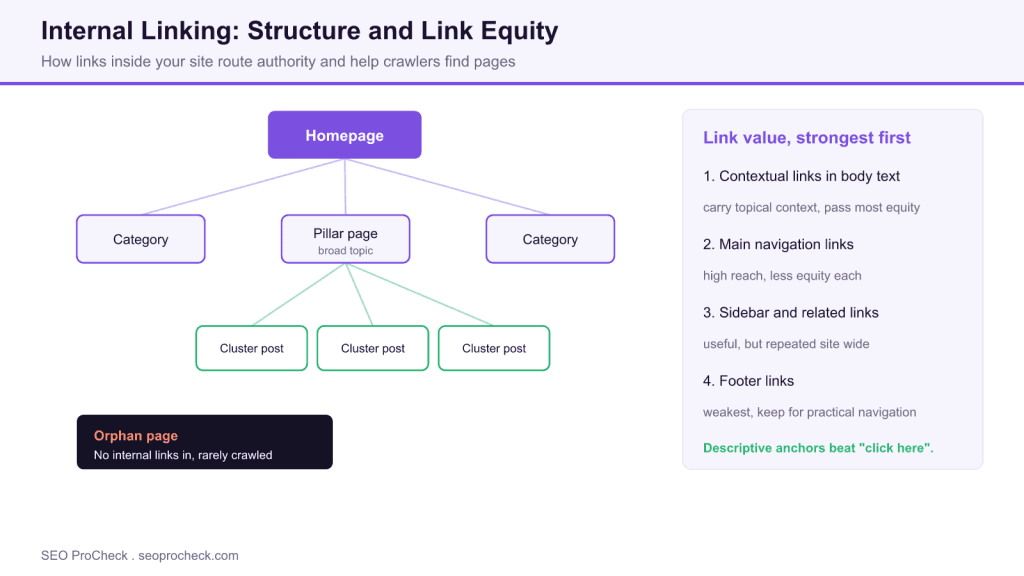
Internal linking connects pages on your own domain to help users navigate, distribute link equity, and let search engines discover and rank your pages. Pages that receive more relevant internal links are treated as more important, get crawled more often, and tend to rank better.
- Contextual links inside body text pass the most equity; footer links pass the least.
- Keep important pages within three or four clicks of the homepage with a flat structure.
- Use descriptive, varied anchor text and avoid generic anchors like "click here".
- Find and fix orphan pages, broken links, and links that point through redirects.
Everything about internal linking for SEO. How to structure links, distribute link equity, improve crawlability, and build effective site architecture through strategic internal linking.
Table of Contents
- Internal Linking Basics
- Link Strategy
- Anchor Text
- Site Structure
- Technical Considerations
- Auditing & Optimization
Internal Linking Basics
What is internal linking?
Links from one page on your domain to another page on the same domain. Helps users navigate, distributes link equity (ranking power) throughout your site, establishes content hierarchy, and helps search engines discover and understand page relationships. Fundamental to SEO architecture.
Why does internal linking matter for SEO?
Internal links help Google discover pages, understand site structure, and determine page importance. Pages with more internal links are seen as more important. Well-linked pages get crawled more frequently and rank better, which is why internal linking is central to crawl budget on large sites. Poor internal linking leaves pages orphaned and underperforming.
What's the difference between internal and external links?
Internal links connect pages on your own domain. External links point to other websites. Both pass ranking signals, but you fully control internal links. External links build relationships and cite sources; internal links structure your own site and distribute your earned authority.
What is link equity and how is it distributed?
Link equity (link juice) is ranking power passed through links. When page A links to page B, some of A's authority flows to B. Pages receiving more internal links accumulate more equity. Strategic linking funnels authority to your most important pages.
How many internal links should a page have?
No strict limit, but quality over quantity matters. Google has said they can handle hundreds of links per page. Focus on relevance and usefulness. A page with 50 genuinely helpful links is better than 200 forced ones. Don't add links just to hit a number.
Should internal links be dofollow or nofollow?
Almost always dofollow. You want link equity flowing through your site. The only exception: links to login pages or other pages you intentionally don't want to pass equity to. Nofollowing internal links wastes your own authority. Don't use nofollow for PageRank sculpting.
Link Strategy
Which pages should I prioritize linking to?
Link most to pages that: drive revenue/conversions, target high-value keywords, need ranking improvement, or serve as pillar content. Your homepage naturally receives most external links; use internal links to distribute that authority to commercial and content pages.
What are contextual links?
Links embedded naturally within body content, surrounded by relevant text. More valuable than navigation or footer links because they carry topical context. Google understands the surrounding text, making contextual links stronger signals of relevance and relationship.
Do navigation links matter for SEO?
Yes. Navigation links appear on every page, giving linked pages maximum internal link count. But they pass less individual equity than contextual links. Use navigation for core pages. Don't clutter navigation with every page; reserve it for genuinely important sections.
Are footer links valuable for SEO?
Less valuable than contextual or main navigation links. Google devalues footer links due to historical abuse (keyword-stuffed footer links). Use footers for practical navigation (contact, legal, sitemap) rather than SEO. Don't stuff keywords or add excessive links.
How should I use sidebar links?
Good for related content, recent posts, or category links. Site-wide sidebars repeat links on many pages, potentially diluting impact. Consider dynamic sidebars showing contextually relevant links per page or section rather than identical links everywhere.
Should I link to old content from new posts?
Yes, and also add links FROM old content TO new content. New posts linking back creates natural hierarchy. More importantly, update old high-performing posts to link to new related content. This passes existing authority to new pages needing initial boost.
Are reciprocal internal links okay?
Yes, when relevant. If page A and page B are related, linking both directions helps users and signals relationship to Google. This differs from external reciprocal linking concerns. Internal reciprocal links are natural and expected for related content.
Anchor Text
What is anchor text?
The clickable text of a link. Tells users and search engines what the linked page is about. Example: in "learn about technical SEO audits," the anchor text is "technical SEO audits." Descriptive anchors help both users and Google understand link context.
What are anchor text best practices for internal links?
Be descriptive and relevant. Use natural language. Vary anchor text (don't use identical anchors for all links to same page). Include target keywords where natural, but avoid over-optimization. Make anchors useful for users, not just search engines.
Can I use exact-match keyword anchors internally?
Yes, more freely than external links. Internal exact-match anchors are natural (you're describing your own content). However, vary anchors to avoid looking spammy. Mix exact match, partial match, branded, and natural descriptive anchors.
Are generic anchors like "click here" bad?
They're missed opportunities. "Click here" tells Google nothing about the destination. "Read our complete SEO guide" is far more descriptive. Occasionally generic anchors are fine for flow, but prioritize descriptive anchors that convey meaning.
What about anchor text for image links?
For linked images, the alt text functions as anchor text. Ensure alt text is descriptive of both the image and destination page. Empty alt text on linked images means the link passes no textual context to Google.
Site Structure
What is SEO site architecture?
How pages are organized and linked together. Good architecture creates clear hierarchy: homepage → category pages → subcategories → individual pages. Every page should be reachable within 3-4 clicks from homepage. Flat, well-linked structures outperform deep, siloed ones.
What are topic clusters?
Content strategy organizing pages around pillar content (comprehensive main page) linked to cluster content (specific subtopic pages). All cluster pages link to the pillar and each other. Signals topical authority to Google. Example: "SEO Guide" pillar linking to specific technique articles.
What is a pillar page?
A comprehensive page covering a broad topic, linking out to detailed cluster pages on specific subtopics. Pillar pages target competitive head terms; cluster pages target long-tail variations. Internal links create semantic relationships that boost the entire cluster's rankings.
What is a siloed site structure?
Organizing content into strict topical categories with links only within each silo. Theory: concentrated topical authority. Reality: often too restrictive. Google understands relationships without strict silos. Allow cross-linking when genuinely relevant. Don't sacrifice user experience for artificial silos.
Is a flat or deep site structure better?
Generally flatter is better. Important pages should be within 3 clicks of homepage. Deep structures (5+ clicks) have pages that get crawled less frequently and accumulate less link equity. Use internal links to flatten structure even with many hierarchical levels.
What are orphan pages?
Pages with no internal links pointing to them. Only discoverable via sitemap or direct URL. Get crawled infrequently and accumulate no internal link equity. Often rank poorly. Find them with crawling tools and add appropriate internal links or consider removing them.
Technical Considerations
Does Google follow JavaScript links?
Usually yes, if properly implemented. Google renders JavaScript and can follow JS-generated links. However, HTML links are more reliably crawled. For critical internal links, prefer standard HTML. Use JS links for UI enhancements, not primary navigation structure.
Do links in tabs or accordions count?
Yes, if the content is in the DOM. Google renders pages and sees content in collapsed elements. Links in hidden tabs still pass equity and are crawlable. However, some argue visible links may carry slightly more weight. Don't hide critical links solely in collapsed UI.
Should internal links point to redirecting URLs?
No. Update internal links to point directly to final destination URLs. Links through redirects work but waste crawl budget and may lose some equity. During migrations, update internal links as part of the process, not just implement redirects.
Should I link to canonicalized pages?
Link to canonical URLs, not duplicate versions. If page A canonicals to page B, link directly to B. Linking to non-canonical versions is inefficient; Google must follow the canonical to understand the relationship. Keep internal links clean.
How should I handle pagination internal links?
Ensure paginated pages link to each other (prev/next), to the first page, and consider linking to last page. Each paginated page should be crawlable. Don't noindex paginated pages; they provide internal links to content within. Google ignores rel=next/prev, so the crawlable links between pages do the work; keep the tags only for other engines that may use them.
Auditing & Optimization
How do I find orphan pages?
Crawl your site with Screaming Frog or Sitebulb, then compare crawled URLs against sitemap or known URLs. Orphans appear in sitemap/analytics but not in crawl (no internal links leading to them). These tools have specific orphan page reports.
How do I analyze internal link equity flow?
Tools like Screaming Frog, Sitebulb, Ahrefs, and Semrush show internal link counts and equity distribution. Look for: important pages with few internal links, unimportant pages with many links, and distribution imbalance. Visualize link flow to identify opportunities.
How do I audit internal anchor text?
Crawl site and export all internal links with anchor text. Look for: over-optimized identical anchors, generic "click here" anchors, missing anchors (linked images without alt text), and opportunities to add keyword-rich descriptive text.
How do I find broken internal links?
Crawl site and check for links returning 404 or other errors. Screaming Frog, Sitebulb, or online tools flag broken links. Fix by updating link destination or removing the link. Broken internal links frustrate users, waste link equity, and clutter your crawl reports. Our Core Web Vitals FAQ covers the page experience side of that frustration.
How do I improve internal linking at scale?
Implement related posts functionality, add contextual links during content updates, use breadcrumbs, create hub pages linking to related content, and add links from high-authority pages to pages needing boosts. Automate where possible but review for relevance.
What tools help with internal link optimization?
Crawlers: Screaming Frog, Sitebulb, Lumar. Analytics: Ahrefs, Semrush (internal link reports). WordPress plugins: Link Whisper, Yoast, Rank Math (internal link suggestions). Visualization: Sitebulb's link flow diagrams. Use combination of crawl data and content analysis.
Link placement compared: value and best use
Not all internal links carry the same weight. This table ranks the common placements by how much equity they typically pass and how to use each one.
| Placement | Typical equity passed | Reach across site | Best used for |
|---|---|---|---|
| Contextual (in body copy) | Highest | Page by page | Passing topical authority to key pages |
| Main navigation | Moderate per link | Site wide | Core categories and hub pages |
| Sidebar and related | Lower, diluted by repetition | Section or site wide | Related posts and recent content |
| Breadcrumbs | Moderate, reinforces hierarchy | Template wide | Signaling depth and parent pages |
| Footer | Lowest, devalued historically | Site wide | Practical links: contact, legal, sitemap |
Frequently Asked Questions
How many internal links should a page have?
There is no fixed limit. Google has said it can handle hundreds of links on a page, so the real constraint is usefulness, not a number. A page with 50 genuinely relevant links serves readers and crawlers better than 200 forced ones. Add links where they help a reader go deeper, and stop when they stop being helpful.
Should internal links be dofollow or nofollow?
Almost always dofollow. You want equity flowing freely through your own site, and nofollowing internal links simply wastes authority you have already earned. The rare exception is a page you deliberately do not want to pass equity to, such as a login screen. Do not use nofollow to try to sculpt PageRank, since that approach stopped working years ago.
What are orphan pages and why do they matter?
Orphan pages have no internal links pointing to them, so they are only reachable through a sitemap or a direct URL. Because crawlers find them through links, orphans get crawled rarely, accumulate no internal equity, and usually rank poorly. Find them by crawling your site and comparing the crawl against your sitemap, then add relevant links or retire the page.
What anchor text should I use for internal links?
Use descriptive, natural anchors that tell the reader and Google what the destination is about. Vary the wording rather than repeating one exact phrase for every link to the same page, and include target keywords only where they read naturally. Internal exact match anchors are safer than external ones because you are describing your own content, but variety still looks healthier.
Is a flat or deep site structure better for SEO?
Flatter is generally better. Aim to keep important pages within three or four clicks of the homepage, since pages buried five or more levels deep get crawled less and gather less equity. You can flatten a large hierarchy without deleting levels by adding contextual and hub links that create shorter paths to deep but valuable pages.
Should internal links point through redirects?
No. Update internal links to point straight at the final destination URL. Links that pass through a redirect still work, but they waste crawl budget and can leak a little equity along the way. During a migration, treat updating internal links as part of the job rather than relying on redirects to paper over old paths.
Take this with you
The assistant links open with a question about this page already written.
Claude Vincent is a technical SEO consultant focused on crawlability, rendering, and AI-search visibility. He writes the field guides and case studies at SEO ProCheck, with a bias toward the durable, unglamorous work that decides whether search engines and AI answer engines can actually read and cite a site.
About SEO ProCheck
Technical SEO consulting and GEO strategy with 20 years of enterprise experience. Case studies, resources, and tools for search and AI visibility.
Work With Me
Technical SEO audits, GEO strategy, site migrations, and international SEO. Hourly consulting for teams who need hands-on support, not just reports.
Subscribe to our newsletter!








Recent Posts
- Google August 2026 Spam Update: Dates, Duration and How to Read Your Data November 2, 2026
- Google Algorithm Updates: The Dated List Since 2003, and What to Do After Each October 31, 2026
- AI Readiness: The Checklist, the Research and the Free Tools October 28, 2026