

Mobile SEO FAQ: Mobile-First Indexing & Optimization Guide
- November 4, 2024
- Technical SEO FAQ
AI Summary
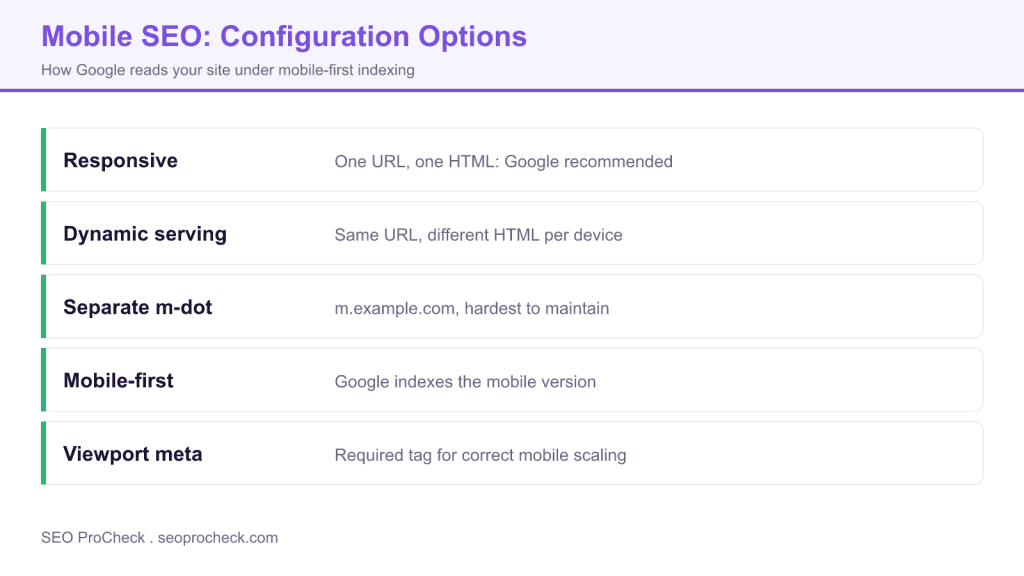
Under mobile-first indexing, Google crawls and indexes the mobile version of your site, so the content and structured data on mobile decide how you rank. Responsive design is the recommended setup because it serves one URL and one HTML to every device, which removes the parity risks of dynamic serving and separate mobile URLs.
- Google indexes the mobile version, so mobile must carry the same content, headings, links, images, and structured data as desktop.
- Responsive design uses one URL and one HTML with CSS that adapts, which Google recommends.
- Include the viewport meta tag so pages scale correctly on small screens.
- Avoid intrusive interstitials and tap targets that sit too close together.

Everything about mobile SEO, mobile-first indexing, and optimizing for mobile search. How Google crawls mobile sites, responsive design best practices, and fixing mobile usability issues.
Table of Contents
- Mobile-First Indexing
- Mobile Configuration Options
- Responsive Design
- Mobile Usability
- Technical Mobile SEO
- Testing & Tools
Mobile-First Indexing
What is mobile-first indexing?
Google predominantly uses the mobile version of your site for indexing and ranking. The mobile version is the primary version Google sees, even for desktop search results. If your mobile site has less content than desktop, that reduced content is what Google indexes.
When did mobile-first indexing start?
Google began rolling out mobile-first indexing in 2018 and completed the transition for all sites by 2023. All websites are now on mobile-first indexing. There is no opt-out; your mobile version is what Google indexes regardless of your preference.
How do I know if my site uses mobile-first indexing?
All sites are now on mobile-first indexing. You can verify by checking which Googlebot crawls your site in server logs (should see Googlebot smartphone) or using URL Inspection in Search Console, which shows "crawled as" Googlebot smartphone.
Does mobile-first indexing affect rankings?
Indirectly. If your mobile site has less content, fewer links, or missing structured data compared to desktop, that affects what Google sees and ranks. Pages aren't penalized for being mobile-first; they're indexed based on mobile version quality.
What if I only have a desktop site?
Google will still index it, using the desktop version. However, you're likely missing mobile traffic and may suffer in mobile search results due to poor mobile usability. Responsive design is strongly recommended for all sites in 2024+.
What is content parity?
Having the same content on mobile and desktop versions. Critical for mobile-first indexing. If your mobile site hides content, uses tabs/accordions that reduce content, or has a simplified version, Google only sees the reduced mobile content for ranking.
Mobile Configuration Options
What is responsive web design?
A single URL serves the same HTML to all devices, with CSS adapting layout based on screen size. Google's recommended approach. One URL, one codebase, one set of content. Easiest to maintain and ensures content parity automatically.
What is dynamic serving?
Same URL but server delivers different HTML based on user agent (device type). More complex than responsive. Requires Vary: User-Agent header to inform Google of different versions. Risk of content parity issues if mobile version differs significantly.
What are separate mobile URLs (m-dot)?
Different URLs for mobile (m.example.com) and desktop (example.com). Requires rel=alternate and rel=canonical tags between versions. Most complex to maintain. Legacy approach largely discouraged now. Higher risk of indexing issues and parity problems.
Which mobile configuration is best?
Responsive design in almost all cases. Single URL simplifies everything: link equity consolidation, content management, crawl efficiency. Google explicitly recommends responsive design. Only consider dynamic serving if extreme performance optimization requires different HTML per device.
Should I switch from m-dot to responsive?
Generally yes. Migration requires careful redirect planning (m.example.com/page → example.com/page), content consolidation, and testing. Benefits: simplified maintenance, consolidated link equity, eliminated duplicate content risk. Plan thoroughly to avoid traffic loss during transition.
Responsive Design
What is the viewport meta tag?
HTML tag telling browsers how to scale content:. Essential for responsive design. Without it, mobile browsers render page at desktop width then shrink it, creating poor mobile experience.
How do CSS media queries work for SEO?
Media queries adapt styling based on device characteristics. For SEO, ensure they only change presentation, not content availability. Content should be in HTML regardless of screen size. Don't use media queries to load completely different content via CSS.
What font size should I use for mobile?
Minimum 16px base font size for readability without zooming. Google's mobile usability report flags text smaller than this. Line height around 1.5 for readability. Buttons and tap targets need at least 48x48 pixels for comfortable tapping.
How should I handle images for mobile?
Use responsive images with srcset attribute to serve appropriately sized images per device. Don't serve desktop-sized images to mobile (wastes bandwidth, slows loading). Use lazy loading for below-fold images. Compress images and use modern formats (WebP, AVIF).
What's the best mobile navigation for SEO?
Hamburger menus are fine; Google can crawl JavaScript-revealed navigation. Ensure navigation links are in HTML (not dynamically loaded from API). Keep navigation simple on mobile. Ensure all important pages are accessible within 3 taps. Test with mobile crawler.
Mobile Usability
What is the Mobile Usability report in Search Console?
Search Console section identifying mobile usability issues affecting your pages. Shows errors like: text too small, clickable elements too close together, content wider than screen, viewport not configured. Fix these issues to improve mobile user experience and potentially rankings.
What are tap target issues?
When clickable elements (buttons, links) are too small or too close together for accurate finger tapping. Google recommends 48x48 CSS pixels minimum with adequate spacing. Users struggle to tap the right element, causing frustration and higher bounce rates.
What causes "content wider than screen" errors?
Fixed-width elements, unresponsive images, horizontal scrolling tables, or CSS not adapting to viewport. Fix with max-width: 100% on images, responsive tables (horizontal scroll within container), and viewport-relative units. Test at various screen widths.
Do mobile interstitials affect SEO?
Intrusive interstitials (popups covering main content) can negatively impact rankings. Google penalizes pages where content isn't immediately accessible on mobile. Acceptable: age verification, login dialogs, small banners. Not acceptable: full-screen popups immediately on page load.
How important is mobile page speed?
Very important. Mobile users often have slower connections. Core Web Vitals are measured on mobile. LCP under 2.5 seconds, INP under 200ms critical for mobile. Optimize images, minimize JavaScript, use caching. Mobile speed directly impacts rankings and user experience.
What should be above the fold on mobile?
Key content answering user intent, clear headline, minimal navigation intrusion. Don't push content down with large headers, ads, or unnecessary elements. Users should see relevant content immediately without scrolling. First meaningful paint should deliver value.
Technical Mobile SEO
What is Googlebot Smartphone?
The mobile crawler Google uses for mobile-first indexing. Identifies as a smartphone user agent. This is the primary crawler for all sites now. Check server logs to verify Googlebot Smartphone can access and render your pages correctly.
When do I need a Vary header?
Use Vary: User-Agent header when serving different content to different devices (dynamic serving). Tells caches and Google that response varies by device. Not needed for responsive design (same HTML to all). Important for avoiding serving cached mobile content to desktop users.
Is AMP still relevant for SEO?
Less relevant than before. AMP is no longer required for Top Stories carousel. Google no longer gives AMP pages preferential treatment. Benefits: potentially faster loading if implemented well. Consider whether complexity is worth it. Many sites have moved away from AMP without negative impact.
Does structured data differ for mobile?
Same structured data should exist on mobile version. With mobile-first indexing, Google reads structured data from mobile. If your mobile version lacks structured data present on desktop, Google won't see it. Ensure complete parity in markup.
Does lazy loading affect mobile SEO?
Implemented correctly, no negative impact. Google can handle lazy-loaded content. Use native lazy loading (loading="lazy") or Intersection Observer API. Ensure content is in DOM and accessible to crawlers. Test that Googlebot sees lazy-loaded content via URL Inspection.
Does hreflang work differently on mobile?
Same implementation; Google reads hreflang from mobile version. Ensure mobile pages have complete hreflang tags. If using separate mobile URLs (m-dot), hreflang can get complex; another reason to use responsive design instead.
Testing & Tools
How do I test if my site is mobile-friendly?
Use Google's Mobile-Friendly Test (search.google.com/test/mobile-friendly), Lighthouse in Chrome DevTools, or Search Console's Mobile Usability report. Test multiple page types (homepage, product pages, articles) as issues may vary. Check rendered screenshot to see what Google sees.
How do I test how Googlebot renders my mobile site?
Use URL Inspection in Search Console, click "Test Live URL" then view rendered page. Shows exactly what Googlebot sees including JavaScript-rendered content. Compare rendered page to your expected mobile layout to identify rendering issues.
How do I test mobile page speed?
Google PageSpeed Insights (pagespeed.web.dev) shows Core Web Vitals for mobile with specific recommendations. Lighthouse provides detailed performance audits. WebPageTest allows testing from real mobile devices on various networks. Test with throttled connection in Chrome DevTools.
How do I use Chrome DevTools for mobile testing?
Open DevTools (F12), click device toolbar icon or Ctrl+Shift+M. Select device or set custom dimensions. Enables mobile viewport testing and user agent simulation. Use Network throttling to simulate slow mobile connections. Not a perfect substitute for real device testing.
Should I test on real mobile devices?
Yes, when possible. Emulators miss real-world factors: actual touch behavior, true performance characteristics, real network conditions. Test on both iOS and Android, various screen sizes. BrowserStack and similar services provide real device testing remotely.
How do I analyze mobile SEO performance?
Segment Google Analytics by device category. Compare mobile vs desktop: bounce rate, time on page, conversions, pages per session. Check Search Console Performance report filtered by mobile. Identify pages with mobile/desktop performance gaps for optimization priority.
Quick reference table
The three mobile configurations differ mainly in how much content parity they risk. Whichever you run, keep media light using the tips in our image and video SEO FAQ, make sure every mobile URL sits in your XML sitemap, and cross check the rest of the technical SEO FAQ.
| Setup | URL | HTML delivered | Google guidance |
|---|---|---|---|
| Responsive design | Same URL for all devices | Same HTML, CSS adapts the layout | Recommended |
| Dynamic serving | Same URL for all devices | Different HTML by user agent | Supported, requires the Vary HTTP header |
| Separate mobile URLs | m.example.com | Separate mobile HTML | Supported, hardest to keep in parity |
Frequently Asked Questions
It means Google predominantly uses the mobile version of your pages for crawling, indexing, and ranking. If your mobile version hides content, links, or structured data that exists on desktop, those elements may not count. Parity between mobile and desktop is the goal.
For most sites, yes. Responsive design serves one URL and one HTML, so there is no risk of the mobile and desktop versions drifting apart, and no duplicate URLs to manage. Separate mobile URLs are supported but are the hardest setup to maintain.
Yes. The viewport meta tag tells the browser to match the screen width and scale content correctly, which is essential for a usable mobile layout. Without it, pages render at desktop width and force users to pinch and zoom.
Check the page in Search Console, which reports mobile usability issues such as text too small to read and clickable elements too close together. Testing on real devices and throttled connections catches problems that lab tools miss.
Yes. Core Web Vitals are measured on mobile, and slow pages frustrate users and can suppress rankings. Compress images, defer offscreen media, and reduce render blocking resources. Speed matters most on the mid range phones and networks many users actually have.
They can. Interstitials that cover the main content right after a user arrives from search are discouraged and may reduce rankings. Banners that occupy a reasonable amount of space, or legally required notices, are generally fine.
Claude Vincent is a technical SEO consultant focused on crawlability, rendering, and AI-search visibility. He writes the field guides and case studies at SEO ProCheck, with a bias toward the durable, unglamorous work that decides whether search engines and AI answer engines can actually read and cite a site.
About SEO ProCheck
Technical SEO consulting and GEO strategy with 20 years of enterprise experience. Case studies, resources, and tools for search and AI visibility.
Work With Me
Technical SEO audits, GEO strategy, site migrations, and international SEO. Hourly consulting for teams who need hands-on support, not just reports.
Subscribe to our newsletter!







Recent Posts
- Can AI Crawlers Actually Read Your Site? I Measured 400 of the Biggest September 5, 2026
- The Pre-Publish Quality Gate for AI-Assisted Content August 6, 2026
- AGENTS.md vs llms.txt vs llms-full.txt: Which Agent File Does What July 18, 2026