

Site Migration FAQ: Domain Moves, Redesigns & Platform Changes
- October 28, 2022
- Technical SEO FAQ
AI Summary
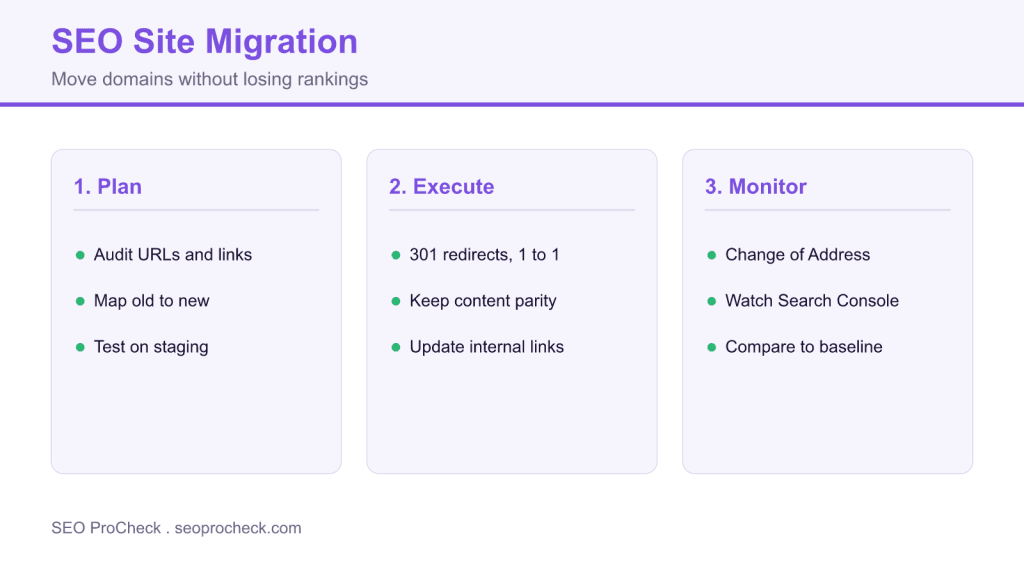
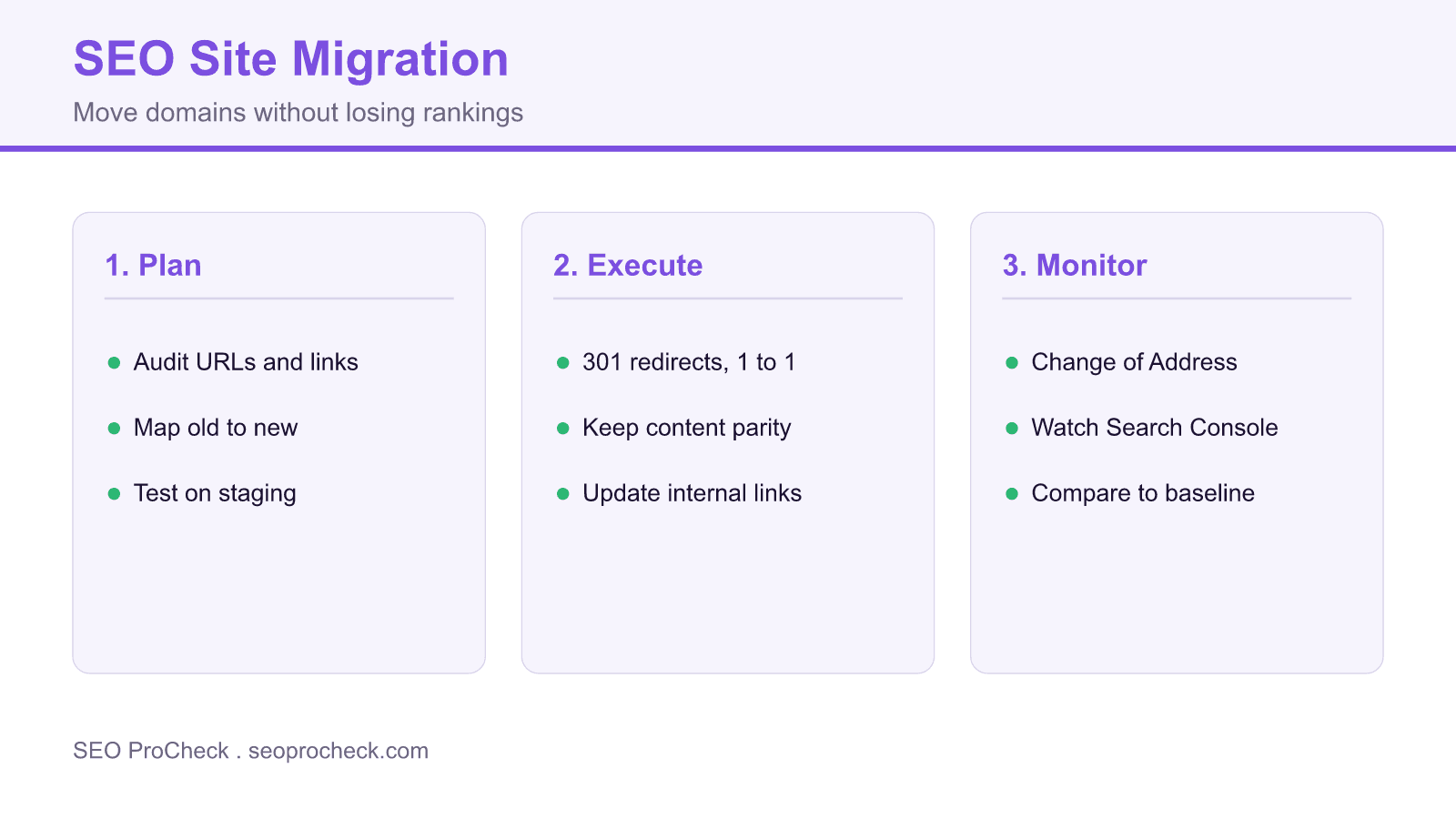
A site migration is any change that alters how search engines see your site, such as a new domain, HTTPS, a URL restructure, or a platform switch. Map every old URL to a new one, use single hop 301 redirects, and expect a temporary traffic dip before recovery.
- Map old URLs to new one to one; never funnel everything to the homepage.
- Use permanent 301 redirects and keep them live indefinitely.
- Preserve content parity so ranking signals transfer cleanly.
- Watch Search Console coverage, 404s, and rankings against a pre migration baseline.
Everything about SEO site migrations: domain changes, platform migrations, URL restructuring, HTTPS transitions, and redesigns. How to preserve rankings and avoid traffic loss.
Table of Contents
- Migration Basics
- Planning & Preparation
- Implementation
- Domain Migrations
- Post-Migration
- Troubleshooting & Recovery
Migration Basics
What is a site migration?
Any significant change affecting how search engines see your site: domain change, HTTPS implementation, URL restructuring, platform change, site redesign, content consolidation, or major architecture changes. All require careful planning to preserve SEO value and rankings.
What are the different types of site migrations?
Domain migration (changing domain name), protocol change (HTTP to HTTPS), URL structure changes (new URL patterns), platform migration (WordPress to Shopify), site redesign (new templates/layout), content migration (consolidating sites), and hybrid combinations of these.
Will a migration affect my rankings?
Typically yes, temporarily. Even well-executed migrations often see 10-20% fluctuations for weeks or months as Google reprocesses signals. Poor migrations can cause permanent losses. Goal: minimize drop duration and severity through proper planning and execution.
How long does SEO recovery take after migration?
Well-executed migrations: stabilization within 1-3 months. Complex migrations or those with issues: 3-6 months or longer. Some sites experience prolonged recovery. Factors: site size, authority, redirect implementation, content parity, technical issues encountered.
Can I avoid migration altogether?
Consider alternatives: incremental changes rather than big bang, keeping existing URLs while updating content/design, or accepting current limitations. Migrations carry inherent risk. Only migrate when benefits significantly outweigh risks and costs.
Planning & Preparation
What should I audit before migration?
Current URL inventory, rankings and traffic by URL, backlink profile, internal linking structure, indexed pages, technical issues to fix, content quality, structured data, sitemap accuracy. Establish baselines for all metrics you'll monitor post-migration.
What is URL mapping?
Document matching every old URL to its new URL destination. Essential for redirect planning. Export all old URLs from crawl, sitemap, and analytics. Map each to appropriate new destination. For pages being removed, map to closest relevant alternative, not homepage.
How do I plan redirects for migration?
Map every old URL to new destination (1:1 redirects ideal). Use 301 redirects for permanent moves. Avoid redirect chains. Plan for URL parameters. Test redirect rules before launch. Include images, PDFs, and all indexed assets. Prepare for URLs you might miss.
How do I test migration on staging?
Block staging from search engines (robots.txt, password, or noindex). Implement all redirects and test thoroughly. Crawl staging to verify structure. Test internal links, canonical tags, sitemaps, structured data. Compare staging against production content. Involve developers, QA, and SEO in testing.
When is the best time to migrate?
During low-traffic periods (avoid peak season). Allow time before any critical business periods. Not during other major Google updates if possible. Have team available for post-launch monitoring. Avoid Fridays (limited weekend support). Never during holiday shopping season for e-commerce.
How do I set expectations with stakeholders?
Traffic will likely drop temporarily, even with perfect execution. Recovery takes time. Share case studies showing typical patterns. Define success metrics beyond immediate traffic. Document risks and mitigation plans. Get buy-in on timeline and acceptable temporary impact.
Implementation
What type of redirects should I use for migration?
301 redirects for permanent moves (most migrations). This tells Google to transfer ranking signals to new URL. Implement at server level (not JavaScript). Avoid redirect chains. Single hop from old to new URL. Keep redirects in place indefinitely; don't remove after months.
What is content parity in migrations?
New pages should have equivalent content to old pages. Removing significant content during migration loses ranking signals for that content. If consolidating content, ensure important information isn't lost. Don't launch redesign with placeholder content.
Should I update internal links during migration?
Yes. Update internal links to point directly to new URLs, not through redirects. Redirects work but add latency and can be removed accidentally. Clean internal links improve crawl efficiency. Update navigation, in-content links, sitemap, and any hardcoded links.
How do canonicals work during migration?
New pages should self-canonical to their new URLs. Don't canonical new pages back to old URLs. If running parallel sites briefly, canonical new site to itself. Redirect + canonical to new URL together provide clear signals. Audit canonicals post-launch.
How should I handle sitemaps during migration?
Create new sitemap with all new URLs before launch. Remove old URLs from sitemap after redirects are live. Submit new sitemap to Search Console. Keep old sitemap temporarily if running parallel. Sitemap helps Google discover new URL structure quickly.
What should I check at migration launch?
Redirects working correctly (test sample), robots.txt allows crawling, new sitemap submitted, Search Console updated, canonical tags correct, no noindex tags on important pages, internal links updated, HTTPS working (if applicable), structured data intact, analytics tracking active.
Domain Migrations
What's different about domain migrations?
All URLs change, losing domain-level signals temporarily. Requires updating external links where possible. Google treats it as a new site initially, then transfers signals via redirects. Use Change of Address tool in Search Console. More impactful than URL changes on same domain.
What is the Change of Address tool?
Search Console feature specifically for domain moves. Tells Google you're moving from old domain to new domain. Helps Google process the move faster. Only for domain-to-domain moves, not URL restructures on same domain. Requires verification of both domains.
How long should domain redirects stay active?
Indefinitely, or as long as possible. At minimum 1 year. Old domain may still have backlinks pointing to it for years. Every removed redirect loses potential link equity. Domain/hosting costs are minimal compared to SEO value preserved. Keep old domain and redirects permanently.
How do I consolidate multiple domains into one?
Map content from all source domains to new consolidated structure. 301 redirect each old URL to most relevant new URL. Don't redirect everything to homepage. Audit for duplicate/conflicting content across sites. Consider what content to keep, merge, or retire. Complex; plan thoroughly.
How do I migrate from ccTLD to gTLD?
Example: example.co.uk to example.com. Implement redirects from old ccTLD. Update hreflang and use the Change of Address tool for the new domain (Search Console country targeting is no longer supported). May affect local rankings in country you're leaving. Consider keeping ccTLD as redirect rather than consolidating, especially if strong local presence.
Post-Migration
What should I monitor after migration?
Organic traffic (by page, not just total), rankings for key terms, indexed pages in Search Console, crawl errors, crawl stats, redirect functionality, 404 errors, page load times, Core Web Vitals, conversion rates. Compare daily against pre-migration baselines.
What Search Console checks matter post-migration?
Page indexing report: indexing status, errors. URL Inspection: check key pages are indexed at new URLs. Performance: compare to baseline. Crawl Stats: verify healthy crawling. Sitemaps: ensure new sitemap is processed. Security: no new issues introduced.
Can I request faster crawling after migration?
Use URL Inspection to request indexing of key pages. Submit new sitemap. For large sites, Google typically discovers changes through crawling. Can't force mass recrawl. Changes naturally process over days/weeks. Patience required; excessive requests don't help.
Is it normal to see traffic drop after migration?
Yes, temporary drops are common even for well-executed migrations. Google needs time to process redirects, recrawl content, and transfer signals. Drops of 10-20% for 2-4 weeks are typical. Drops beyond 30% or lasting months indicate problems needing investigation.
Troubleshooting & Recovery
How do I diagnose migration problems?
Check redirect implementation (are they working?). Verify no accidental noindex. Compare indexed page counts old vs new. Check for canonical issues. Look for crawl errors. Compare content between old and new versions. Analyze which pages/queries lost most traffic.
What if I missed some redirects?
Identify 404s in Search Console and analytics. Check backlink sources for broken links. Add missing redirects immediately. Use crawl data to find orphaned old URLs. Set up catch-all redirects for patterns you missed, but specific redirects are better.
Why is recovery taking longer than expected?
Possible causes: redirect chains, content parity issues, canonical problems, technical issues on new site, crawl rate limitations, Google algorithms coinciding with migration, link equity not fully transferred. Audit thoroughly. Sometimes patience is needed; other times active fixes required.
What if rankings don't recover after months?
Investigate: are redirects still working? Did content quality change? Are backlinks still pointing (via redirect) to relevant pages? Compare new pages to competitors. Check for penalties. Sometimes losses are due to content/quality changes coinciding with migration, not the migration itself.
Can I rollback a migration?
Technically yes, but creates additional confusion for Google. Would need to reverse all redirects. Rarely recommended unless migration catastrophically failed and issues can't be fixed forward. Better to diagnose and fix problems on new site than ping-pong between domains.
What if my migration failed badly?
Stop any ongoing issues (fix broken redirects, remove harmful changes). Audit everything systematically. Prioritize fixes by impact: high-traffic pages first. Be patient; recovery from bad migration takes months of consistent fixes. Consider expert help for complex situations.
Migration types, risks, and safeguards
| Migration type | Main risk | Key safeguard |
|---|---|---|
| Domain change | Loss of domain level signals | 301 redirects plus Change of Address |
| HTTP to HTTPS | Mixed content and duplicate URLs | Redirect to HTTPS and update canonicals |
| URL restructure | Broken links and lost equity | One to one 301 map |
| Platform change | Template and content drift | Content parity and full crawl test |
| Redesign | Removed content and new templates | Keep content and internal links intact |
Related SEO references
Frequently Asked Questions
A temporary dip is normal even for a clean migration, often around 10 to 20 percent for a few weeks while Google reprocesses redirects and signals. Drops beyond 30 percent or lasting months usually point to a fixable problem rather than the migration itself.
Use permanent 301 redirects for migrated URLs, implemented at the server level rather than in JavaScript. Keep each redirect a single hop from old to new, avoid chains, and leave the redirects in place indefinitely.
No. Redirect each old URL to the closest matching new page. Mass redirects to the homepage are treated as soft 404s and lose the ranking signals that the specific page had earned.
It is a Search Console feature for domain to domain moves that tells Google you are moving from an old domain to a new one, which helps Google process the move faster. It applies only to full domain changes, not URL restructures on the same domain, and needs both properties verified.
Keep them indefinitely, or at least a year at a minimum. Old URLs can retain backlinks for years, and every removed redirect risks losing that link equity, so the small hosting cost is worth it.
Confirm the redirects still resolve in a single hop, check for accidental noindex tags, compare indexed page counts old versus new, and review canonical tags. Then analyze which URLs and queries lost the most so you can focus your fixes.
Take this with you
The assistant links open with a question about this page already written. Nothing is sent until you press enter.
Claude Vincent is a technical SEO consultant focused on crawlability, rendering, and AI-search visibility. He writes the field guides and case studies at SEO ProCheck, with a bias toward the durable, unglamorous work that decides whether search engines and AI answer engines can actually read and cite a site.
About SEO ProCheck
Technical SEO consulting and GEO strategy with 20 years of enterprise experience. Case studies, resources, and tools for search and AI visibility.
Work With Me
Technical SEO audits, GEO strategy, site migrations, and international SEO. Hourly consulting for teams who need hands-on support, not just reports.
Subscribe to our newsletter!








Recent Posts
- Most Top Sites Never Say Who They Are in Structured Data October 14, 2026
- Homepage Titles Are Mostly Too Short, Not Too Long October 8, 2026
- Who Actually Serves an llms.txt? 184 Top Sites Measured September 29, 2026