

AI Summary
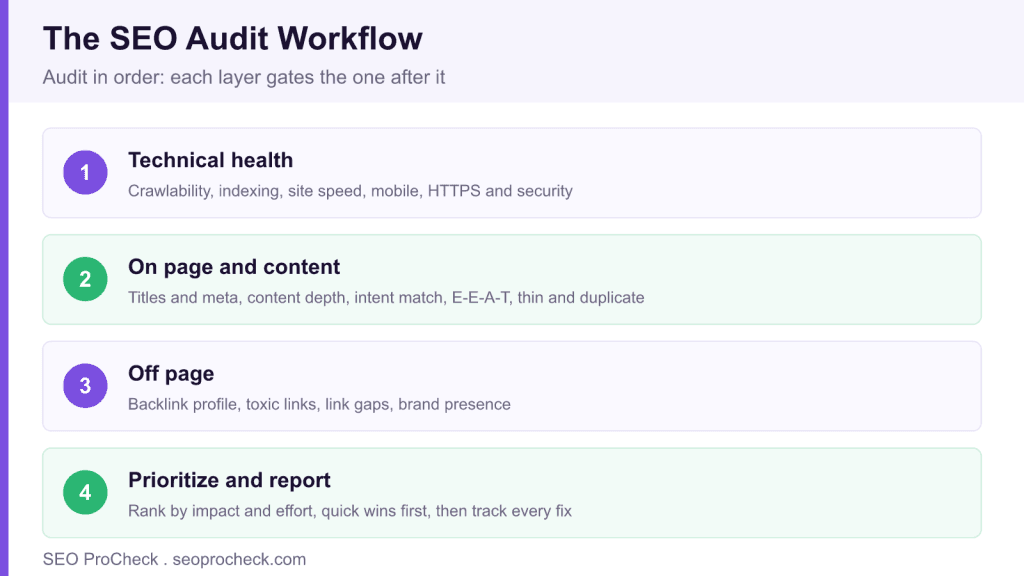
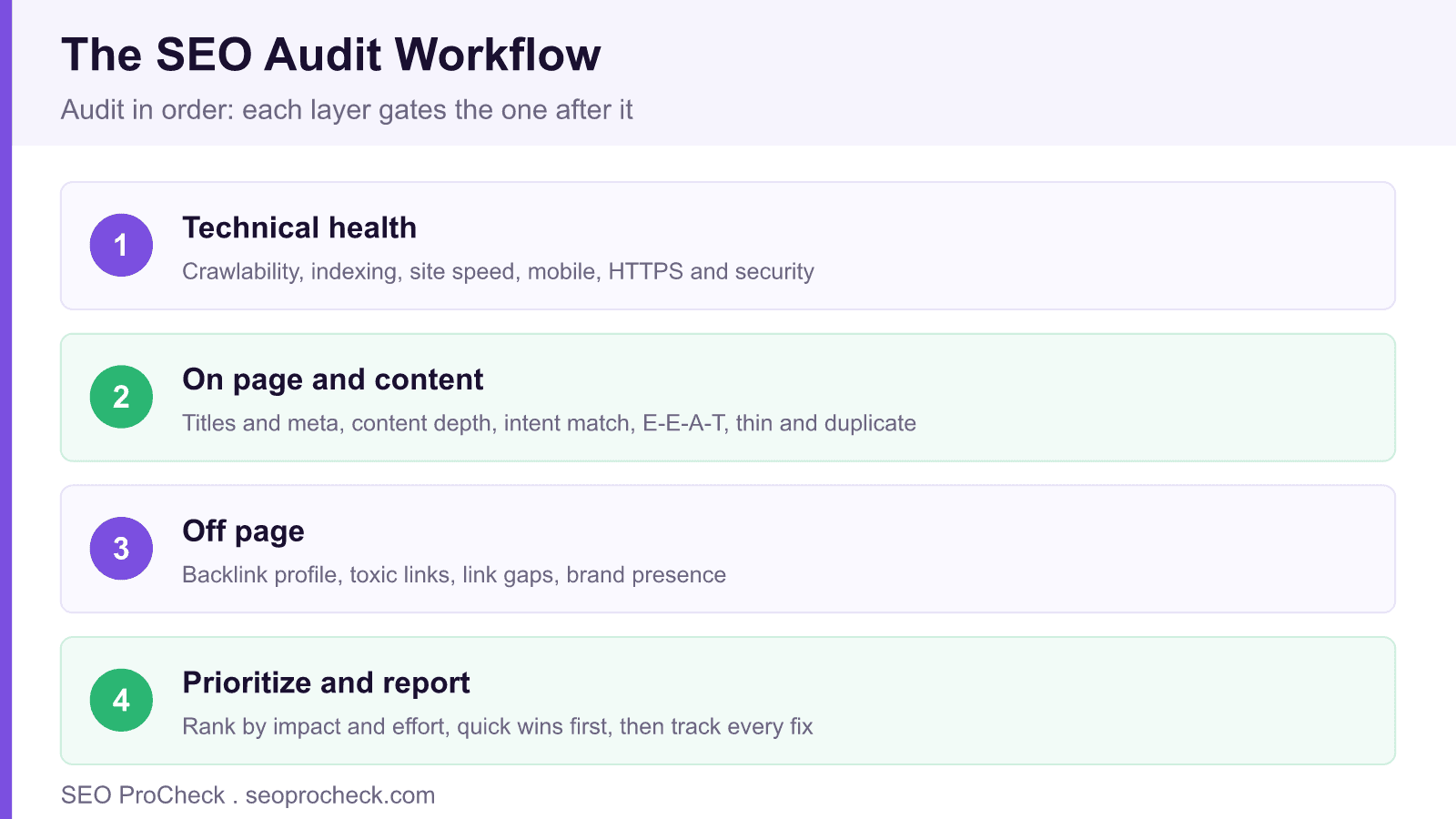
An SEO audit is a comprehensive evaluation of technical health, on page elements, content quality, and off page factors that surfaces what is hurting rankings and where the opportunities sit. Work in order, starting with Google’s own data in Search Console, then a full crawl, so each layer gates the next before you prioritize fixes by impact and effort.
- A crawl collects data; an audit interprets it into prioritized, actionable recommendations.
- Run a comprehensive audit annually or before major projects, with lighter monthly monitoring in between.
- Fix critical issues that block indexing or security first, regardless of effort.
- Quick wins include broken links, missing meta descriptions, alt text, and redirect chains.
Complete guide to SEO audits. What to analyze, tools to use, how to prioritize findings, and turning audit insights into actionable improvements.
Table of Contents
SEO Audit Basics
What is an SEO audit?
Comprehensive evaluation of a website's search optimization. Examines technical health, on-page elements, content quality, and off-page factors. Identifies issues hurting rankings and opportunities for improvement. Foundation for developing effective SEO strategy.
Why do I need an SEO audit?
Uncovers hidden problems affecting visibility. Provides baseline for measuring improvements. Identifies quick wins and strategic priorities. Prevents wasted effort on wrong issues. Essential before major changes (redesigns, migrations). Regular audits catch problems before they compound.
How often should I audit my site?
Comprehensive audit: annually or before major projects. Ongoing monitoring: monthly checks of key metrics. After significant changes: migrations, redesigns, CMS updates. Following algorithm updates affecting your site. Frequency depends on site size, change rate, and resources.
What does a full SEO audit include?
Technical SEO (crawlability, indexing, speed, mobile). On-page SEO (titles, meta, content, structure). Content quality (E-E-A-T, depth, freshness). Off-page SEO (backlinks, brand mentions). User experience (Core Web Vitals, navigation). Competitive analysis. Comprehensive audits cover all areas.
What's the difference between an audit and a crawl?
Crawl: automated scan collecting technical data (URLs, status codes, meta tags). Audit: analysis and interpretation of data, including manual review, strategic assessment, and prioritized recommendations. Crawls provide data; audits provide insights and action plans.
Technical Audit
What crawlability issues should I check?
Robots.txt blocking important content, crawl errors in Search Console, redirect chains and loops, slow server response, orphan pages, infinite crawl traps, proper use of noindex, XML sitemap accuracy, crawl budget waste on low-value URLs.
What indexing issues should I check?
Compare indexed pages (site: search) vs intended pages. Check Search Console's Page indexing report. Look for: blocked pages that should be indexed, indexed pages that shouldn't be, duplicate content, canonical issues, noindex misuse, index bloat from parameters.
How do I audit site structure?
Analyze click depth (pages reachable within 3-4 clicks?). Review internal linking patterns. Check URL hierarchy logic. Identify orphan pages. Evaluate navigation structure. Assess breadcrumb implementation. Ensure logical content organization. Structure affects both crawling and user experience.
How do I audit site speed?
Run PageSpeed Insights for Core Web Vitals (LCP, INP, CLS). Test multiple page types. Check field data (real users) vs lab data. Identify: render-blocking resources, image optimization, JavaScript issues, server response time. Prioritize issues by impact and effort.
What mobile issues should I check?
Lighthouse or PageSpeed Insights mobile results, responsive design functioning, tap target sizes, font readability, viewport configuration, content parity with desktop, mobile page speed, and a Chrome DevTools device mode check (Google retired the Mobile-Friendly Test and the Mobile Usability report on December 1, 2023). With mobile-first indexing, mobile issues directly affect rankings.
What security issues affect SEO?
HTTPS implementation and mixed content errors, security issues flagged in Search Console, proper SSL certificate configuration, security headers, vulnerability to hacking (clean site of malware). Security issues can prevent indexing and harm user trust.
Content Audit
What is a content inventory?
Catalog of all content on your site with metrics: URL, title, traffic, backlinks, word count, publish date, last update. Spreadsheet or database format. Foundation for content audit. Reveals what content exists and how it performs. Identifies gaps and opportunities.
How do I assess content quality?
Evaluate: E-E-A-T signals, depth and comprehensiveness, accuracy and freshness, unique value vs competitors, user intent match, readability, proper formatting. Use traffic and engagement data as quality proxies. Manual review of important pages essential.
How do I identify thin content?
Low word count pages (under 300-500 words depending on topic), pages with minimal unique content, duplicate or near-duplicate content, auto-generated or templated content with little value, pages with high bounce rate and low engagement.
How do I find duplicate content?
Crawl for identical or near-identical title tags and content. Check for URL variations (www/non-www, HTTP/HTTPS, trailing slashes). Identify parameter-generated duplicates. Compare against external sites using Copyscape. Review canonical tag implementation.
How do I audit keyword targeting?
Map current rankings to intended targets. Identify cannibalization (multiple pages targeting same keyword). Find keyword gaps (opportunities not targeted). Assess intent alignment. Review title tag and meta description optimization. Check for over-optimization.
How do I audit E-E-A-T signals?
Check: author identification and credentials, about page quality, contact information, expertise demonstration, experience evidence, citations and sources, site reputation signals, YMYL compliance if applicable. Compare against Quality Rater Guidelines examples.
Off-Page Audit
How do I audit my backlink profile?
Use Ahrefs, Semrush, or Moz for backlink data. Analyze: total links and domains, authority distribution, anchor text patterns, link quality assessment, toxic link identification, new vs lost links, competitor comparison. Quality matters more than quantity.
How do I identify toxic backlinks?
Signs: spammy or irrelevant sites, link networks/PBNs, excessive exact-match anchors from suspicious sites, foreign language sites with no relevance, known bad neighborhoods. Tools flag potential issues but manual review confirms. Most sites have some low-quality links; focus on patterns.
How do I identify link opportunities?
Competitor backlink analysis reveals sites linking to competitors but not you. Broken link opportunities on relevant sites. Unlinked brand mentions. Resource page opportunities. Content gaps you could fill and earn links. Relationship-based opportunities in your industry.
How do I audit brand presence?
Search brand name: what appears? Review brand mentions (linked and unlinked). Check knowledge panel if exists. Audit directory listings for consistency. Assess social media presence. Monitor brand sentiment. Strong brand presence supports E-E-A-T.
Tools & Process
What tools do I need for an SEO audit?
Crawlers: Screaming Frog, Sitebulb (detailed auditing). Search Console (Google's data). Analytics (traffic data). Backlink tools: Ahrefs or Semrush. Speed: PageSpeed Insights. Spreadsheets for analysis. Multiple tools provide complete picture; no single tool covers everything.
How do I use Screaming Frog for audits?
Enter domain to crawl entire site. Review tabs: response codes, page titles, meta descriptions, H1s, images, links. Export data for analysis. Configure settings for JavaScript rendering if needed. Generate reports for specific issues. Foundational audit tool.
How is Sitebulb different from Screaming Frog?
Sitebulb provides more interpretation: prioritized hints, issue severity ratings, visualizations. Better for less technical users or quick audits. Screaming Frog provides raw data, more flexible for custom analysis. Many SEOs use both. Sitebulb for quick insights, Screaming Frog for deep dives.
How do I use Search Console for auditing?
Page indexing report: indexing issues. Performance report: keyword and page performance. Core Web Vitals: speed issues. Manual Actions: penalties. Links report: backlink sample. Direct data from Google; essential for any audit.
What's the best audit process?
Start with Search Console for Google's view. Crawl the site comprehensively. Analyze technical issues first (foundation). Review content quality. Assess off-page factors. Compile findings. Prioritize by impact and effort. Create actionable recommendations. Document for tracking.
Prioritization & Reporting
How do I prioritize audit findings?
Consider impact (how much will fixing help?) and effort (how hard to fix?). High impact, low effort: do first (quick wins). High impact, high effort: plan strategically. Low impact items: backlog or ignore. Critical issues (blocking indexing, security) always first regardless of effort.
What are typical quick wins in audits?
Fixing broken internal links, updating missing meta descriptions, compressing unoptimized images, adding missing alt text, fixing redirect chains, implementing missing canonical tags, updating outdated content, improving title tags. Low effort, immediate improvement potential.
What should an SEO audit report include?
Executive summary for stakeholders. Current performance baseline. Categorized findings (technical, content, off-page). Issue severity ratings. Prioritized recommendations with expected impact. Implementation guidance. Success metrics for tracking. Avoid overwhelming with raw data; focus on actionable insights.
How do I present audit findings to stakeholders?
Lead with business impact, not technical jargon. Show current performance vs potential. Prioritize recommendations clearly. Estimate resources needed. Provide timeline expectations. Include competitor context. Make recommendations actionable with clear next steps. Tailor detail level to audience.
How do I track audit implementation?
Create tracking spreadsheet or project management board. Assign owners to each item. Set deadlines. Monitor completion. Measure impact of implemented changes. Re-audit after implementation batch. Continuous tracking ensures audit insights become actual improvements.
What should I monitor between audits?
Search Console for new issues. Rankings for priority keywords. Core Web Vitals. Crawl errors. Index coverage. Organic traffic trends. Backlink changes. Set up alerts for significant changes. Ongoing monitoring catches issues before next full audit.
Audit checklist by area
| Area | What to check | Primary tool | Red flag |
|---|---|---|---|
| Technical | Crawl, index, speed, mobile, HTTPS | Screaming Frog, Search Console | Noindex on pages you want ranked |
| On page | Titles, intent match, cannibalization | Search Console, manual review | Two URLs trading one query |
| Content | Depth, E-E-A-T, thin or duplicate | Siteliner, manual review | Under 300 words, no clear author |
| Off page | Backlink profile, toxic links | Ahrefs or Semrush | Mostly directory or PBN links |
| Reporting | Impact versus effort ranking | Spreadsheet or project board | A 90 page PDF nobody reads |
Frequently Asked Questions
What is an SEO audit?
An SEO audit is a comprehensive evaluation of a website’s search optimization across technical health, on page elements, content quality, and off page factors. It identifies issues hurting rankings and opportunities for improvement, and it forms the foundation for an effective SEO strategy.
How often should I audit my site?
Run a comprehensive audit annually or before major projects such as migrations and redesigns, with lighter monthly monitoring of key metrics in between. Also audit after significant changes and after algorithm updates that affect your site. Frequency depends on site size, change rate, and resources.
What is the difference between an audit and a crawl?
A crawl is an automated scan that collects technical data such as URLs, status codes, and meta tags. An audit is the analysis and interpretation of that data, including manual review, strategic assessment, and prioritized recommendations. Crawls provide data; audits provide insights and an action plan.
How do I prioritize audit findings?
Weigh impact against effort. High impact and low effort items are quick wins to do first, while high impact and high effort items get planned strategically and low impact items go to the backlog. Critical issues that block indexing or affect security always come first, regardless of effort.
What are typical quick wins in an audit?
Common quick wins include fixing broken internal links, adding missing meta descriptions and alt text, compressing unoptimized images, resolving redirect chains, and implementing missing canonical tags. These are low effort changes with immediate improvement potential.
What tools do I need for an SEO audit?
A crawler such as Screaming Frog or Sitebulb, Google Search Console for Google’s own data, an analytics tool for traffic, and a backlink tool such as Ahrefs or Semrush. Add PageSpeed Insights for speed and a spreadsheet for analysis. No single tool covers everything, so combine them.
Related on SEO ProCheck
- Top SEO factors: what the audit is ultimately checking against.
- Duplicate content FAQ: a common finding in the content stage.
- Meta robots and X-Robots-Tag reference: for the indexing checks.
Take this with you
The assistant links open with a question about this page already written. Nothing is sent until you press enter.
Claude Vincent is a technical SEO consultant focused on crawlability, rendering, and AI-search visibility. He writes the field guides and case studies at SEO ProCheck, with a bias toward the durable, unglamorous work that decides whether search engines and AI answer engines can actually read and cite a site.
About SEO ProCheck
Technical SEO consulting and GEO strategy with 20 years of enterprise experience. Case studies, resources, and tools for search and AI visibility.
Work With Me
Technical SEO audits, GEO strategy, site migrations, and international SEO. Hourly consulting for teams who need hands-on support, not just reports.
Subscribe to our newsletter!








Recent Posts
- Most Top Sites Never Say Who They Are in Structured Data October 14, 2026
- Homepage Titles Are Mostly Too Short, Not Too Long October 8, 2026
- Who Actually Serves an llms.txt? 184 Top Sites Measured September 29, 2026