

AI Summary
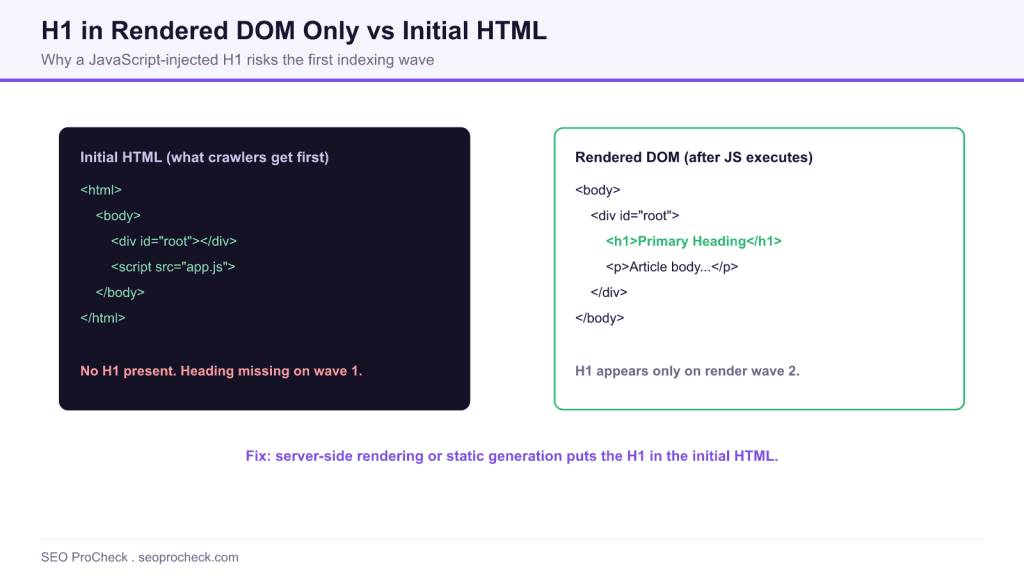
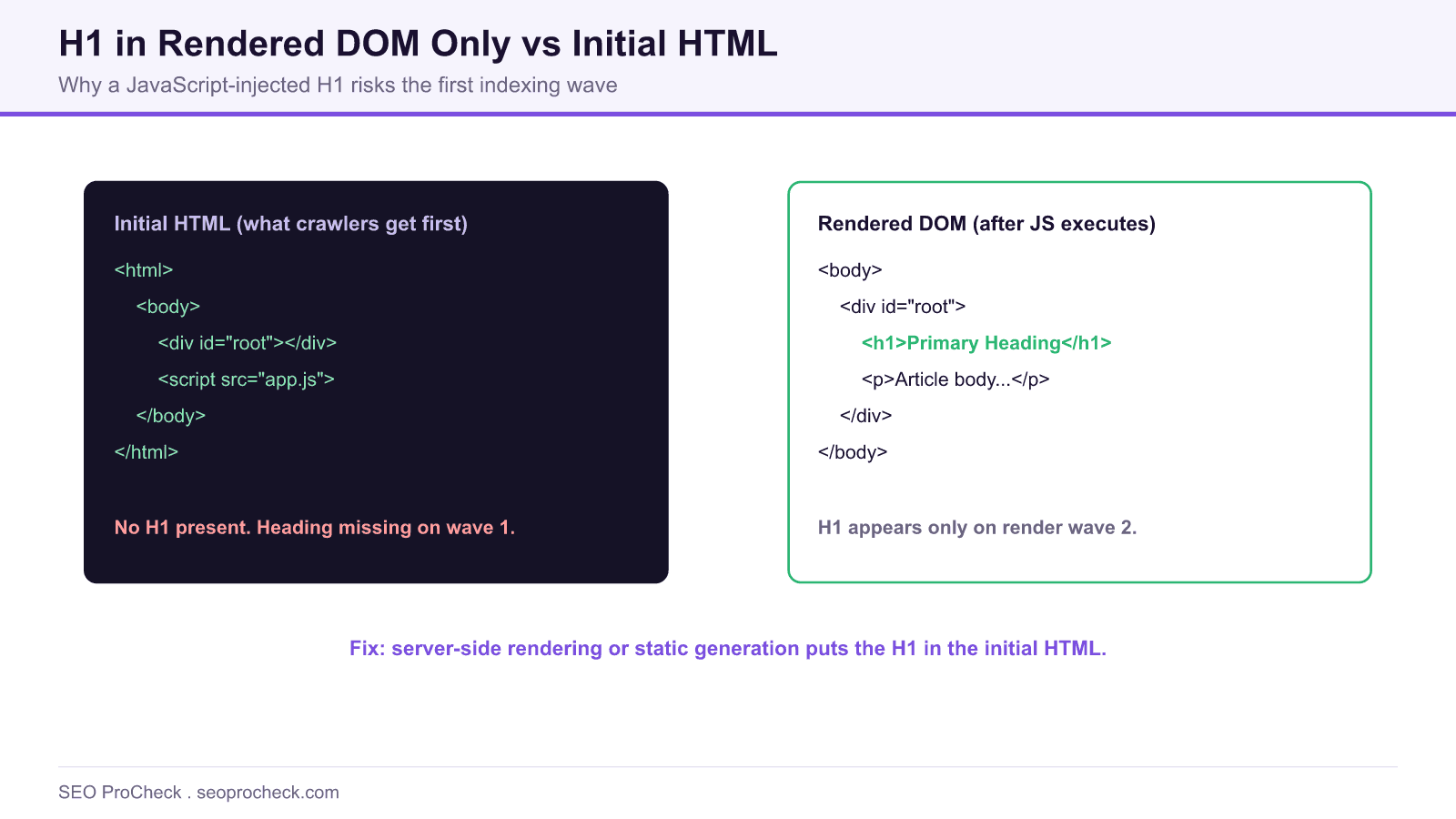
When your H1 exists only in the rendered DOM after JavaScript runs, and not in the initial HTML response, search engines must wait for the render phase to see your primary heading. The reliable fix is server side rendering or static generation so the H1 ships in the first HTML response.
- Google indexes in two waves: raw HTML first, JavaScript rendered content later.
- An H1 injected by client side JavaScript can be missed or delayed on the first wave.
- Client rendered frameworks like React, Vue, and Angular default to an empty HTML shell.
- Server side rendering or static generation puts the H1 in the initial HTML for every crawler.
Quick Reference
Element Code: ON-009
Issue: H1 tag appears only after JavaScript renders the page, not in raw HTML source
Impact: Potential indexing delays, reliance on JavaScript rendering for SEO
Fix: Implement server-side rendering (SSR) or ensure critical H1 is in initial HTML
Detection: Compare raw HTML source vs. rendered DOM, Screaming Frog JavaScript rendering
What Is This Issue?
When an H1 tag only exists in the rendered HTML (after JavaScript executes) but not in the raw HTML source, search engines must rely on their JavaScript rendering capabilities to see your primary heading. While Google can render JavaScript, this adds complexity and potential delay to the indexing process.
Why This Matters for Your Website
Search Engine Impact
Google uses a two-phase indexing process: first indexing raw HTML, then rendering JavaScript later. Critical content like H1 tags that only exist after JavaScript execution may not be indexed immediately, potentially affecting how quickly and accurately Google understands your page.
Rendering Reliability
JavaScript rendering can fail for various reasons: blocked resources, timeouts, errors. If your H1 depends on JavaScript that fails to execute, Google may never see your primary heading.
Technical Background
Modern JavaScript frameworks (React, Vue, Angular) often render content client-side by default. Without server-side rendering (SSR) or static generation, the initial HTML document contains only a shell, with actual content injected by JavaScript.
How to Check
- View Page Source: Right-click, View Source, search for your H1 text
- Inspect Element: DevTools shows rendered DOM, compare to source
- Screaming Frog: Compare HTML vs. JavaScript-rendered versions
- Google Search Console: Use URL Inspection to see what Google sees
How to Fix This Issue
- Server-Side Rendering: Use Next.js, Nuxt.js, or similar frameworks that support SSR
- Static Generation: Pre-render pages at build time
- Hybrid Approach: Ensure critical elements like H1 are in initial HTML
- Progressive Enhancement: Start with basic HTML, enhance with JavaScript
AI Search and GEO Considerations
AI crawlers have varying JavaScript rendering capabilities. Ensuring your H1 is in the initial HTML guarantees all search systems can access your primary heading, improving your visibility across traditional and AI-powered search engines.
TL;DR (The Simple Version)
Your H1 only shows up after JavaScript runs, not in the original HTML. Google can usually handle this, but it's not ideal. Critical content like your main heading should be in the HTML that gets delivered to the browser, not injected by JavaScript later. Consider server-side rendering if you're using a JavaScript framework.
How to Confirm the Problem in One Command
Before changing your rendering setup, verify what crawlers actually receive on the first wave. Fetch the raw HTML and search it for your heading text. If the H1 is absent from this response but visible in the browser, it is being injected by JavaScript:
curl -s https://example.com/your-page/ | grep -i "<h1"An empty result means no H1 in the initial HTML. Confirm the contrast by opening DevTools and inspecting the rendered DOM, where the H1 will be present. The URL Inspection tool in Search Console shows the rendered HTML Google finally sees, which is useful for confirming the render wave eventually resolves the heading.
Framework Defaults and the Fix for Each
The right fix depends on how your framework renders. This table maps common stacks to the approach that ships the H1 in the first response.
| Stack | Default behavior | Recommended fix |
|---|---|---|
| React (Create React App) | Client rendered, empty shell | Move to Next.js with server rendering or static export |
| Vue (plain SPA) | Client rendered, empty shell | Adopt Nuxt with server rendering or static generation |
| Angular | Client rendered by default | Enable Angular Universal for server side rendering |
| Static site content | Prebuilt HTML | Ensure the template outputs the H1 at build time |
Why the Initial HTML Wins
Putting the H1 in the first response removes an entire class of risk. Rendering can fail when scripts are blocked, time out, or error, and any of those failures can leave your primary heading invisible to a crawler. Even when rendering succeeds, it adds latency to indexing. Because the H1 is one of the strongest on page signals of what a page is about, it belongs in the HTML that ships to the browser, not in a payload assembled later. The same principle protects your visibility across AI crawlers, many of which have weaker JavaScript rendering than Google. For the broader picture, see our research on server rendering versus client rendering for AI crawlers and JavaScript, AI search, and server side rendering.
If your audit also flags a missing heading rather than a delayed one, review the fix in our guide to an H1 tag that is missing, and reinforce your structure with our advice on how to structure headings for SEO.
Frequently Asked Questions
Is an H1 that only appears after JavaScript an SEO problem?
It is a risk rather than a guaranteed penalty. Google can render JavaScript, but doing so adds delay and can fail, so a heading that exists only after render may be indexed late or missed. Shipping the H1 in the initial HTML removes that risk.
How do I check whether my H1 is in the raw HTML?
Fetch the page with a tool that does not run JavaScript, such as curl, and search the response for your H1 text. If the browser shows the heading but the raw response does not, it is being injected client side.
Does server side rendering fix this issue completely?
Yes, for the heading. Server side rendering and static generation both place the H1 in the first HTML response, so every crawler sees it without waiting for the render wave. It also improves perceived load time for users.
Do AI search crawlers render JavaScript like Google does?
Many do not, or do so less reliably than Google. Keeping the H1 and other critical content in the initial HTML is the safest way to stay visible across both traditional and AI powered search systems.
Can I keep using React or Vue and still fix this?
Yes. Use a framework layer that adds server rendering or static generation, such as Next.js for React or Nuxt for Vue, so the initial HTML includes your headings while you keep the client side interactivity.
Which is better for the H1, server rendering or static generation?
Both put the H1 in the first response. Static generation suits content that changes infrequently and can be prebuilt, while server side rendering suits pages that need fresh or personalized data at request time.
Take this with you
The assistant links open with a question about this page already written. Nothing is sent until you press enter.
Claude Vincent is a technical SEO consultant focused on crawlability, rendering, and AI-search visibility. He writes the field guides and case studies at SEO ProCheck, with a bias toward the durable, unglamorous work that decides whether search engines and AI answer engines can actually read and cite a site.
About SEO ProCheck
Technical SEO consulting and GEO strategy with 20 years of enterprise experience. Case studies, resources, and tools for search and AI visibility.
Work With Me
Technical SEO audits, GEO strategy, site migrations, and international SEO. Hourly consulting for teams who need hands-on support, not just reports.
Subscribe to our newsletter!







Recent Posts
- Finding a Competitor's Sitemap, and Turning It Into a Change Log September 15, 2026
- AI Crawler User Agents: The Current Names, and Which Ones Sites Actually Block September 9, 2026
- Can AI Crawlers Actually Read Your Site? I Measured 400 of the Biggest September 5, 2026