

AI Summary
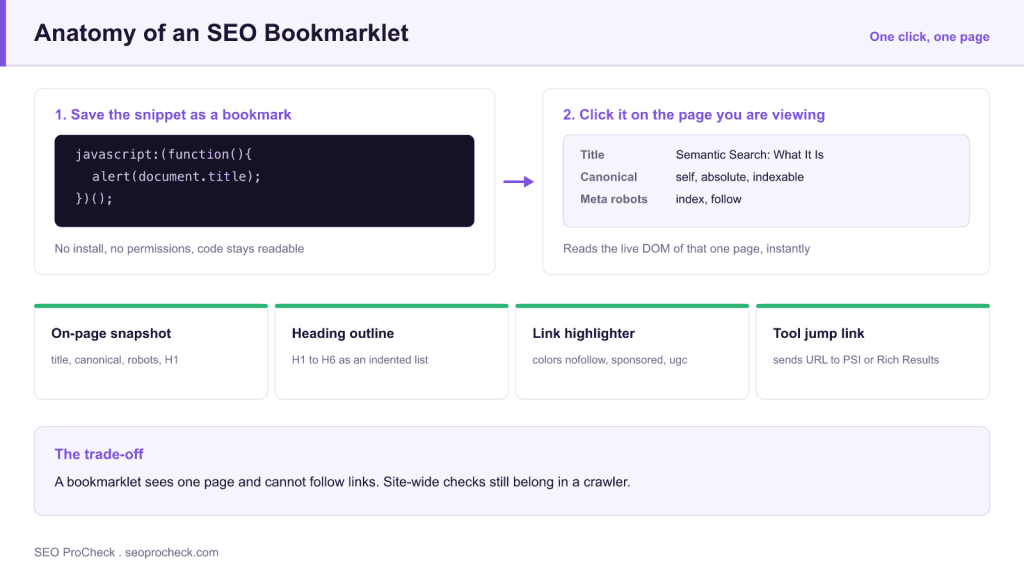
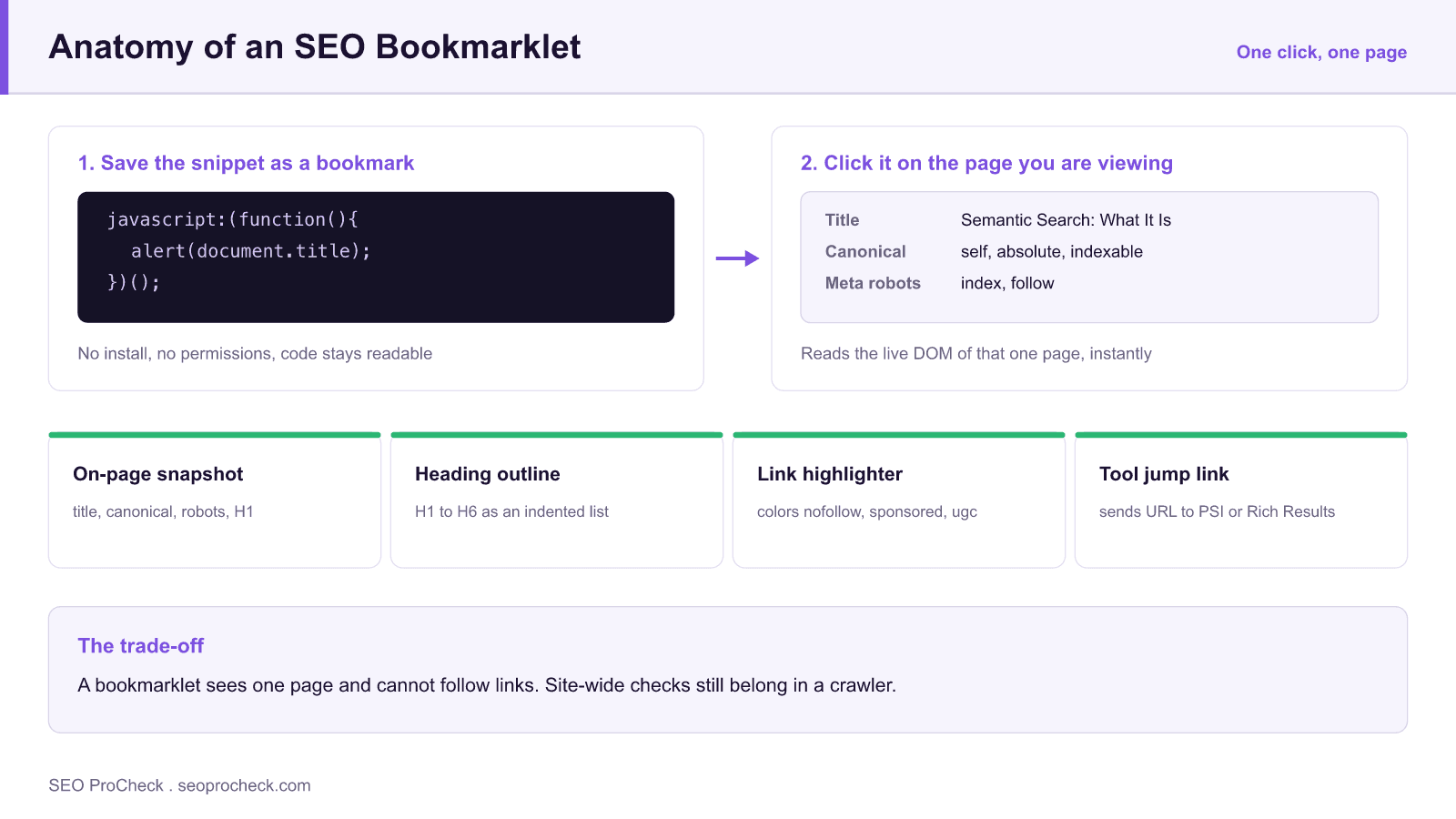
What are SEO bookmarklets? SEO bookmarklets are one-click JavaScript snippets saved as ordinary browser bookmarks: click one while viewing any page and it instantly runs a diagnostic on that page: surfacing the canonical tag, highlighting nofollow links, extracting the heading outline, or jumping straight to that URL in Google’s testing tools. They need no installation, no extension permissions, and no subscription, which is why agencies like Detailed still use them for rapid first-pass audits before firing up a full crawler.
- A bookmarklet is an ordinary bookmark whose URL uses the
javascript:scheme, so clicking it runs code on the page you are already viewing. - It reads the rendered DOM, which makes it the fastest way to compare raw source against what actually renders.
- No install and no permission prompt, but also no sandbox: it inherits your logged-in session, so only run code you can read.
- One page at a time. Anything site-wide still belongs in a crawler.
Get the SEO Secrets Our Industry-Leading Clients Pay Us to Find provides valuable insights for SEO practitioners. This resource examines approaches and considerations that can improve organic search performance.
Key Concepts
Understanding the fundamental principles behind this topic helps inform strategic decisions. Whether optimizing for traditional search or emerging AI platforms, foundational concepts remain relevant. This resource covers the essential knowledge practitioners need.
Technically there is nothing exotic about a bookmarklet. A bookmark stores a URL; when that URL uses the javascript: scheme instead of https:, activating the bookmark executes the code against the page currently loaded in the tab. That single design fact explains every property that follows:
- It runs as the page. The script can read the rendered DOM, computed styles, and anything else the page itself can see, which is why it reports post-JavaScript reality rather than raw server HTML.
- No install step, and no update channel. Nothing is registered with the browser, so nothing can silently update itself. The flip side is that a bookmarklet broken by a site redesign stays broken until you edit it.
- No permission prompt, and no permission boundary. A bookmarklet is not isolated from the page the way an extension content script is. It inherits your authenticated session on that origin.
Wrapping the code in an immediately invoked function expression, the (function(){ ... })(); pattern, keeps its variables out of the page's global scope and avoids collisions with the site's own JavaScript. Most published bookmarklets already do this. If one does not, wrap it yourself before saving it.
Implementation Considerations
Moving from concept to execution requires understanding practical constraints and opportunities. Different situations call for different approaches. This resource provides guidance for applying concepts in real-world contexts.
Installation takes under a minute, but the details differ by browser:
- Chrome and Edge: open the bookmark manager, choose Add new bookmark, and paste the code into the URL field. Pasting into the address bar is what strips the
javascript:prefix. - Firefox: open the bookmarks manager, choose New Bookmark, and paste into the URL field the same way.
- Safari: create an ordinary bookmark first, then edit its address, because Safari will not accept a
javascript:URL in the create dialog.
Keep them together in a dedicated folder on the bookmarks bar. Eight well-chosen bookmarklets in one folder are faster to reach than an extension popup, and they survive a profile rebuild as a plain HTML export.
When one misbehaves, the cause is usually structural rather than a bug in the script:
| What you see | Underlying cause | What to do |
|---|---|---|
| Absolutely nothing happens | The javascript: prefix was stripped when you pasted | Re-add the prefix by editing the bookmark in the bookmark manager |
| Works on some sites, silently fails on others | A Content Security Policy blocks injected or remote scripts | Prefer self-contained bookmarklets that only read the DOM |
| Reports stale values on a single-page app | It read the DOM before client-side routing finished | Click it again once the view has settled |
| Misses content that is clearly on screen | The markup lives in a cross-origin iframe | Open the frame in its own tab and run it there |
| Selectors match nothing on a modern component site | The nodes sit inside a shadow root | Inspect the rendered tree in DevTools, which traverses shadow DOM |
Measuring Impact
SEO efforts require measurement to demonstrate value and guide optimization. Identifying appropriate metrics, establishing baselines, and tracking progress enables data-driven improvement. This resource addresses how to evaluate success.
Bookmarklets are a speed tool, so the honest measure is time to first finding rather than coverage. A workable rule for deciding whether a check earns a slot on the bookmarks bar: it should answer a yes or no question about one URL in a few seconds, and you should run it often enough to remember it is there. Anything you use twice a year belongs in a notes file, not on the bar.
Escalate to a crawler the moment the question involves more than one URL, comparison across time, or an artifact you need to hand to a client. The two tools are complements rather than competitors: the bookmarklet tells you this page has a problem, the crawl tells you how many other pages share it.
This resource contributes to the knowledge base SEO practitioners need for effective optimization in an evolving search landscape.
Why Bookmarklets Still Earn a Place in an SEO Workflow
The source article behind this summary is Detailed’s collection of Chrome bookmarklets for SEO, the quick-check scripts their team clicks dozens of times a day while reviewing client sites. The pitch is simple: a bookmarklet answers one question about the page you are already looking at, in under a second, with zero context switching. That speed matters during discovery calls, live audits, and competitor reviews, where opening a crawler or a browser extension panel breaks the flow.
Bookmarklets have three practical advantages over extensions. First, they run only when clicked, so they add no passive page-load overhead and no always-on tracking surface. Second, they work in any browser that supports bookmarks, including locked-down corporate machines where installing extensions needs IT approval. Third, the code is fully visible in the bookmark’s URL field, so you can audit exactly what it does before you trust it. The trade-off is depth: a bookmarklet inspects one page at a time and cannot follow links, so anything that needs site-wide coverage still belongs in a crawler: see our Screaming Frog crawl recipes for that side of the workflow.
The Checks Practitioners Actually Run With Bookmarklets
Across Detailed’s set and the wider community collections, the same categories of one-click checks come up again and again. This table maps the common ones to what they replace:
| Bookmarklet check | What it does | What it replaces |
|---|---|---|
| On-page snapshot | Overlays title, meta description, canonical, meta robots, and H1 for the current page | Opening view-source and hunting through the <head> |
| Heading outline | Extracts the H1 to H6 structure as an indented list | An extension panel or a single-URL crawl |
| Link attribute highlighter | Colors nofollow / sponsored / UGC links directly on the page | Inspecting individual links in DevTools |
| Rendered vs. raw source | Opens the current DOM state for comparison against the server HTML | Manual DevTools “copy outerHTML” workflows |
| SERP shortcuts | Runs site: or brand queries for the current domain in one click | Typing operators by hand |
| Tool jump links | Sends the current URL to PageSpeed Insights, the Rich Results Test, or a validator | Copy-pasting URLs between tabs |
| SERP result extractor | Copies ranking URLs and titles from a results page into a pasteable list | Manual copy-paste during quick SERP sampling |
If you prefer maintained collections over building your own, we keep two summarized on this site: Fili Wiese’s SEO bookmarklets and the classic 69 SEO bookmarklets roundup. Our own day-to-day browser tooling is listed in the Browser Extensions & Daily SEO Stack.
Installing and Auditing a Bookmarklet Safely
Installation is the same everywhere: create a new bookmark, paste the JavaScript (starting with javascript:) into the URL field, and name it. Two gotchas trip people up. Chrome and Edge silently strip the javascript: prefix when you paste into the address bar as a security measure. Pasting into the bookmark manager’s URL field avoids this, or you can retype the prefix manually. And on pages with a strict Content Security Policy, some bookmarklets that inject external scripts will fail; self-contained ones that only read the DOM keep working.
The security rule is non-negotiable: a bookmarklet runs with full access to whatever page you are on, including logged-in sessions. Only install code you can read, or code from a source you trust, and be especially wary of minified bookmarklets that fetch a remote script at click time, because the remote file can change after you have installed it. When in doubt, paste the code into a formatter and skim what it touches before saving it.
Where Bookmarklets Fit in 2026
The one-page nature of bookmarklets has aged surprisingly well. Rendered-DOM inspection has become more important, not less, now that both Google and AI crawlers judge pages on what the HTML actually delivers, so a one-click raw-vs-rendered comparison is often the fastest first test before a deeper JavaScript rendering diagnosis. What has changed is the ecosystem around them: several Google surfaces that older bookmarklet collections targeted (the cache: operator, the standalone AMP test) have been retired, so any collection you adopt from an older article needs a quick liveness pass: click each one and delete the ones pointing at dead endpoints.
Frequently Asked Questions
What is an SEO bookmarklet?
A bookmarklet is a browser bookmark whose “URL” is a snippet of JavaScript prefixed with javascript:. Clicking it executes the script on the page you are currently viewing. SEO bookmarklets typically read the DOM to surface tags, links, or structure, or forward the current URL to an external testing tool.
Are bookmarklets better than SEO Chrome extensions?
They solve different problems. Extensions offer richer interfaces and persistent settings but require installation permissions and run background code. Bookmarklets are lighter, fully auditable, and work where extensions are blocked, but each one does exactly one thing on one page. Most practitioners run both.
Do bookmarklets work in Firefox and Safari?
Yes. Bookmarklets are plain bookmarks, so they work in every major desktop browser. The only variations are where you paste the code (bookmark manager vs. address bar) and how strict the browser is about the javascript: prefix on paste.
Why does my bookmarklet do nothing when I click it?
The three usual causes: the javascript: prefix was stripped on paste, the page’s Content Security Policy blocks the script from injecting resources, or the site’s markup changed and the selectors in the script no longer match anything. Test on a simple page first to isolate which it is.
Can a bookmarklet crawl my whole site?
No. A bookmarklet only sees the page it runs on. For site-wide checks (broken links, duplicate titles, redirect chains) you need a crawler; our crawl recipes cover the standard configurations.
Are bookmarklets safe to use on logged-in sites?
Only if you trust the code, because the script runs inside your authenticated session. Prefer self-contained bookmarklets you have read over ones that load remote scripts, and never install a bookmarklet from an untrusted source on the same browser profile you use for client CMS or analytics logins.
Claude Vincent is a technical SEO consultant focused on crawlability, rendering, and AI-search visibility. He writes the field guides and case studies at SEO ProCheck, with a bias toward the durable, unglamorous work that decides whether search engines and AI answer engines can actually read and cite a site.
About SEO ProCheck
Technical SEO consulting and GEO strategy with 20 years of enterprise experience. Case studies, resources, and tools for search and AI visibility.
Work With Me
Technical SEO audits, GEO strategy, site migrations, and international SEO. Hourly consulting for teams who need hands-on support, not just reports.
Subscribe to our newsletter!






