

AI Summary
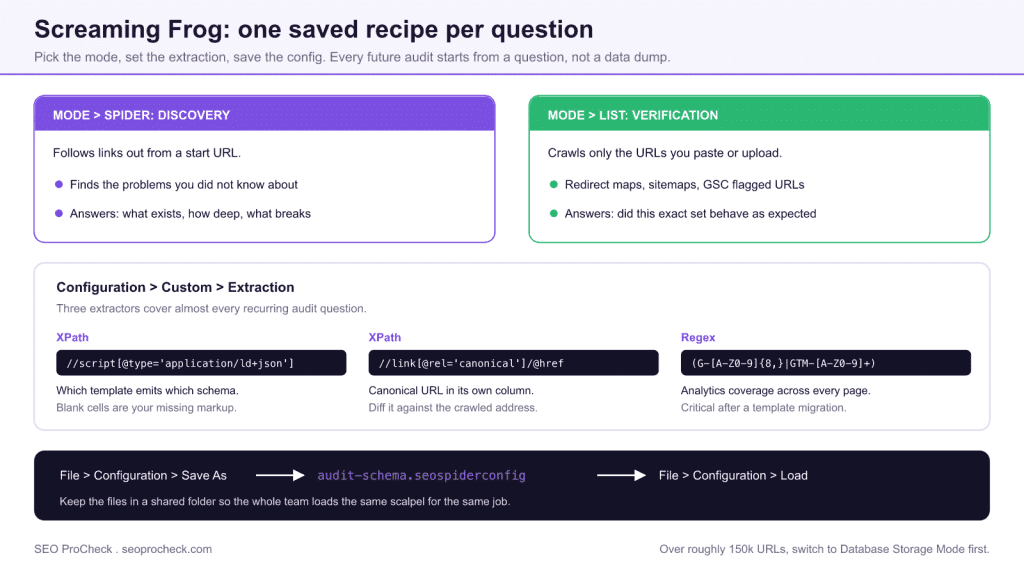
A Screaming Frog recipe is a saved .seospiderconfig file that turns the crawler into a single purpose diagnostic: a custom extraction for schema or analytics validation, a list-mode config for redirect and sitemap verification, or a tightened spider config for a JavaScript or section-only audit. Build each one once through File > Configuration > Save As and every future audit starts from a precise question instead of a 50,000 URL data dump.
- Spider mode discovers problems; List mode verifies a known set. Choosing the wrong one is why crawls take all afternoon.
- Custom extraction (Configuration > Custom > Extraction) accepts XPath, CSSPath, and regex, and runs against rendered HTML only when rendering is enabled.
- Connect Search Console, GA4, and PageSpeed under Configuration > API Access to get a traffic-weighted fix list from a single crawl.
- Beyond roughly 150,000 URLs, switch to Database Storage Mode or the crawl will die partway through.
Quick answer: Screaming Frog crawl recipes are saved .seospiderconfig files that turn the crawler into a set of single-purpose diagnostic tools: custom extraction configs for schema and analytics validation, list-mode configs for redirect-map and sitemap verification, and tightened spider configs for JavaScript or section-only audits. Build each recipe once via File > Configuration > Save As, and every future audit starts with a precise question instead of a 50,000-URL data dump.
Most SEOs run Screaming Frog the same way every time: point it at a domain, hit start, and skim the tabs. That leaves the most powerful features, custom extraction, list mode, and surgical configuration, untouched. The recipes below are saved configurations you can paste in once and reuse on every audit, turning a generic crawler into a precision diagnostic instrument.
Why save configurations instead of crawling fresh every time
Screaming Frog lets you export a full configuration as a .seospiderconfig file via File > Configuration > Save As. Build a recipe once, save it, and load it the next time you need that exact diagnostic. The real leverage comes from three areas most people skip: Custom Extraction (Configuration > Custom > Extraction), list mode (Mode > List), and tightening the spider config so you crawl only what answers your question. Pair these and you stop drowning in 50,000 URLs to confirm one hypothesis.
Custom extraction recipes
Custom extraction pulls anything from the rendered or raw HTML using CSSPath, XPath, or regex. Set the extractor type in the dropdown next to each field. These are the ones worth keeping permanently.
1. Pull structured data type and validate at scale
Use XPath to grab the @type from JSON-LD so you can see which template emits which schema:
- Extractor: XPath
- Expression:
//script[@type='application/ld+json']/text() - Set the dropdown to Extract Text. Then filter the export for pages missing
Article,Product, orFAQPagewhere you expect it.
2. Detect canonical mismatches your CMS hides
Capture the canonical URL into its own column so you can compare it against the address with a spreadsheet formula rather than eyeballing the Canonicals tab:
- Extractor: XPath
- Expression:
//link[@rel='canonical']/@href
3. Find pages missing a self-referencing hreflang or analytics tag
Confirm GA4 or GTM fires site-wide with a regex extractor, faster than checking a sample by hand:
- Extractor: Regex
- Expression:
(G-[A-Z0-9]{8,}|GTM-[A-Z0-9]+) - Any blank cell in the export is a page where the container is absent. Critical after a template migration.
4. Extract word count and thin-content signals
Target the main content container directly instead of trusting whole-page word count, which includes nav and footer boilerplate:
- Extractor: CSSPath
- Expression:
articleormain(adjust to your template), Extract Text - Use
=LEN()minus spaces logic in Sheets, or sort by the extracted string length, to surface genuinely thin body copy.
5. Scrape prices, ratings, or stock status for ecommerce diffs
Point CSSPath at the price node (span.price, .product-price) and the review count. Run the same recipe weekly and diff the exports to catch unintended price or availability changes that tank rich results.
List mode recipes
Switch to Mode > List to crawl a fixed set of URLs instead of following links. This is where Screaming Frog becomes a verification tool rather than a discovery tool.
- Audit only your indexable money pages. Export your priority URLs (from GSC, a sitemap, or a ranking export), paste them into list mode, and check status code, canonical, indexability, and title in one pass, no crawling the entire site.
- Validate a redirect map before launch. In list mode, enable Configuration > Spider > Advanced > Always Follow Redirects, paste your old URLs, and use Reports > Redirects > Redirect Chains to confirm every legacy URL lands on a 200 in a single hop. Catch 302s, chains, and loops before they cost you equity.
- Crawl a sitemap to find orphans and errors. Use Download Sitemap in list mode (Upload > Download Sitemap Index). Cross-reference against a full crawl: URLs in the sitemap but not in the crawl are orphaned; URLs returning non-200s in your sitemap are actively telling Google to index broken pages.
- Spot-check GSC-flagged URLs. When Search Console reports "Crawled, currently not indexed" or soft 404s, paste that exact list and inspect indexability, canonical target, and response code together to diagnose the pattern fast.
Configuration recipes that sharpen every crawl
The spider configuration is where you trade noise for signal. Save these as named configs.
The "JS-rendered audit" config
- Configuration > Spider > Rendering > JavaScript. Set AJAX timeout to at least 5 seconds for heavy SPAs.
- Compare rendered vs. raw HTML using the JavaScript tab filters, "Contains JavaScript Links" and "Pages with Blocked Resources" reveal content Google may never see.
The "log-light, fast structural" config
- Disable image, CSS, JS, and SWF crawling under Spider > Crawl when you only care about HTML architecture. This dramatically cuts crawl time and memory.
- Turn off Store HTML / Rendered HTML under Spider > Extraction if you don't need it, huge memory savings on large sites.
The "include/exclude scalpel" config
- Configuration > Include with a regex like
https://example.com/blog/.*crawls only one section. - Configuration > Exclude with
.*?.*drops every parameterized URL when faceted navigation is flooding your crawl. Combine with Remove Parameters for canonicalization testing.
The "crawl as Googlebot" config
- Set Configuration > User-Agent to Googlebot Smartphone and respect or ignore robots.txt deliberately (Spider > Robots.txt) to see exactly what the mobile crawler reaches, and what's being blocked.
Connect APIs for one-pass prioritization
Under Configuration > API Access, plug in Google Search Console, GA4, and PageSpeed Insights. Now a single crawl returns each URL alongside its clicks, impressions, sessions, and Core Web Vitals. Sort by impressions descending, filter to non-indexable or slow pages, and you have a ranked fix list backed by real traffic data instead of crawl-depth guesses.
Recipe reference table
The full library at a glance: the exact menu path to configure each recipe and what the resulting export tells you:
| Recipe / task | Exact config path | What the export shows |
|---|---|---|
| Schema type audit | Configuration > Custom > Extraction, XPath //script[@type='application/ld+json']/text() | Which templates emit which JSON-LD types; blanks = pages missing expected schema |
| Canonical mismatch sweep | Configuration > Custom > Extraction, XPath //link[@rel='canonical']/@href | Canonical URL per page in its own column, diffable against the crawled address |
| GA4/GTM coverage check | Configuration > Custom > Extraction, Regex (G-[A-Z0-9]{8,}|GTM-[A-Z0-9]+) | Every page where the tag container is absent (blank cells) |
| Thin-content detection | Configuration > Custom > Extraction, CSSPath article/main, Extract Text | Body-only text length per URL, excluding nav/footer boilerplate |
| Redirect map validation | Mode > List + Configuration > Spider > Advanced > Always Follow Redirects, then Reports > Redirects > Redirect Chains | Hop count, chains, loops, and final status for every legacy URL |
| Sitemap orphan check | Mode > List > Upload > Download Sitemap Index | Sitemap URLs missing from the link graph, plus non-200s Google is being told to index |
| JS rendering audit | Configuration > Spider > Rendering > JavaScript (AJAX timeout 5s+) | JavaScript tab filters: JS-only links, blocked resources, raw-vs-rendered differences |
| Section-only crawl | Configuration > Include, regex e.g. https://example.com/blog/.* | A clean crawl of one section without the rest of the site as noise |
| Googlebot-eye view | Configuration > User-Agent > Googlebot Smartphone + Spider > Robots.txt setting | Exactly what the mobile crawler can reach and what robots.txt blocks |
| Traffic-weighted fix list | Configuration > API Access > GSC / GA4 / PSI | Each URL with clicks, impressions, sessions, and CWV in one export |
Choosing the right extractor
Most failed extractions are a wrong-tool problem rather than a wrong-expression problem. The three extractor types are not interchangeable, and the dropdown next to the expression (Extract Text, Extract HTML Element, Extract Inner HTML, Function Value) changes what lands in the cell:
| What you are pulling | Extractor | Output setting | Why this one |
|---|---|---|---|
| An attribute value (canonical href, image src, hreflang) | XPath | Extract Text | XPath addresses attributes directly with /@href, which CSSPath cannot express |
| A block of visible copy from one container | CSSPath | Extract Text | Shorter and more readable than the XPath equivalent, and stable against class reordering |
| Anything spanning tags, or a pattern in a script | Regex | n/a | Regex runs over the raw source string, so it reaches content the DOM selectors cannot address |
| Raw JSON-LD to parse later | XPath | Extract Inner HTML | Extract Text will strip the structure you need to parse downstream |
| Presence or absence of an element | XPath | Function Value with count() | Returns a number, so you can filter for zero instead of scanning for blanks |
One caveat worth internalising: extraction runs against whatever DOM state the crawl produced. With rendering off, your selectors hit raw source; with rendering on, they hit the rendered DOM. A canonical extraction that returns blanks under one setting and values under the other has told you something important about the site, so before assuming the expression is broken, run it both ways and compare.
Which export to open first
A finished crawl offers dozens of exports, and opening them in the wrong order wastes the hour after the crawl. Work outward from what blocks indexing:
- Response Codes, filtered to 4xx and 5xx. Broken destinations invalidate conclusions drawn from every other tab, so clear them first.
- Directives, then Canonicals. Anything non-indexable is not competing at all. Sort by Indexability Status and read the reasons before looking at content quality.
- Reports > Redirects > Redirect Chains. Chains and loops are cheap to fix and quietly common after migrations and template changes.
- Your custom extraction columns. This is the answer to the question you actually crawled for, which is why the recipe exists.
- Crawl Depth, sorted descending. Real content sitting at depth 8 or deeper is an architecture finding, not a crawler finding.
Screaming Frog tells you what a crawler can reach, which is not the same as what Googlebot does reach. When the two disagree, the argument is settled by server log analysis, the only source that records real crawler behaviour rather than a simulation of it. Pair the two: the crawl tells you what should be reachable, the logs tell you what Google actually fetched, and the gap between them is usually the whole finding.
Common mistakes
- Crawling in default (memory) storage on large sites. Switch to Database Storage Mode (Configuration > System > Storage Mode) for anything over ~150k URLs, or the crawl dies.
- Trusting raw HTML on a JS site. If the framework renders client-side, enable JavaScript rendering or your content and link audits are fiction.
- Forgetting list mode ignores robots.txt by default in some setups. Verify your robots configuration matches your intent before drawing conclusions.
- Extracting from the wrong DOM state. CSSPath and XPath run against rendered HTML only when rendering is on; otherwise they hit raw source. Match the extractor mode to the rendering mode.
Build your library
Save each of these as a named .seospiderconfig file in a shared folder so your whole team loads the same scalpel for the same job. The goal isn't to crawl more, it's to ask one precise question per crawl and get an exportable answer in minutes. That discipline is what separates a crawl report from a diagnosis.
Frequently Asked Questions
How do I save and reuse a Screaming Frog configuration?
File > Configuration > Save As writes everything (spider settings, custom extractions, includes and excludes, API connections) to a .seospiderconfig file. Load it with File > Configuration > Load before the next crawl. Keep the files in a shared drive so the whole team runs identical diagnostics.
What's the difference between Spider mode and List mode?
Spider mode discovers URLs by following links from the start page; List mode (Mode > List) crawls only the exact URLs you paste or upload. Use Spider mode to find problems you don't know about, List mode to verify a known set: redirect maps, sitemap contents, GSC-flagged URLs.
When do I need JavaScript rendering enabled?
Whenever the site injects content, links, canonicals, or meta tags client-side: React, Vue, Angular, or heavy tag-manager DOM edits. Enable it under Configuration > Spider > Rendering > JavaScript, and remember custom extractions then run against the rendered DOM, not raw source. If raw and rendered audits disagree, the rendered one is closer to what Google indexes.
Why does my crawl crash or freeze on a large site?
Default memory storage holds the whole crawl in RAM. Switch to Database Storage Mode (Configuration > System > Storage Mode) for sites beyond roughly 150k URLs, and disable images/CSS/JS crawling plus stored HTML when you only need structural data.
Can Screaming Frog crawl a staging site behind authentication?
Yes. Configuration > Authentication handles both standards-based auth (basic/digest, entered when the crawl hits the challenge) and forms-based login via the built-in browser. For IP-allowlisted staging, crawl from an allowed machine or set a custom header under Configuration > HTTP Header.
How do I compare two crawls to see what changed?
Use Mode > Compare with the previous crawl saved in Database Storage Mode. It diffs URLs, indexability, titles, and structure between the two crawls, the fastest way to verify a release didn't silently change canonicals or drop pages.
Want this handled properly on your site?
It is exactly the kind of work an advanced technical SEO audit covers. See how an advanced SEO audit works →
Take this with you
The assistant links open with a question about this page already written. Nothing is sent until you press enter.
Claude Vincent is a technical SEO consultant focused on crawlability, rendering, and AI-search visibility. He writes the field guides and case studies at SEO ProCheck, with a bias toward the durable, unglamorous work that decides whether search engines and AI answer engines can actually read and cite a site.
About SEO ProCheck
Technical SEO consulting and GEO strategy with 20 years of enterprise experience. Case studies, resources, and tools for search and AI visibility.
Work With Me
Technical SEO audits, GEO strategy, site migrations, and international SEO. Hourly consulting for teams who need hands-on support, not just reports.
Subscribe to our newsletter!








Recent Posts
- Most Top Sites Never Say Who They Are in Structured Data October 14, 2026
- Homepage Titles Are Mostly Too Short, Not Too Long October 8, 2026
- Who Actually Serves an llms.txt? 184 Top Sites Measured September 29, 2026