

69 Amazing SEO Bookmarklets to SuperCharge Your Internet Marketing
- January 11, 2023
- General
AI Summary
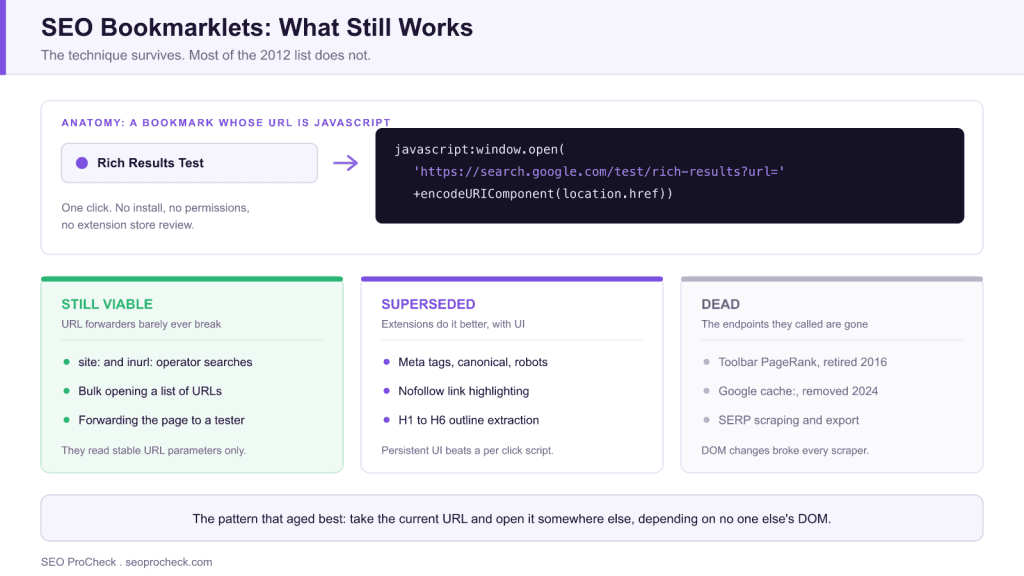
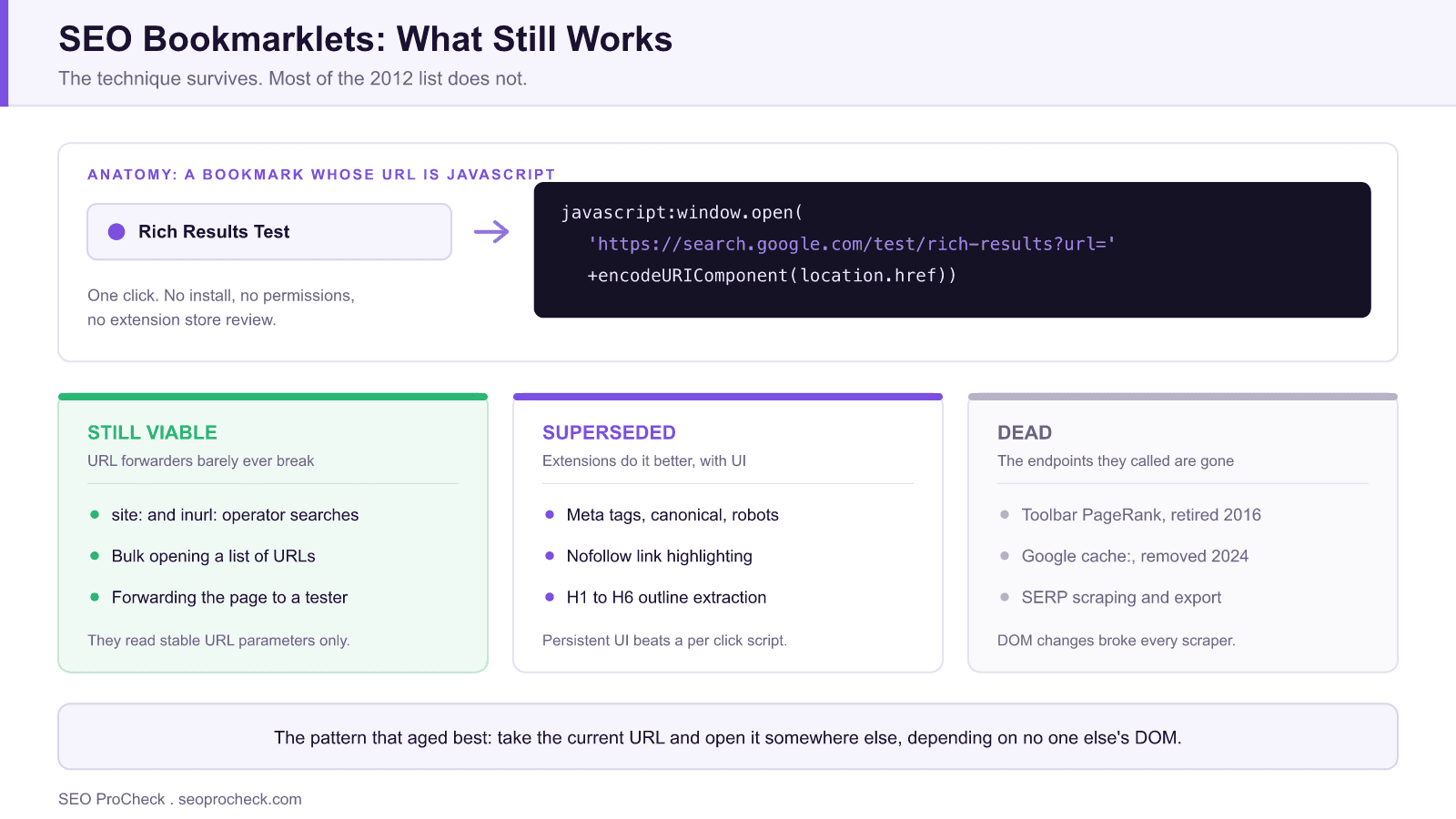
SEO bookmarklets are tiny snippets of JavaScript saved as browser bookmarks that run an instant check on whatever page you are viewing. The linked cognitiveSEO roundup of 69 of them was a classic of the early 2010s SEO toolbox, but most of those specific bookmarklets are dead or obsolete today.
- The technique still works in every major browser: a bookmark whose URL starts with
javascript:. - What broke: retired endpoints such as Toolbar PageRank and Google's
cache:operator, plus constant DOM changes on scraped pages. - The class that aged best is the URL forwarder, which sends the current page to another tool.
- Extensions, crawlers, and DevTools snippets absorbed nearly everything else the original list did.
Quick answer: SEO bookmarklets are tiny snippets of JavaScript saved as browser bookmarks that run an instant check on whatever page you are viewing: highlight nofollow links, extract headings, jump to a site: search, pull the source code of the current URL. The linked cognitiveSEO roundup of 69 of them was a classic of the early-2010s SEO toolbox. Most of those specific bookmarklets are dead or obsolete today, because their jobs moved into browser extensions and crawlers, but the bookmarklet technique itself is still the fastest way to script a custom one-click check no extension offers.
Why This List Mattered (and What Broke)
When the source article was published, bookmarklets were the practical middle ground between doing checks by hand and paying for software: one click to see a page's meta tags, count its links, or query a metrics API. Two things have eroded the original 69 since then. First, the endpoints died. Bookmarklets that leaned on Toolbar PageRank (retired by Google in 2016), Yahoo Site Explorer, or Google's cache: operator (which Google removed in 2024) simply stopped working. Second, the SERP and page DOM they scraped kept changing; any bookmarklet that parsed Google's results page needed constant maintenance and usually lost. What survives from the genre is the pattern, not the list.
Where Each Bookmarklet Job Lives Now
| Task class (2012 bookmarklet) | Status of the bookmarklet approach | Modern equivalent |
|---|---|---|
| Show meta tags, canonicals, robots directives on-page | Superseded | Extensions like SEO META in 1 CLICK or Detailed; DevTools |
| Highlight nofollow/internal/external links | Superseded | Link-highlighting built into most SEO extensions |
| Extract H1 to H6 outline | Superseded | Heading-structure views in extensions and accessibility tools |
Quick site:, inurl:, footprint searches | Still viable | Bookmarklets remain great for one-click operator searches on the current domain |
| Toolbar PageRank / third-party metric lookups | Dead | Authority metrics inside Moz/Ahrefs/Semrush extensions and APIs |
| View Google cache of current page | Dead (operator removed 2024) | Wayback Machine bookmarklet or archive extensions |
| SERP result scraping/exporting | Fragile-to-dead | Rank trackers and SERP APIs; DOM changes broke scrapers |
| Structured data / source inspection | Partly viable | Rich Results Test, Schema validator bookmarklets still handy as URL-forwarders |
| Bulk-open a list of URLs | Still viable | Bookmarklets and small extensions both work; crawlers for real bulk work |
The Bookmarklet Pattern Is Still Worth Knowing
A bookmarklet is just javascript: followed by code in a bookmark's URL field, executing in the context of the current page. That makes it the lightest possible automation: no install, no permissions, no extension-store review, works in any browser. The class of bookmarklet that has aged best is the URL-forwarder, which takes the current page and opens it in another tool. Three examples you can adapt (create a bookmark and paste one as its URL):
- Inspect the page in Google's Rich Results Test:
javascript:window.open('https://search.google.com/test/rich-results?url='+encodeURIComponent(location.href)) - Check the current page in the Wayback Machine:
javascript:window.open('https://web.archive.org/web/*/'+location.href) - Run a site: search for the current domain:
javascript:window.open('https://www.google.com/search?q=site:'+location.hostname)
Forwarders like these barely ever break because they depend only on stable URL parameters, not on scraping anyone's DOM. For everything heavier, a curated set of extensions covers the old list's territory far better, so see our picks in 12 essential SEO browser extensions and the maintained browser extensions and daily SEO stack page.
How to Judge Whether a Bookmarklet Will Survive
Before you save one, look at what its code actually depends on. Dependencies fall into four tiers, and the tier predicts the lifespan almost perfectly:
| What the code depends on | Expected lifespan | Example | Why |
|---|---|---|---|
| A documented URL parameter on a stable tool | Years | Opening the current URL in the Rich Results Test | Query string formats are a public contract that tools rarely break |
| Standard DOM APIs on the page you are on | Years | Listing every h1 to h6, or every rel value on the page | The HTML spec does not change under you |
| A specific site's class names or DOM shape | Weeks to months | Pulling result titles out of a Google SERP | Class names are internal implementation and get rewritten without notice |
| A third-party endpoint or free API | Unpredictable | Any metric lookup that calls someone else's service | Endpoints get deprecated, rate-limited, or moved behind an API key |
The practical rule: write bookmarklets against the first two tiers only, and reach for a proper tool for anything in the bottom two. That single filter explains why the surviving members of the original 69 are almost all operator searches and forwarders, while every PageRank and SERP-scraping entry on that list is now a dead bookmark. It is also worth remembering that a bookmarklet runs with full access to whatever page you are on, so treat any snippet you did not read yourself the same way you would treat pasting unknown code into a console: do not.
What's Changed Since: The Real Successors
Three tool classes absorbed the bookmarklet's job. Extensions took the on-page inspection niche, with persistent UI and no per-click limits. Desktop and cloud crawlers took the "check this across many pages" niche, because a bookmarklet inspects one page while a crawler inspects fifty thousand. And most recently, browser DevTools snippets and AI assistants took the custom-script niche: a snippet in DevTools (Sources, then Snippets) is a bookmarklet with a proper editor, and asking an AI tool to write either takes seconds, which, ironically, has made small custom bookmarklets easier to build in 2026 than they were in 2012. Free-standing web tools cover the rest; our tools and resources hub lists no-install checkers for most one-off jobs the original 69 handled.
FAQ
A bookmark whose URL is a javascript: snippet instead of a web address. Clicking it runs the script on the page you are viewing, extracting data, highlighting elements, or sending the URL to another tool.
The technique works in all major browsers. Individual old bookmarklets often do not, because the services they called (Toolbar PageRank, Google cache) are gone or the pages they scraped have changed. URL-forwarding bookmarklets remain reliable.
For standard checks, no, because extensions are richer and maintained. Bookmarklets win for custom one-off checks, locked-down browsers where you cannot install extensions, and privacy, since they run only when clicked with no background access.
Create a new bookmark, paste the javascript: code into the URL or address field, and name it. Clicking the bookmark on any page runs it. Some browsers strip the javascript: prefix on paste, so retype it if that happens.
Only as safe as their code, because a bookmarklet runs with full access to the page you are on. Use bookmarklets whose code you can read (they are usually one line), and never paste code you do not understand from an untrusted source.
Google removed the cache: feature in 2024. The practical replacement is the Wayback Machine (archive.org) for historical copies, and Search Console's URL Inspection for how Googlebot last saw your own pages.
This resource contributes to the knowledge base SEO practitioners need for effective optimization in an evolving search landscape.
Take this with you
The assistant links open with a question about this page already written.
Claude Vincent is a technical SEO consultant focused on crawlability, rendering, and AI-search visibility. He writes the field guides and case studies at SEO ProCheck, with a bias toward the durable, unglamorous work that decides whether search engines and AI answer engines can actually read and cite a site.
About SEO ProCheck
Technical SEO consulting and GEO strategy with 20 years of enterprise experience. Case studies, resources, and tools for search and AI visibility.
Work With Me
Technical SEO audits, GEO strategy, site migrations, and international SEO. Hourly consulting for teams who need hands-on support, not just reports.
Subscribe to our newsletter!








Recent Posts
- Google August 2026 Spam Update: Dates, Duration and How to Read Your Data November 2, 2026
- Google Algorithm Updates: The Dated List Since 2003, and What to Do After Each October 31, 2026
- AI Readiness: The Checklist, the Research and the Free Tools October 28, 2026