


AI Summary
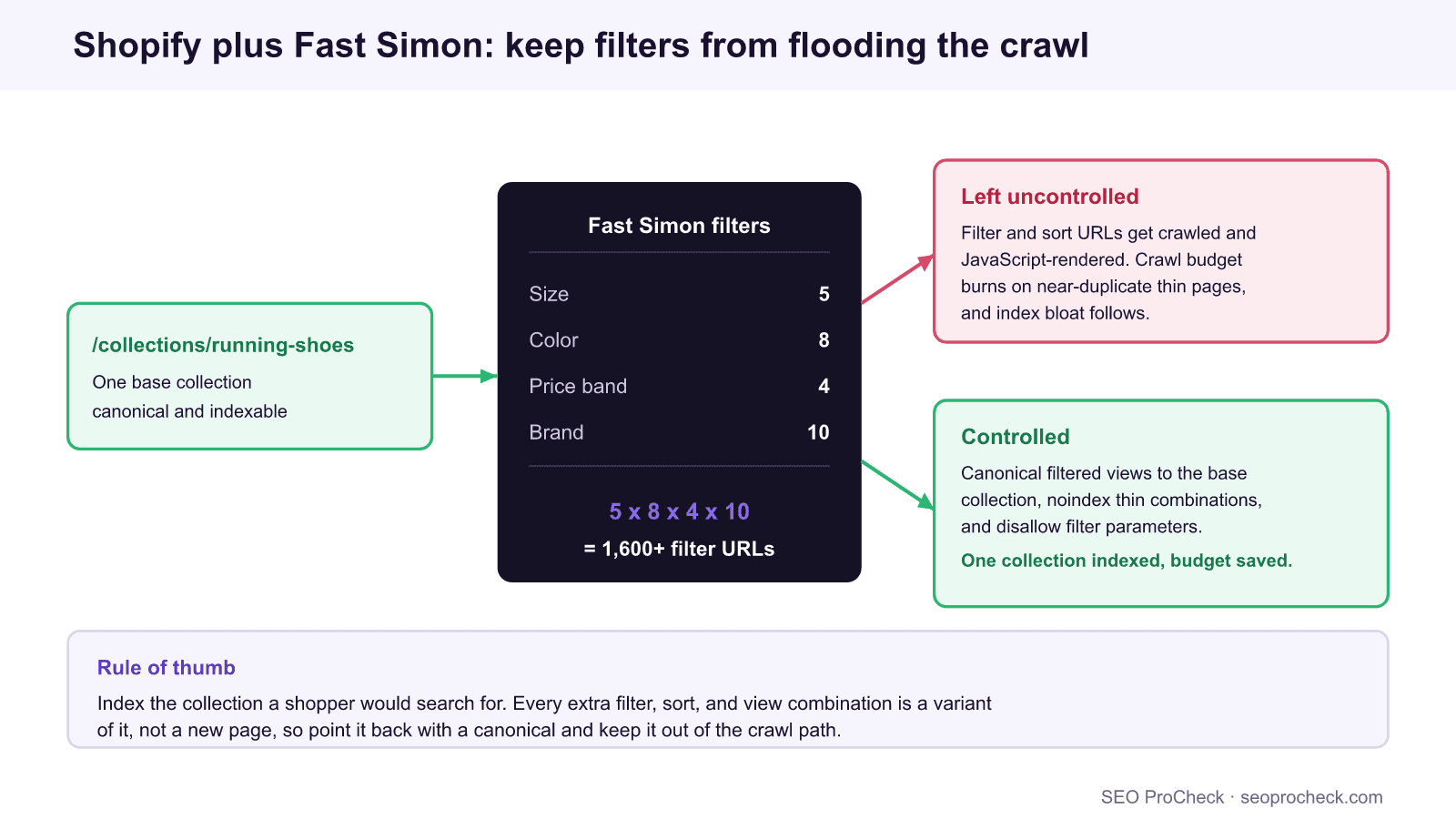
Fast Simon adds fast search, filtering, and merchandising to a Shopify store, but its filter and sort views can spawn thousands of near-duplicate, JavaScript-rendered URLs. Left uncontrolled they burn crawl budget and bloat the index, so the fix is to keep base collections canonical and indexable while canonicalizing, noindexing, and disallowing the filtered variants.
- Index the collection a shopper would actually search for; treat every filter and sort as a variant of it, not a new page.
- Fast Simon results are often client-side rendered, so confirm Googlebot can see the collection content, not just a spinner.
- Shopify serves products at two paths, so rely on the canonical to
/products/handleto avoid duplicates. - Combine canonical tags, selective noindex, and robots.txt parameter rules; no single control does the whole job.
Fast Simon is one of the most popular search and merchandising apps on Shopify. It gives shoppers instant search, rich filtering, and personalized collection sorting, and it usually lifts conversion. It can also, if nobody is watching the crawl, quietly manufacture thousands of URLs that Google has to fetch, render, and sort out. The case study this page cites walks through exactly that tension on a real store: a great on-site experience sitting on top of a crawl problem.
The good news is that Shopify plus Fast Simon is very manageable once you understand which URLs deserve to be indexed and which are just variants of a page that already exists. This guide covers what Fast Simon changes, where the crawl problems come from, the exact control pattern that keeps a large catalog lean, and how to verify the crawler sees what you think it sees. For the wider foundation, pair it with our complete Shopify SEO guide.
This SEO case study documents a successful optimization initiative, providing actionable insights for practitioners. The documented approach demonstrates how strategic SEO implementation drives measurable results.
Initial Situation
Understanding the starting point is essential context for evaluating any case study. This documentation covers the initial challenges, competitive position, and business objectives that shaped the SEO strategy.
Strategy and Approach
The strategic approach combined multiple SEO disciplines to address identified opportunities. Key decisions around prioritization and resource allocation provide a template for similar initiatives.
Implementation
Moving from strategy to execution required specific technical implementations, content development, and process changes. This case study documents the practical steps that translated strategy into action.
Results and Learnings
The outcomes demonstrate effectiveness through measurable improvements in rankings, traffic, and business metrics. Analysis of successes and challenges provides learning value for practitioners.
Case studies like this contribute to the SEO knowledge base, helping practitioners learn from documented real-world experiences.
What Fast Simon changes about a Shopify store
Out of the box, Shopify renders collection pages server-side at /collections/handle. Fast Simon commonly takes over the collection and search experience and builds results with JavaScript so filtering feels instant. That is excellent for users and neutral for SEO only if two things hold: the base collection content is available to a crawler without executing the app, and the endless filter and sort permutations are kept out of the index. When a store enables rich filtering, each facet the shopper can toggle becomes a URL parameter, and parameters combine. Five sizes, eight colors, four price bands, and ten brands is 1,600 combinations on a single collection before pagination or sort order enters the maths.
Where the crawl problems come from
Three issues account for nearly every Shopify plus Fast Simon audit finding: faceted URL explosion, client-side rendering of results, and Shopify’s own duplicate product paths. The table maps each URL type to what you actually want Google to do with it.
| URL type | Index intent | Control |
|---|---|---|
/collections/handle (base collection) | Index | Self-canonical, include in the sitemap, ensure content renders for crawlers |
/collections/handle?filter... (Fast Simon facet) | Do not index | Canonical to the base collection, add noindex, disallow the filter parameter |
/collections/handle?sort_by=... | Do not index | Canonical to the base collection; sort order is not a distinct page |
| Fast Simon search results page | Do not index | noindex, keep out of the sitemap; internal search is not a landing page |
/collections/handle/products/handle | Do not index | Rely on Shopify’s canonical to /products/handle |
Curated /collections/handle/tag view | Case by case | Index only deliberately merchandised tag pages; canonical the rest to the base |
The faceted permutations are the heavy hitters. Our guides on the faceted navigation SEO strategy and on faceted navigation crawl control go deeper on which facets, if any, are worth indexing as their own landing pages.
The control pattern that keeps a catalog lean
No single lever solves this, because canonical tags, noindex, and robots.txt each address a different stage. Use them together:
- Canonical tags consolidate ranking signals: every filtered and sorted view of a collection points its
rel=canonicalat the clean base collection URL. This is the primary duplicate-content control. - Selective noindex removes thin filter combinations from the index. Reserve indexing for a small set of high-demand facets (for example a popular brand or category) that genuinely deserve a landing page.
- robots.txt parameter rules stop the crawler wasting budget on parameter soup. On Shopify you can edit
robots.txt.liquidto disallow specific filter parameters once their content is safely consolidated by canonicals. Never disallow a URL you still need Google to crawl to read its canonical or noindex. - The XML sitemap should list only the canonical, indexable collections and products, giving Google a clean map that contradicts the parameter noise.
Order matters: consolidate with canonicals and let Google recrawl before you disallow parameters, otherwise you block the crawler from ever seeing the signal that would have removed the duplicates.
Verify what Googlebot actually sees
Because Fast Simon leans on JavaScript, the most important check is whether the collection content exists for a crawler that does not run the app. Fetch the raw HTML and look for product links:
curl -s https://store.example.com/collections/running-shoes | grep -c "/products/"A count near zero means the grid is built client-side, so confirm it appears in the rendered DOM with the live URL Inspection test in Search Console. Then crawl the site with a rendering-enabled crawler and a plain HTML crawler and compare: any collection that only has products in the rendered crawl depends on JavaScript, which is fragile for indexing. Our note on diagnosing JavaScript rendering covers this comparison in detail. Finish by pulling the list of indexed URLs from the Pages report and confirming that filter and sort parameters are absent; if they are piling up, your canonicals are being ignored or your noindex was blocked by a premature robots.txt rule.
FAQ
Not inherently. Fast Simon improves the shopping experience, but its filter and sort views can create thousands of near-duplicate URLs and it often renders results with JavaScript. Managed with canonicals, selective noindex, and parameter rules, it is fine; ignored, it wastes crawl budget and bloats the index.
Usually no. A filtered or sorted view is a variant of the base collection, not a distinct page, so it should carry a canonical back to the clean collection URL. Index only a small, deliberate set of high-demand facet pages that deserve to rank on their own.
First consolidate with canonical tags and let Google recrawl, then disallow the filter parameters in robots.txt.liquid. Keep only canonical collections and products in the XML sitemap so the crawler has a clean map to follow.
They are only if the collection content is available without executing the app or is reliably server-side rendered. Verify with the live URL Inspection test and by fetching the raw HTML; if the product grid only appears after JavaScript runs, indexing becomes fragile.
Shopify serves a product at both /products/handle and /collections/handle/products/handle. It sets the canonical to the clean /products/handle version, so let that canonical stand and link to the clean path internally.
Use the live URL Inspection test to view the rendered HTML and screenshot, and fetch the raw HTML with curl to count product links. Then run a rendered crawl and a plain HTML crawl and compare which collections only have products after rendering.
Is faceted navigation flooding your Shopify crawl?
An audit maps which collection, filter, and product URLs Google is crawling and indexing, then gives you the exact canonical and robots rules to fix it.
Source: https://www.searchenginejournal.com/shopify-seo-case-study/423395/
Take this with you
The assistant links open with a question about this page already written. Nothing is sent until you press enter.
Claude Vincent is a technical SEO consultant focused on crawlability, rendering, and AI-search visibility. He writes the field guides and case studies at SEO ProCheck, with a bias toward the durable, unglamorous work that decides whether search engines and AI answer engines can actually read and cite a site.
About SEO ProCheck
Technical SEO consulting and GEO strategy with 20 years of enterprise experience. Case studies, resources, and tools for search and AI visibility.
Work With Me
Technical SEO audits, GEO strategy, site migrations, and international SEO. Hourly consulting for teams who need hands-on support, not just reports.
Subscribe to our newsletter!








Recent Posts
- Most Top Sites Never Say Who They Are in Structured Data October 14, 2026
- Homepage Titles Are Mostly Too Short, Not Too Long October 8, 2026
- Who Actually Serves an llms.txt? 184 Top Sites Measured September 29, 2026