

TL;DR
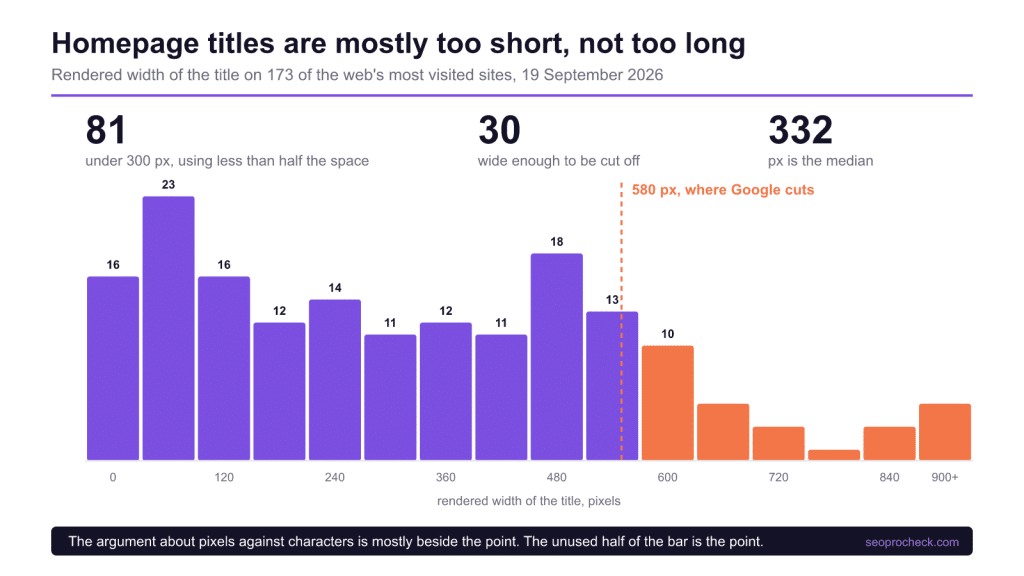
I measured the rendered width of the title on 173 of the most visited sites on the web, the way a search result actually truncates. The famous overflow problem is real but small, and the opposite problem is much larger.
- 30 of 173 (17.3%) are wide enough to be cut off. That is the problem everyone writes about.
- 81 of 173 (46.8%) come in under 300 px, using less than half the width a result gets.
- Median width is 332 px and median length is 35 characters, so the typical title uses a bit over half the space.
- The 60 character rule of thumb agreed with the pixel measurement on 169 of 173 titles (97.7%). The pixels against characters argument barely matters at these lengths.
- Big caveat, stated up front: these are homepages, where a short brand-only title is often the right answer. The finding is about the shape of the distribution, not a scolding.
The measurement
Same 184 host sample as the other work this month. I fetched each homepage, pulled the <title>, decoded the entities, collapsed the whitespace, and measured the string at 20 px Arial, which is close enough to what a desktop result renders at to be useful. 173 of the 184 gave me a usable title.
The truncation point used here is 580 px. Google has never published a number and it moves with the layout, so treat it as a line in roughly the right place rather than a specification. Everything below is reported against that line and you can move it yourself without changing the shape of the result.
What the distribution says
| Band | Sites | Share | What it means |
|---|---|---|---|
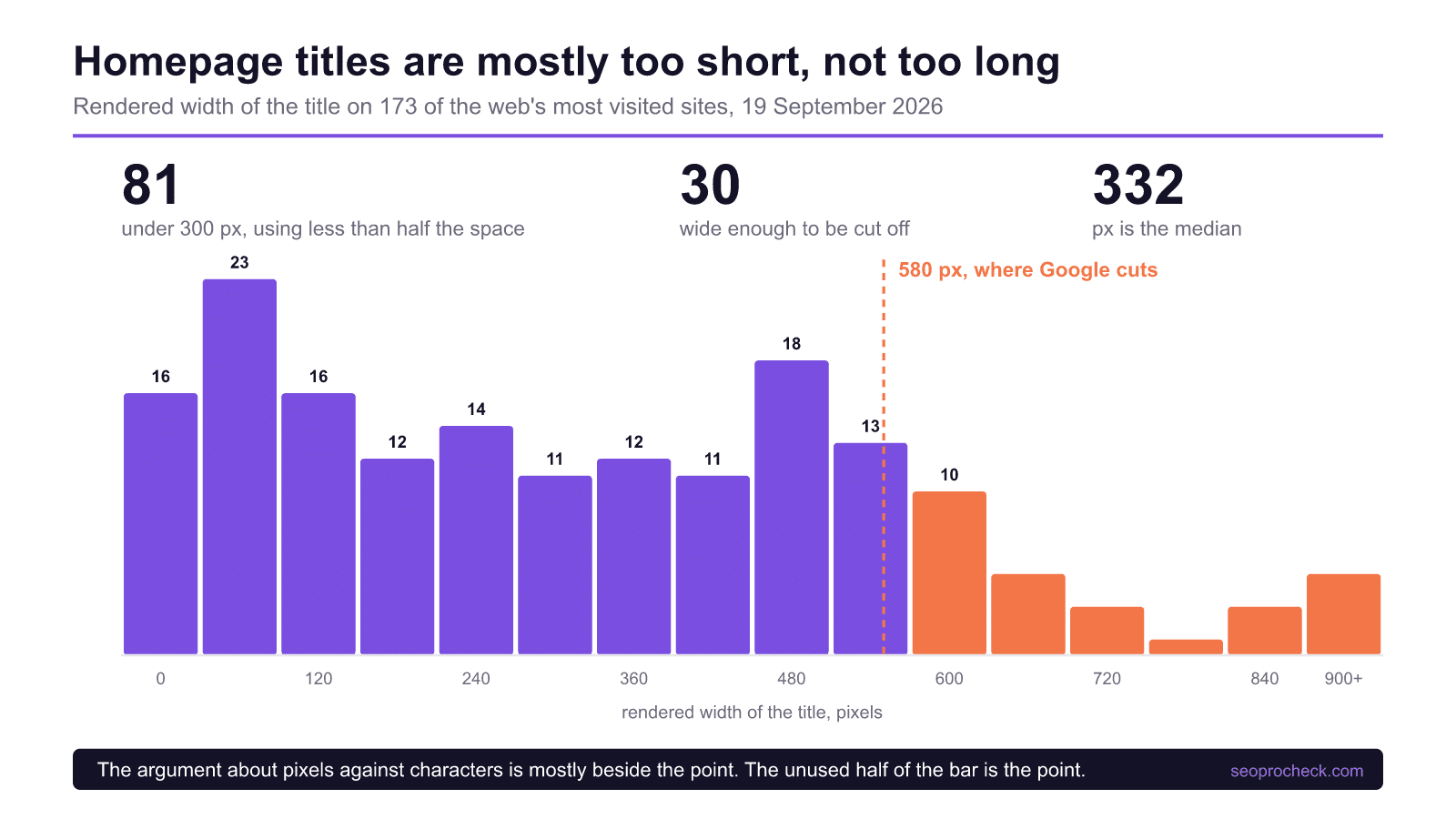
| Under 300 px | 81 of 173 | 46.8% | Less than half the available width is used |
| 300 to 580 px | 62 of 173 | 35.8% | Uses the space and survives intact |
| Over 580 px | 30 of 173 | 17.3% | Gets cut off, and the tail end is wasted |
Nearly half the sample sits in the first row. The advice industry has spent a decade warning about the third row, which contains 17.3% of these sites, while the row with 46.8% of them goes unmentioned. A result gets a fixed amount of width whether you use it or not, and a title that stops at 200 px has handed the rest back.
The pixels against characters argument, settled for this sample
The standard correction to the 60 character rule is that Google truncates on width, not on count, so a title full of wide letters breaks the rule early and one full of narrow letters survives past it. That is true in principle. In this sample it almost never mattered.
Sorting by character count and sorting by pixel width put 169 of the 173 titles on the same side of the line, 97.7% agreement. Only 1 title came in at 60 characters or fewer and still overflowed, and only 3 ran past 60 characters and still fitted.
| Case | Count | Which sites |
|---|---|---|
| 60 characters or fewer, still truncates | 1 | gamepass.com |
| More than 60 characters, fits anyway | 3 | github.com, digicert.com, f5.com |
So the rule of thumb is a decent proxy and the correction to it is technically right and practically small. If you are measuring pixels, good, keep doing it. If you are counting characters and someone tells you that is amateurish, they are describing a difference that moved four titles out of 173.
The honest limit of this
These are homepages, which is the worst page type to draw title advice from. A homepage title of a single brand word is frequently correct: people searching the brand want to see the brand, and stuffing a description behind it helps nobody. Several of the shortest titles here belong to companies whose name is the entire query people type.
So read the left hand side of that chart as a description rather than a diagnosis. The place the unused width genuinely costs you is on templated pages, where a title is generated from a pattern and the pattern was written to be safe rather than useful. A category page titled with two words is leaving room that a qualifier, a count or a location would have filled.
The check worth running is on your own templates rather than your homepage. Pull the titles for one template across a few hundred URLs, measure them, and look at the distribution rather than the average. Patterns produce clusters, and a cluster sitting at 220 px is a template with room in it.
What to do with the width you have
Fill it with something a person would use to choose. On a product page that is the qualifier that separates you from the other nine results. On a location page it is the location. On a guide it is the year or the scope. The words that earn the space are the ones that answer the next question the searcher has, not the ones that repeat the keyword.
Two things worth avoiding. Do not pad to hit a width, because a title that reads as filler is worse than a short one. And do not put the brand first on anything other than the homepage, since the left hand side is the part that always survives truncation and it is the most valuable real estate you control.
If you want to get a feel for the constraint rather than read about it, the title tag round in Let's Chill gives you a brief and a live width meter and makes you ship something under the line. It uses the same 580 px figure as this measurement.
For the related question of what a crawler does with the page once it arrives, the crawler access study covers whether it can reach it at all, and the sitemap change log method covers how to watch a competitor rewrite theirs.
Questions people ask about this
Is the truncation point really 580 pixels?
It is approximately that on a desktop result and Google has never published a figure. The layout changes, the font changes, and mobile behaves differently. Use it as a line in roughly the right place, and if you prefer a more cautious number then move it down and re-read the same distribution.
Should I stop counting characters?
You do not have to. On this sample, character count and pixel width put 169 of 173 titles on the same side of the cutoff. Measuring pixels is more correct and costs nothing if your tool does it, but the practical difference is small at ordinary title lengths.
Is a short homepage title a mistake?
Usually not. If your brand name is what people type, a brand-only homepage title is the right answer and adding description behind it helps nobody. The unused width matters much more on templated pages than on the homepage.
Does Google rewrite my title anyway?
Often, yes, and that is a reason to write a good one rather than a reason to stop. Rewrites tend to draw on the heading and on-page text, so a title that matches what the page actually covers is likelier to survive as written.
What about mobile?
Mobile results allow a different width and wrap rather than cut in some layouts, so a title that truncates on desktop may show in full on a phone and the reverse also happens. Measure whichever surface matters most to your traffic and do not assume the two agree.
How do I measure width without building something?
Any tool that reports pixel width will do, and if you have none, render the string in a canvas at 20 px Arial and read the measured width. That is exactly the method used here, and it is a few lines of code rather than a project.
Method: homepage fetched once per host on 19 September 2026 from a single residential connection in the United States. Title extracted from the first <title> element, entities decoded, whitespace collapsed, then measured at 20 px Arial. 173 of 184 hosts returned a usable title. Truncation line set at 580 px.
Take this with you
The assistant links open with a question about this page already written. Nothing is sent until you press enter.
Claude Vincent is a technical SEO consultant focused on crawlability, rendering, and AI-search visibility. He writes the field guides and case studies at SEO ProCheck, with a bias toward the durable, unglamorous work that decides whether search engines and AI answer engines can actually read and cite a site.
About SEO ProCheck
Technical SEO consulting and GEO strategy with 20 years of enterprise experience. Case studies, resources, and tools for search and AI visibility.
Work With Me
Technical SEO audits, GEO strategy, site migrations, and international SEO. Hourly consulting for teams who need hands-on support, not just reports.
Subscribe to our newsletter!







Recent Posts
- Most Top Sites Never Say Who They Are in Structured Data October 14, 2026
- Homepage Titles Are Mostly Too Short, Not Too Long October 8, 2026
- Who Actually Serves an llms.txt? 184 Top Sites Measured September 29, 2026