

The Magically Moving Meta Robots Tag And The Potential SEO Danger It Brings
- September 19, 2018
- Metadata
AI Summary
A robots meta tag only works when it sits inside the document <head>. When invalid HTML or a script pushes that tag into the <body>, Google stops honoring it, so a noindex you thought was live is quietly ignored and the page you meant to hide stays in the index. This case study documents exactly that failure mode and why it hides in plain sight.
- Google reads robots meta directives only in the head, never in the body.
- An element that is not allowed in the head forces the browser to close the head early, relocating any tag below it.
- The rendered DOM can differ from the raw source, so JavaScript can move or inject the tag after load.
- Confirm placement with Search Console URL Inspection and view-source before trusting a directive.
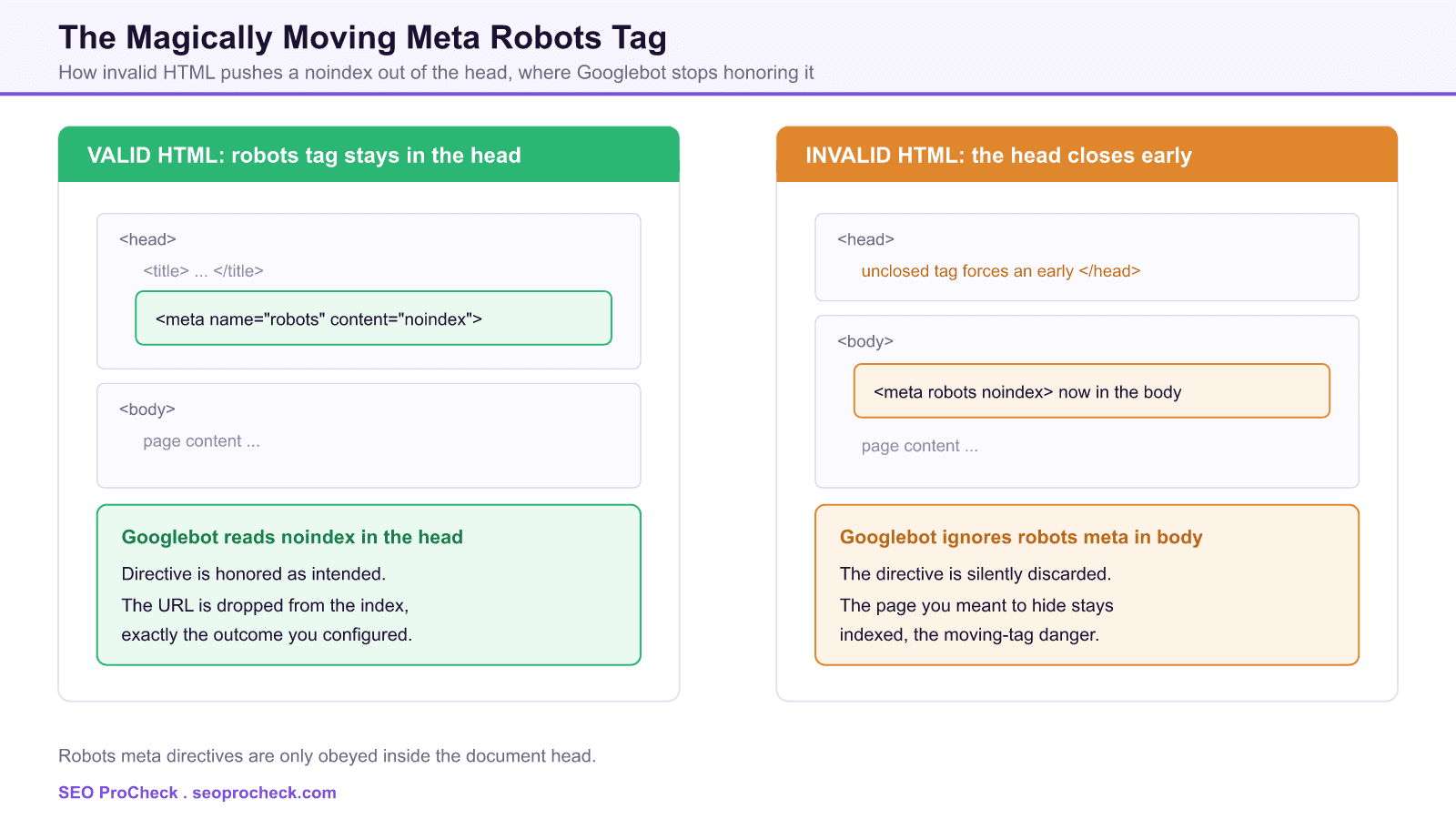
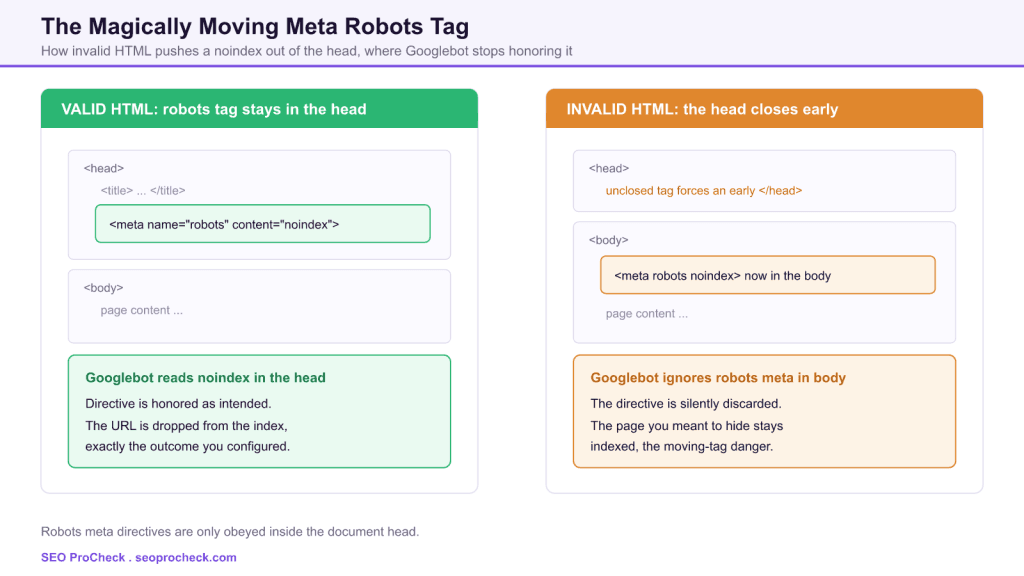
This case study documents one of the most deceptive failure modes in technical SEO: a robots meta tag that appears to be correctly configured yet is completely ignored by Google. The directive has not changed, the plugin still writes it, and view-source shows the expected noindex. The tag has simply moved out of the place where crawlers read it, and nothing in a casual audit flags the problem.
Why a robots meta tag has to live in the head
Google's own documentation is explicit: a robots meta tag is only recognized inside the <head> section of a page. A directive placed in the <body> is discarded. That rule is not a quirk, it is how the HTML specification treats metadata: the head is the container for document-level instructions, and the body is content. Search engines follow the parsed document, so the moment a robots meta tag ends up in the body, the instruction it carries stops counting.
The danger is that both a working tag and a broken one look identical in a code snippet. <meta name="robots" content="noindex"> is the same string whether it sits in the head or the body. Only its position in the parsed document decides whether it is obeyed, and position is exactly what a routine check tends to skip.
How the head closes early and the tag moves
Browsers build the head from the top down and switch to the body the first time they meet content that is not permitted in the head. If a stray element, an unclosed tag, or injected markup appears before the robots meta tag, the parser inserts an implicit </head> at that point and starts the body. Every tag after the break, including the robots meta tag, is now body content. The source order never changed, but the parsed structure did, and the parsed structure is what Googlebot uses.
This is why the tag seems to move by magic. Nobody edited the meta tag. Something earlier in the head, often added by a theme, a plugin, a tag manager, or a CDN that rewrites HTML, broke the head boundary and dragged everything below it into the body.
HTML in the head that can trigger an early break
| What appears in the head | Why it breaks the head | Effect on a robots meta tag below it |
|---|---|---|
A body-only element such as <img>, <div>, or <p> | These are not valid in the head, so the parser opens the body immediately | The robots tag is now in the body and ignored |
An unclosed <title>, <script>, or comment | Following markup is swallowed or the head ends where the parser recovers | The tag can be consumed or displaced out of the head |
| Raw text or markup injected by a tag manager or CDN worker | Non-head content forces an implicit close of the head | Any later robots meta tag lands in the body |
| A framework or script that relocates the tag in the DOM | The rendered DOM differs from the raw HTML source | The tag can be moved out of the head after render |
How JavaScript makes the problem harder to see
Google renders JavaScript, so the crawler evaluates the rendered DOM, not only the raw HTML. That cuts both ways. A noindex that a script injects into the rendered head can be honored, which surprises teams who trust view-source alone. In the opposite direction, a script that reorders the head, or a hydration step that reattaches nodes, can shift a robots meta tag into the body of the rendered document. Because rendering happens on a separate pass, the state Google acts on may not match what you see when you first load the page. The only reliable view is the rendered HTML the crawler produced.
How to diagnose a moved or injected robots tag
Work from what the crawler actually sees, not from the template you wrote:
- Search Console URL Inspection. Run the live test, open View Crawled Page and the rendered HTML, and confirm the robots meta tag is a direct child of
<head>. The Coverage or Page Indexing report will also flag Excluded by noindex tag when a directive is active. - Compare raw and rendered. Check
view-source:for the source order and the rendered DOM for the final structure. A mismatch points at scripts or invalid markup. - Validate the HTML. Run the page through an HTML validator and look for anything illegal inside the head. A single misplaced element upstream is enough to move everything below it.
- Fetch the header too. An
X-Robots-TagHTTP response header carries the same directives and is easy to overlook. When the meta tag and the header disagree, the most restrictive value wins.
For the full set of directives and where each one belongs, see our complete meta robots and X-Robots-Tag reference. Because rendering timing is part of the story, the lessons in how long JavaScript content takes to index and in this server-side rendering crawl failure are close companions to this one.
How to prevent the moving-tag danger
Keep the head strictly valid and keep the robots meta tag high in it, before any third-party output. Audit what plugins, tag managers, and edge workers inject into the head, since those are the usual culprits for illegal content. After any template or CDN change, re-inspect a sample of URLs in the rendered HTML rather than assuming the source order held. Treat an ignored directive as a live defect: a noindex that is not honored means a page you intended to hide is fully indexable, and the reverse, an unexpected injected noindex, can quietly drop an important page from search.
This SEO case study documents a successful optimization initiative, providing actionable insights for practitioners. The documented approach demonstrates how strategic SEO implementation drives measurable results.
Initial Situation
Understanding the starting point is essential context for evaluating any case study. This documentation covers the initial challenges, competitive position, and business objectives that shaped the SEO strategy.
Strategy and Approach
The strategic approach combined multiple SEO disciplines to address identified opportunities. Key decisions around prioritization and resource allocation provide a template for similar initiatives.
Implementation
Moving from strategy to execution required specific technical implementations, content development, and process changes. This case study documents the practical steps that translated strategy into action.
Results and Learnings
The outcomes demonstrate effectiveness through measurable improvements in rankings, traffic, and business metrics. Analysis of successes and challenges provides learning value for practitioners.
Case studies like this contribute to the SEO knowledge base, helping practitioners learn from documented real-world experiences.
Source: https://www.gsqi.com/marketing-blog/magically-moving-meta-robots-tag-seo-danger/
FAQ
It must be inside the document head. Google reads robots meta directives only in the head, so a tag that ends up in the body is ignored even though the noindex text is still present.
Invalid HTML in the head is the usual cause. An element that is not allowed in the head, an unclosed tag, or markup injected before the meta tag forces the browser to close the head early, and every tag below that point becomes body content.
Yes, if the directive is present in the head of the rendered DOM, because Google renders JavaScript before deciding. It can also work the other way, where a script relocates the tag into the body and the directive is lost, so always check the rendered HTML.
Use Search Console URL Inspection to view the rendered HTML and check that the robots meta tag is a direct child of the head. Compare that against view-source, and run the page through an HTML validator to spot illegal content in the head.
No. An ignored noindex means the page you meant to hide is still indexable, so treat it as a bug to fix rather than a reprieve. Fix the head so the directive is honored, or the page can appear in search unexpectedly.
The header is delivered in the HTTP response, so it does not depend on head placement and cannot be pushed into the body. When the meta tag and the header both apply, Google follows the most restrictive value for each directive.
Claude Vincent is a technical SEO consultant focused on crawlability, rendering, and AI-search visibility. He writes the field guides and case studies at SEO ProCheck, with a bias toward the durable, unglamorous work that decides whether search engines and AI answer engines can actually read and cite a site.
About SEO ProCheck
Technical SEO consulting and GEO strategy with 20 years of enterprise experience. Case studies, resources, and tools for search and AI visibility.
Work With Me
Technical SEO audits, GEO strategy, site migrations, and international SEO. Hourly consulting for teams who need hands-on support, not just reports.
Subscribe to our newsletter!






