

AI Summary
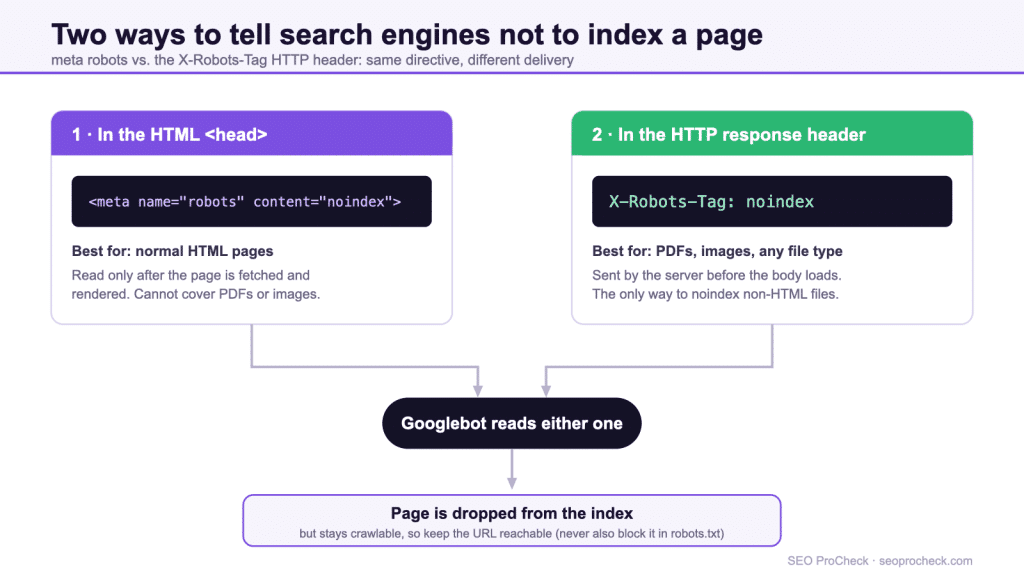
The robots meta tag and the X-Robots-Tag HTTP header carry the same indexing directives: noindex, nofollow, nosnippet and more. The meta tag lives in a page’s HTML <head>; the header rides in the HTTP response, so it is the only way to control non-HTML files such as PDFs and images.
noindexkeeps a URL out of search results, but the page must stay crawlable, never also block it in robots.txt.- Use the meta tag for HTML pages; use X-Robots-Tag for PDFs, images, and server-wide rules.
- Directives are read only after the crawler fetches the URL, so a robots.txt block hides them.
- When the meta tag and header conflict, Google obeys the most restrictive directive.

noindex directive: one in the HTML head, one in the HTTP response.The robots meta tag and the X-Robots-Tag HTTP header give the same instructions to search and AI crawlers, but they live in different places. The meta tag goes in the HTML <head> of a page; the X-Robots-Tag rides in the HTTP response, so it can control non-HTML files like PDFs and images. Both control what crawlers do after they fetch a page: whether to index it, follow its links, show a snippet, cap a preview size, or drop it on a date. This is different from robots.txt, which controls whether crawlers fetch the page at all. The two most consequential directives in 2026 are noindex (keep a page out of the index) and nosnippet / max-snippet (which now also gate whether your text feeds AI Overviews and AI Mode). One trap dominates all others: if robots.txt blocks a URL, the crawler never reads the noindex on it, so the page can still get indexed. Block in robots.txt or noindex in the page, not both.
Robots meta directives are the most precise indexing controls you have. A single line tells Google or Bing exactly how to treat one page or one file: index it or not, follow its links or not, how large a preview to show, and how that content may appear in AI answers. This reference covers every directive that the major engines support in 2026, the difference between the meta tag and the HTTP header, the ordering and conflict rules that decide which directive wins, and the mistakes that quietly cost rankings.
If you are looking for the file that controls crawling rather than indexing, see the companion complete robots.txt reference. The distinction between those two systems is the single most misunderstood thing in technical SEO, so we start there.
Meta robots vs X-Robots-Tag vs robots.txt
These three mechanisms are constantly confused because all three involve the word "robots." They do different jobs and operate at different stages of the crawl. The table below is the mental model worth memorizing.
| Mechanism | Where it lives | Controls | Works on non-HTML? | Crawler must fetch the page? |
|---|---|---|---|---|
| robots.txt | One file at the domain root | Whether the crawler fetches the URL at all | Yes (any path) | No, it reads the rule before fetching |
| Robots meta tag | HTML <head> (or body) of one page | Indexing, link following, snippets, previews | No, HTML only | Yes, it must read the HTML |
| X-Robots-Tag | HTTP response header for one resource | Same directives as the meta tag | Yes (PDF, image, video, any file) | Yes, it must read the response |
The load-bearing row is the last column. Both the meta tag and X-Robots-Tag are read only after the crawler fetches the resource. robots.txt is read before. That is why blocking a URL in robots.txt and also putting noindex in its meta tag is self-defeating: the crawler obeys robots.txt, never fetches the page, never sees the noindex, and the URL can still appear in results as a bare link discovered from external sources.
Every robots meta directive, explained
The robots meta tag is a single line in the head. The default behavior, if no tag is present, is identical to index, follow.
<meta name="robots" content="noindex, nofollow">| Directive | What it does |
|---|---|
index / follow / all | The defaults. Stating them has no effect; they exist mainly to be explicit or to override an inherited directive. |
noindex | Do not show this page in search results. The single most important directive. Removes the page from the index on next crawl. |
nofollow | Do not follow any links on this page for crawl discovery or link equity. |
none | Shorthand for noindex, nofollow. |
nosnippet | No text snippet or video preview in results. In 2026 this also stops the content from being used in Google AI Overviews and AI Mode. A static image thumbnail may still appear. |
max-snippet:[n] | Cap the text snippet at n characters. 0 behaves like nosnippet; -1 means no limit. The cap applies to AI features too unless a separate content licensing agreement exists. |
max-image-preview:[setting] | Largest image preview allowed: none, standard, or large. |
max-video-preview:[n] | Maximum seconds of video preview. 0 means a static image only; -1 means no limit. |
noimageindex | Do not index images hosted on this page. |
notranslate | Do not offer a translation of this page in results. |
indexifembedded | Allow indexing of content embedded via iframe even when the page also carries noindex. Only works alongside noindex. |
unavailable_after:[date] | Drop the page from results after the given date and time (RFC 822, RFC 850, or ISO 8601). Useful for time-limited offers and event pages. |
noarchive / nocache | Google has retired noarchive along with its cached-page feature, so it has no effect there. Bing still honors both noarchive and its synonym nocache to suppress a cached copy. |
Directive support matrix: Googlebot vs Bingbot
Not every directive is honored by every engine, and the differences are exactly where audits go wrong. "Not documented" below means the engine's official documentation does not list the directive; in practice it is ignored. When a directive is unsupported, the engine treats it as unknown text and falls back to defaults, so an unsupported directive never breaks the supported ones next to it in the same tag.
| Directive | Googlebot | Bingbot |
|---|---|---|
noindex | Supported | Supported |
nofollow | Supported | Supported |
none | Supported (equals noindex, nofollow) | Not documented; use noindex, nofollow explicitly |
nosnippet | Supported; also removes content from AI Overviews / AI Mode | Supported |
max-snippet:[n] | Supported | Supported (adopted the max-* family in 2020) |
max-image-preview | Supported | Supported |
max-video-preview | Supported | Supported |
noimageindex | Supported | Not documented |
notranslate | Supported | Not documented |
indexifembedded | Supported (Google-only directive, introduced 2022) | Not supported |
unavailable_after:[date] | Supported | Not documented |
noarchive / nocache | No effect; Google retired the cached-page feature | Supported (both spellings) |
nositelinkssearchbox | No effect; Google retired the sitelinks search box on November 21, 2024 and archived this rule | Not applicable |
The nosnippet, max-snippet, and data-nosnippet controls
Snippet controls used to be cosmetic. They now decide whether your words feed AI answers. Google has confirmed that nosnippet and max-snippet govern not only the classic blue-link snippet but also whether content can appear in AI Overviews and AI Mode. If you set nosnippet, you remove the page from those AI surfaces entirely, which is a real trade-off: less exposure in AI answers, but also no chance of being summarized without a click. This is the lever to think hardest about in 2026.
There is a finer instrument than the page-wide tag. The data-nosnippet HTML attribute excludes a specific block of text from snippets while leaving the rest of the page eligible. Apply it to a span, div, or section:
<p>This sentence can appear in a snippet.
<span data-nosnippet>This phrase will never appear in a snippet.</span>
</p>
Two caveats. The element must be valid HTML with a proper closing tag, and the attribute should be present when the element is first created in the DOM. Adding data-nosnippet with JavaScript after render is unreliable.
X-Robots-Tag for non-HTML files
The meta tag only works in HTML, because there is no <head> in a PDF, a JPEG, or a video file. To keep those out of the index you set the same directives in the HTTP response with the X-Robots-Tag header. Every robots meta value works identically here.
The simplest case, a single directive on one response:
X-Robots-Tag: noindexTo keep every PDF on a site out of search, set the header on all PDF responses. On Apache, target the file type in your configuration or .htaccess:
<Files ~ ".pdf$">
  Header set X-Robots-Tag "noindex, nofollow"
</Files>
On Nginx, add the header inside a location block matched to the extension:
location ~* .pdf$ {
  add_header X-Robots-Tag "noindex, nofollow";
}
You can also target a specific crawler by prefixing its name, and you can stack multiple headers in one response:
X-Robots-Tag: googlebot: noindex, nofollow
X-Robots-Tag: otherbot: noindex
X-Robots-Tag: unavailable_after: 25 Dec 2026 15:00:00 PST
One detail that saves hours of debugging: header names, crawler names, and directive values are all case-insensitive, but the header must actually appear on the response. Use a header-inspection tool or your browser network panel to confirm the directive is being sent before you assume it is working.
Targeting specific crawlers
Replace robots with a named user agent to scope a rule to that crawler. A generic robots tag applies to all of them; a named tag overrides the generic one for that crawler. Use separate tags for separate crawlers:
<meta name="robots" content="index, follow">
<meta name="googlebot" content="max-snippet:50">
<meta name="googlebot-news" content="noindex">
For the full catalog of which bots read which signals, including the AI crawlers, see the AI crawler map.
AI-specific directives: noai, noimageai, and Google-Extended
A separate family of directives addresses AI training rather than search indexing. noai asks AI crawlers not to use a page's content for model training; noimageai does the same for images. They are placed in the same robots meta tag or X-Robots-Tag header:
<meta name="robots" content="noai, noimageai">Be clear-eyed about their status. noai and noimageai originated as a community proposal, not a formal standard from any search engine. There is no specification and no enforcement; compliance is voluntary. Well-behaved crawlers from major AI companies increasingly respect them, but a scraper that ignores them faces no consequence. Treat them as a polite request, not a wall.
One common mix-up to settle: Google-Extended is not a meta directive. It is a robots.txt user-agent token that controls whether your content trains Gemini and related Google AI products. You cannot set Google-Extended in a meta tag; it belongs in robots.txt. This is exactly the kind of cross-system confusion the comparison table above is meant to prevent.
Ordering and conflict rules
When directives disagree, the rule is simple: the most restrictive directive wins. A few worked examples:
max-snippet:50together withnosnippetresolves tonosnippet, because no snippet is more restrictive than a capped one.- A generic
robotstag and a namedgooglebottag both present: Googlebot obeys its named tag for any directive it specifies, and falls back to the generic tag for directives the named tag omits. - A meta tag and an X-Robots-Tag header on the same HTML page: the engine combines them, again taking the most restrictive value for each directive.
The exception worth remembering is indexifembedded, which is not a conflict but a deliberate pairing: it only does anything when noindex is also present, relaxing it for embedded content.
How to verify what the crawler actually sees
Most robots-directive incidents are not exotic; they are directives that were never actually served, or were served to crawlers but not to the browser you tested with. Verify at three layers before declaring a directive live.
1. Check the HTTP header from the command line. Browser dev tools work, but curl is faster and shows exactly what a bot receives, with no extension or cache interference:
curl -sI https://example.com/whitepaper.pdf | grep -i x-robots-tagIf nothing comes back, the header is not being sent, whatever your server config claims. Re-test with a Googlebot user-agent string (curl -sI -A "Googlebot") as well: CDNs and security layers sometimes serve different headers to bots.
2. Check the rendered HTML, not just view-source. Google reads the robots meta tag from the rendered DOM. An SEO plugin, a tag manager, or a framework hydration step can inject or remove a meta robots tag after initial HTML load. In Google Search Console, run the URL through URL Inspection, then open View crawled page → HTML and search the source for name="robots". The Indexing allowed? row in the same report states plainly whether Google detected a blocking directive on its last crawl.
3. Find every affected page in bulk. The report path in Search Console is Indexing → Pages → "Excluded by 'noindex' tag". Read that list on every audit; it is where accidental site-section noindexes surface. If a page you care about appears there, you have found the incident. For a crawler-side sweep, Screaming Frog reports both the meta tag and the X-Robots-Tag header in the Directives tab, which catches the header-based noindexes that HTML-only greps miss.
Common mistakes
- Blocking and noindexing the same URL. robots.txt stops the fetch, so the
noindexis never read. Pick one. To remove an indexed page, allow crawling and servenoindexuntil it drops out, then block if you wish. - Site-wide noindex left over from staging. A
noindexapplied during development and never removed at launch is a classic traffic-zeroing bug. Audit the live header and meta tag on day one. - Expecting noindex to free crawl budget. A noindexed page is still crawled to read the directive. It saves index space, not crawl budget.
- Using noindex where a 410 is correct. For permanently removed content, a status code is cleaner than a noindexed placeholder. See 404 vs 410 status codes for when to use each.
- Assuming noarchive still works on Google. It does not; the cached-page feature is gone. The directive is only meaningful on Bing now.
- Setting nosnippet without intending to leave AI surfaces. Because
nosnippetnow also removes content from AI Overviews and AI Mode, applying it broadly can cut AI visibility you wanted to keep.
FAQ
No. The engine must re-crawl the page to see the directive, then process the removal. It usually takes days to a few weeks. To force a faster review, request indexing of the URL so the crawler returns sooner.
Use the meta tag for HTML pages because it is easy to set per page. Use X-Robots-Tag for anything that is not HTML, such as PDFs, images, and videos, or when you want to apply a rule across many files at the server level.
Only for crawlers that choose to honor them. They are a voluntary convention, not an enforced standard. Reputable AI companies increasingly respect them, but they offer no technical protection against scrapers that ignore them.
No. Google-Extended is a robots.txt user-agent token that governs AI training for Google products. It cannot be placed in a meta tag or X-Robots-Tag header.
The engine combines them and applies the most restrictive value for each directive. There is no concept of one overriding the other wholesale.
Yes. Google has stated that a page kept in noindex for a long time is eventually treated as noindex, nofollow, because pages dropped from the index are crawled less and their links stop being processed. If you rely on a noindexed hub page purely to pass internal links, that arrangement decays; link to the targets from indexable pages instead.
Per page, use your SEO plugin: in Yoast it is the Advanced section of the post sidebar ("Allow search engines to show this content?"), in Rank Math the Advanced tab's robots meta checkboxes. Site-wide, Settings → Reading → "Discourage search engines from indexing this site" outputs a global noindex, which is also the setting to check first when a WordPress site vanishes from Google after a relaunch.
Not sure your indexing directives are doing what you think?
A single stray noindex or a robots.txt block over a noindexed page can quietly remove pages from search. An audit catches it.
Take this with you
The assistant links open with a question about this page already written. Nothing is sent until you press enter.
Claude Vincent is a technical SEO consultant focused on crawlability, rendering, and AI-search visibility. He writes the field guides and case studies at SEO ProCheck, with a bias toward the durable, unglamorous work that decides whether search engines and AI answer engines can actually read and cite a site.
About SEO ProCheck
Technical SEO consulting and GEO strategy with 20 years of enterprise experience. Case studies, resources, and tools for search and AI visibility.
Work With Me
Technical SEO audits, GEO strategy, site migrations, and international SEO. Hourly consulting for teams who need hands-on support, not just reports.
Subscribe to our newsletter!








Recent Posts
- Most Top Sites Never Say Who They Are in Structured Data October 14, 2026
- Homepage Titles Are Mostly Too Short, Not Too Long October 8, 2026
- Who Actually Serves an llms.txt? 184 Top Sites Measured September 29, 2026