

Fixing Soft 404 Errors: Identification and Solutions
- January 20, 2025
- Crawlability and Indexation, Technical SEO
AI Summary
A soft 404 is a URL that returns HTTP 200 while its content reads as missing or empty, so Google declines to index it. Fixing it is a triage exercise: export the flagged URLs, classify each one by cause, then apply the fix that matches that cause.
- Five causes, five different fixes: a real 404 or 410, a relevant 301, enrichment of a thin but valid page, a rendering repair, or a reworded false positive.
- Redirecting a dead URL to the homepage is itself treated as a soft 404.
- Check clicks, impressions, and referring domains before serving a hard 404 on any flagged URL.
- Re-validate through the Pages report. Validation runs in batches and takes weeks.

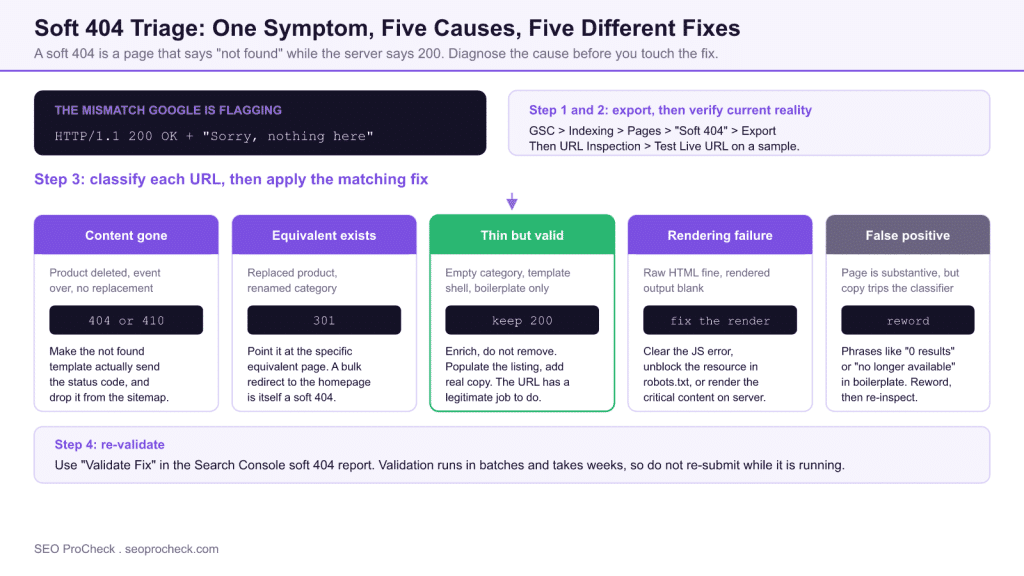
Fixing soft 404s is a triage exercise: export the flagged URLs from Search Console's Pages report, classify each by cause (page genuinely gone, page empty or thin, redirect to an irrelevant destination, or rendering failure), apply the matching fix (a real 404/410, a relevant 301, restored content, or a rendering repair), then re-validate in GSC. This page is the working checklist; for the full background on what soft 404s are and why Google flags them, see our reference guide on soft 404 errors.
Understanding Status Codes
Status Codes represents a critical component of modern SEO strategy. As search engines continue to evolve and user expectations shift, understanding the nuances of status codes becomes essential for maintaining and improving organic visibility. This guide covers the key concepts, implementation approaches, and strategic considerations that SEO practitioners need to master.
A soft 404 is a mismatch between what the server says and what the page shows: the HTTP response is 200 OK, but Google's evaluation of the content concludes "this is effectively a not-found or empty page." Because the diagnosis is content-based, fixing it is never a single server tweak: each flagged URL has to be triaged individually. The workflow below is how to get through hundreds of them systematically.
Step 1: Export the Flagged URLs
In Search Console, open Indexing → Pages, find "Soft 404" in the "Why pages aren't indexed" table, click into it, and use Export (top right). The UI export caps at 1,000 rows; if you're over that, slice by subfolder using a URL filter, or pull the sample and treat it as representative: soft 404s almost always cluster by template, so the pattern matters more than the complete list. Also grab the "Last crawled" date per URL: anything crawled months ago may already be fixed or may have decayed further.
Step 2: Verify the Current Reality
GSC's list reflects the state at last crawl, not today. Batch-check the live status before diagnosing anything:
- Single URL:
curl -sI https://example.com/page/ | head -5: confirm the actual response code and anyLocation:header. - Batch: Screaming Frog in List mode (Mode → List → paste the export) gives status code, redirect target, word count, and title for every URL in one pass. Sort by word count ascending: the near-zero rows are usually your thin/empty cluster.
- Google's view: for a sample of each cluster, run GSC URL Inspection → Test live URL and open the rendered HTML screenshot. If the raw HTML has content but the rendered page is blank, you have a JavaScript rendering failure, not a content problem.
Step 3: Classify and Fix
Every soft 404 falls into one of five buckets. The fix follows from the bucket, not from the URL:
| Cause | How to recognize it | Correct fix |
|---|---|---|
| Content genuinely gone, no replacement | Product deleted, event over, page intentionally removed; "not found"-style page served with 200 | Return a real 404 (or 410 if permanent), configure the CMS/server so the not-found template actually sends the status code, and remove the URL from the XML sitemap |
| Content gone, close equivalent exists | Replaced product, renamed category, merged article | 301 to the specific equivalent page: not to the homepage or a broad category, which Google treats as a soft 404 itself |
| Page valid but thin/empty | Category with zero items, template shell, boilerplate-only page, near-zero word count | Keep the 200 and make the page substantive: real content, populated listings, useful copy: enrichment, not removal, when the URL has a legitimate job |
| Rendering failure | Raw HTML fine, rendered result blank in the live test; JS error or blocked resource | Fix the script error, unblock the resource in robots.txt, or server-side render the critical content |
| False positive | Page is genuinely substantive; wording like "0 results" or "no longer available" appears in boilerplate | Reword the trigger phrase, strengthen unique content, then request re-inspection: Google's classifier keys on not-found-style signals in the copy |
Work the buckets in cluster order, biggest first. On most sites one template (faceted categories, expired listings, empty tag archives) accounts for the large majority of the report, and one template-level fix clears the whole cluster.
Step 4: Re-validate and Confirm
After deploying fixes, go back to the Soft 404 row in the Pages report and click "Validate fix". Google re-crawls the affected URLs over the following days to weeks and emails you a pass/fail. Two practical notes: validation fails entirely if any sampled URL still shows the problem, so don't start it until the whole cluster is deployed; and for high-priority URLs you can shortcut the wait with URL Inspection → Request indexing on a handful to confirm the new classification before betting the batch.
Choosing Between 404, 410, 301 and noindex
The four responses are not interchangeable, and picking the wrong one is how a cleared report quietly refills. What each one actually signals:
| Response | What it tells Google | Use it when | Do not use it when |
|---|---|---|---|
404 | Not found, status uncertain, may return | The content is gone and no equivalent exists | The URL still has links or residual impressions worth preserving |
410 | Gone deliberately and permanently | You are certain the URL will never come back | There is any chance the content returns at that address |
301 | Moved permanently to this specific replacement | A close equivalent exists for that exact intent | The only candidate destination is the homepage or a broad category |
noindex on a 200 | A real page, but keep it out of results | The page must stay live for users but has no search job | You are using it to hide a page that should simply be fixed or removed |
Soft 404s rarely arrive alone. The same empty templates and abandoned URL patterns usually show up as index bloat, and clearing both in one pass is more efficient than two. If Google is fetching these URLs but never committing them to the index, the neighbouring discovered, currently not indexed state explains what the crawler is weighing. On large sites the wasted fetches matter in their own right: see crawl budget for when that becomes a real constraint rather than a theoretical one.
Key Considerations for Fixing Soft 404 Errors
When approaching status codes, several factors require careful attention. Technical implementation must align with broader SEO objectives while maintaining site performance and user experience. The balance between optimization and over-optimization requires ongoing monitoring and adjustment based on performance data and algorithm changes. Industry benchmarks and competitor analysis provide context for evaluating your own implementation.
Before choosing "return a real 404" for any URL, check what you'd be giving up: pull the URL's clicks and impressions from GSC Performance and its referring domains from your link index. A flagged URL with real links or residual impressions deserves a 301 to a relevant destination or restored content, not a hard 404. Soft-404 triage is one of the few places where deliberately serving an error is correct, but only for URLs with nothing worth preserving.
Implementation Best Practices
Successful implementation begins with thorough auditing of current state and clear goal definition. Document baseline metrics before making changes to enable accurate impact measurement. Prioritize changes based on potential impact and implementation effort, focusing on high-impact items first. Test changes in staging environments when possible, and monitor closely after deployment to production. Maintain documentation of changes for future reference and troubleshooting.
Keep the triage sheet as the audit artifact: one row per URL with columns for live status, bucket, fix applied, deploy date, and validation outcome. When the next Pages-report cycle runs, filter for repeat offenders: a URL that returns to the Soft 404 report after a "fix" means the bucket was misdiagnosed, and those are the rows worth a manual second look.
Common Mistakes to Avoid
Several patterns consistently cause problems in status codes implementations. Rushing implementation without proper planning leads to errors that can be costly to fix. Ignoring the interplay between different SEO factors creates conflicts that undermine results. Failing to monitor and iterate based on performance data means missing optimization opportunities. Over-optimization signals can trigger algorithmic penalties that take months to recover from.
The classic soft-404 blunders: redirecting everything to the homepage (Google explicitly treats irrelevant mass redirects as soft 404s, so the report never clears); "fixing" a custom 404 page's appearance while it still returns 200; noindexing thin-but-valid pages instead of populating them, which throws away the URL; and starting Validate fix before the deploy is complete, burning a validation cycle on a guaranteed failure.
Measuring Success
Effective measurement requires defining appropriate KPIs aligned with business objectives. Track both leading indicators (rankings, impressions, technical metrics) and lagging indicators (traffic, conversions, revenue) to build a complete picture. Establish reasonable timeframes for evaluation, as SEO changes often take weeks or months to fully manifest in results. Compare performance against historical baselines and competitor benchmarks to contextualize results.
For this workflow the scoreboard is simple: the Soft 404 count in the Pages report trending toward zero and staying there across two crawl cycles, passed validation states on each cluster, and, for the enriched-rather-than-removed URLs, their reappearance under "Indexed" with impressions returning in the Performance report.
Strategic Recommendations
Approach status codes as an ongoing program rather than a one-time project. Build processes for regular auditing, monitoring, and optimization. Stay current with industry developments and algorithm changes that may affect your strategy. Invest in education for team members to build internal capabilities. Consider how status codes fits within your broader digital marketing and business strategy for maximum impact.
Frequently Asked Questions
How do I find soft 404 errors on my site?
Search Console is the authoritative source: Indexing → Pages → "Soft 404" under the not-indexed reasons, with a per-URL export. Supplement it with a crawler pass sorted by word count to catch thin pages Google hasn't flagged yet, and spot-check with URL Inspection's live test to see exactly how Google renders a suspect page.
Should a soft 404 be fixed with a 404 or a 301 redirect?
Depends on whether an equivalent page exists. Content gone with a close substitute: 301 to that specific page. Content gone with no substitute: serve a genuine 404 or 410. Never mass-redirect to the homepage or a generic category: Google classifies irrelevant redirects as soft 404s too, and the report won't clear.
Why does Google report a soft 404 on a page that exists?
Because the classifier reads content signals, not your intent. Common triggers: near-empty templates (a category with zero products), boilerplate phrases like "no results found" or "no longer available" in a 200 page, or JavaScript failures that leave the rendered page blank. Check the rendered HTML in URL Inspection's live test, that's the version Google judged.
How long does it take for soft 404 errors to clear in Search Console?
After you click Validate fix, Google re-crawls the affected URLs over days to a few weeks depending on crawl frequency, and the report updates as validation progresses. Individual URLs can be accelerated with Request indexing in URL Inspection, but the report itself always lags the actual fix.
Do soft 404 errors hurt SEO?
The flagged pages are dropped from the index, so they earn nothing while flagged, that's direct damage when the page is a real, valuable URL misclassified as empty. At scale they also waste crawl budget and add to the pool of low-value URLs Google evaluates your site by, which is why large soft-404 clusters are worth clearing promptly. Details in the soft 404 reference guide.
Can I just noindex pages flagged as soft 404?
You can, but it's usually the wrong tool: noindex concedes the URL without fixing anything. If the page has a legitimate reason to exist, populate it with real content and let it be indexed; if it doesn't, serve a proper 404/410 or redirect to the true equivalent. Noindex is only sensible for pages you actively want crawlable-but-unindexed, like some faceted navigation states.
Take this with you
The assistant links open with a question about this page already written. Nothing is sent until you press enter.
Claude Vincent is a technical SEO consultant focused on crawlability, rendering, and AI-search visibility. He writes the field guides and case studies at SEO ProCheck, with a bias toward the durable, unglamorous work that decides whether search engines and AI answer engines can actually read and cite a site.
About SEO ProCheck
Technical SEO consulting and GEO strategy with 20 years of enterprise experience. Case studies, resources, and tools for search and AI visibility.
Work With Me
Technical SEO audits, GEO strategy, site migrations, and international SEO. Hourly consulting for teams who need hands-on support, not just reports.
Subscribe to our newsletter!







Recent Posts
- Finding a Competitor's Sitemap, and Turning It Into a Change Log September 15, 2026
- AI Crawler User Agents: The Current Names, and Which Ones Sites Actually Block September 9, 2026
- Can AI Crawlers Actually Read Your Site? I Measured 400 of the Biggest September 5, 2026