

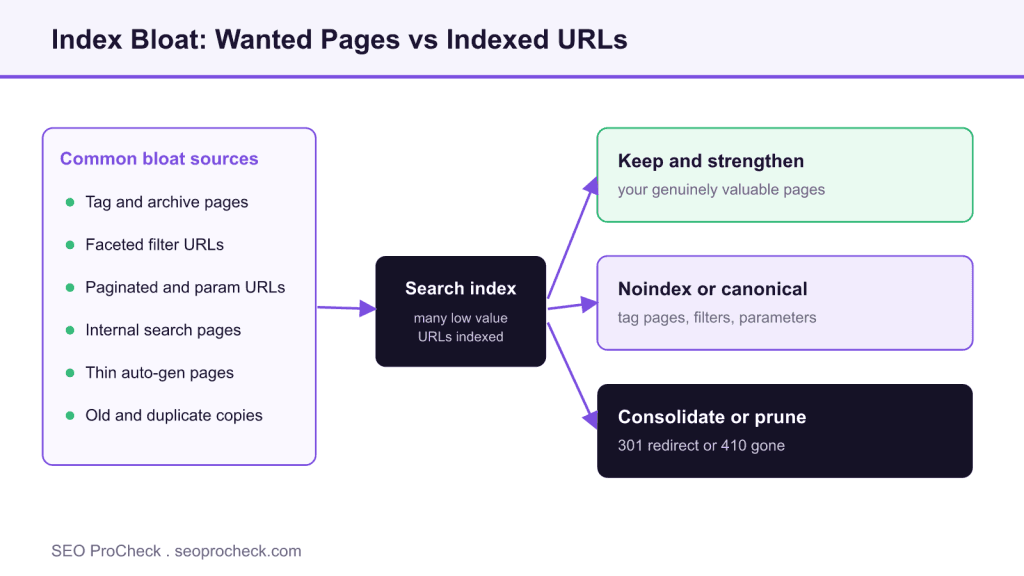
AI Summary
Index bloat is when search engines have indexed far more URLs from your site than you have genuinely valuable pages, and those extras are usually thin, duplicate, or auto generated. The fix is to find them, decide which deserve to stay, and noindex, consolidate, or remove the rest so your strongest pages carry the site quality signal.
- Bloat is a ratio problem, not a size problem: a large site full of useful pages is healthy.
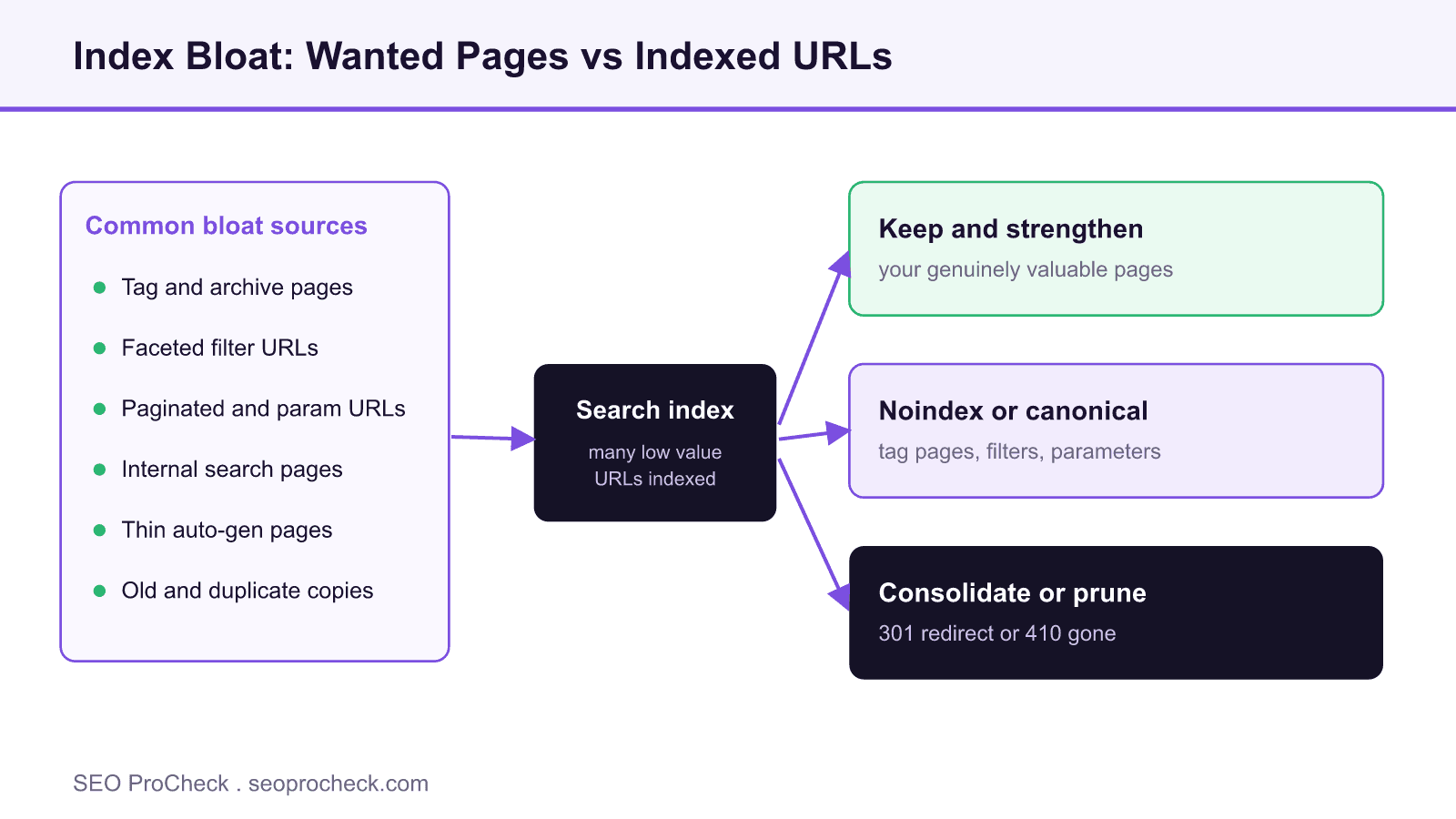
- The usual sources are tag and archive pages, faceted filters, parameter URLs, internal search results, and thin auto generated pages.
- Diagnose by comparing your real page count, the indexed count in Search Console, and a site: query.
- Fix per template with noindex, canonical, robots.txt, or a 301 or 410, never one blanket rule.
What index bloat actually is
Index bloat is the gap between the number of pages you want in the search index and the number actually indexed. A site with a few hundred worthwhile articles might have thousands of URLs sitting in Google's index: tag pages, filtered product views, paginated lists, search result pages, and old drafts nobody links to. Each is a real, crawlable, indexable URL, but very few earn clicks or answer a query well.
The problem is not size by itself. Large sites can be healthy. The problem is ratio. When most of what is indexed is low value, search engines spend their attention on pages that do nothing for you, and your good pages compete against your own filler.
Why it hurts your rankings
Modern ranking leans heavily on site-level quality assessment. Search engines weigh the body of work a domain publishes, not just the single page in front of them. A library full of thin URLs sends a weaker overall signal than a tighter library of strong pages. Index bloat creates four concrete drags:
- Diluted quality signals. A high proportion of low-value URLs lowers the average quality search engines associate with the domain.
- Wasted crawl budget. Crawlers spend time re-fetching worthless URLs instead of discovering and refreshing the pages you care about.
- Internal competition. Multiple near-identical URLs split relevance and links, so none of them ranks as well as one consolidated page would.
- Slower recovery. For a site that has already lost visibility, bloat is often part of the reason, and clearing it is a core step back toward trust.
Common sources of bloat
Most bloat comes from a handful of predictable places. CMS and ecommerce platforms generate many of these automatically, which is why the count creeps up unnoticed.
- Tag and archive pages. WordPress and similar systems spin up a separate URL for every tag, category, author, and date archive, most carrying little unique content.
- Faceted navigation. Filters for color, size, price, and sort order multiply into thousands of near-duplicate parameter combinations.
- Paginated and parameter URLs. Page 2, page 3, session IDs, and tracking parameters all become separate indexable addresses.
- Thin auto-generated pages. Location templates, empty profile pages, and programmatic pages with little to say.
- Internal search result pages. When a site's own search output gets indexed, it produces an endless, low-quality URL space.
- Old or duplicate content. Retired posts, staging copies, printer-friendly versions, and HTTP or www duplicates.
How to diagnose it
You do not need expensive tooling to spot the pattern. Start by comparing three numbers.
- Your real page count. Roughly how many pages do you actually want people to find? Use your sitemap and CMS counts as a baseline.
- The indexed count in Search Console. Open the Pages report under Indexing. Compare "indexed" against "not indexed" and read the reason breakdown. Large "crawled but not indexed" and "duplicate" buckets point to bloat.
- A
site:query. Searchingsite:yourdomain.comgives a rough ceiling on what Google knows about. If it dwarfs your real page count, dig in.
Then run a crawler such as Screaming Frog or Sitebulb to list every reachable URL, group them by template, and flag the thin and duplicate clusters. This is also where you can see which low-quality pages search engines have quietly excluded, a pattern explored in our look at how lower-quality content gets excluded from indexing.
How to fix it
Work from a list, page type by page type, and decide for each cluster whether it should be indexed, consolidated, blocked, or removed.
- Noindex thin pages you still need for users. Tag pages and internal search results often help visitors but should not sit in the index. Add a
noindexrobots meta tag and keep the page live. - Consolidate duplicates. Merge overlapping articles into one stronger page and redirect the rest with a 301.
- Use canonical tags to point parameter and filter variants at the primary URL so signals concentrate on one address.
- Control crawling with robots.txt for URL patterns that should never be fetched, such as infinite filter combinations. Be careful: blocking crawl does not remove an already-indexed page, so pair it correctly with noindex. Our robots.txt reference covers the syntax and the common traps.
- Prune low-value content. Pages that are outdated, redundant, and unlikely to ever rank can be removed and redirected or returned as 410. Fewer, better pages is the goal.
The link to quality-based ranking
Cutting bloat is not a trick. It aligns what the index contains with what your site is genuinely good at. When the average indexed page is useful, the domain reads as higher quality and your best work stops competing against your own clutter. For sites recovering from a quality-related decline, this cleanup is often the most direct lever available.
How to fix bloat by page type
| Page type | Typical problem | Recommended action |
|---|---|---|
| Tag and archive pages | Thin, near duplicate content | Add a noindex robots meta tag, keep the page live for users |
| Faceted filter URLs | Endless parameter combinations | Canonical the variants to the base URL, block infinite combos in robots.txt |
| Paginated and parameter URLs | Split relevance and links | Let each page self canonical, do not block crawling blindly |
| Internal search results | Infinite low quality URL space | Noindex the template and disallow the search path in robots.txt |
| Thin auto generated pages | Little unique content | Expand into something useful, or remove and return 410 |
| Old and duplicate posts | Retired or redundant copies | Consolidate into one stronger page and 301, or 410 if nothing to keep |
FAQ
Is a high indexed page count always bad?
No. The concern is the ratio of low-value to valuable pages. A large site full of useful, distinct pages is fine. Trouble starts when most indexed URLs are thin, duplicate, or auto-generated.
Should I use noindex or robots.txt to remove a page?
To remove an indexed page, use a noindex tag and keep the page crawlable so engines can see it. Use robots.txt to stop crawling of patterns you never want fetched. Blocking in robots.txt alone will not remove a page already in the index.
How fast will rankings improve after cleanup?
There is no fixed timeline. Search engines have to recrawl and reprocess the affected URLs, which can take weeks. Treat it as steady maintenance rather than an overnight fix, and track the indexed count over time.
How do I find index bloat in Google Search Console?
Open the Pages report under Indexing and compare the indexed count against not indexed, then read the reason breakdown. Large "Crawled currently not indexed" and "Duplicate" buckets, plus an indexed total far above your real page count, are the clearest signs of bloat.
Does index bloat waste crawl budget?
Yes. Crawlers spend time re fetching low value URLs instead of discovering and refreshing the pages you care about. It matters most on large sites, where crawl demand is a real constraint and thin URLs can crowd out your important pages.
Will removing pages hurt my traffic?
Only if you remove pages that earn clicks or hold links. Audit first, keep and strengthen anything with value, and redirect any removed URL with a 301 to the closest relevant page so you preserve its signals rather than dropping them.
Not sure how much of your site is dead weight?
An audit maps every indexed URL, flags the thin and duplicate clusters, and gives you a prioritized cleanup plan that protects what ranks while trimming what drags you down.
Take this with you
The assistant links open with a question about this page already written. Nothing is sent until you press enter.
Claude Vincent is a technical SEO consultant focused on crawlability, rendering, and AI-search visibility. He writes the field guides and case studies at SEO ProCheck, with a bias toward the durable, unglamorous work that decides whether search engines and AI answer engines can actually read and cite a site.
About SEO ProCheck
Technical SEO consulting and GEO strategy with 20 years of enterprise experience. Case studies, resources, and tools for search and AI visibility.
Work With Me
Technical SEO audits, GEO strategy, site migrations, and international SEO. Hourly consulting for teams who need hands-on support, not just reports.
Subscribe to our newsletter!








Recent Posts
- Most Top Sites Never Say Who They Are in Structured Data October 14, 2026
- Homepage Titles Are Mostly Too Short, Not Too Long October 8, 2026
- Who Actually Serves an llms.txt? 184 Top Sites Measured September 29, 2026