


AI Summary
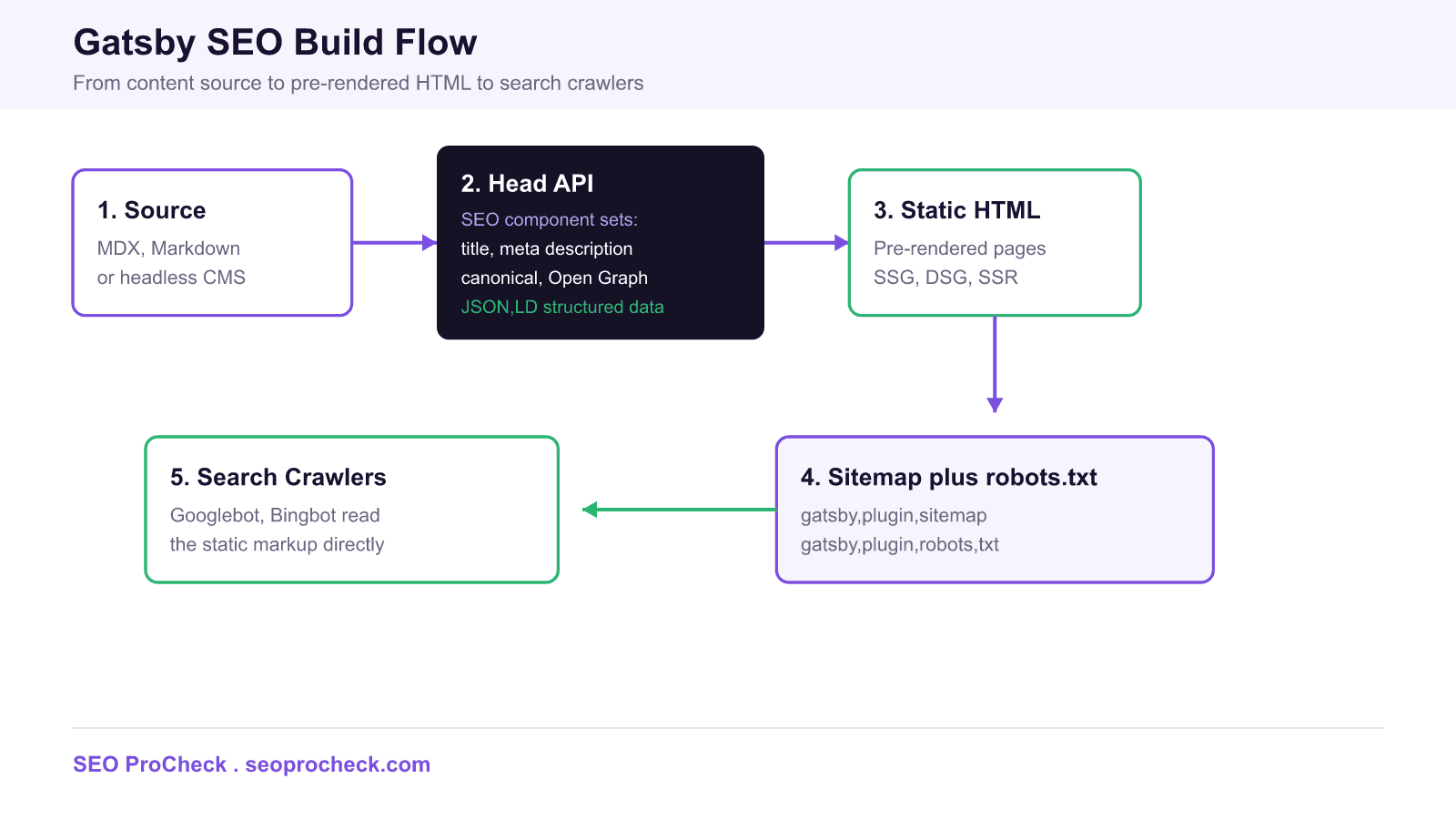
You make a Gatsby site SEO ready by exporting a reusable Head component on every page that sets the title, meta description, canonical link, Open Graph and Twitter tags, and JSON-LD, then letting Gatsby pre-render each route to static HTML that crawlers read directly. Add gatsby-plugin-sitemap and gatsby-plugin-robots-txt for discovery, and gatsby-plugin-image with gatsby-plugin-sharp for fast Core Web Vitals.
- The Gatsby Head API replaces gatsby-plugin-react-helmet as the native way to manage head tags per page.
- SSG, DSG, and SSR all output pre-rendered HTML, so page content is visible to Googlebot without heavy JavaScript execution.
- gatsby-plugin-sitemap and gatsby-plugin-robots-txt handle sitemap and robots.txt generation at build time.
- gatsby-plugin-image plus gatsby-plugin-sharp deliver responsive, dimension locked images that protect LCP and CLS.
Gatsby SEO best practices
Gatsby is a React based static site generator, so its SEO strengths and its pitfalls both come from how it turns your components into HTML at build time. Done well, a Gatsby site ships lean, pre-rendered pages that crawlers index effortlessly. Done carelessly, key pages hide behind client only rendering and never surface in search. This guide walks through the practical moving parts: the Head API, a reusable SEO component, sitemap and robots.txt plugins, image performance, rendering modes, and the URL settings that quietly break canonicals. If you are coming from another stack, our Drupal SEO module guide covers the same fundamentals in a CMS context.
The Gatsby Head API versus react-helmet
Older Gatsby tutorials tell you to install gatsby-plugin-react-helmet and render a Helmet component inside your page body. That still works, but it adds a dependency and can behave inconsistently during hydration. Modern Gatsby ships the Head API: you export a named function called Head from any page or template, and Gatsby injects whatever it returns into the document head during server rendering. Because the tags are emitted into the static HTML, search engines see the correct title, meta description, and canonical without executing JavaScript. Prefer the Head API for new work and migrate Helmet usage when you touch a template.
Build one reusable SEO component
Centralize head logic in a single component so every page sets a consistent set of tags: a unique title, a meta description, a self referencing canonical link, Open Graph and Twitter Card tags for social previews, and a JSON-LD block for structured data. The example below reads values from pageContext, which you populate in gatsby-node.js when you create pages. Note the JSON-LD is emitted through a script tag with type application/ld+json, exactly the shape Google expects.
import * as React from "react"

export const Head = ({ pageContext }) => {
  const siteUrl = "https://example.com"
  const { title, description, path } = pageContext
  const canonical = siteUrl + path
  return (
    <>
      <title>{title}</title>
      <meta name="description" content={description} />
      <link rel="canonical" href={canonical} />
      <meta property="og:title" content={title} />
      <meta property="og:description" content={description} />
      <meta property="og:type" content="website" />
      <meta property="og:url" content={canonical} />
      <meta name="twitter:card" content="summary_large_image" />
      <script type="application/ld+json">
        {JSON.stringify({
          "@context": "https://schema.org",
          "@type": "Article",
          headline: title,
          description: description,
          url: canonical,
        })}
      </script>
    </>
  )
}
Reusing this component keeps the head consistent and prevents the classic errors flagged by automated audits, such as a missing meta description on templated pages. Pass a distinct title and description for every route so no two pages compete with identical metadata.
Sitemap, robots.txt, and gatsby-config.js
Two plugins handle crawl discovery. gatsby-plugin-sitemap generates an XML sitemap at build time; you can override the output path, supply a custom GraphQL query, reshape entries with serialize, and drop utility routes with excludes. gatsby-plugin-robots-txt writes a robots.txt file where you declare the host, point at the sitemap, and set allow or disallow policy per user agent. Wiring both in gatsby-config.js looks like this:
module.exports = {
  siteMetadata: {
    siteUrl: "https://example.com",
    title: "Example",
  },
  trailingSlash: "always",
  plugins: [
    "gatsby-plugin-image",
    "gatsby-plugin-sharp",
    "gatsby-transformer-sharp",
    {
      resolve: "gatsby-plugin-sitemap",
      options: {
        output: "/sitemap",
        excludes: ["/preview/**", "/404"],
        query: `{ allSitePage { nodes { path } } }`,
      },
    },
    {
      resolve: "gatsby-plugin-robots-txt",
      options: {
        host: "https://example.com",
        sitemap: "https://example.com/sitemap-index.xml",
        policy: [{ userAgent: "*", allow: "/" }],
      },
    },
  ],
}
Set the sitemap option on the robots plugin to your sitemap index URL so crawlers can find the full URL inventory from a single robots.txt request. Use excludes to keep preview, staging, and thank you pages out of the index.
Which plugin does what
| Plugin or feature | SEO role | Key config keys |
|---|---|---|
| Gatsby Head API | Per page title, meta, canonical, JSON-LD | export const Head |
| gatsby-plugin-sitemap | Generates the XML sitemap for discovery | output, query, serialize, excludes |
| gatsby-plugin-robots-txt | Emits robots.txt referencing the sitemap | host, sitemap, policy |
| gatsby-plugin-image | Responsive images protecting LCP and CLS | layout, placeholder, formats |
| gatsby-plugin-sharp | Image processing backend for sizing | quality, breakpoints |
Images and Core Web Vitals
Image weight is the most common Gatsby performance drag. Pair gatsby-plugin-image with gatsby-plugin-sharp to generate responsive sources in modern formats, set explicit width and height so the browser reserves space, and lazy load anything below the fold. For your Largest Contentful Paint element, usually a hero image, use eager loading and a high fetch priority so it paints fast. Reserving dimensions is also what keeps Cumulative Layout Shift near zero. And every image needs descriptive alt text; audits routinely flag images with a missing alt attribute, which hurts both accessibility and image search.
SSG, DSG, and SSR crawlability
Gatsby offers three rendering modes. Static Site Generation builds every page to HTML at build time and is the default and safest choice for SEO. Deferred Static Generation builds a page the first time it is requested, then caches it, which suits large archives where most pages get little traffic. Server Side Rendering builds the page fresh on each request for highly dynamic content. All three return real, pre-rendered HTML to the crawler, so your titles, meta tags, and body copy are present in the initial response. The danger zone is client only routes created with the reach router splat pattern, where content renders only after JavaScript runs. Keep anything that must rank on a statically rendered path.
Path prefix, asset prefix, trailing slash, and hreflang
A few configuration options quietly govern URL hygiene. Set pathPrefix when the site is served from a subdirectory and assetPrefix when static assets live on a separate CDN host, then build with the prefix paths flag so links resolve correctly. Choose a single trailingSlash policy, commonly always, and stick with it; mixing slashed and unslashed URLs spawns duplicate paths and conflicting canonicals. For multilingual sites, emit alternate link tags with hreflang values from your Head component so Google maps language and region variants to one another. Consistent canonicals and clean prefixes prevent the self referencing canonical mismatches that plague migrated Gatsby builds. For a broader checklist, start from the SEO ProCheck homepage.
Frequently asked questions
Does Gatsby need a separate SEO plugin, or is the Head API enough?
For most sites the built in Gatsby Head API is enough to manage title, meta description, canonical, Open Graph, and JSON-LD. You export a Head function from each page or template and Gatsby injects the tags into the document head. The older gatsby-plugin-react-helmet approach still works, but the Head API is the current recommended pattern and needs no extra dependency.
What is the difference between the Head API and gatsby-plugin-react-helmet?
React Helmet was a third party component you rendered inside your page body to push tags into the head. The Head API is native to Gatsby: you export a named Head component alongside your page and Gatsby handles deduplication and server rendering. New projects should prefer the Head API because Helmet adds a dependency and can behave inconsistently during hydration.
Are Gatsby pages crawlable by Google if the content is built in React?
Yes. Static pages built with SSG and pages built at request time with DSG or SSR are pre-rendered to real HTML before they reach the crawler. Googlebot and Bingbot read the markup directly without executing much JavaScript, so titles, meta tags, headings, and body copy are present in the initial response. Client only routes are the exception and need special handling.
How do I add an XML sitemap and robots.txt to a Gatsby site?
Install gatsby-plugin-sitemap to generate an XML sitemap at build time and gatsby-plugin-robots-txt to emit a robots.txt file. In gatsby-config.js you point the robots plugin at the sitemap URL with the sitemap and host options, and you can exclude preview or utility routes from the sitemap using the excludes option.
How does Gatsby help Core Web Vitals?
gatsby-plugin-image paired with gatsby-plugin-sharp produces responsive, correctly sized images with modern formats like WebP and AVIF, explicit dimensions to avoid layout shift, and lazy loading below the fold. Prioritizing the largest above the fold image improves Largest Contentful Paint, and reserved image dimensions reduce Cumulative Layout Shift.
What should I set for trailingSlash and pathPrefix?
Pick one trailingSlash policy, commonly always, and keep it consistent so you do not create duplicate URLs and redundant canonicals. Use pathPrefix only when the site is served from a subdirectory, and assetPrefix when static assets sit on a separate CDN host. Mismatched slashes and prefixes are a frequent source of self referencing canonical errors.
Take this with you
The assistant links open with a question about this page already written. Nothing is sent until you press enter.
Claude Vincent is a technical SEO consultant focused on crawlability, rendering, and AI-search visibility. He writes the field guides and case studies at SEO ProCheck, with a bias toward the durable, unglamorous work that decides whether search engines and AI answer engines can actually read and cite a site.
About SEO ProCheck
Technical SEO consulting and GEO strategy with 20 years of enterprise experience. Case studies, resources, and tools for search and AI visibility.
Work With Me
Technical SEO audits, GEO strategy, site migrations, and international SEO. Hourly consulting for teams who need hands-on support, not just reports.
Subscribe to our newsletter!








Recent Posts
- Most Top Sites Never Say Who They Are in Structured Data October 14, 2026
- Homepage Titles Are Mostly Too Short, Not Too Long October 8, 2026
- Who Actually Serves an llms.txt? 184 Top Sites Measured September 29, 2026