

Crawl Budget FAQ: Managing How Search Engines Crawl Your Site
- October 12, 2021
- Technical SEO FAQ
AI Summary
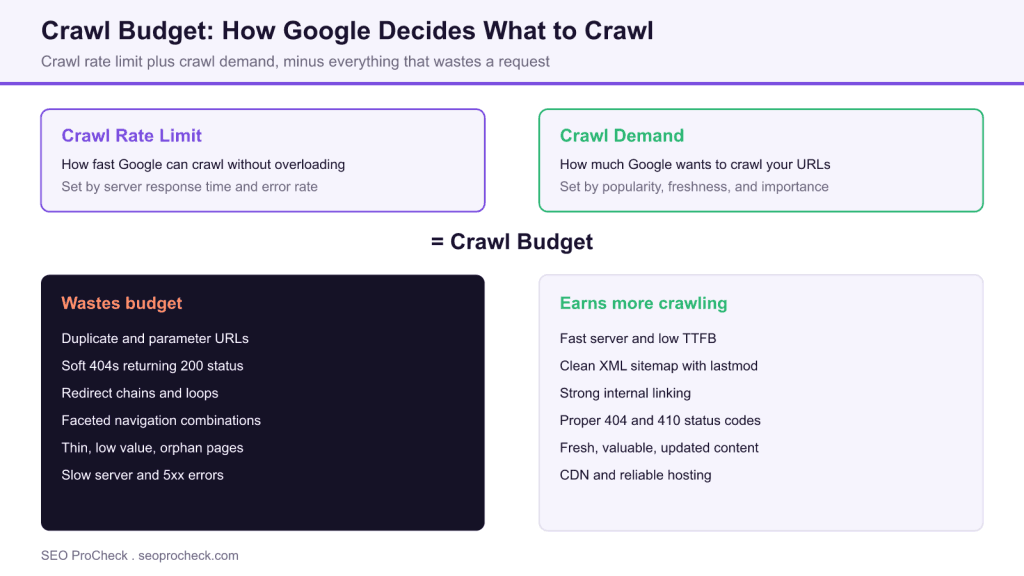
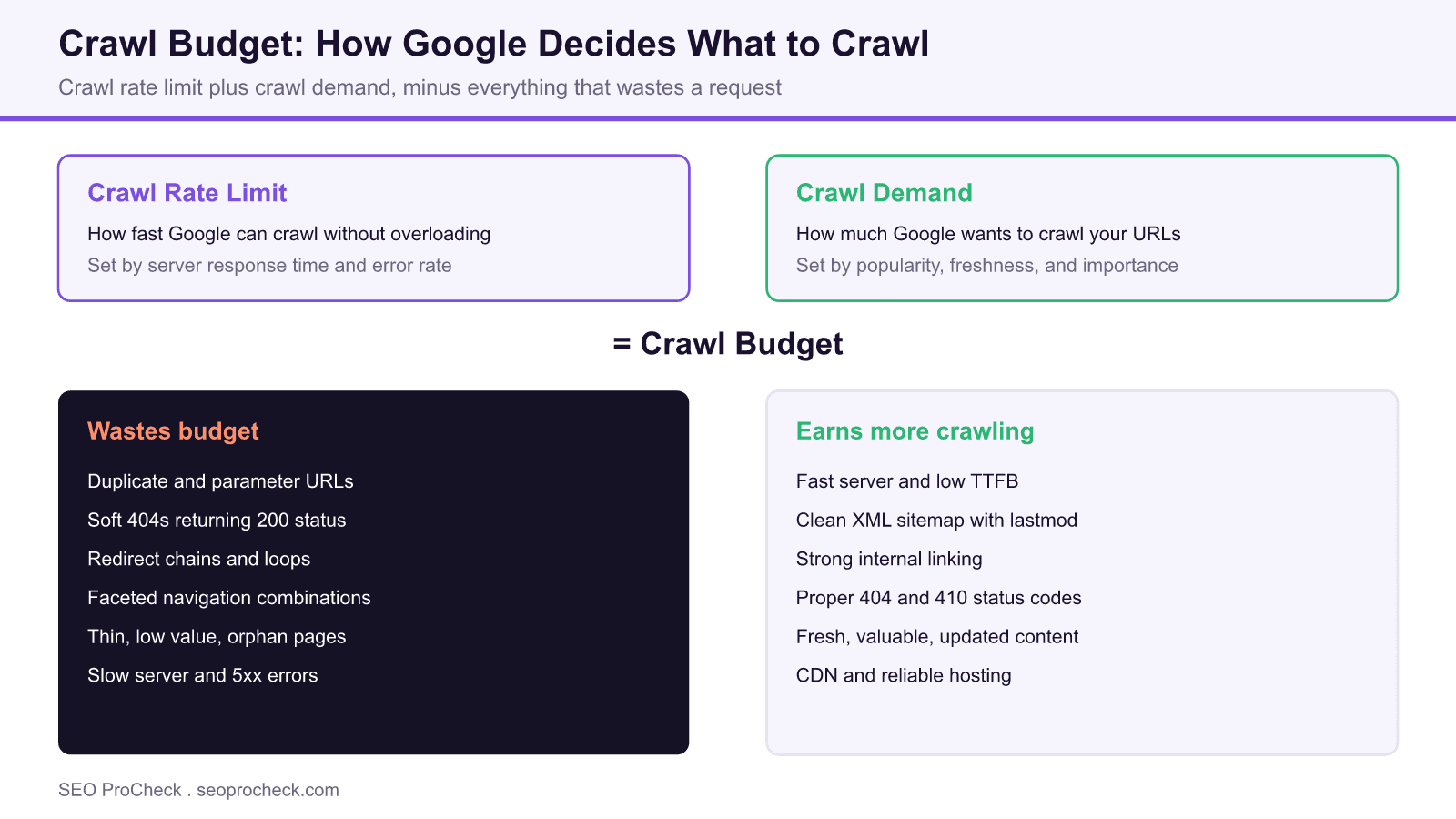
Crawl budget is the number of URLs Googlebot will fetch on your site in a given window. It is the product of your crawl rate limit (how fast Google can crawl without straining your server) and your crawl demand (how much Google wants to crawl based on popularity and freshness), so you improve it by removing waste rather than asking for more.
- Crawl budget only matters for large sites, roughly 500,000 or more URLs, fast changing content, or sites with indexing backlogs.
- Duplicates, soft 404s, redirect chains, and faceted URLs quietly burn the budget you have.
- A faster server, clean sitemaps, proper status codes, and strong internal links earn more crawling.
- You cannot buy crawl budget: Google allocates it to fast, popular, frequently updated sites.
Everything you need to know about crawl budget: what it is, why it matters, and how to optimize it. Essential for large sites, e-commerce, and anyone with indexing issues.
Table of Contents
- Crawl Budget Basics
- Factors That Affect Crawl Budget
- Optimization Strategies
- Diagnosing Problems
- Specific Situations
Crawl Budget Basics
What is crawl budget?
The number of pages Googlebot will crawl on your site within a given timeframe. It combines crawl rate limit (how fast Google can crawl without overloading your server) and crawl demand (how much Google wants to crawl based on popularity and freshness). Not an official metric you can see directly.
Does crawl budget matter for my site?
Only if you have a large site (500,000+ URLs), frequently changing content, or indexing problems. Small sites under 10,000 pages rarely have crawl budget issues. Google typically crawls small sites completely without constraint. Focus on content quality instead.
What is crawl rate limit?
The maximum crawling speed Google uses to avoid overloading your server. Determined by server response time and error rates. Fast, reliable servers get crawled more aggressively. Slow or error-prone servers trigger Google to back off automatically.
What is crawl demand?
How much Google wants to crawl your site based on popularity, freshness needs, and URL importance. Popular pages with frequent updates have high crawl demand. Stale, low-traffic pages have low demand. You influence this through content quality and update frequency.
Can I see my crawl budget?
Not directly as a single number. Use Google Search Console's Crawl Stats report (Settings > Crawl Stats) to see crawl requests per day, download size, and response times. This shows crawling patterns but not an explicit "budget" allocation.
What does the Crawl Stats report show?
Total crawl requests, total download size, average response time over 90 days. Breakdown by response code, file type, purpose (discovery vs refresh), and Googlebot type. Use it to identify crawl patterns, server issues, and wasted crawl on non-essential URLs.
Can I increase my crawl budget?
Not directly. Improve server speed, fix errors, remove low-quality pages, and build site authority. Google automatically allocates more crawling to fast, popular, frequently-updated sites. You can request temporary increases for large migrations via Search Console.
Factors That Affect Crawl Budget
How does server speed affect crawl budget?
Faster servers allow more aggressive crawling. If pages load in 200ms vs 2 seconds, Google can crawl 10x more pages in the same time. Slow Time to First Byte (TTFB) directly limits crawl capacity. Invest in hosting, caching, and CDN for large sites.
How do server errors affect crawling?
5xx errors signal server problems, causing Google to reduce crawl rate to avoid overload. Frequent errors waste crawl budget on failed requests. Fix server stability issues first. Monitor error rates in Crawl Stats and server logs.
Does duplicate content waste crawl budget?
Yes. Google crawls duplicates before identifying them as such. Hundreds of parameter variations, session IDs, or printer-friendly versions waste crawls. Consolidate with canonicals or block non-essential variations.
What are soft 404s and why do they matter?
Pages returning 200 status but displaying "not found" or empty content. Google detects these and flags them in Search Console. They waste crawl budget because Google keeps rechecking them. Return proper 404 or 410 status codes for missing content.
How do redirect chains affect crawling?
Each redirect in a chain consumes a crawl request. A→B→C→D means 4 requests for one destination. Google follows up to 10 redirects but may abandon complex chains. Flatten chains to single redirects. Check for loops which waste unlimited crawls.
Do low-quality pages hurt crawl budget?
Yes. Pages with thin content, no traffic, or no backlinks have low crawl priority. If your site has thousands of these, they compete with important pages for crawl attention. Consolidate, improve, or noindex low-value pages.
Does site size directly determine crawl budget?
Not linearly. A 10-million page site doesn't get 10x the budget of a 1-million page site. Budget scales with site authority, server capacity, and content quality. Large sites must be more efficient; every wasted crawl matters more.
Does XML sitemap affect crawl budget?
Sitemaps help Google discover URLs but don't increase total budget. They help prioritize which pages get crawled by signaling importance and freshness via lastmod. Keep sitemaps clean: only include indexable, canonical URLs worth crawling.
Optimization Strategies
How do I improve crawl efficiency?
Remove or noindex low-value pages, fix redirect chains, eliminate duplicate content, improve server speed, return proper status codes, keep XML sitemaps clean, use robots.txt strategically. Goal: ensure every crawl request hits a valuable, indexable page.
Should I use robots.txt to manage crawl budget?
Yes, strategically. Block faceted navigation parameters, internal search results, admin areas, and other non-indexable sections. Don't block CSS/JS. Be careful: blocked pages can still get indexed via links. Combine with noindex where appropriate.
Does noindex save crawl budget?
No. Google must crawl pages to see noindex tags. Noindexed pages still consume crawl budget on each visit. For true crawl savings, use robots.txt to block crawling entirely. See the meta robots and X-Robots-Tag reference for the exact directive syntax. But remember: blocked pages can still appear in index without content.
How should I handle pagination for crawl budget?
Use rel=next/prev (still useful for some crawlers), ensure all paginated pages are in sitemap, keep page depth shallow. For infinite scroll, implement progressive loading with crawlable links. Consider whether deep pagination pages need indexing at all.
How do I handle faceted navigation?
Facets create exponential URL combinations (color × size × brand = thousands of URLs). Block non-essential combinations via robots.txt, use canonical to main category, or implement AJAX filtering. Only allow valuable filter combinations to be crawled.
Does internal linking affect crawl budget?
Yes. Well-linked pages get crawled more frequently. Orphan pages (no internal links) may never be discovered. Ensure important pages are linked from navigation, related content, and sitemaps. Flat site architecture distributes crawl more evenly. Our internal linking FAQ covers how to build those paths.
Does publishing fresh content help crawl budget?
Indirectly. Frequently updated sites signal high crawl demand, encouraging more visits. But only if content is valuable. Publishing garbage content frequently won't help. Quality and freshness together increase crawl priority for your entire site.
Diagnosing Problems
How do I know if I have a crawl budget problem?
Symptoms: new pages take weeks to get indexed, important pages not being crawled (check last crawl date in URL Inspection), Crawl Stats showing flat or declining requests, many pages stuck in "Discovered: currently not indexed" status.
What can log file analysis tell me about crawl budget?
Server logs show exactly which URLs Googlebot requests, when, and how often. Reveals wasted crawls on low-value URLs, ignored important pages, and crawl patterns over time. Essential for large sites. Tools: Screaming Frog Log Analyzer, Botify, custom scripts.
What does "Discovered: currently not indexed" mean?
Google found the URL but hasn't crawled it yet, often due to crawl budget constraints. The page is in queue but not prioritized. Improve internal linking to signal importance, ensure it's in sitemap, and check that similar pages aren't cannibalizing attention.
What does "Crawled: currently not indexed" mean?
Google crawled it but chose not to index. This is a quality issue, not crawl budget. The page may be thin, duplicate, or low-value. Improve content quality, consolidate similar pages, or accept that Google doesn't find it index-worthy.
How do I check when Google last crawled a page?
Use URL Inspection in Search Console. Shows last crawl date under "Indexing" section. Server logs provide exact timestamps. Frequent crawls indicate high priority; rare crawls suggest low priority or access issues.
What causes sudden crawl rate drops?
Server slowdowns, increased error rates, robots.txt changes blocking content, hosting issues, site migrations gone wrong, or Google algorithm adjustments. Check Crawl Stats for timing, correlate with site changes, review server logs for errors.
Specific Situations
How should e-commerce sites manage crawl budget?
Block or noindex faceted navigation variants, out-of-stock product archives, internal search results, and session/tracking parameters. Prioritize category pages and top products. Use dynamic sitemaps excluding discontinued items. Monitor crawl distribution across product vs non-product pages.
Do news sites have different crawl budget needs?
Yes. News sites need rapid crawling for time-sensitive content. Use Google News sitemap with publication dates, implement WebSub/PubSubHubbub for instant notification, keep server fast for high-volume crawling. Old articles naturally get less crawl attention.
How do site migrations affect crawl budget?
Migrations temporarily increase crawl demand as Google processes redirects and reindexes content. Ensure redirects are fast (not through redirect chains), server can handle increased load, and old URLs properly redirect.
Does using a CDN help crawl budget?
Yes. CDNs improve response time globally, allowing faster crawling. They also handle traffic spikes without server errors. Ensure CDN doesn't block Googlebot, returns proper status codes, and serves same content as origin. Configure cache headers appropriately.
Does JavaScript rendering affect crawl budget?
Yes. JavaScript pages require two-phase crawling: initial HTML fetch, then rendering queue. Rendering is resource-intensive for Google. Heavy JS sites may face rendering delays. Use server-side rendering, static rendering, or hydration for critical content to ensure faster processing; Google calls dynamic rendering a workaround, not a long-term solution.
Do subdomains have separate crawl budgets?
Generally yes. Google treats subdomains somewhat independently. blog.example.com and shop.example.com have separate crawl allocations. This can help isolate crawl-heavy sections but also means less popular subdomains get less attention than if content were on main domain.
How do international sites manage crawl budget?
Multiple language/country versions multiply URLs significantly. Use hreflang correctly so Google understands relationships. Consider ccTLDs vs subdirectories (subdirectories share domain authority and crawl). Ensure each version has unique, valuable content worth crawling.
Common crawl waste, the fix, and where to spot it
Most crawl budget problems trace back to a handful of patterns. This table pairs each one with the fix and the report or signal that surfaces it.
| Symptom | Likely cause | Fix | Where to spot it |
|---|---|---|---|
| Many URLs "Discovered: currently not indexed" | Crawl demand too low for site size | Prune thin pages, strengthen internal links, tighten sitemaps | Search Console Page Indexing report |
| Crawl requests flat while URL count climbs | Slow server or rising error rate | Improve TTFB, add caching and a CDN, fix 5xx errors | Crawl Stats: average response time |
| Googlebot hitting parameter and filter URLs | Faceted navigation and session IDs | Block in robots.txt, canonicalize, or load filters via AJAX | Server log analysis by URL pattern |
| Crawls landing on redirects and 404s | Redirect chains and soft 404s | Flatten to single redirects, return real 404 or 410 | Crawl Stats: by response code |
| New content slow to appear | Deep architecture, weak linking | Flatten depth, link from hubs, submit in sitemap | URL Inspection: last crawl date |
Frequently Asked Questions
Does crawl budget actually affect small websites?
For most sites under about 10,000 URLs, no. Google generally crawls small, healthy sites completely without hitting a ceiling. Crawl budget becomes a real constraint on very large sites, sites with rapidly changing inventory, or sites carrying a large backlog of low value URLs. If you are small and pages are not getting indexed, the cause is almost always quality or internal linking, not budget.
Can I see my crawl budget as a single number in Search Console?
No. Google does not expose crawl budget as one figure. The closest view is the Crawl Stats report under Settings, which shows total crawl requests, total download size, and average response time over the last 90 days, broken down by response code, file type, and purpose. You read budget indirectly from those trends rather than a headline number.
Does adding noindex tags save crawl budget?
Not by itself. Google has to crawl a page to see its noindex tag, so a noindexed URL still consumes a crawl request every time it is visited. To actually stop crawling, disallow the URL in robots.txt. The trade off is that a robots blocked URL can still appear in the index without a snippet, so pick the mechanism that matches your goal.
How do I know if I have a crawl budget problem?
Watch for new pages taking weeks to index, important URLs showing old last crawl dates in URL Inspection, Crawl Stats requests staying flat while your site grows, and large clusters stuck in Discovered: currently not indexed. One symptom alone is weak evidence. Several together on a large site point to a budget or crawl efficiency issue.
Do faceted navigation and filters really waste that much crawling?
Yes, on large catalogs they are usually the single biggest drain. Combining color, size, brand, and sort options multiplies into thousands or millions of near duplicate URLs, and Googlebot will happily crawl them. Restrict the non essential combinations with robots.txt, canonical tags, or AJAX filtering, and reserve crawling for the filter pages that earn search traffic.
Do subdomains share the same crawl budget as my main domain?
Generally they are treated somewhat separately. A blog subdomain and a shop subdomain tend to receive their own crawl allocation, which can isolate a crawl heavy section but also means a less popular subdomain gets less attention than the same content on the main domain would. Weigh that against the authority consolidation benefits of subdirectories before you split content onto subdomains.
Take this with you
The assistant links open with a question about this page already written. Nothing is sent until you press enter.
Claude Vincent is a technical SEO consultant focused on crawlability, rendering, and AI-search visibility. He writes the field guides and case studies at SEO ProCheck, with a bias toward the durable, unglamorous work that decides whether search engines and AI answer engines can actually read and cite a site.
About SEO ProCheck
Technical SEO consulting and GEO strategy with 20 years of enterprise experience. Case studies, resources, and tools for search and AI visibility.
Work With Me
Technical SEO audits, GEO strategy, site migrations, and international SEO. Hourly consulting for teams who need hands-on support, not just reports.
Subscribe to our newsletter!








Recent Posts
- Most Top Sites Never Say Who They Are in Structured Data October 14, 2026
- Homepage Titles Are Mostly Too Short, Not Too Long October 8, 2026
- Who Actually Serves an llms.txt? 184 Top Sites Measured September 29, 2026