

AI Summary
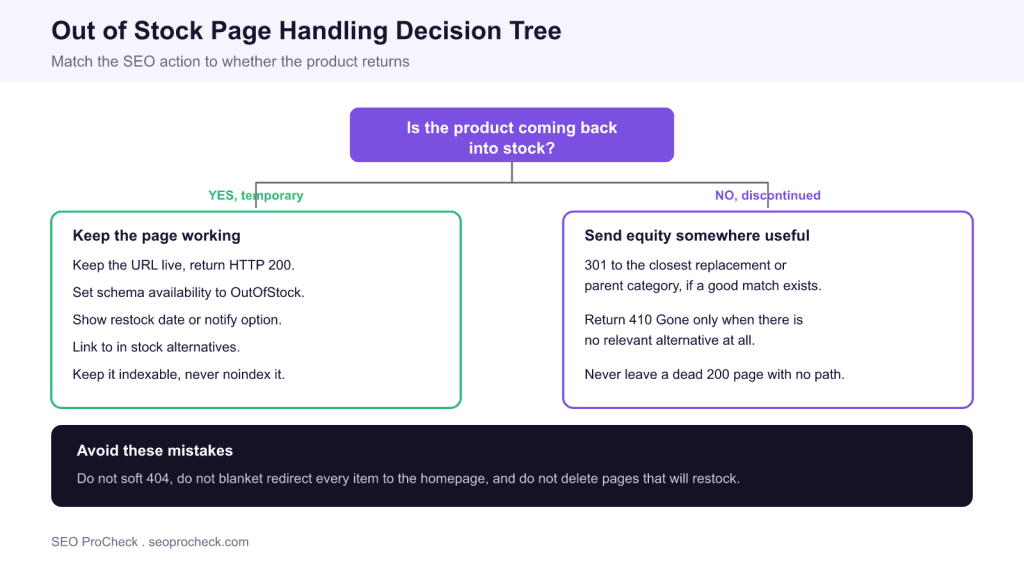
Handle an out of stock page by asking one question: is the product coming back? If it will restock, keep the URL live at HTTP 200, mark the schema availability as OutOfStock, and link to alternatives so the page holds its rankings. If it is permanently discontinued, 301 redirect to the closest replacement, or return 410 Gone only when no relevant alternative exists.
- Temporary stockouts: keep the page live and indexable at 200, never noindex or delete it.
- Set the Product schema availability to OutOfStock so listings and AI answers stay accurate.
- Permanent removals: 301 to the nearest replacement or parent category to transfer equity.
- Avoid soft 404s and blanket redirects to the homepage, which throw away rankings and confuse crawlers.

Why Out of Stock Handling Matters
Out of stock page handling is the set of decisions you make when an item you rank for is no longer purchasable. It matters because a popular product page often carries years of accumulated ranking equity, internal links and backlinks, and a careless response, deleting it, redirecting it to the homepage, or letting it soft 404, throws that value away. Get it wrong at scale and a retail site can bleed rankings across a whole category. Get it right and you protect the equity while giving shoppers a useful next step. For the shared vocabulary, the out of stock pages glossary entry is a quick reference.
The entire decision reduces to one question: is the product coming back? Everything else follows from the answer, because a temporary stockout and a permanent discontinuation call for opposite technical responses. Treating them the same is the root cause of most out of stock SEO mistakes.
Temporary Stockouts: Keep the Page Alive
When a product will restock, the page should keep working exactly as before. Return a normal HTTP 200 status, keep the URL indexable, and do not add a noindex tag, because removing the page from the index surrenders rankings you will want back the moment stock returns. Update the on page state to be honest with shoppers: show that the item is temporarily unavailable, offer a restock date or an email notify option, and prominently link to in stock alternatives or the parent category so the visit is not wasted. Those alternative links also keep users engaged and pass them to pages that can convert today. Ground the surrounding page in solid ecommerce product page SEO so the temporary state is the only thing that changes.
Reflect the state in structured data as well. In your Product schema, set the availability property to OutOfStock (or BackOrder or PreOrder where they apply) so that Search listings, free product listings and AI shopping answers describe the item accurately. Mismatched availability, where the page says sold out but the schema still says in stock, undermines trust and can cause disapprovals, so keep the visible state and the markup in agreement.
Permanent Removals: Redirect or Retire
When a product is gone for good, the goal shifts from preserving the page to preserving its equity. If a close replacement exists, a newer model, a successor product, or a tightly related item, 301 redirect the old URL to it so the accumulated authority flows to a page that can still convert. If there is no genuine replacement, do not force a redirect to the homepage or an unrelated category, because search engines treat an irrelevant redirect as a soft 404 and drop the equity anyway. Instead, return 410 Gone, which states clearly and permanently that the page has been intentionally removed, or a 404 if your platform cannot serve 410. For a precise map of when each code applies, keep the HTTP status codes reference open while you plan.
The table below matches each common scenario to its recommended action so you can turn the decision tree into a repeatable rule set for your catalogue.
| Scenario | Recommended action | Why |
|---|---|---|
| Temporarily out of stock, restock expected | Keep live at 200, availability OutOfStock, show alternatives | Preserves rankings and equity for when it returns |
| Seasonal item that returns each year | Keep live at 200 all year round | Rebuilding equity every season is slow and costly |
| Discontinued, close replacement exists | 301 redirect to the replacement | Transfers accumulated equity to a relevant page |
| Discontinued, no relevant replacement | 410 Gone, or 404 | Signals intentional removal and frees crawl budget |
| Out of stock but strong reviews or content | Keep live and indexable at 200 | The page still satisfies research intent and links |
One more habit protects temporary stockout pages: keep their internal links and breadcrumbs intact. A page that loses its links to and from the rest of the catalogue becomes an orphan, which slows recrawling and weakens the very authority you are trying to hold. Leave the product in its category listings, keep related product modules populated, and the page stays a healthy part of the site rather than a dead end waiting for stock.
Mistakes That Cost Rankings
A handful of errors account for most lost equity. The first is the soft 404: a page that returns 200 but shows only a bare sold out message with no content and no path forward, which Google may quietly drop from the index. The second is the blanket homepage redirect, where every discontinued item points at the home page; because none of those redirects is topically relevant, the equity evaporates. The third is noindexing or deleting pages that will restock, which forfeits rankings you then have to rebuild from scratch. The fourth is leaving stale availability in your structured data so listings promise stock you do not have. Each of these is easy to avoid once you have decided, per item, whether the product is coming back.
Handling It at Scale
On a large catalogue, make the logic automatic. Drive the on page availability state and the schema availability value from the same inventory field that controls the buy button, so they can never disagree. Maintain a rule that discontinued items are reviewed for a replacement before any redirect is set, and default to keeping temporarily unavailable items live and indexable. Monitor your status codes and coverage reports for spikes in soft 404s or unexpected 404s after inventory changes, and audit a sample of out of stock URLs each month to confirm the right status is being served. Automation removes the human error that causes catalogue wide losses.
What's Changed: Availability Signals and AI Shopping
Accurate availability now travels further than the product page. Free product listings and AI shopping experiences read the same structured availability data, so an out of stock item with correct OutOfStock markup is described honestly across every surface, while a stale in stock value can surface a product a shopper cannot buy. The durable approach has not changed: decide by whether the product returns, keep temporary stockouts live and indexable with accurate availability, redirect permanent removals to a relevant replacement, and reserve 410 for the genuinely gone. That single policy protects rankings today and keeps you accurately represented in AI answers.
Frequently Asked Questions
Should I delete a product page when the item is out of stock?
No, not if the product will restock. Deleting or noindexing the page surrenders the rankings and equity it has built, which you then have to rebuild when stock returns. Keep the URL live at HTTP 200, mark it OutOfStock in schema, and link to alternatives. Only remove a page when the product is permanently discontinued.
What HTTP status code should an out of stock page return?
A temporarily out of stock page should return 200 so it stays indexed. A permanently discontinued page with a close replacement should 301 redirect to that replacement. If there is no relevant alternative, return 410 Gone, or 404 if your platform cannot serve 410, to signal intentional removal.
Should I redirect out of stock products to the homepage?
No. A redirect to the homepage or an unrelated page is treated as a soft 404 because it is not topically relevant, so the equity is lost anyway. Redirect only to a genuinely related replacement or parent category. When no relevant target exists, return 410 rather than forcing an irrelevant redirect.
How should I set structured data for an out of stock product?
Set the availability property in your Product schema to OutOfStock, or BackOrder or PreOrder where they apply. Drive that value from the same inventory field that controls the buy button so the markup and the visible page never disagree. Accurate availability keeps your listings and AI shopping answers honest and avoids disapprovals.
How do I handle seasonal products that go out of stock?
Keep seasonal product URLs live and indexable at 200 all year, even during the off season. Rebuilding a page's equity every time it returns is slow and costly, so it is better to maintain the page and simply reflect the current availability. Show expected restock timing and link to related in season items.
What is a soft 404 and why is it a problem for out of stock pages?
A soft 404 is a page that returns a 200 status but has little or no useful content, such as a bare sold out message with no path forward. Google may treat it as an error and drop it from the index, costing you the ranking. Avoid it by keeping real content, alternatives and clear next steps on temporarily unavailable pages.
Take this with you
The assistant links open with a question about this page already written. Nothing is sent until you press enter.
Claude Vincent is a technical SEO consultant focused on crawlability, rendering, and AI-search visibility. He writes the field guides and case studies at SEO ProCheck, with a bias toward the durable, unglamorous work that decides whether search engines and AI answer engines can actually read and cite a site.
About SEO ProCheck
Technical SEO consulting and GEO strategy with 20 years of enterprise experience. Case studies, resources, and tools for search and AI visibility.
Work With Me
Technical SEO audits, GEO strategy, site migrations, and international SEO. Hourly consulting for teams who need hands-on support, not just reports.
Subscribe to our newsletter!








Recent Posts
- Most Top Sites Never Say Who They Are in Structured Data October 14, 2026
- Homepage Titles Are Mostly Too Short, Not Too Long October 8, 2026
- Who Actually Serves an llms.txt? 184 Top Sites Measured September 29, 2026