

Regex for Marketers: Plain English, Real World Examples [VIDEO] - Annielytics.com
- June 1, 2021
- General
AI Summary
Regex is a compact pattern language for matching text, and for marketers it unlocks precise filtering across Search Console, GA4, Looker Studio, Screaming Frog, and Google Sheets. Learning six core tokens, anchors, the dot, character classes, the digit token, quantifiers, and alternation, covers most real reporting tasks.
- Anchors ^ and $ tie a match to the start or end of a string.
- Search Console and GA4 use the RE2 engine, so lookbehind is not supported.
- Always escape a literal dot as backslash dot or your match counts inflate.
- Search Console added full regex filters in 2021, now a core SEO use case.
A regular expression, almost always shortened to regex, is a compact pattern language for matching text. For marketers it is one of the highest leverage skills you can pick up, because the same six or seven building blocks unlock powerful filtering across Google Search Console, GA4, Looker Studio, Screaming Frog, and Google Sheets. The linked video walks through the concept in plain English, and the sections below turn that into patterns you can paste into a report today.
The building blocks you actually need
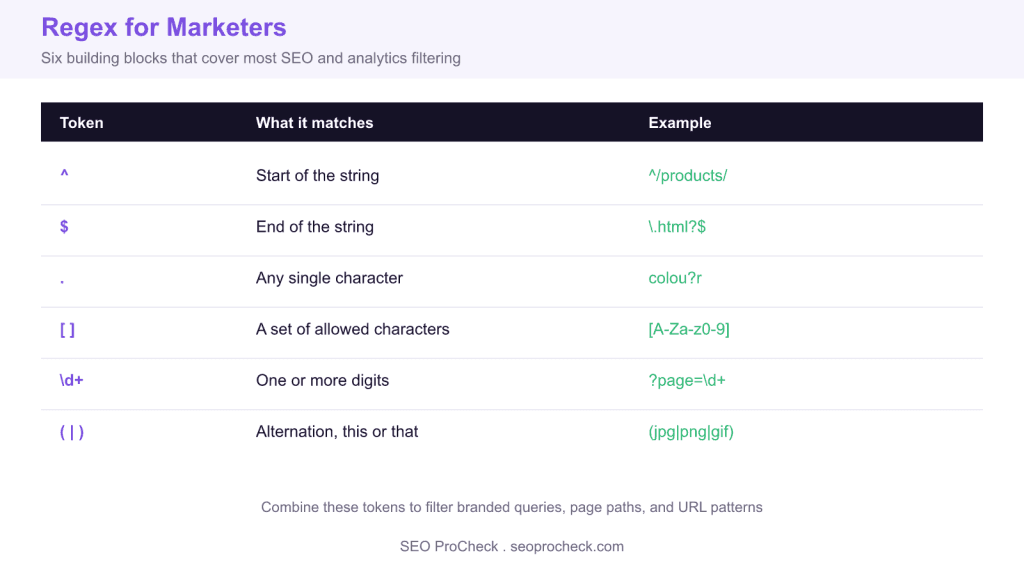
You do not need to memorise the whole regex specification. Marketers get most of the value from a handful of tokens. Anchors ^ and $ tie a match to the start or end of a string. A dot . matches any single character, and a question mark makes the preceding item optional, so colou?r matches both spellings. Square brackets define a character class, so [A-Za-z0-9] matches any letter or digit. The token \d matches a digit, and adding + means one or more, so \d+ matches a run of digits. Round brackets with a pipe give you alternation, so (jpg|png|gif) matches any of those three. Escaping a special character with a backslash makes it literal, which is why a real dot in a file extension is written \. and not just .
Worked examples for SEO and analytics
Say you want to separate branded from non branded queries in the Search Console performance report. Add a Query filter, choose custom regex, and match your brand terms with a case flexible alternation such as seo\s?procheck|seoprocheck. To see everything that is not branded, use the does not match regex option with the same pattern. To pull every product URL in Screaming Frog custom extraction or a page path filter, anchor the path with ^/products/[a-z0-9-]+$ so you catch the product slugs but not deeper faceted URLs.
In GA4 explorations, a page path filter using the matches regex operator lets you group a section in one row. For example ^/blog/(seo|geo|analytics)/ isolates three blog subfolders. In Google Sheets you can lift the numeric id out of a messy URL with =REGEXEXTRACT(A2,"[?&]id=(\d+)"), which returns just the captured digits. These are the same tokens from the cheat sheet, recombined for each tool.
# Search Console: branded queries (custom regex, matches)
seo\s?procheck|brandname

# GA4 / Looker Studio: isolate three blog subfolders
^/blog/(seo|geo|analytics)/

# Google Sheets: extract a numeric id from a URL
=REGEXEXTRACT(A2,"[?&]id=(\d+)")

# Screaming Frog: match clean product URLs only
^/products/[a-z0-9-]+$
Where each tool differs
Regex flavours are not identical, and the differences trip up marketers who copy a pattern between tools. Google Search Console and GA4 both use the RE2 engine, which is fast but does not support lookbehind. GA4 regex filters historically default to a full match, so you often need to wrap a pattern with .* on both sides, whereas Search Console does a partial match by default. Google Sheets and Looker Studio also use RE2. Screaming Frog uses Java regex, which supports lookahead and lookbehind. When a pattern that works in Screaming Frog fails in GA4, an unsupported lookaround is the usual cause.
Common mistakes and how to avoid them
The most frequent error is forgetting to escape the dot. Writing sitename.com matches sitename plus any character plus com, so it also matches sitenameXcom. Write sitename\.com when you mean a literal dot. The second common trap is greedy matching: .* grabs as much as it can, so /blog/.*/ can swallow more path than you intended. Anchor your patterns and prefer specific character classes over a bare dot star. Finally, test every pattern on a small sample before you trust a filtered report, because a silently wrong regex produces clean looking numbers that are simply incorrect.
What has changed since this video
The core regex tokens are decades old and have not changed, but the places marketers use them have grown. Google Search Console added a full regex filter for queries and pages in 2021, which is now one of the most practical uses of regex in SEO. GA4 replaced Universal Analytics and carries regex support into audiences, explorations, and channel group definitions, all on the RE2 engine. Looker Studio filters accept regex too, so a single pattern can drive a whole dashboard. The skill itself is more valuable now, not less, because reporting has fragmented across more surfaces that all speak the same pattern language.
Regex token cheat sheet
| Token | Matches | Marketing example |
|---|---|---|
^ | Start of the string | ^/products/ matches paths that begin with the products folder |
$ | End of the string | \.html?$ matches URLs ending in html or htm |
. | Any single character | colou?r matches color and colour |
[ ] | A set of characters | [A-Za-z0-9] matches any letter or digit |
\d+ | One or more digits | ?page=\d+ matches numbered pagination parameters |
( | ) | Alternation, this or that | (jpg|png|gif) matches any of three image types |
Related reading
- Screaming Frog advanced usage, where regex extraction shines
- Log file analysis FAQ for pattern based filtering
- Spotting repetitive URL paths worth a regex rule
Frequently asked questions
What is regex and why should a marketer learn it?
Regex is a compact pattern language for matching text. Marketers use it to filter reports precisely in Search Console, GA4, Looker Studio, Screaming Frog, and Google Sheets. Learning six or seven tokens covers the vast majority of real filtering tasks, so the return on a small time investment is high.
Does Google Search Console support regex filters?
Yes. The performance report lets you filter both queries and pages with a custom regex, using either matches regex or does not match regex. It runs on the RE2 engine and does a partial match by default, so you rarely need to wrap patterns in wildcards.
Why does my regex work in Screaming Frog but fail in GA4?
Screaming Frog uses Java regex, which supports lookahead and lookbehind, while GA4 and Search Console use Google RE2, which does not support lookbehind. If a pattern relies on a lookaround it will fail on the RE2 tools. Rewrite it with anchors and character classes instead.
How do I separate branded from non branded queries?
Build an alternation of your brand spellings, for example seo\s?procheck|brandname, then filter with matches regex to see branded queries and does not match regex to see everything else. Account for spacing and common misspellings so you capture the full branded set.
Why do I need to escape the dot in a regex?
An unescaped dot matches any single character, so example.com also matches exampleXcom. Writing example\.com forces a literal dot. Forgetting this is the most common regex mistake and it silently inflates your match counts.
Can I use regex in Google Sheets?
Yes. Sheets offers REGEXEXTRACT, REGEXMATCH, and REGEXREPLACE, all running on RE2. A pattern like REGEXEXTRACT(A2,"[?&]id=(\d+)") pulls a numeric id straight out of a URL, which is handy for cleaning up exported reports.
Take this with you
The assistant links open with a question about this page already written. Nothing is sent until you press enter.
Claude Vincent is a technical SEO consultant focused on crawlability, rendering, and AI-search visibility. He writes the field guides and case studies at SEO ProCheck, with a bias toward the durable, unglamorous work that decides whether search engines and AI answer engines can actually read and cite a site.
About SEO ProCheck
Technical SEO consulting and GEO strategy with 20 years of enterprise experience. Case studies, resources, and tools for search and AI visibility.
Work With Me
Technical SEO audits, GEO strategy, site migrations, and international SEO. Hourly consulting for teams who need hands-on support, not just reports.
Subscribe to our newsletter!








Recent Posts
- Most Top Sites Never Say Who They Are in Structured Data October 14, 2026
- Homepage Titles Are Mostly Too Short, Not Too Long October 8, 2026
- Who Actually Serves an llms.txt? 184 Top Sites Measured September 29, 2026