

AI Summary
Schema markup is structured data, almost always JSON-LD, that labels your content so search engines can read it as entities and facts instead of raw prose. It is not a ranking factor: what it buys is eligibility for rich results such as review stars, prices and breadcrumbs, plus cleaner entity understanding for the AI systems that summarise and cite your pages.
- Use JSON-LD, and emit one graph per page. Duplicate blocks from the theme, the SEO plugin and a page builder are the most common real-world fault.
- Markup must match visible content. Rating markup for reviews that are not on the page is a structured data spam violation.
- Validity means eligibility, not entitlement. Google applies quality thresholds per feature and per site.
- Highest return first: Product with Offer, then BreadcrumbList sitewide, then Organization on the homepage. HowTo rich results are gone, so remove that markup.
Quick answer: Schema markup is structured data (almost always JSON-LD placed in the page's <head> or body) that labels your content so search engines can parse it as entities and facts rather than raw text. It does not directly raise rankings, but it unlocks rich results (review stars, product pricing, breadcrumbs) that measurably lift click-through rate, and it helps LLM-based search features understand and cite your pages.
Structured data helps search engines understand content context and enables rich results in search listings. This resource covers schema implementation strategies and best practices for maximizing structured data benefits. For the plain-language definition and vocabulary background, see the schema markup glossary entry.
Schema Types and Applications
Different schema types serve different purposes. Article, Product, LocalBusiness, FAQ, HowTo, and other schemas each provide specific functionality, though Google no longer shows HowTo or FAQ rich results. Selecting appropriate schema types for your content enables relevant rich results and improves search engine understanding.
The practical question is not "which schema exists" but "which schema does Google actually reward with a visible feature." Google's supported list is far narrower than the full schema.org vocabulary, and it shrinks over time. HowTo rich results were removed on all devices in September 2023, FAQ rich results were restricted to authoritative government and health sites in the same sweep, and Google stopped showing FAQ rich results for every site on May 7, 2026. Implement what still pays:
| Schema type | Rich result in Google (2026) | Key required properties | Worth doing? |
|---|---|---|---|
| Product + Offer + AggregateRating | Price, availability, review stars (merchant listings) | name, offers.price, priceCurrency, availability | Yes: highest CTR impact of any schema |
| Article / NewsArticle / BlogPosting | Headline + image in Top Stories and Discover | headline, image, datePublished, author | Yes for publishers; low effort |
| BreadcrumbList | Breadcrumb trail replaces raw URL in snippet | itemListElement with position, name, item | Yes: sitewide, trivial to template |
| Organization | Knowledge panel signals, logo, sameAs entity linking | name, url, logo, sameAs | Yes: homepage only; feeds entity understanding |
| LocalBusiness | Hours, address in local results | name, address, openingHoursSpecification, geo | Yes for any business with a physical location |
| FAQPage | Retired for all sites on May 7, 2026 (gov/health only from Aug 2023) | mainEntity Question/Answer pairs | Only for entity clarity: expect no visual result (is FAQ schema still worth it?) |
| HowTo | Deprecated (desktop removed Sept 2023) | n/a | No: remove it, it's dead weight |
| Event | Date/venue event listings | name, startDate, location | Yes if you run events |
| Recipe / JobPosting / Course | Dedicated vertical features | Vertical-specific; check Google's docs per type | Yes: mandatory in those verticals |
Implementation Best Practices
JSON-LD provides the recommended format for schema implementation. Proper nesting, complete required fields, and accurate data all contribute to schema effectiveness. Testing with Google's Rich Results Test ensures proper implementation before deployment.
Type-by-type walkthroughs live in the dedicated guides for Article schema and BreadcrumbList schema, which is the pair almost every content site needs first.
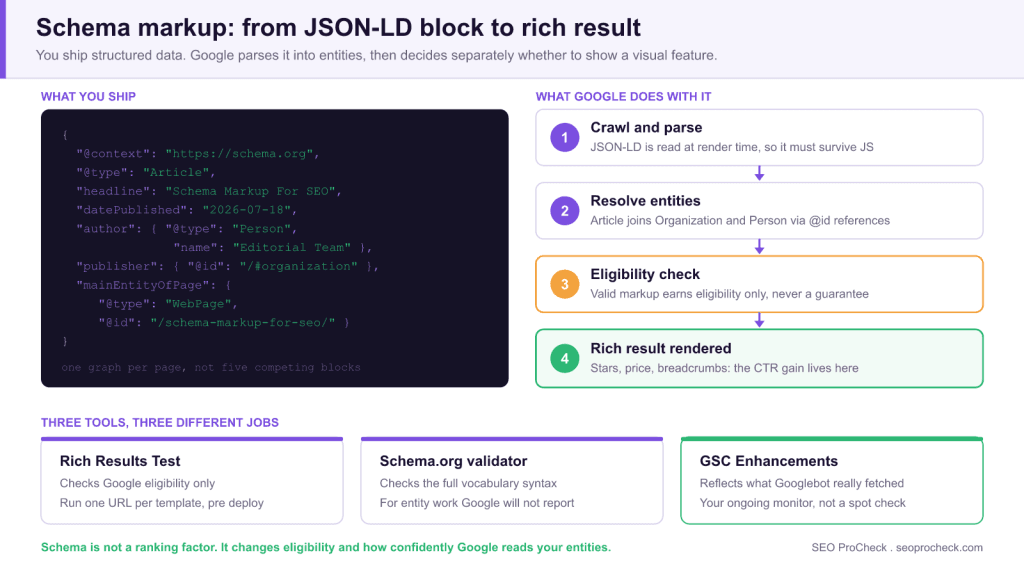
A minimal Article implementation looks like this: note the @id anchors, which let you connect the Article to its Organization publisher without repeating the full object:
<script type="application/ld+json">
{
  "@context": "https://schema.org",
  "@type": "Article",
  "headline": "Schema Markup For SEO",
  "datePublished": "2026-07-18",
  "dateModified": "2026-07-18",
  "author": { "@type": "Person", "name": "Editorial Team" },
  "publisher": { "@id": "https://example.com/#organization" },
  "mainEntityOfPage": { "@type": "WebPage", "@id": "https://example.com/schema-markup-for-seo/" }
}
</script>
Field-tested rules that separate clean implementations from messy ones:
- One graph per page, not five competing blocks. Most WordPress sites end up with duplicate schema from the theme, the SEO plugin, and a page builder simultaneously. Crawl your own site and count
application/ld+jsonblocks per template: if a page emits two conflicting Article objects, fix the source, don't add a third. - Markup must match visible content. Google treats invisible-content markup (review stars for reviews that don't exist on the page) as a structured data spam violation, and a manual action here kills all rich results sitewide.
- Required vs. recommended properties: missing required fields make the item ineligible; missing recommended fields reduce which features it can appear in. In the Rich Results Test, red = fix now, amber = fix when convenient.
- Template it, don't hand-write it. Schema belongs in the theme or plugin layer, populated from real post fields (title, publish date, featured image). Hand-pasted JSON-LD drifts out of date the first time someone edits the post.
Validation errors and what they actually mean
The Rich Results Test and the GSC Enhancements reports use terse labels. This is what each one usually means in practice, and what to check first:
| Reported message | What it usually means | First thing to check |
|---|---|---|
Missing field "image" | A required property for the feature is absent, so the item is ineligible | Whether the template outputs a featured image at all, and whether the URL is absolute |
Missing field "aggregateRating" (recommended) | Amber warning only: the item is still eligible, just for fewer features | Whether you genuinely have ratings on the page. Never add the field without visible reviews |
Invalid object type for field "author" | You passed a plain string where the vocabulary expects a Person or Organization node | The author field in the SEO plugin or theme template |
Either "offers", "review" or "aggregateRating" should be specified | A Product node with none of the three commerce properties, common on category templates | Whether the Product type belongs on that template at all |
Parsing error: Missing ',' or '}' | Broken JSON, almost always an unescaped quote in a title or description | The last content edit, and whether the template escapes field values |
Duplicate field or two Article nodes on one URL | Theme, SEO plugin and page builder all emitting schema at once | Count the application/ld+json blocks in view-source, then disable the losers |
| Valid item, zero impressions in the Search appearance filter | Eligible but not selected: a quality or feature-level decision, not a markup fault | Page quality and the feature's current availability, not more markup |
Rich Results Impact
While schema isn't a direct ranking factor, rich results improve click-through rates. Review stars, recipe cards, and other rich results make listings more prominent and informative, while FAQ accordions stopped appearing in Google for every site on May 7, 2026. This visibility advantage can significantly impact traffic from search.
Measure the impact instead of assuming it. In Google Search Console, go to Performance > Search results, click + New > Search appearance, and filter to the specific appearance type (e.g. "Product snippets", "Review snippet", "Videos"). Compare CTR for that appearance against your site average at the same position range: that delta is your schema payoff. Sitewide, monitor the dedicated reports under Search Console > Shopping and the Enhancements section in the left nav: each detected schema type gets its own report with valid/invalid item counts, and a spike in "invalid items" after a theme update is usually your first warning that a template change broke the markup.
Validation and Monitoring Workflow
Three tools, three different jobs. Use all of them:
- Rich Results Test (search.google.com/test/rich-results): checks Google eligibility only. Run it on one URL per template before and after any deploy that touches head output.
- Schema.org validator (validator.schema.org): checks syntax against the full vocabulary, including types Google ignores. Use it for Organization/entity work that the Rich Results Test won't report on.
- Debugging workflow for structured data covers the order to run these in when a template breaks.
- GSC Enhancements reports: your ongoing monitor. Validation errors here reflect what Googlebot actually fetched, so they catch problems the on-demand testers miss (e.g. JavaScript-injected schema that fails at render time).
Decision rule for prioritizing schema work: start with whatever template has the most indexed pages (usually the blog post or product template), fix duplicate/conflicting blocks first, then add BreadcrumbList sitewide, then the one vertical type your business model depends on. Organization markup on the homepage is a one-hour job worth doing early because it feeds entity reconciliation everywhere else.
Frequently Asked Questions
Does schema markup improve rankings directly?
No. Google has repeatedly confirmed structured data is not a ranking factor. What it changes is eligibility for rich results and how confidently Google understands your entities. The traffic gain comes from CTR on enhanced listings, not from position improvement, though better CTR on a listing can compound over time.
Should I use JSON-LD or microdata?
JSON-LD, full stop. It's Google's stated preference, it keeps markup out of your HTML templates so designers can't accidentally break it, and it's the only format most SEO plugins and tag managers support cleanly. Only keep microdata if it's already deployed and validating: migrating working microdata is low priority.
Can I add schema through Google Tag Manager?
You can: a Custom HTML tag injecting a JSON-LD script works, and Google renders it. But it's a last resort: GTM-injected schema only exists after rendering, which delays pickup, and it lives outside your CMS where content editors will never keep it in sync. Use it for testing hypotheses or when you have zero CMS access, then migrate to the template.
Why does my schema validate but show no rich results?
Validity means eligibility, not entitlement. Google applies quality thresholds per feature and per site: thin pages, low-trust sites, and deprecated types (HowTo, and FAQ since May 7, 2026) validate perfectly and get nothing. Check the Search appearance filter in GSC Performance: if impressions for the feature are zero after 4 to 6 weeks on an indexed page, Google has decided not to show it, and more markup won't change that: page quality might.
Does schema markup matter for AI search and LLMs?
Increasingly, yes. Structured data gives AI answer engines clean entity-attribute-value triples instead of forcing them to parse prose, and clear Organization/Person/Product markup improves the odds of accurate attribution when your content is summarized or cited. It's the same work as classic schema hygiene, so treat AI visibility as a bonus reason, not a separate project.
How much schema is too much?
Mark up what's genuinely on the page and stop. Stacking a dozen types on one URL doesn't multiply anything: it increases the odds of a conflict or a spammy-markup flag. A typical content page needs exactly three things: the content type (Article/Product/etc.), BreadcrumbList, and a reference to the site's Organization node. That's it.
This resource provides practical guidance for implementing structured data that improves search presence.
Source: https://www.electriqmarketing.com/blog/schema-markup-for-seo
Take this with you
The assistant links open with a question about this page already written. Nothing is sent until you press enter.
Claude Vincent is a technical SEO consultant focused on crawlability, rendering, and AI-search visibility. He writes the field guides and case studies at SEO ProCheck, with a bias toward the durable, unglamorous work that decides whether search engines and AI answer engines can actually read and cite a site.
About SEO ProCheck
Technical SEO consulting and GEO strategy with 20 years of enterprise experience. Case studies, resources, and tools for search and AI visibility.
Work With Me
Technical SEO audits, GEO strategy, site migrations, and international SEO. Hourly consulting for teams who need hands-on support, not just reports.
Subscribe to our newsletter!








Recent Posts
- Most Top Sites Never Say Who They Are in Structured Data October 14, 2026
- Homepage Titles Are Mostly Too Short, Not Too Long October 8, 2026
- Who Actually Serves an llms.txt? 184 Top Sites Measured September 29, 2026