

AI Summary
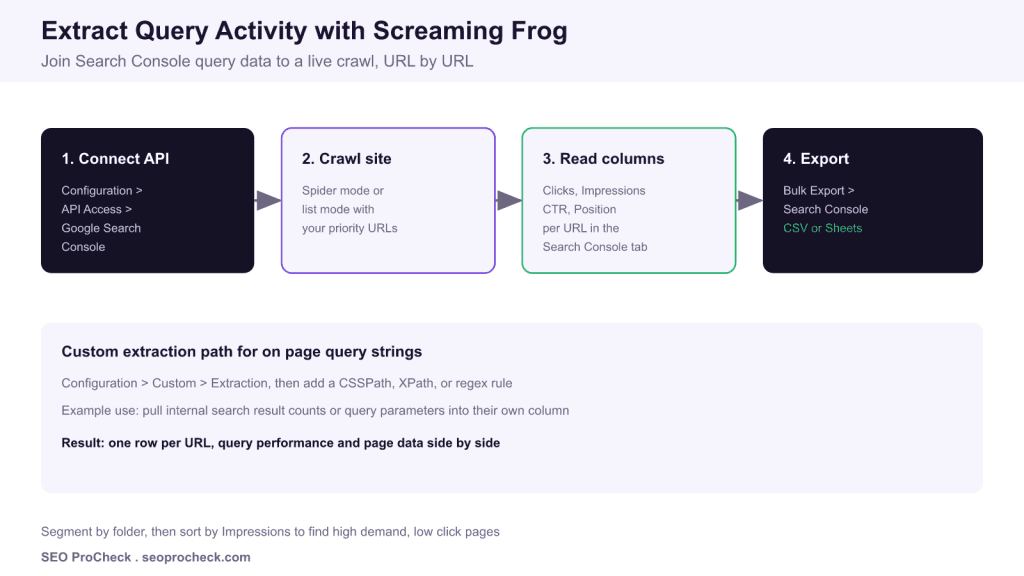
Screaming Frog can pull Search Console query activity into a crawl by connecting the Google Search Console API, so every URL shows its Clicks, Impressions, CTR, and Position next to its on page data. That single joined view makes it fast to spot high demand pages that lose clicks and to prioritise fixes.
- Connect under Configuration, API Access, Google Search Console before crawling.
- Query metrics attach per URL in the Search Console tab of the crawl.
- Sort by Impressions to surface high demand, low click pages.
- Add Custom Extraction rules to capture on page query strings in the same export.
Daniel Hinckley shared a compact tip on LinkedIn: use Screaming Frog to extract query activity. This page keeps his source reference and expands it into a repeatable workflow you can run on any property, plus the exact menu paths and a worked prioritisation example.
Why join query data to a crawl
Search Console tells you how queries perform. A crawler tells you how pages are built. Screaming Frog lets you merge both so that a single row shows the URL, its Clicks, Impressions, CTR, and Position, and its technical attributes such as title length, status code, indexability, and word count. Instead of tabbing between tools, you get demand and page quality side by side, which is where prioritisation decisions actually get made.
Step by step: connect the Search Console API
- Open Configuration, then API Access, then Google Search Console.
- Sign in and select the exact property that matches the site you are crawling, including the correct http or https and www variant.
- Choose your date range and, if needed, a country or device filter under the API settings.
- Start the crawl in spider mode from the homepage, or switch to list mode to crawl only a set of priority URLs you paste or upload.
- When the crawl finishes, open the Search Console tab to see the joined Clicks, Impressions, CTR, and Position columns.
Reading the columns
| Column | What it tells you | Action trigger |
|---|---|---|
| Impressions | Search demand the URL already reaches | High value if paired with weak CTR |
| CTR | Share of impressions that click | Below expected: rewrite title and meta description |
| Position | Average ranking for matched queries | Positions 5 to 15: strengthen content and internal links |
| Clicks | Realised traffic | Zero clicks with impressions: intent mismatch |
Custom extraction for on page query strings
The same crawl can capture on page data that Search Console never sees. Open Configuration, then Custom, then Extraction, and add a rule using CSSPath, XPath, or regex. Common uses include pulling an internal search result count, a query parameter value, or a visible SKU into its own column so it exports next to the query metrics.
A worked prioritisation pass
After the crawl, use Bulk Export, then Search Console, to send the joined table to CSV or Google Sheets. Sort by Impressions descending, then filter to rows where CTR sits below your site average and Position is between 5 and 15. Those pages already earn demand and sit within striking distance of the top results, so a sharper title, a stronger meta description, and two or three contextual internal links often move them quickly.
For more depth, see our Screaming Frog custom extraction guide, the advanced usage guide, and how to reinforce these wins with an internal linking strategy.
Frequently asked questions
How does Screaming Frog pull Search Console query data?
Connect it under Configuration then API Access then Google Search Console, authorise your property, and run the crawl. Screaming Frog joins Clicks, Impressions, CTR, and Position to each matching URL in the Search Console tab.
Does this show individual keywords or only URL level metrics?
The API join reports performance at the URL level. To see the queries themselves you export from Search Console directly or use the Search Analytics for Sheets style workflow, then match on URL in a spreadsheet.
Do I need a paid Screaming Frog licence?
The Search Console API connection and larger crawls require a paid licence. The free tier is capped at 500 URLs and does not include the API integrations.
What is the difference between spider mode and list mode here?
Spider mode discovers URLs by following links from a start URL. List mode crawls a fixed set of URLs you paste or upload, which is ideal when you only want query data for a specific priority set.
How do I find high demand pages that underperform?
Sort the joined data by Impressions descending, then scan for low CTR or weak average Position. Those pages already earn demand but lose the click, which makes them fast title, meta, and content wins.
Can I extract on page query strings too?
Yes. Use Configuration then Custom then Extraction and add a CSSPath, XPath, or regex rule to capture internal search counts or query parameters into their own column alongside the crawl data.
Take this with you
The assistant links open with a question about this page already written. Nothing is sent until you press enter.
Claude Vincent is a technical SEO consultant focused on crawlability, rendering, and AI-search visibility. He writes the field guides and case studies at SEO ProCheck, with a bias toward the durable, unglamorous work that decides whether search engines and AI answer engines can actually read and cite a site.
About SEO ProCheck
Technical SEO consulting and GEO strategy with 20 years of enterprise experience. Case studies, resources, and tools for search and AI visibility.
Work With Me
Technical SEO audits, GEO strategy, site migrations, and international SEO. Hourly consulting for teams who need hands-on support, not just reports.
Subscribe to our newsletter!








Recent Posts
- Most Top Sites Never Say Who They Are in Structured Data October 14, 2026
- Homepage Titles Are Mostly Too Short, Not Too Long October 8, 2026
- Who Actually Serves an llms.txt? 184 Top Sites Measured September 29, 2026