

AI Summary
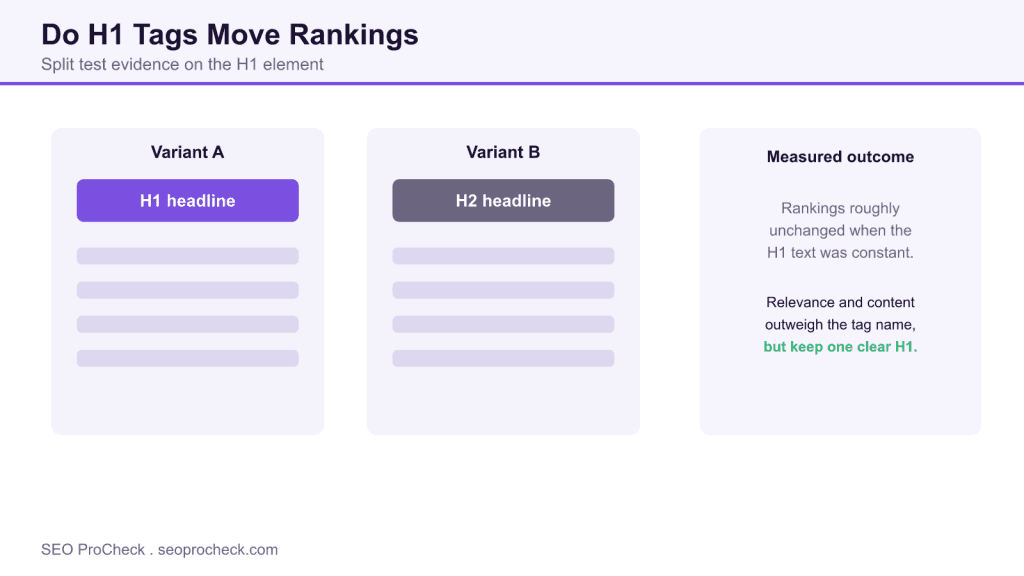
H1 tags are a best practice for structure and accessibility, but controlled tests, including the well-known Moz experiment, suggest that swapping an H1 for an H2 while keeping the same text has little measurable ranking effect. Keep one clear, descriptive H1 per page for users and semantics, and do not expect the tag name alone to move rankings.
- The Moz experiment swapped H1 tags for H2 tags and found negligible ranking change.
- The wording and relevance of the heading matter more than which tag wraps it.
- One clear H1 still helps accessibility, document structure and content clarity.
- Multiple or missing H1s are more likely to cause problems than the tag choice itself.

What the H1 experiment actually tested
The Moz study referenced in the source below took a direct approach: on a set of pages, it changed the main heading from an H1 tag to an H2 tag while leaving the visible text and everything else the same. The question was whether the tag name itself, H1 versus H2, carried ranking weight. The observed effect was negligible, which supports Google guidance that its systems are flexible about heading tags and care more about the content of a heading than its exact level.
That does not make headings unimportant. It reframes why they matter. For the structural view, see our guide on how to structure headings for SEO and the reference entry on heading structure.
Why keep an H1 anyway
Three reasons survive the experiment. Accessibility comes first: screen reader users navigate by heading level, and a clear H1 announces the page subject. Document semantics come second: a single top-level heading gives the page an unambiguous title within its content, which helps both assistive technology and parsers. Clarity comes third: authoring discipline that produces one strong H1 tends to produce better structured content overall. None of these depend on the H1 being a magic ranking lever; they depend on it being consistent and descriptive.
The mistakes that do cause problems
If the tag name is close to neutral, the failure modes are structural. A missing H1 leaves the page without a clear subject heading. Multiple H1s dilute that clarity and can confuse assistive technology, which is why we flag pages with duplicate H1s. Skipped levels, jumping from H1 straight to H4, break the outline. An H1 that repeats the exact title tag verbatim is a missed chance to add context. Fixing these is higher value than agonizing over whether a heading should be H1 or H2.
Practical guidance
Use exactly one H1 per page and make it describe the page subject in plain language. Let it complement, not duplicate, the title tag, since the two serve different audiences: the title tag speaks to the search result, the H1 speaks to the reader on the page. Nest H2 and H3 headings logically beneath it to build a clean outline. Then spend your remaining effort on the content those headings introduce, because relevance and depth are what the same experiments consistently show to matter most.
H1 decisions and their real impact
| Decision | Ranking impact | Why it still matters |
|---|---|---|
| H1 versus H2 for the same text | Negligible in tests | Semantics and accessibility favor a true H1 |
| Missing H1 | Low to moderate | Page lacks a clear subject heading |
| Multiple H1s | Low, mostly clarity | Confuses assistive tech and document outline |
| H1 duplicates title tag exactly | Low | Wastes a chance to add context for readers |
| Descriptive, single H1 | Supportive | Best for users, structure and clarity |
What has changed since
Google has since reiterated that its systems are flexible about heading tags and do not require a formal H1, which is consistent with the experiment. The enduring advice remains to use one clear, descriptive H1 for structure and accessibility rather than for a direct ranking boost.
Case summary and source
The original third-party summary and attribution for this page are preserved below.
Content-driven SEO success requires strategic approaches to creation, optimization, and management. This case study demonstrates how content strategy directly drives organic growth when aligned with user needs and search behavior.
Content Strategy Framework
Effective content strategy begins with understanding target audiences, their questions, and the competitive content landscape. This case study outlines the strategic framework that guided content decisions, from topic selection to format choices.
Content Development Process
Moving from strategy to published content requires efficient processes for research, creation, and optimization. This case study documents workflows, quality standards, and production approaches that enabled consistent, high-quality output.
Optimization and Distribution
Published content requires ongoing optimization based on performance data. This case study covers how content was refined post-publication, how internal linking supported content performance, and how distribution amplified content reach.
Results and Attribution
Measuring content ROI requires connecting content efforts to business outcomes. This case study demonstrates the traffic, engagement, and business results achieved through strategic content investment. Attribution methodology helps validate content strategy effectiveness.
Content SEO case studies help practitioners build cases for content investment with documented results.
Source: https://moz.com/blog/h1-seo-experiment
Frequently asked questions
Are H1 tags a ranking factor?
H1 tags are a minor, supportive signal at best. Controlled tests such as the Moz experiment found that changing an H1 to an H2 with the same text had negligible ranking impact, so relevance and content quality matter far more than the tag itself.
Should every page have an H1?
Yes, using one clear H1 per page is best practice. It helps screen reader users, gives the page an unambiguous subject heading and supports a clean document outline, even though the tag alone will not move rankings much.
Is it bad to have multiple H1 tags?
It is not usually a ranking disaster, but multiple H1s weaken the clarity of your document structure and can confuse assistive technology. A single, descriptive H1 is the cleaner choice.
Should my H1 match my title tag?
They can be similar but do not have to be identical. The title tag targets the search result, while the H1 speaks to the on-page reader, so letting them complement each other adds context.
Does Google require an H1?
No. Google has said its systems are flexible about heading tags and can understand a page without a formal H1. The recommendation to use one is about structure and accessibility rather than a strict requirement.
What heading mistakes actually hurt?
Missing headings, skipped levels such as jumping from H1 to H4, and duplicate H1s are more likely to cause real problems than choosing between H1 and H2 for a single heading.
Take this with you
The assistant links open with a question about this page already written. Nothing is sent until you press enter.
Claude Vincent is a technical SEO consultant focused on crawlability, rendering, and AI-search visibility. He writes the field guides and case studies at SEO ProCheck, with a bias toward the durable, unglamorous work that decides whether search engines and AI answer engines can actually read and cite a site.
About SEO ProCheck
Technical SEO consulting and GEO strategy with 20 years of enterprise experience. Case studies, resources, and tools for search and AI visibility.
Work With Me
Technical SEO audits, GEO strategy, site migrations, and international SEO. Hourly consulting for teams who need hands-on support, not just reports.
Subscribe to our newsletter!








Recent Posts
- Most Top Sites Never Say Who They Are in Structured Data October 14, 2026
- Homepage Titles Are Mostly Too Short, Not Too Long October 8, 2026
- Who Actually Serves an llms.txt? 184 Top Sites Measured September 29, 2026