

Does adding a question on the cost of a product within the title tag help organic traffic?
- July 26, 2023
- Metadata
AI Summary
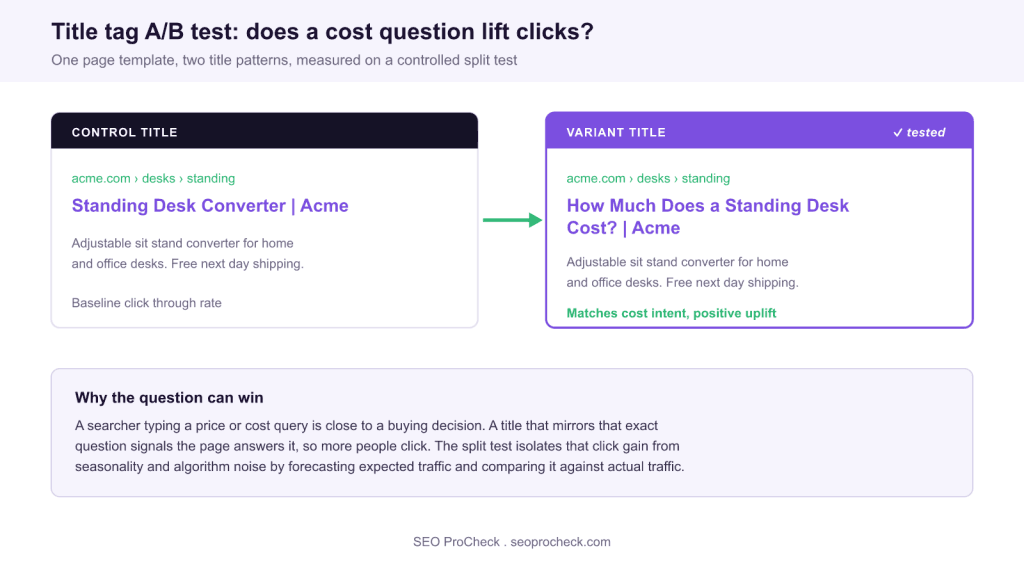
Yes. In a controlled SEO split test, adding a cost question such as "How much does a standing desk cost?" to the title tag produced a positive organic click uplift on transactional pages by matching buyer intent. The gain is real but page specific, so treat it as a pattern to validate on your own templates rather than a guaranteed win.
- An SEO A/B test splits similar pages into control and variant groups, then forecasts expected traffic to isolate the true effect of the title change.
- A cost or price question mirrors the exact query a buyer types, which is a strong intent match on transactional product and pricing pages.
- Google frequently rewrites title tags, so a rewritten title can mask your test. Check the title Google actually shows, not just the tag you set.
- Run the test to statistical significance, usually across several weeks, and validate before any sitewide rollout.
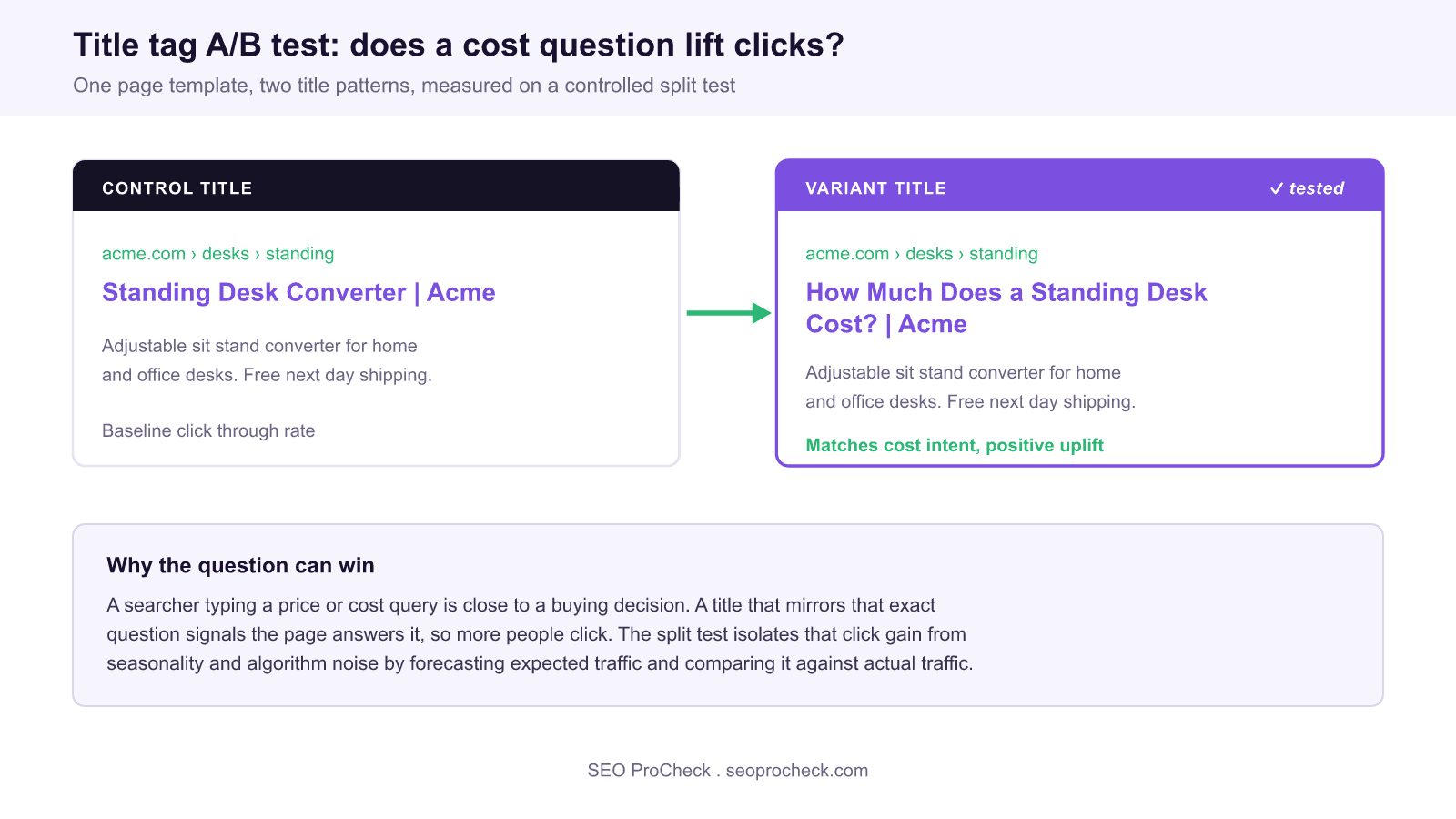
This SEO case study documents a title tag experiment that asked a narrow, testable question: does putting a cost question inside the title tag earn more organic clicks than a standard product title? The short answer from the split test was yes, with a positive uplift on transactional pages. The longer answer, and the part worth your time, is why it worked, when it does not, and how to run the same test cleanly on your own site.
Why test a title tag instead of just changing it
Changing every title on the site at once feels productive, but it leaves you with no clean baseline. If traffic moves, you cannot tell whether the title change caused it or whether it was seasonality, a competitor, or an algorithm update. A proper SEO A/B test solves this. You split a set of similar pages into a control group and a variant group, apply one change to the variant, and use a forecasting model to compare the actual traffic against what those pages would have earned unchanged. The gap between forecast and reality, tested for statistical significance, is the true effect of the title change. This is the same click behaviour discipline that underlies our note on pogosticking and the click pattern that decides rankings: measure what searchers actually do, do not assume it.
The hypothesis: a cost question in the title
The test behind this case study asked a focused question: does adding a phrase like how much a product costs to the title tag increase organic clicks? The logic is intent matching. Someone typing a cost or price query is close to a decision, and a title that mirrors their exact question signals that the page answers it. The result reported in the source was a positive uplift on the transactional pages tested. Read the source for the full methodology and figures, and treat the number as evidence from that site rather than a guaranteed outcome for yours.
Source: https://www.searchpilot.com/resources/case-studies/adding-question-on-cost-to-title-tag
Why a cost or price modifier matches intent
A title tag is an advertisement that competes against nine other results on the page. When the words in your title repeat the words in the query, two things happen: Google often bolds the match, and the searcher recognises their own question staring back at them. For commercial queries, "cost", "price", and "how much" are among the highest intent modifiers a person can type, because they are asked at the moment of comparison, not idle curiosity. A title that answers "How much does it cost?" tells that searcher your page holds the number they came for, which is a stronger promise than a generic brand plus category title.
This is also why the effect is uneven. On a transactional product or pricing page the promise is credible, because the page really does carry a price. On an informational article that never states a figure, the same title over-promises, the searcher pogosticks straight back to Google, and any short term click gain decays. Match the modifier to what the page can actually deliver.
| Title modifier | Query intent it matches | Best page type | Watch out for |
|---|---|---|---|
How much does X cost? | Cost research, close to purchase | Product, pricing, service pages | Google may rewrite it to a plainer title |
X price or X cost | Direct price lookup | Product and category pages | Falls flat if the page hides the price |
Is X worth it? | Evaluation before buying | Review and comparison pages | Must genuinely answer the question |
Best X for Y | Shortlisting options | Category and roundup pages | Competitive, needs strong content behind it |
How to X | Task completion | Guides and how-to content | Informational, rarely transactional |
Title length, truncation, and where the modifier goes
A question title only works if the searcher can read it. Google truncates the SERP title around 580 to 600 pixels, which is roughly 55 to 60 characters for average text, and it truncates by pixel width, not character count, so wide capital letters eat the budget faster. Front load the words that carry the intent. "How much does a standing desk cost?" reads clearly even when the brand at the end is clipped, whereas "Acme Furniture Company Standing Desk Converter Pricing and Cost Guide" buries the cost promise past the fold. Put the modifier and the product name first, and let the brand fall off the end if something has to go.
Do not stuff two modifiers into one title. "How much does a standing desk cost and is it worth it?" splits the promise and reads as spam. One clear question per title. If the meta description also repeats the cost angle, you reinforce the promise without crowding the title, and you avoid the separate problem of a title and meta description that say the same thing.
What has changed since this test
The single biggest shift is that Google now rewrites title tags far more aggressively than it did when many early title experiments ran. Since the 2021 title generation update, Google routinely replaces the title you set with your H1, anchor text, or other on-page text when it judges the result a better match for the query. That matters for a cost question test in two ways. First, your carefully crafted question may never reach the SERP, so any test has to measure the title Google displays, not just the tag in the source. Second, if Google is already synthesising a cost oriented title from your on-page content, hard coding the question in the tag may show little additional lift. Always inspect the live result for your target queries before concluding a test failed.
The second shift is AI Overviews and AI Mode absorbing more informational cost queries at the top of the page. Pure "what does X cost" research questions increasingly get answered inline, which can depress clicks to every organic result regardless of title. Transactional and branded cost queries, where the searcher wants a specific vendor and a checkout, are far less affected, which is another reason this pattern holds up best on genuinely transactional pages.
| Step | Action | Output |
|---|---|---|
| Hypothesis | A question title lifts clicks on cost intent | A testable prediction |
| Split | Bucket similar pages into control and variant | Comparable groups |
| Measure | Model expected clicks against actual clicks | Significance and uplift |
| Decide | Roll out, iterate, or revert | An evidence based change |
How to run your own version
Pick a template with enough comparable pages, such as product or pricing pages, so the split has statistical power. Change only the title tag pattern in the variant group and hold everything else constant. Let the test run long enough to reach significance, usually several weeks, so the model can separate the change from normal fluctuation. If the variant wins, roll the pattern out and test the next idea; if it loses or stays flat, revert and learn. This is how you build title decisions on evidence instead of opinion.
A worked example makes the buckets concrete. Say you run a store with 400 product pages on one template. Randomly assign 200 to control, which keeps the pattern "[Product] Converter | Acme", and 200 to variant, which becomes "How Much Does a [Product] Cost? | Acme". Both groups keep the same content, price, schema, and internal links, so the only difference is the title pattern. After the model has enough data, usually several weeks of clicks, you compare forecast clicks to actual clicks for each group. If the variant beats its forecast and the control tracks its forecast, the question title is doing the work, not the season. For more experiments in this vein, browse our metadata case studies.
Frequently asked questions
In this controlled SEO A/B test a title that asked how much a product costs matched buyer intent and produced a positive organic uplift on transactional pages. Results vary by site, so validate on your own pages before rolling it out.
It splits similar pages into a control group and a variant group, applies one change to the variant, and uses a forecasting model to compare actual traffic against what the pages would have earned unchanged. The gap between forecast and reality, once it is statistically significant, is the isolated effect of the change.
Because sitewide changes give you no clean baseline. Testing tells you whether the title change caused the traffic difference, rather than seasonality, a competitor, or an algorithm update that happened at the same time.
Transactional product and pricing pages where searchers actively look for cost information and the page really carries a price. Informational pages that never state a figure tend to over-promise, so they rarely see the same lift.
Google frequently replaces the title you set with your H1 or other on-page text when it judges that a better match. Inspect the live SERP for your target queries to see the title Google actually displays, and strengthen the on-page heading so the cost angle survives any rewrite.
Long enough to reach statistical significance, typically several weeks, so the forecasting model can separate the change from normal fluctuation and seasonality. Ending a test early on a promising first week is the most common way to fool yourself.
Take this with you
The assistant links open with a question about this page already written. Nothing is sent until you press enter.
Claude Vincent is a technical SEO consultant focused on crawlability, rendering, and AI-search visibility. He writes the field guides and case studies at SEO ProCheck, with a bias toward the durable, unglamorous work that decides whether search engines and AI answer engines can actually read and cite a site.
About SEO ProCheck
Technical SEO consulting and GEO strategy with 20 years of enterprise experience. Case studies, resources, and tools for search and AI visibility.
Work With Me
Technical SEO audits, GEO strategy, site migrations, and international SEO. Hourly consulting for teams who need hands-on support, not just reports.
Subscribe to our newsletter!








Recent Posts
- Most Top Sites Never Say Who They Are in Structured Data October 14, 2026
- Homepage Titles Are Mostly Too Short, Not Too Long October 8, 2026
- Who Actually Serves an llms.txt? 184 Top Sites Measured September 29, 2026