

Foot Locker Image SEO Case Study: 228% Increase for Google Image Thumbnails
- July 26, 2023
- Metadata

AI Summary
Foot Locker's category pages served product images at 67x67 pixels in their server rendered HTML, so Google crawled the files but rarely indexed them and the listings appeared without image thumbnails. Raising the minimum dimensions to 200x200 made the images eligible, and Brodie Clark's analysis reports a 228 percent increase in estimated monthly organic visits to pages that now carry a thumbnail.
- The gate is the intrinsic size of the delivered image, not the CSS box it is displayed in.
- Google publishes no exact pixel minimum, so treat 67x67 as clearly too small and 200x200 as a workable floor rather than an official threshold.
- The reported metric is visits to pages that display a thumbnail, an eligibility gain, not a proven click lift.
- Change was implemented 20 July 2023, measured against JD Sports and Hype DC using third party index data.
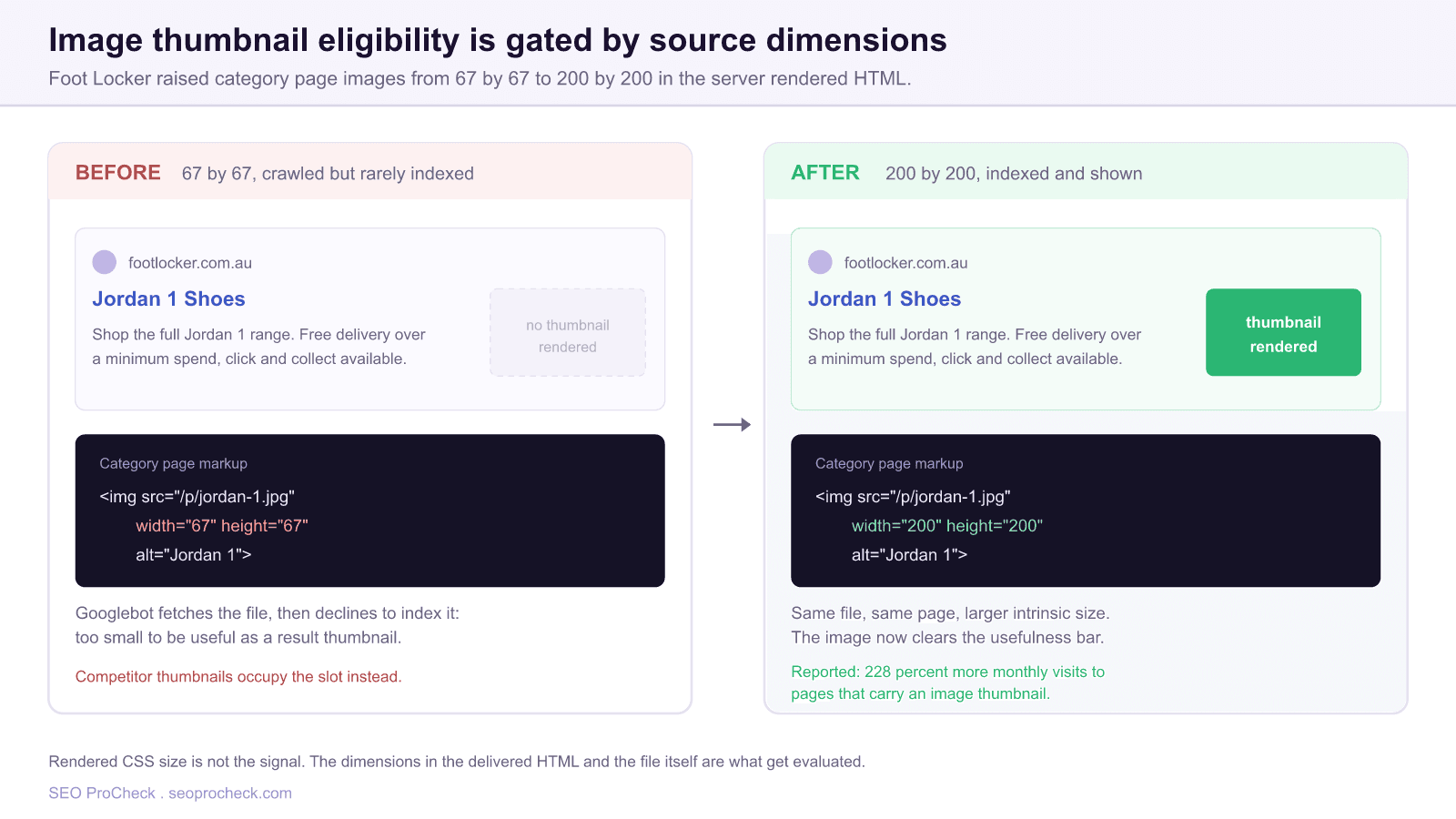
Most image SEO advice stops at alt text and file naming. This case study is useful precisely because it is about none of that. Foot Locker's images were crawlable, correctly labelled and served from a working CDN. They simply were not big enough to be worth indexing, and that one property was enough to keep image thumbnails off their listings while competitors collected them.
The finding, documented by Brodie Clark, is that Foot Locker's category pages carried product images with very small dimensions, 67x67 pixels, in the server rendered HTML. Google fetched those files. It largely declined to index them. The team raised the minimum to 200x200, which Clark notes was "the highest they were prepared to increase without impacting page size", and the thumbnail presence changed materially. The change went in on 20 July 2023.
Why a small image gets crawled and then dropped
Crawling and indexing are separate decisions for images just as they are for pages. Googlebot will happily fetch a 67x67 JPEG. Whether that file then enters the image index depends on whether it is judged useful, and a thumbnail that cannot be rendered at result size without falling apart is not useful.
Google does not publish a hard pixel minimum, and you should be suspicious of any article that quotes one as though it were documented. What Google's own image guidance does say is that images should be high quality and large enough to be displayed well. The practical read from this case study is a floor, not a formula: 67x67 was clearly under it, 200x200 cleared it for this retailer's templates.
Three distinctions decide whether your images are actually eligible, and teams routinely confuse them:
- Intrinsic file dimensions. The real pixel dimensions of the file the server returns. This is what matters most.
- HTML width and height attributes. What the markup declares. These should match the intrinsic size and are also what protects you from layout shift.
- CSS display size. The box the browser paints the image into. This is not the signal. An image displayed at 400px wide via CSS while the underlying file is 67px wide is still a 67px image.
Foot Locker's problem lived in the first two. The category template was generating genuinely small derivatives, and the markup declared them honestly. Anyone auditing by screenshot would have seen normal looking product tiles and missed it entirely.
How to audit your own templates for this
The audit is fast if you look at the delivered HTML rather than the rendered page. Fetch a category page as Googlebot would receive it and inspect the image nodes directly.
- Pull the raw HTML with
curland read the<img>tags on a listing template. Do this for the server response, not the DevTools Elements panel, which shows the post JavaScript DOM. - Compare declared attributes with the real file. Request the image URL itself and check its actual dimensions. A CDN that resizes on a query string, for example
?w=67or/67x67/in the path, is the usual culprit. - Check the
srcsetcandidates. If you serve responsive images, confirm the smallest candidate is not the one Google is most likely to take, and that a genuinely large candidate exists. Asizesattribute that resolves tiny on the crawler's viewport can starve the selection. - Confirm the images are reachable. Images blocked by
robots.txt, including on a separate CDN hostname, cannot be indexed at all. Our disallowed image check covers how that failure presents. - Verify lazy loading is not hiding them. Native
loading="lazy"with a realsrcis safe. A placeholder insrcwith the true URL parked indata-srcand nonoscriptfallback is not. - Spot check indexation by searching for a distinctive product image in Google Images with a
site:filter on your domain. Absence across a whole template is the signal you are looking for, not the absence of one file.
| Element | Before | After | Why it mattered |
|---|---|---|---|
| Category image dimensions | 67x67 px | 200x200 px minimum | Cleared the usefulness bar for image indexing |
| Where the size was set | Server rendered HTML | Server rendered HTML | No JavaScript dependency, so the change took effect on crawl |
| Constraint accepted | Smallest possible payload | Largest size tolerable for page weight | Explicit performance trade off, not an unbounded increase |
| Reported outcome | About 60K monthly visits to pages with thumbnails | About 195K, a 228 percent increase | Eligibility metric, estimated from third party index data |
| Benchmark query | "jordan 1", position 2, no thumbnail | Thumbnail present | High volume term in the Australian market |
Reading the 228 percent honestly
This is where practitioners get burned when they take a case study to a stakeholder. The reported figure is a 228 percent increase in estimated organic visits per month to pages that now have image thumbnails, moving from roughly 60,000 to roughly 195,000. That is a measure of how much of Foot Locker's ranking footprint became thumbnail bearing. It is not a measurement that organic traffic rose 228 percent.
Two caveats follow from that, and both are worth stating in your own deck before someone else does:
- The traffic estimate is third party. Clark's analysis uses publicly accessible index data, benchmarked against JD Sports and Hype DC. Estimated visit figures from any index tool are directional, not audited analytics.
- Thumbnail presence is a visibility change, not a guaranteed click change. A thumbnail plausibly improves click through rate on a crowded mobile result, and Foot Locker overtook Hype DC on thumbnail presence in the Australian market, but attributing a specific CTR delta would require split testing that this study does not claim to have run.
Framed correctly, it is still a strong result. A template level change with a bounded performance cost moved a large share of a retailer's ranking inventory from ineligible to eligible. That is exactly the kind of intervention worth prioritising, because it is one engineering ticket applied across thousands of URLs.
Turning this into a repeatable standard
The durable lesson is to make image dimensions a template standard with an owner, rather than an incident you rediscover every eighteen months. Practical steps:
- Set a documented minimum for every image role in your design system: listing tile, product hero, editorial inline, logo. Write the number down and put it in the component definition.
- Add a crawl assertion. Configure your crawler to extract
<img>width and height and flag any page where a content image declares under your minimum. This turns a one off audit into a regression test. - Balance against page weight deliberately. Foot Locker's team picked the largest size they would accept, which is the right instinct. Serve modern formats and correct compression so the dimension increase does not become a Core Web Vitals regression.
- Keep an image sitemap or image entries in your existing sitemaps so discovery does not depend solely on in page links.
If you want the wider checklist that this sits inside, our complete image SEO guide covers formats, compression and markup, image SEO beyond alt text covers the technical delivery layer, and Google Images SEO covers how selection and ranking work once your files are actually eligible.
Frequently asked questions
Why are my images crawled but not indexed?
Crawling and indexing are separate decisions. Google will fetch an image and still decline to index it if the file is too small to be useful, is low quality, is a decorative asset, or is duplicated at scale across the site. Very small intrinsic dimensions, as in this case study, are one of the most common and most fixable causes.
What image size does Google need to show a thumbnail in search results?
Google does not publish a hard minimum, so any specific number you see quoted is inference rather than documentation. This case study is a useful datapoint: 67x67 was too small, and 200x200 was sufficient for these templates. Treat 200x200 as a sensible floor for content images and go larger where page weight allows.
Does the CSS display size affect image indexing?
No. What matters is the intrinsic size of the file your server delivers, together with the dimensions declared in the HTML. An image scaled up by CSS to look large is still a small image as far as indexing is concerned, which is why this class of problem survives visual QA.
Does lazy loading stop Google from indexing images?
Native loading="lazy" with a real URL in the src attribute is safe and recommended. Problems arise with custom JavaScript lazy loaders that put a placeholder in src and hide the true URL in a data attribute, because the real file may never be discovered. Always confirm by inspecting the raw server response.
How do I check whether a specific image is indexed?
Search Google Images with a site: filter for your domain and look for the asset, and use URL Inspection on the hosting page to confirm the page itself is indexed and the image is discoverable. Judge by template rather than by single file: if an entire listing template is absent from image results, that is your signal.
Will adding image thumbnails increase my clicks?
A thumbnail makes a listing more prominent on mobile, so it is reasonable to expect a click through benefit, but this case study measures thumbnail eligibility rather than click lift. If you need a defensible CTR number, run a split test on your own templates and measure in Search Console rather than importing a figure from someone else's study.
The wider point is that image SEO failures are usually infrastructural. Nobody chose to serve 67 pixel product images; a resizing rule somewhere did, and no report surfaced it. Put a minimum in your design system, assert it in your crawl, and this stays fixed.
Source: https://brodieclark.com/foot-locker-image-seo/
Take this with you
The assistant links open with a question about this page already written. Nothing is sent until you press enter.
Claude Vincent is a technical SEO consultant focused on crawlability, rendering, and AI-search visibility. He writes the field guides and case studies at SEO ProCheck, with a bias toward the durable, unglamorous work that decides whether search engines and AI answer engines can actually read and cite a site.
About SEO ProCheck
Technical SEO consulting and GEO strategy with 20 years of enterprise experience. Case studies, resources, and tools for search and AI visibility.
Work With Me
Technical SEO audits, GEO strategy, site migrations, and international SEO. Hourly consulting for teams who need hands-on support, not just reports.
Subscribe to our newsletter!








Recent Posts
- Most Top Sites Never Say Who They Are in Structured Data October 14, 2026
- Homepage Titles Are Mostly Too Short, Not Too Long October 8, 2026
- Who Actually Serves an llms.txt? 184 Top Sites Measured September 29, 2026