

Improve Largest Contentful Paint (LCP) by removing image transitions – Performance @ Shopify
- March 6, 2023
- Web Performance
AI Summary
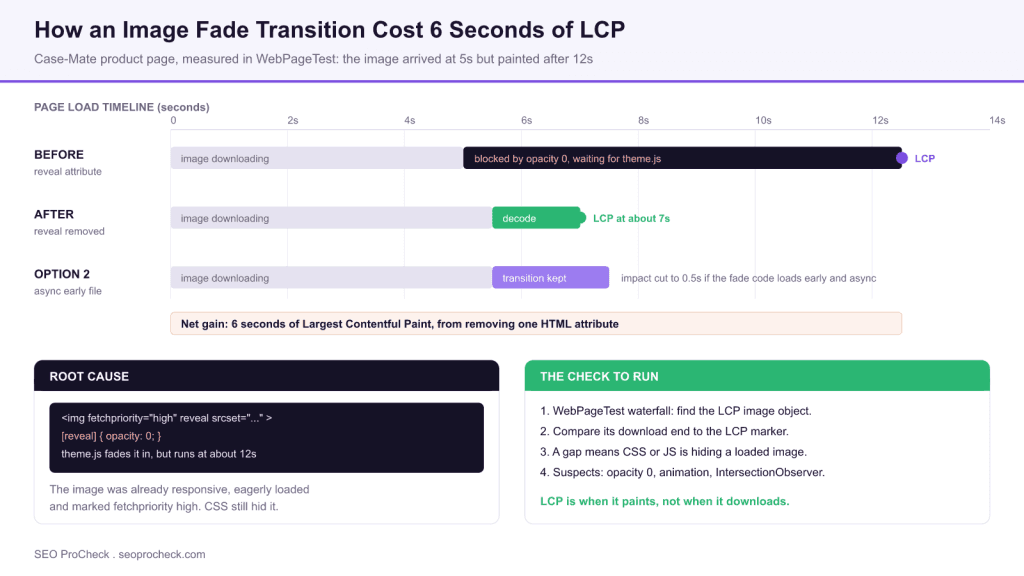
A fade in transition on a Case-Mate product image delayed Largest Contentful Paint by six seconds. The image finished downloading just before 5 seconds, but a CSS rule tied to a reveal attribute held it at opacity: 0 until theme.js executed at around 12 seconds.
- LCP is measured when the element paints, not when it downloads, so an invisible loaded image scores nothing.
- The team had already removed lazy loading, added
srcsetand setfetchpriority="high". None of it helped, because the bottleneck was render delay. - Removing one HTML attribute moved the paint from after 12 seconds to after 7 seconds.
- Keeping the transition is possible: extracted into its own async file loaded early, the penalty fell to about 0.5 seconds.
- Diagnostic: in a WebPageTest waterfall, compare the LCP image download end against the LCP marker. A wide gap means something is hiding it.
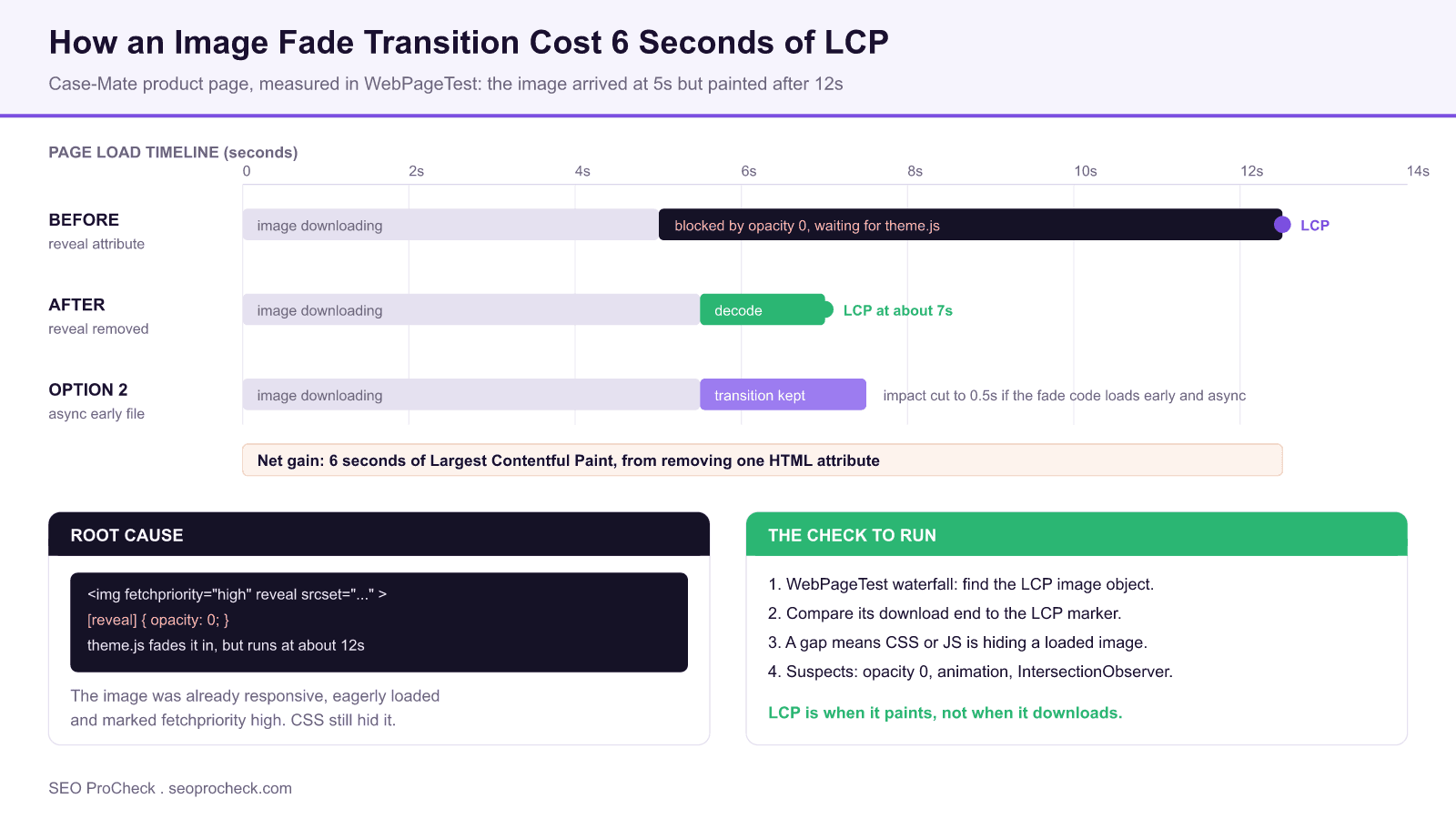
Michael Gooding of Shopify's performance team published this case study in March 2023 after an office hours session with the team at Case-Mate. It is a short piece, and it documents one of the most under diagnosed classes of Largest Contentful Paint failure: the image is fine, the network is fine, and the page still fails Core Web Vitals because CSS is deliberately hiding the hero element until a late running script says otherwise.
The setup: an image that was already optimised
What makes the case study useful is that Case-Mate had done the obvious work first. Their product image had already been:
- stripped of lazy loading, so it was eagerly requested;
- made responsive with a
srcsetattribute so the browser could pick an appropriate size; - marked with
fetchpriority="high"to raise it above other requests.
That is the standard hero image checklist, and it was all in place. The Liquid that produced it, simplified, looked like this:
{{ product
  | image_url: width: 1000
  | image_tag:
      fetchpriority: "high",
      reveal,
      widths: "400,...,1000",
      sizes: "(max-width: 999px) calc(100vw - 48px), 640px"
}}
Which rendered to markup along these lines:
<img fetchpriority="high"
     reveal
     srcset="image.jpg?width=400 400w, ... image.jpg?width=1000 1000w"
     sizes="(max-width: 999px) calc(100vw - 48px), 640px">
Everything in that tag is correct except one word: reveal.
Reading the waterfall: download time is not paint time
Using WebPageTest, the Shopify team compared when the image was downloaded against when it appeared. The product image, object 25 in that run, finished downloading just before 5 seconds. It did not appear on screen until after 12 seconds. Seven seconds of nothing, with the bytes already sitting in the browser.
| Measurement | Before (reveal attribute present) | After (attribute removed) |
|---|---|---|
| Image download completes | Just before 5 seconds | Just before 5.5 seconds |
| Image visible in the browser | After 12 seconds | After 7 seconds |
| Gap between download and paint | Over 7 seconds | About 1.5 seconds |
| Reported LCP improvement | 6 seconds | |
| If the transition is kept but loaded async and early | Impact reduced to about 0.5 seconds |
Figures reported by Michael Gooding for the Case-Mate product page, measured in WebPageTest. Object numbers differ between the two runs (25 before, 18 after) because removing the attribute changed the request order.
Chrome DevTools then supplied the cause: an opacity: 0 style was applied via the reveal attribute, making the image invisible from the moment it parsed. The JavaScript that faded it back into view lived in theme.js, and that file did not execute until around 12 seconds into the page load. The image was not slow. The image was hidden, and the thing holding the key was stuck in a queue.
The author's own summary of the size of the win is worth repeating: removing the attribute reveal recovered six seconds, which he describes as a full second of delay per letter of HTML.
Where this sits in the LCP breakdown
Google splits LCP into four consecutive sub parts. Knowing which one owns your time is the difference between a fix and a month of wasted image compression work.
| LCP sub part | What it covers | Typical cause when it is the bottleneck | Fix that actually works |
|---|---|---|---|
| Time to First Byte | Server response for the document | Slow origin, no caching | Cache, edge rendering |
| Resource load delay | Gap from TTFB to the image request starting | Late discovery, lazy loading, CSS background image, JS injected src | Static markup, preload, remove loading lazy on the hero |
| Resource load duration | The image download itself | Oversized or unoptimised file, slow CDN | Modern formats, srcset, sizes, compression |
| Element render delay | Gap from download finishing to the pixel appearing | Opacity zero, animation, render blocking script, font swap, hydration | Remove the transition, unblock the script, this case study |
Google's LCP breakdown. Case-Mate had already fixed the middle two parts. Their entire problem sat in the fourth row, which is the sub part most teams never look at.
Render delay is the sub part that hides in plain sight, because every popular diagnostic surfaces image weight and image priority while saying almost nothing about whether CSS is willing to draw the element.
The two fixes, and which one to pick
Option 1, remove the transition. The author's stated preference, and the one we would echo. In this case it meant deleting a single attribute from the image tag. Fade in animations on a hero image are almost pure cost: the user came to see the product, and animating it into existence delays the only thing they wanted.
Option 2, stop the transition code from render blocking. If the design team will not give up the effect, find the code that performs it and check when it runs. If it is buried in a bundle, extract it into its own file and load it asynchronously near the top of the document. On this same page that reduced the transition's impact to about 0.5 seconds, which is a defensible compromise.
There is a third approach the article does not cover but which is worth knowing: express the transition so that the element's default state is visible and JavaScript is only needed to enhance it. If the fade is driven purely by CSS with no JS gate, or if the hiding rule is scoped behind a class that JavaScript adds rather than removes, a late or failed script leaves you with a visible image instead of a blank box. Progressive enhancement, applied to animation.
How to check your own templates in ten minutes
1. Run the template in WebPageTest (mobile, 4G).
   Open the waterfall, find the LCP element in the filmstrip.

2. Compare two numbers:
   a. when the LCP image request finishes
   b. the green LCP marker
   A gap of more than about a second is a render delay bug.

3. Confirm the cause in Chrome DevTools:
   Elements panel > select the LCP element > Computed
   Look for: opacity, visibility, transform, clip-path,
   animation-name, and any attribute selector rule.

4. Grep the theme for the coupling:
   grep -rn "opacity: 0" assets/*.css
   grep -rn "reveal\|animate\|scroll-trigger" assets/*.js
Do this on the template that earns the money, not the homepage. Product detail pages and category pages are where reveal animations get applied in bulk, and they are also where the conversion impact of a slow LCP is measurable.
Why this belongs in an SEO backlog, not just a developer one
LCP is a Core Web Vital with a good threshold of 2.5 seconds at the 75th percentile of real users. A page painting its hero at 12 seconds is not marginally failing, it is failing by a factor of five, and no amount of content work compensates. What makes this class of bug an SEO problem specifically is that it survives every checklist an SEO normally runs: the image is compressed, responsive, eagerly loaded and high priority. Every audit tool gives it a pass.
If you want to find these across a site rather than one URL at a time, start with our Core Web Vitals checker to identify which templates fail LCP in the field, then use the page speed analyzer to separate load delay from render delay. For the commercial framing, our Vodafone page speed case study puts a revenue number on exactly this kind of improvement, and our technical SEO audit includes render delay diagnosis on your key templates.
FAQ
They can, badly. LCP is recorded when the element is actually painted to the screen, not when its bytes finish downloading. If a fade in starts the element at opacity zero and the script that removes that style runs late, LCP is pushed out to whenever that script runs. On the Case-Mate page this cost six full seconds.
This is the classic symptom of a render delay rather than a load delay. Open a WebPageTest waterfall, find the object row for the LCP image, and compare when the request completes against the LCP marker. A large gap points at CSS or JavaScript hiding the element, not at your CDN or image weight.
Only if the bottleneck is discovery or download priority. Case-Mate had already removed lazy loading, added srcset, and set fetchpriority high, and the image still painted at 12 seconds. Resource hints cannot help when the problem is a CSS rule keeping the element invisible after it has arrived.
The source article gives a compromise: pull the transition code out of the main bundle into its own file and load it asynchronously near the top of the document. On the same page that cut the transition penalty from around six seconds to about 0.5 seconds. Removing the transition entirely remains the faster option.
It is a theme level convention, not a web standard. Themes add a marker attribute such as reveal to elements they intend to animate, pair it with a CSS rule like [reveal] { opacity: 0 } and then have theme.js remove or override it. The attribute is harmless on its own; the coupling to a late running script is what causes damage.
Yes. LCP is one of the three Core Web Vitals used in the page experience signals, with the good threshold at 2.5 seconds measured at the 75th percentile of real users. A page painting its hero image at 12 seconds fails that threshold by a very wide margin regardless of how well optimised the image file itself is.
Fast image, slow LCP?
We trace Largest Contentful Paint down to the sub part that owns the time and tell your developers exactly which rule or script to change.
Take this with you
The assistant links open with a question about this page already written. Nothing is sent until you press enter.
Claude Vincent is a technical SEO consultant focused on crawlability, rendering, and AI-search visibility. He writes the field guides and case studies at SEO ProCheck, with a bias toward the durable, unglamorous work that decides whether search engines and AI answer engines can actually read and cite a site.
About SEO ProCheck
Technical SEO consulting and GEO strategy with 20 years of enterprise experience. Case studies, resources, and tools for search and AI visibility.
Work With Me
Technical SEO audits, GEO strategy, site migrations, and international SEO. Hourly consulting for teams who need hands-on support, not just reports.
Subscribe to our newsletter!








Recent Posts
- Most Top Sites Never Say Who They Are in Structured Data October 14, 2026
- Homepage Titles Are Mostly Too Short, Not Too Long October 8, 2026
- Who Actually Serves an llms.txt? 184 Top Sites Measured September 29, 2026