

AI Summary
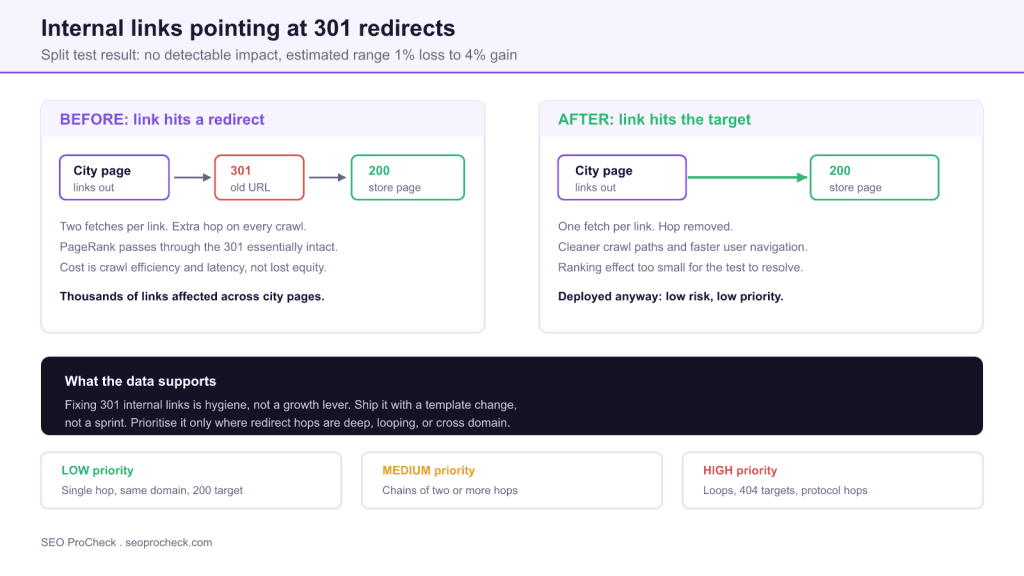
Internal links that point at 301 redirects do not measurably harm SEO. A SearchPilot split test on a retail site found no detectable impact on organic traffic, with the estimated effect ranging from a 1% loss to a 4% gain.
- Google has stated since 2016 that no PageRank is lost through 301 or 302 redirects, so the equity-leak argument for urgent fixes does not hold.
- The real cost of a redirected internal link is one extra request per crawl, which only matters at very large URL counts.
- Redirect chains, loops, and links resolving to 404 are a genuinely different problem and do deserve immediate fixes.
- Treat single-hop cleanup as template hygiene, not a sprint, and never remove the redirect rules themselves.
Every technical SEO audit template flags them: internal links that point at a URL which then
301 redirects somewhere else. The recommendation is always the same, repoint the links at the
final destination. It appears in audit after audit, usually near the top, usually with a red
severity badge. The question almost nobody asks is what happens to traffic when you actually do it.
SearchPilot tested it. Their result is the useful kind of unglamorous: no detectable impact.
What the test actually measured
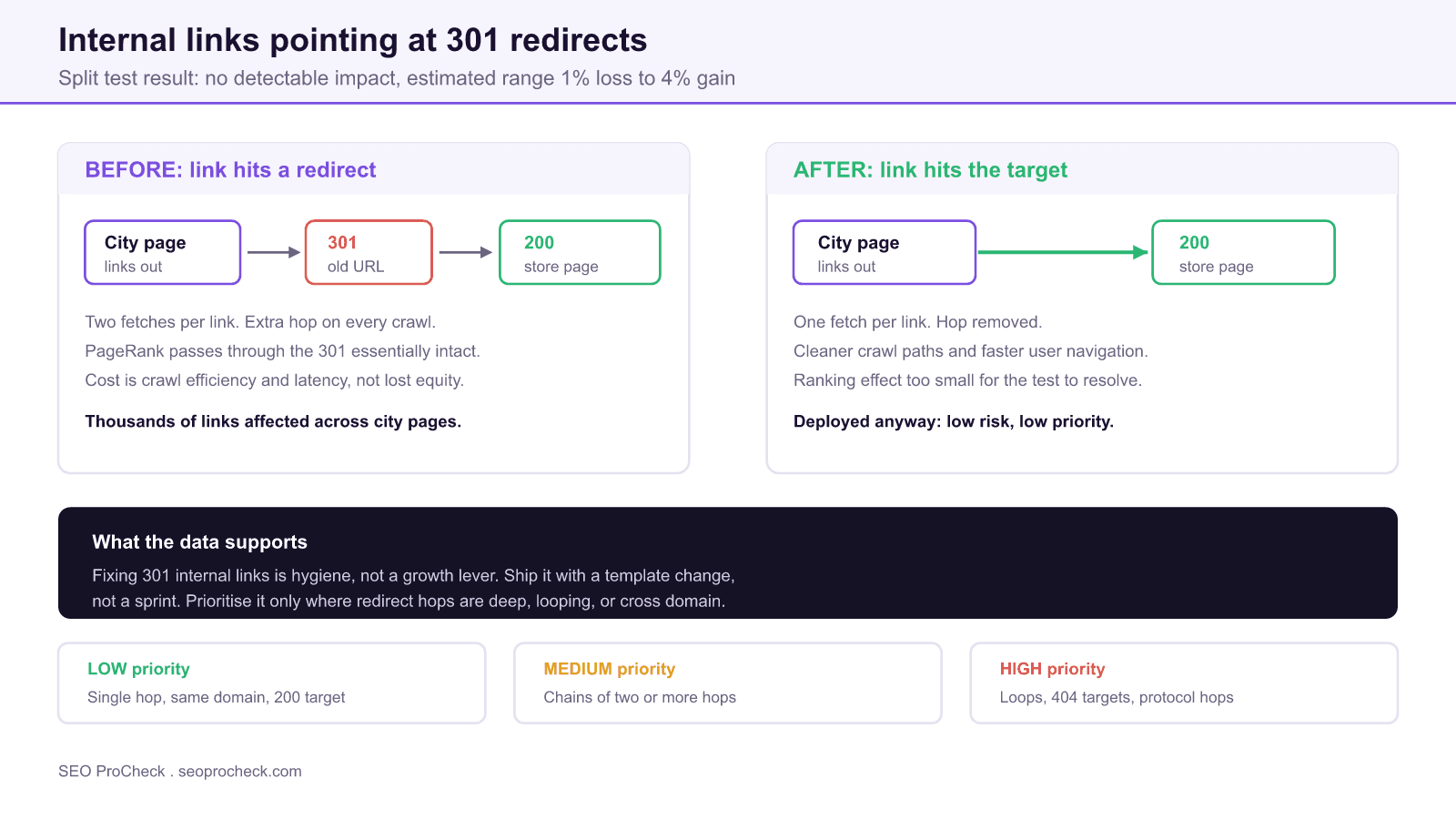
A retail client had thousands of internal links on city level pages pointing at old store page
URLs. Those old URLs 301 redirected to the current store pages. The variant group had those links
rewritten to point directly at the live store page URLs, which returned 200. The control group kept
the redirected links. Both groups were otherwise identical, which is the whole point of a
proper split test: it isolates one variable against a live control rather than comparing a site
against its own past.
The measured effect on organic traffic to store pages ranged from a 1% loss to a 4% gain.
SearchPilot described this as a good but not conclusive chance of a positive impact. It did not
reach statistical significance. Their conclusion was that the change was worth making but was
not as urgent as other changes in the development queue, and the client deployed it anyway
because the cost of shipping it was trivial.
That framing is the takeaway. The change is not wrong. It is just not the lever the audit
templates imply it is.
Why the effect is so small
The urgency in most audit templates traces back to an assumption about PageRank decay that no
longer reflects Google's stated behaviour. The belief was that each redirect hop bled roughly 15% of
the equity, the same damping factor applied to any link. Under that model, thousands of redirected
internal links would be quietly hemorrhaging authority.
Google has said since 2016 that no PageRank is lost through 301 or 302 redirects. If that holds,
then repointing a link from a redirected URL to its target does not recover any equity, because none
was being lost. What it recovers is a request. The crawler fetches the old URL, reads the redirect,
then fetches the target, where it could have fetched the target once.
That leaves three genuine benefits, all of them real but all of them modest:
- Crawl efficiency. Half the requests for those URLs. This matters at millions of
URLs and is statistical noise at a few thousand. Our crawl budget guide covers when the threshold is actually crossed. - User latency. An extra round trip on every click, which on mobile connections is
a real if small delay. - Maintenance clarity. Once links point at live URLs, you can eventually retire the
redirect rules instead of carrying them forever in a growing htaccess file.
Where redirected internal links do cause damage
The split test covered the benign case: one hop, same host, resolving to a 200. That case is
common and mostly harmless. Several adjacent cases are not, and lumping them together under one
audit finding is why this recommendation gets over-prioritised.
| Scenario | What the crawler does | Real cost | Priority |
|---|---|---|---|
| Single 301 hop, same host, resolves to 200 | Two requests, then indexes the target | Minor crawl overhead only | Low, fix in template |
| Chain of two or more redirects | Follows each hop, gives up after about five | Wasted crawl, slow user navigation | Medium |
| Redirect loop | Abandons the URL entirely | Target never crawled or indexed | High, fix now |
| Link resolves to 404 or 410 | Fetches, finds nothing, drops the target | Equity lost, dead end for users | High, fix now |
| Protocol or host hop, HTTP to HTTPS or non-www to www | Two requests on every internal link | Site wide overhead, multiplies fast | High at scale |
| 302 used where a move is permanent | May keep the old URL as canonical | Wrong URL can stay indexed | Medium |
Triage model for redirected internal links. Only the bottom four rows justify displacing other work in the development queue.
The distinction worth internalising is between a redirect that works and a redirect that
fails. A single clean hop works. A chain that exceeds the crawler's patience, a loop, or a
hop that terminates in a 404 does not, and those genuinely cost you indexed pages. Google follows up
to about five hops before it gives up on a chain. Our
HTTP status codes reference
covers which codes pass equity and which are dead ends.
Finding them: the exact reports
You do not need a bespoke tool for this. Both mainstream crawlers expose it directly, and the
column you sort on is hop count, not raw volume.
# Screaming Frog: export every internal link that hits a redirect
Reports > Redirects > Redirect and Canonical Chains

# Columns that matter in the export
Source        the page containing the link
Address       the URL that was linked
Final Address  where the chain ends
Number of Redirects  hop count, sort descending
Final Status Code   anything not 200 is a real bug

# Command line crawl, headless, straight to CSV
screamingfrogseospider --crawl https://example.com \
  --headless --save-crawl \
  --export-tabs "Response Codes:Redirection (3xx)" \
  --output-folder ~/crawls/
Sort the export by Number of Redirects descending, then filter
Final Status Code for anything that is not 200. Those two operations surface every case
from the high priority rows of the table above, and they are usually a small fraction of the total.
The remaining bulk, single hops resolving cleanly, is your low priority pile.
To spot check an individual URL without opening a crawler, curl tells you everything in one line:
# Check one internal link, show every hop and the final code
curl -sIL -o /dev/null -w "%{http_code} %{num_redirects} %{url_effective}\n" \
  https://example.com/old-store-url/

# Full hop by hop trace
curl -sIL https://example.com/old-store-url/ | grep -Ei "^(HTTP|location)"

# Expected clean result: one line, 200, zero redirects
A num_redirects of 0 with a 200 is a clean link. A value of 1 is the benign case. A
value of 2 or more is worth a ticket. You can run the same check in bulk against a URL list, or use
our redirect chain checker
for a quick browser based look.
How to actually fix them without a sprint
The reason this finding lingers on audit lists for years is that teams treat it as a content task,
editing links page by page. It is almost always a template task instead.
- Group the export by source template, not by URL. Thousands of bad links usually
trace back to a handful of components: a navigation partial, a related products module, a footer, a
breadcrumb. Fix the component and every instance follows. - Fix the link source, not the rendered output. If URLs come from a database field
or a CMS relation, update the stored value. Patching the rendered HTML means the problem returns on
the next content edit. - Run a find and replace on body content last. For links genuinely hardcoded in
editorial content, a scripted database replace handles the long tail. Take a backup first and
constrain the pattern tightly. - Leave the redirects in place. This is the step people get wrong. External sites
and old bookmarks still point at those URLs. Repointing your internal links does not make the
redirect rules removable. - Recrawl and confirm the count drops. If it does not, the links are being
generated somewhere you have not found yet.
What this means for how you write audits
The broader lesson is about severity calibration. An audit that flags redirected internal links
with the same urgency as a redirect loop or a noindexed money page trains stakeholders to ignore the
severity column entirely. Once that happens, the genuinely critical findings get the same shrug as
the cosmetic ones.
A defensible way to write this finding is to split it: one low priority item covering clean single
hops, framed as hygiene to fold into the next template release, and one high priority item covering
chains, loops and dead ends, with the affected URL count attached. That gives whoever reads the audit
a real decision to make instead of an undifferentiated list. Our
technical SEO audit framework
covers the wider prioritisation model.
It is also a reminder of why split testing matters. Without a controlled test, this
recommendation is untestable folklore that sounds right. With one, you learn it is worth doing and
not worth rushing. Those are different instructions, and the difference is worth a lot of engineering
hours across a year.
Related internal linking work that does move numbers
If the goal is to get more out of internal links, the evidence points elsewhere. SearchPilot's
tests on adding internal links to under linked pages have produced measurable uplifts, which
is a different intervention from cleaning up the links that already exist. Adding links changes how
equity is distributed; repointing links changes only the path it travels. Our
complete internal linking guide
covers the distribution side, and the
one followed internal link check
finds the orphan-adjacent pages where added links tend to pay off most.
FAQ
On the evidence available, not measurably. SearchPilot ran a controlled split test on a retail site and found no detectable impact on organic traffic, with the estimated effect ranging from a 1% loss to a 4% gain. Google has also stated repeatedly that 301 redirects pass PageRank, so the link equity argument for urgent fixes is weak.
Google has said since 2016 that no PageRank is lost through 301 or 302 redirects. The older assumption of a 15% damping loss per hop reflects much earlier behaviour and is no longer the stated model. Treat redirected internal links as a crawl efficiency question, not an equity leak.
Yes, but as routine hygiene rather than a priority project. The fix costs almost nothing when it is done in a template or with a find and replace, and it removes an unnecessary request for every user and crawler. What the data does not support is pulling engineers off revenue work to do it.
When the hops stack up. Chains of two or more redirects, redirect loops, and protocol or host hops such as HTTP to HTTPS or non-www to www all cost real crawl budget and can break equity flow entirely, while links that resolve to a 404 or 410 lose equity and leave users at a dead end. Those cases justify immediate attention.
Crawl the site with Screaming Frog or Sitebulb and use the redirect reports. In Screaming Frog the path is Reports then Redirects then Redirect and Canonical Chains, which exports every hop with its source page. Sitebulb surfaces the same data under Redirects in the crawl audit.
Marginally, and only at scale. Each redirected link means the crawler makes two requests instead of one. On a site with a few thousand URLs that is noise. On a site with millions of URLs and deep chains it becomes a genuine efficiency gain worth measuring.
Source: https://www.searchpilot.com/resources/case-studies/change-internal-redirect-links-for-seo/
Not sure which redirect findings actually matter on your site?
Most audits flag every redirected link at the same severity. An audit that separates hygiene from real crawl damage saves engineering time.
Take this with you
The assistant links open with a question about this page already written. Nothing is sent until you press enter.
Claude Vincent is a technical SEO consultant focused on crawlability, rendering, and AI-search visibility. He writes the field guides and case studies at SEO ProCheck, with a bias toward the durable, unglamorous work that decides whether search engines and AI answer engines can actually read and cite a site.
About SEO ProCheck
Technical SEO consulting and GEO strategy with 20 years of enterprise experience. Case studies, resources, and tools for search and AI visibility.
Work With Me
Technical SEO audits, GEO strategy, site migrations, and international SEO. Hourly consulting for teams who need hands-on support, not just reports.
Subscribe to our newsletter!








Recent Posts
- Most Top Sites Never Say Who They Are in Structured Data October 14, 2026
- Homepage Titles Are Mostly Too Short, Not Too Long October 8, 2026
- Who Actually Serves an llms.txt? 184 Top Sites Measured September 29, 2026