

Speakable Schema for Voice Search
- January 20, 2025
- AEO (Answer Engine Optimization), AI and Search

AI Summary
Speakable schema is a schema.org markup that uses the SpeakableSpecification type to tell voice assistants which parts of a page are best suited to be read aloud. You point at those sections with a cssSelector or xpath list inside your Article or WebPage JSON-LD, keeping the marked passages short, self contained and factual.
- Use one location method per block:
cssSelectororxpath, never both. - Mark only concise, self contained passages, roughly two or three sentences or about 20 to 30 seconds of audio.
- Google documents Speakable as a limited, mainly news focused feature, so treat it as an enhancement, not a ranking lever.
- Lead with a summary sentence that answers the query without referring to anything visual on the page.
What speakable schema is
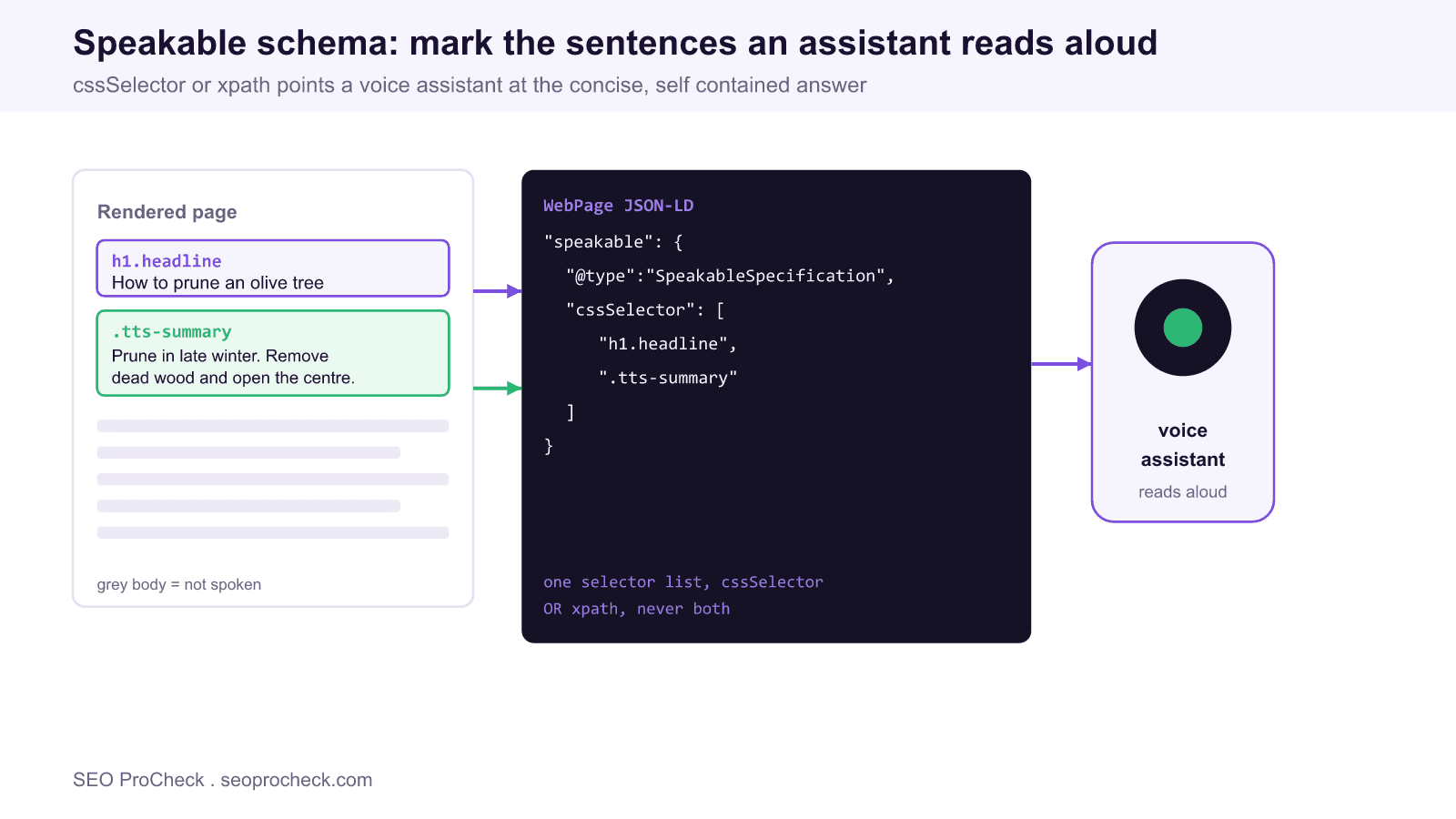
Speakable is a property defined on schema.org that carries a value of type SpeakableSpecification. It marks the sections of a page that make sense when a voice assistant reads them back with text to speech. A device that supports the feature can pull those specific sentences instead of guessing which part of the article to speak, or worse, reading the whole thing. It lives inside the structured data you already publish for an Article or WebPage.
Set expectations first. Google documents Speakable but describes it as a limited feature that has been focused on news content and specific locales rather than a broad, guaranteed enhancement across all queries. Treat the markup as future facing plumbing and a way to structure your answer, not as a switch that turns on rankings. The discipline it forces, writing a tight self contained answer near the top of the page, helps with answer engines and featured snippets regardless of whether a given assistant consumes the property today.
How to point at the content
The specification identifies content in one of two ways, and you pick exactly one per SpeakableSpecification block. The cssSelector approach references elements by CSS selector, which is readable and stable if your templates use consistent class names. The xpath approach references elements by their position in the document tree, which is more brittle when markup shifts. Most teams choose cssSelector.
{
  "@context": "https://schema.org",
  "@type": "Article",
  "headline": "How to prune an olive tree",
  "speakable": {
    "@type": "SpeakableSpecification",
    "cssSelector": ["h1.headline", ".tts-summary"]
  }
}
The selectors above must match real elements that contain the exact text you want spoken. The .tts-summary class wraps a short lead paragraph written specifically to stand on its own. Here is the xpath variant for the same two elements, shown only to illustrate that you would use this instead of, not alongside, the cssSelector:
"speakable": {
  "@type": "SpeakableSpecification",
  "xpath": [
    "/html/head/title",
    "/html/body//p[@class='tts-summary']"
  ]
}
Write passages that survive being read aloud
A sentence that works on screen can fail out loud. Audio has no headings, no links to click, and no image to glance at, so every marked passage has to carry its own context. Aim for two or three sentences, roughly 20 to 30 seconds. Front load the answer. Avoid phrases like see the chart below or as shown above, because they reference something the listener cannot see. Spell out anything that depends on visual formatting, and keep numbers and units unambiguous.
Do and do not
| Do | Do not |
|---|---|
| Mark a self contained summary sentence that answers the query | Mark a paragraph that starts with as mentioned above |
| Keep each passage to about two or three sentences | Mark the entire article body |
| Use one method, cssSelector or xpath, per block | Combine cssSelector and xpath in the same block |
| Point at elements that actually contain the spoken text | Point at a wrapper that also contains navigation or ads |
| Spell out numbers, units and context for the ear | Rely on tables, images or on screen layout for meaning |
cssSelector versus xpath
| Method | Best when | Weakness |
|---|---|---|
cssSelector | Templates use stable, semantic class names | Breaks if a class is renamed in a redesign |
xpath | You need precise document position and cannot add classes | Brittle, any structural change to the tree can break it |
Testing the markup
Validate the JSON-LD like any other structured data. Paste the page or the snippet into the Schema Markup Validator at validator.schema.org and confirm the SpeakableSpecification parses with no errors and that the selectors are present. Note that Google's Rich Results Test does not report a dedicated speakable result, so a clean parse in the schema validator plus a manual check that each selector resolves to the intended text is the practical bar. Load the live page, run the selector in your browser console with document.querySelector('.tts-summary'), and read the returned text out loud to sanity check it.
Frequently asked questions
What is speakable schema used for?
It marks the sections of a page best suited to be read aloud by a voice assistant using text to speech. You declare them with a SpeakableSpecification inside your Article or WebPage JSON-LD so a device speaks the right sentences instead of guessing.
Should I use cssSelector or xpath?
Use cssSelector in most cases because it is readable and stable when your templates use consistent class names. Reserve xpath for when you cannot add classes and need to target elements by document position. Use only one method per block.
How long should a speakable passage be?
Keep each marked passage to about two or three sentences, roughly 20 to 30 seconds of audio. Longer passages lose the listener and shorter ones often lack context. Front load the direct answer.
Does speakable schema improve my rankings?
There is no evidence it is a ranking factor. Google documents it as a limited, mainly news focused feature. The real benefit is the discipline of writing a concise, self contained answer, which also helps with featured snippets and answer engines.
Can I mark the whole article as speakable?
You should not. Marking the entire body defeats the purpose and produces a long, meandering read. Point the selectors only at a headline and a short summary that stand on their own.
How do I test speakable markup?
Validate the JSON-LD in the Schema Markup Validator at validator.schema.org, then confirm each selector resolves to the intended text on the live page using document.querySelector in the browser console. Read the result aloud to check it works without visual context.
Related reading
Speakable is one tactic inside answer engine optimization. Pair it with broader voice search optimization work and with your wider schema and structured data setup.
Take this with you
The assistant links open with a question about this page already written. Nothing is sent until you press enter.
Claude Vincent is a technical SEO consultant focused on crawlability, rendering, and AI-search visibility. He writes the field guides and case studies at SEO ProCheck, with a bias toward the durable, unglamorous work that decides whether search engines and AI answer engines can actually read and cite a site.
About SEO ProCheck
Technical SEO consulting and GEO strategy with 20 years of enterprise experience. Case studies, resources, and tools for search and AI visibility.
Work With Me
Technical SEO audits, GEO strategy, site migrations, and international SEO. Hourly consulting for teams who need hands-on support, not just reports.
Subscribe to our newsletter!








Recent Posts
- Most Top Sites Never Say Who They Are in Structured Data October 14, 2026
- Homepage Titles Are Mostly Too Short, Not Too Long October 8, 2026
- Who Actually Serves an llms.txt? 184 Top Sites Measured September 29, 2026