

CDN Setup Best Practices for SEO
- April 28, 2025
- Core Web Vitals and Performance, Technical SEO
AI Summary
A content delivery network speeds up your site by serving cached copies from servers close to each visitor, which improves Core Web Vitals and global response times. It stays SEO safe when you serve one canonical host, set correct caching headers, and never block crawlers or cache personalized pages.
- Edge caching lowers TTFB and Largest Contentful Paint for distant visitors.
- Serve one canonical host and keep HTML off raw edge and asset subdomains.
- Never full page cache logged in, cart, or personalized responses.
- Verify from several regions, inspect headers, and confirm bots get 200 not a challenge.
A content delivery network (CDN) speeds up your site by serving cached copies from servers close to each visitor, which improves Core Web Vitals and global response times. To keep it SEO-safe, serve one canonical host, set correct caching headers, never cache logged-in or personalized pages, keep robots.txt and sitemaps accurate, and make sure your firewall does not block Googlebot or AI crawlers. Verify by testing from several regions, inspecting response headers, and confirming search bots can reach your pages.
What a CDN is and how it helps SEO
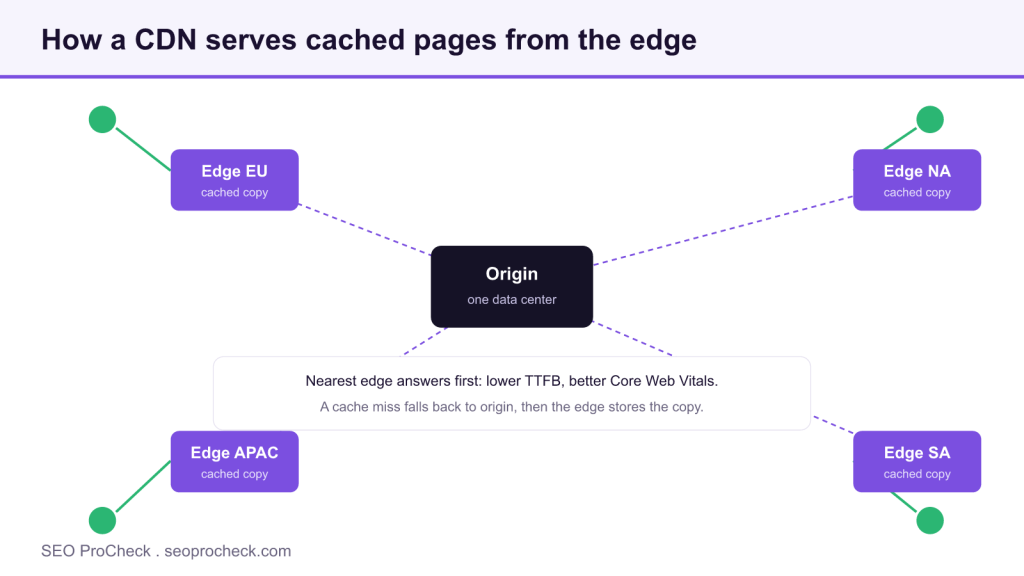
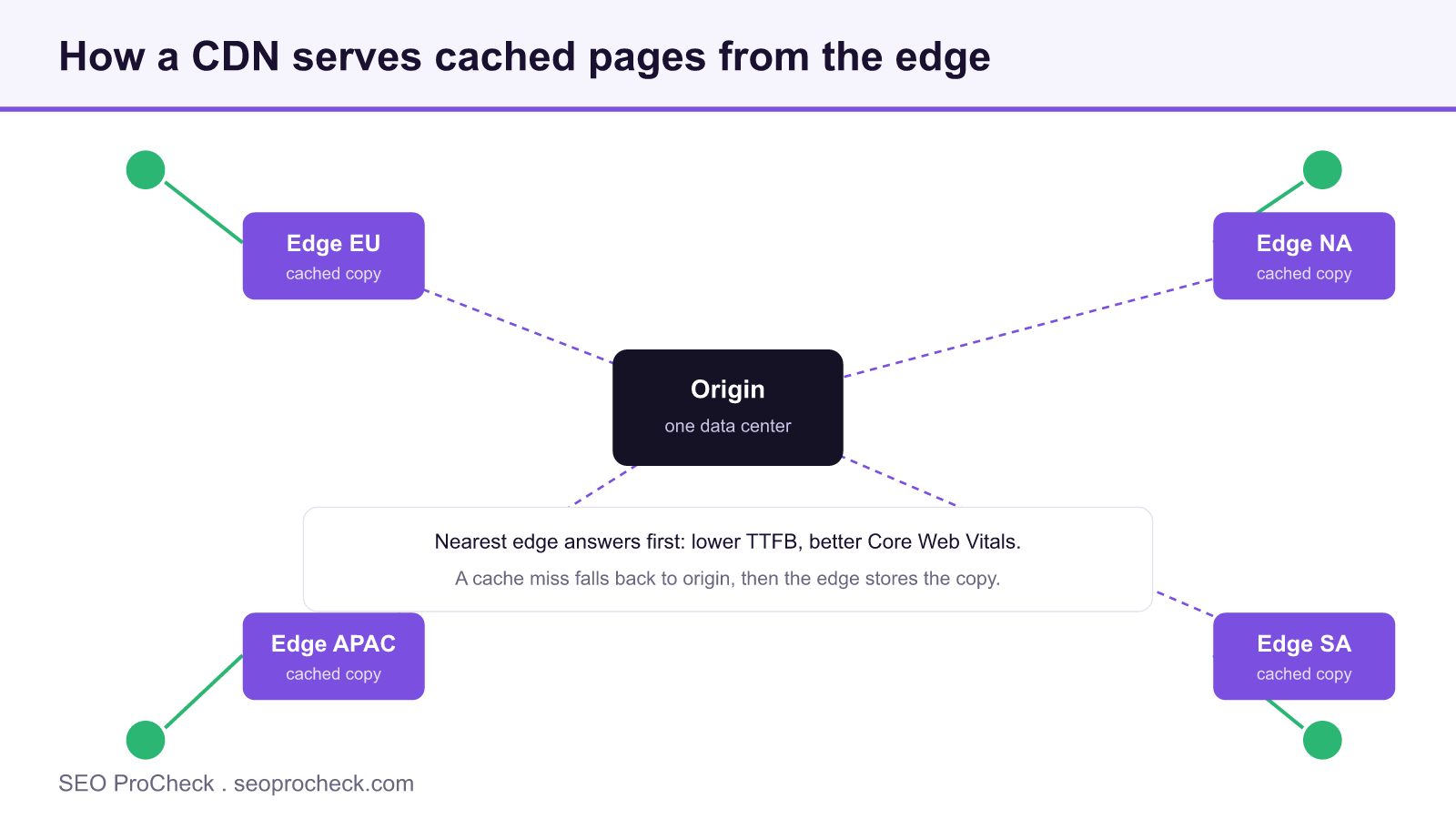
A content delivery network is a group of servers distributed worldwide. Instead of every request traveling to your origin server, the CDN stores cached copies of your pages, images, scripts, and stylesheets at edge locations near your users. When someone visits, the nearest edge node responds. That single change touches several factors search engines care about.
Speed and Core Web Vitals. Serving assets from a nearby edge reduces round-trip time. That lowers Largest Contentful Paint and improves the responsiveness signals Google evaluates. Faster CSS and JavaScript delivery also reduces layout shift and input delay, so a well-configured CDN often lifts your field data in the Chrome User Experience Report.
Global time to first byte (TTFB). If your origin sits in one country, distant users wait longer for the first byte. Edge caching flattens that gap, giving a visitor in another region a similar experience to one near your data center. Lower, more consistent TTFB helps rankings and crawl efficiency.
Reliability and crawl stability. A CDN absorbs traffic spikes and can keep serving cached pages if your origin is briefly unavailable. Fewer timeouts mean Googlebot meets fewer roadblocks, which protects crawl budget and keeps pages indexed. Persistent server faults are a ranking risk, which is why 5xx server errors and their SEO impact deserve close attention.
SEO-safe configuration
A CDN only helps when it looks like one clean site to search engines. Start with these settings.
- Serve one canonical host. Pick a single hostname (for example
www.example.com) and redirect every alternative to it with a 301. Make sure your CDN does not expose pages on a raw edge hostname that search engines could index separately. - Avoid duplicate content across CDN hostnames. Keep HTML on your canonical host and reserve any asset subdomain for images, CSS, and scripts only. Where duplicates are unavoidable, use a self-referencing
rel="canonical"tag pointing to the preferred URL. - Set correct caching headers. Use long
Cache-Controllifetimes for versioned static assets and short or revalidating values for HTML. HonorETagandLast-Modifiedso the edge can validate freshness rather than serving stale documents. - Do not block Googlebot or AI crawlers. Allow Googlebot, Bingbot, and the documented AI crawler user agents your strategy permits. Confirm your CDN security rules do not silently challenge or rate-limit them.
- Keep robots.txt and sitemaps correct. Serve
robots.txtand your XML sitemaps from the canonical host with current rules. A cached or outdatedrobots.txtcan accidentally disallow whole sections, so see our complete robots.txt reference when in doubt. - Handle HTTPS and modern protocols. Serve everything over HTTPS with a valid certificate, redirect HTTP to HTTPS, and enable HTTP/2 or HTTP/3 at the edge for faster multiplexed delivery.
Cache-Control by content type
| Content type | Rule at the edge | Why |
|---|---|---|
| Versioned CSS and JS | Long max-age, immutable | The filename changes on every deploy, so a one year cache is safe |
| HTML documents | Short lifetime or must revalidate | Content changes; honor ETag and Last Modified so the edge validates freshness |
| Personalized or logged in pages | no-store, bypass full page cache | Varies by cookie or session; caching risks serving one visitor another visitor's page |
| robots.txt and XML sitemaps | Short lifetime, purge on change | A stale copy can disallow whole sections or list dead URLs |
Common mistakes
Most CDN problems are configuration errors, not technology failures. Watch for these.
- Caching personalized or authenticated pages. If the edge caches a logged-in dashboard or cart, one user can be served another user's content. Exclude pages that vary by cookie, session, or user from full-page caching.
- Serving stale cache after updates. Publishing new content but leaving the old version cached means crawlers keep seeing the outdated page. Purge the cache on publish or set sensible revalidation so changes appear promptly.
- Blocking bots through the WAF. Aggressive web application firewall or bot-management rules sometimes treat legitimate search and AI crawlers as threats. The result is pages dropping out of the index for no obvious reason.
- Mixed content. An HTTPS page that loads an asset over HTTP triggers browser warnings and can break rendering. Make sure every resource the CDN serves uses HTTPS.
How to verify your CDN setup
Treat verification as a routine. After any CDN or caching change, run through this list.
- Test from multiple regions. Use a multi-location speed test to confirm TTFB and load times are consistent for visitors far from your origin.
- Check the headers. Inspect responses for
Cache-Control, the cache hit or miss status your CDN reports, and a single canonical redirect chain. Confirm HTML is not being cached when it should not be. - Confirm bots are allowed. Fetch a page with a search-engine user agent and verify it returns 200, not a challenge. Use Search Console's URL Inspection to see what Google retrieves.
# Check headers and how the edge handled the request
curl -sI -A "Googlebot" https://www.example.com/

# Confirm robots.txt served from the canonical host is current
curl -s https://www.example.com/robots.txt
If headers show stale caching, a wrong canonical, or a blocked bot, fix it at the CDN configuration level rather than patching around it at the origin.
Frequently asked questions
No. A correctly configured CDN helps SEO by improving speed and reliability. Problems only arise from misconfiguration, such as caching personalized pages or blocking crawlers.
Both work. Caching static assets is the simplest win. Full-page caching delivers larger speed gains but needs careful rules to exclude logged-in, cart, and other personalized pages.
Set short cache lifetimes or revalidation for HTML, honor ETag and Last-Modified, and purge the relevant cache automatically whenever you publish or update a page.
Does a CDN change my rankings directly?
Not by itself. It improves speed, reliability, and crawl stability, which are the ranking relevant signals. The CDN is the delivery mechanism, not a ranking factor you can point to on its own.
Which CDN should I use for SEO?
Any reputable CDN configured correctly is SEO safe. The provider matters far less than serving one canonical host, correct caching headers, and unblocked crawlers, so choose for coverage, price, and features, then verify the setup.
Can a CDN cause duplicate content?
Yes, if pages become reachable on a raw edge hostname or an asset subdomain also serves HTML. Keep HTML on the canonical host and use self referencing canonical tags so search engines do not split indexing across hosts.
An advanced SEO audit checks your caching headers, canonical setup, crawler access, and Core Web Vitals end to end.
Take this with you
The assistant links open with a question about this page already written. Nothing is sent until you press enter.
Claude Vincent is a technical SEO consultant focused on crawlability, rendering, and AI-search visibility. He writes the field guides and case studies at SEO ProCheck, with a bias toward the durable, unglamorous work that decides whether search engines and AI answer engines can actually read and cite a site.
About SEO ProCheck
Technical SEO consulting and GEO strategy with 20 years of enterprise experience. Case studies, resources, and tools for search and AI visibility.
Work With Me
Technical SEO audits, GEO strategy, site migrations, and international SEO. Hourly consulting for teams who need hands-on support, not just reports.
Subscribe to our newsletter!








Recent Posts
- Most Top Sites Never Say Who They Are in Structured Data October 14, 2026
- Homepage Titles Are Mostly Too Short, Not Too Long October 8, 2026
- Who Actually Serves an llms.txt? 184 Top Sites Measured September 29, 2026