

DNS Configuration Impact on SEO Performance
- January 26, 2026
- Core Web Vitals and Performance, Technical SEO
AI Summary
DNS configuration affects SEO indirectly but measurably, because the very first DNS lookup happens before the browser can open a connection, so a slow or misconfigured zone inflates Time to First Byte and drags Largest Contentful Paint with it. You control the impact through TTL tuning, an Anycast provider, short CNAME chains, and resource hints like preconnect and dns-prefetch.
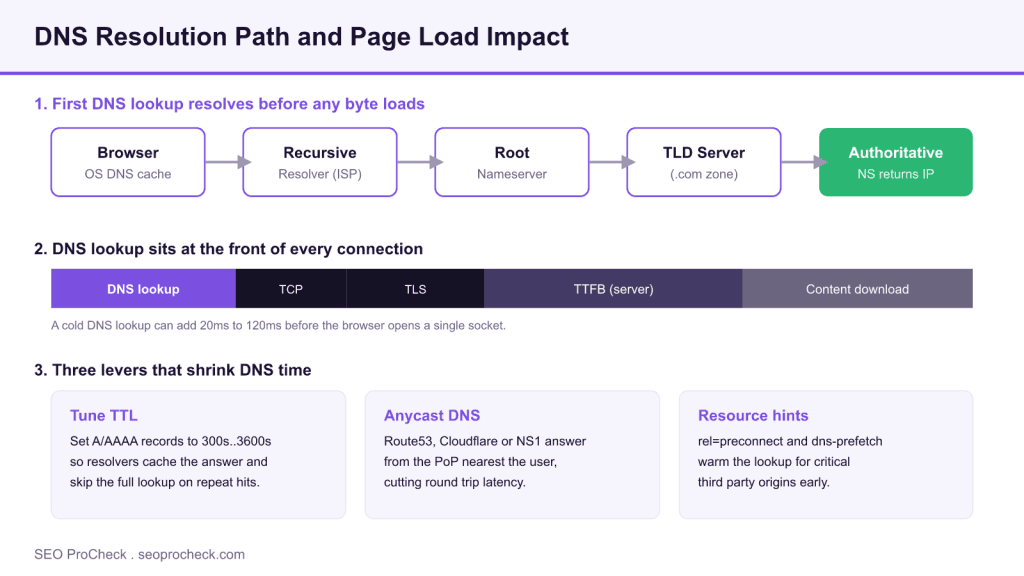
- A cold DNS lookup typically adds 20ms to 120ms to the critical path, all of it before the first byte.
- Set A and AAAA record TTLs to 300s..3600s so recursive resolvers cache the answer between visits.
- Anycast DNS answers from the point of presence nearest the user, cutting query round trips.
- Measure it directly with dig, curl timing variables, and the DNS phase in WebPageTest or Chrome DevTools.

Why DNS sits in the SEO critical path
Google does not rank you higher for having fast DNS. What it does do is measure page experience through Core Web Vitals, and DNS resolution is the first thing that happens on any cold visit to your domain. Before a single HTML byte moves, the browser has to translate your hostname into an IP address. That resolution step blocks the TCP handshake, which blocks TLS, which blocks the server response. Every millisecond spent resolving the name is a millisecond added to Time to First Byte, and TTFB is the floor under Largest Contentful Paint. If your DNS is slow or over engineered, you pay that tax on the exact metric Google watches.
The effect is easy to underestimate because your own repeat visits are cached. Your recursive resolver already holds the answer, so the lookup reads as zero in your browser. The visitor arriving from a Google result on a mobile network with a cold cache sees the full cost. That is the visitor whose field data lands in the Chrome User Experience Report and feeds your ranking signals, so optimize for the cold case, not the warm one.
How resolution actually works
A cold lookup walks the hierarchy shown in the diagram above. The browser asks the operating system, the OS asks the configured recursive resolver, and if nothing is cached the resolver queries a root nameserver, then the TLD nameserver for your extension, then your authoritative nameserver, which finally returns the record. Each hop is a network round trip. On a well cached resolver most of those hops are skipped, but the last mile to your authoritative nameserver is the part you own and the part you can make fast or slow.
Two configuration choices dominate the cold cost. The first is your authoritative provider and whether it uses Anycast so that a resolver in Frankfurt talks to a nearby node instead of crossing an ocean. The second is your record TTL, which decides how long resolvers keep the answer before they repeat the walk.
TTL tuning without shooting yourself in the foot
TTL is the number of seconds a resolver may cache your record. Set it too low and resolvers re query constantly, which raises average lookup time and load on your nameservers. Set it too high and a failover or IP migration takes hours to propagate. The practical sweet spot for stable production records is 3600 seconds. When you plan a migration, lower the TTL to 300 seconds a full day beforehand so the old long TTL has already expired everywhere, cut over, confirm, then raise it back.
| Record | Suggested TTL | Reason |
|---|---|---|
| A / AAAA (stable site) | 3600s | Maximizes resolver caching, low churn |
| A / AAAA (pre migration) | 300s | Lets a cutover propagate in minutes |
| CNAME to CDN | 3600s | CDN handles edge routing, hostname is stable |
| MX / TXT | 3600s to 86400s | Rarely changes, no page speed impact |
| Failover A record | 60s to 120s | Health check driven, needs fast switch |
Watch your CNAME chains and DNSSEC overhead
Every CNAME is an extra resolution step. A hostname that points www to a CDN alias, which points to a load balancer alias, which points to a regional alias, forces the resolver to chase three lookups before it gets an address. Flatten what you can. Many providers offer a flattened or apex CNAME (sometimes called ALIAS or ANAME) so your root domain can target a CDN hostname without the chain penalty.
DNSSEC is worth enabling for integrity, but understand the tradeoff: signed responses are larger and validation adds work, so a signed zone on a slow provider is slower than an unsigned zone on a fast one. Do not skip DNSSEC to save a few milliseconds, but do pair it with an Anycast provider so the round trip time stays low.
Resource hints tell the browser to resolve early
You cannot only fix your own zone; most pages pull fonts, analytics, and images from third party origins, each needing its own lookup. Resource hints let you start those lookups during initial HTML parse instead of when the referencing asset is discovered. Add them in the head:
<link rel="preconnect" href="https://fonts.gstatic.com" crossorigin>
<link rel="dns-prefetch" href="//cdn.example.com">
<link rel="preconnect" href="https://www.googletagmanager.com">
Use preconnect for a small number of origins that are certain to be needed early, because preconnect also opens the TCP and TLS connection and that costs resources if overused. Use dns-prefetch as the cheaper fallback for origins that may be needed later. Reserve preconnect for three or four critical origins at most.
Measure it, do not guess
Two commands give you the numbers. Use dig to read query time straight from your authoritative nameserver, and use curl timing variables to see DNS as a slice of the full request:
dig +stats seoprocheck.com

curl -w "dns:%{time_namelookup} connect:%{time_connect} ttfb:%{time_starttransfer}\n" -o /dev/null -s https://seoprocheck.com/
The time_namelookup value is the DNS portion in seconds. Compare a cold run against a warm run to see the true cost. In the browser, the Network panel in Chrome DevTools breaks out DNS Lookup under Timing, and WebPageTest reports a DNS phase per request in its waterfall. If DNS is consistently a meaningful share of your TTFB, your provider or your record structure is the problem, not your server.
Where this connects to the rest of your stack
Fast DNS is one input into a fast first byte. Once the name resolves, your server response time takes over, so pair this work with the guidance on how to reduce server response times and TTFB. A content delivery network shortens both the DNS distance and the content distance, which is why our CDN setup best practices for SEO treat DNS and edge caching as one system. Modern transport protocols compound the win, covered in HTTP/2 and HTTP/3 SEO benefits, and the metrics all of this feeds are explained in the Core Web Vitals overview.
Frequently asked questions
Does DNS configuration directly affect Google rankings?
Not directly. Google does not have a DNS speed ranking factor. It does measure page experience through Core Web Vitals, and slow DNS inflates Time to First Byte, which raises Largest Contentful Paint. So the influence is real but indirect, flowing through the metrics Google already tracks.
What is a good TTL for my main A record?
For a stable production site, 3600 seconds is a sensible default because it lets resolvers cache the answer and skip repeat lookups. Before a planned IP change, lower it to 300 seconds a day ahead so the cutover propagates quickly, then raise it back once traffic is confirmed on the new address.
Should I use preconnect or dns-prefetch?
Use preconnect for the three or four critical origins your page needs early, since it also opens the TCP and TLS connection. Use dns-prefetch as a lighter hint for origins that may be needed later. Overusing preconnect wastes connections, so keep the preconnect list short and deliberate.
Is Anycast DNS worth it for a small site?
Usually yes, because most managed DNS providers include Anycast at no extra cost on standard plans. It answers queries from the network node nearest each visitor, which trims the cold lookup for a global audience without any change to your records.
How do I measure my current DNS lookup time?
Run dig +stats yourdomain.com to read the query time from your authoritative nameserver, and run a curl request with the time_namelookup timing variable to see DNS as a slice of the full request. In the browser, the Chrome DevTools Network panel shows a DNS Lookup entry under the Timing tab.
Does DNSSEC slow my site down?
DNSSEC adds slightly larger responses and validation work, so a signed zone is marginally heavier than an unsigned one. The security benefit is worth it, and pairing DNSSEC with a fast Anycast provider keeps the round trip low enough that visitors will not notice the difference.
Claude Vincent is a technical SEO consultant focused on crawlability, rendering, and AI-search visibility. He writes the field guides and case studies at SEO ProCheck, with a bias toward the durable, unglamorous work that decides whether search engines and AI answer engines can actually read and cite a site.
About SEO ProCheck
Technical SEO consulting and GEO strategy with 20 years of enterprise experience. Case studies, resources, and tools for search and AI visibility.
Work With Me
Technical SEO audits, GEO strategy, site migrations, and international SEO. Hourly consulting for teams who need hands-on support, not just reports.
Subscribe to our newsletter!







Recent Posts
- Can AI Crawlers Actually Read Your Site? I Measured 400 of the Biggest September 5, 2026
- The Pre-Publish Quality Gate for AI-Assisted Content August 6, 2026
- AGENTS.md vs llms.txt vs llms-full.txt: Which Agent File Does What July 18, 2026