

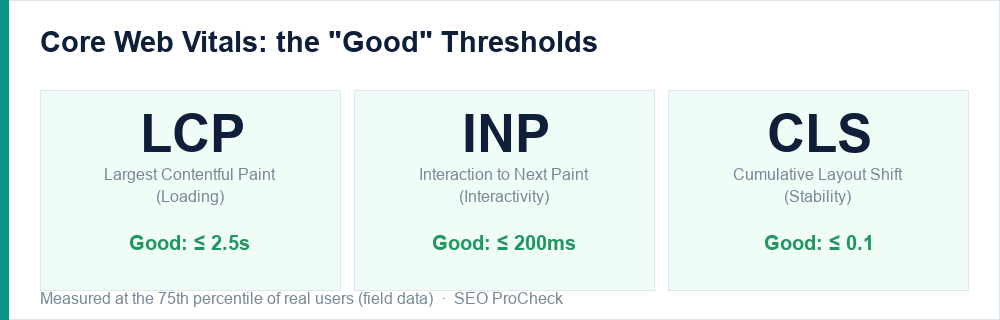
Core Web Vitals are Google's three field-measured metrics for real-world page experience: how fast the main content loads, how quickly the page responds to interaction, and how stable the layout is as it loads. They are a (light) ranking factor, and far more importantly, a direct measure of whether real users have a good time on your site.
The three metrics in detail
LCP, Largest Contentful Paint (loading). The time until the largest visible element in the viewport — usually a hero image, a heading, or a banner — finishes rendering. It answers "how long until the page looks loaded?" Good is 2.5 seconds or less.
INP, Interaction to Next Paint (interactivity). How quickly the page visually responds to user input — clicks, taps, key presses — across the entire visit. INP replaced First Input Delay (FID) as a Core Web Vital in March 2024, and it is stricter: where FID measured only the first interaction's delay, INP measures the responsiveness of every interaction. Good is 200 milliseconds or less.
CLS, Cumulative Layout Shift (stability). How much the page's content moves around unexpectedly while it loads — the annoyance of reaching to tap a button just as an ad pushes it down. Good is 0.1 or less.
Lab data vs field data, the distinction that trips people up
Tools like Lighthouse give you lab data: a single, simulated page load in a controlled environment. It is excellent for debugging because it is repeatable. But Google does not rank on lab data — it uses field data: measurements from real Chrome users, aggregated in the Chrome User Experience Report (CrUX), evaluated at the 75th percentile. That percentile matters: it means three out of four of your visitors must have a good experience for the metric to pass.
This is why a page can score a green 95 in Lighthouse and still fail Core Web Vitals in Search Console — the lab test ran on a fast simulated connection, while your real users are on mid-range phones and patchy networks. Always trust field data for the verdict and use lab data to find the cause.
Where to measure them
- PageSpeed Insights — shows both field (CrUX) and lab data for a URL, with specific opportunities.
- Search Console → Core Web Vitals report — field data for your whole site, grouped by URL patterns, with "Poor / Needs improvement / Good" buckets. This is your scorecard.
- Chrome DevTools and the Web Vitals extension — for live, in-browser debugging as you interact with the page.
Fix them in order of impact
For most sites the priority is LCP first (it fails most often and caching usually moves it fast), then CLS (often quick wins like setting image dimensions), then INP (usually the hardest, because it means reducing JavaScript). Each has its own guide in this series.
A note on how much it matters for rankings
Core Web Vitals are a real but lightweight ranking signal — they are a tiebreaker, not a magic lever. Great content on a slow page still beats thin content on a fast one. But a genuinely poor experience can hold back content that would otherwise rank, and it costs you conversions regardless of rankings. Treat it as table stakes, not a growth strategy.
Failing Core Web Vitals?
Speed and stability are part of every technical audit I run. See how an advanced SEO audit works →
Take this with you
The assistant links open with a question about this page already written. Nothing is sent until you press enter.
Claude Vincent is a technical SEO consultant focused on crawlability, rendering, and AI-search visibility. He writes the field guides and case studies at SEO ProCheck, with a bias toward the durable, unglamorous work that decides whether search engines and AI answer engines can actually read and cite a site.
About SEO ProCheck
Technical SEO consulting and GEO strategy with 20 years of enterprise experience. Case studies, resources, and tools for search and AI visibility.
Work With Me
Technical SEO audits, GEO strategy, site migrations, and international SEO. Hourly consulting for teams who need hands-on support, not just reports.
Subscribe to our newsletter!








Recent Posts
- Most Top Sites Never Say Who They Are in Structured Data October 14, 2026
- Homepage Titles Are Mostly Too Short, Not Too Long October 8, 2026
- Who Actually Serves an llms.txt? 184 Top Sites Measured September 29, 2026