

Preconnect and Preload for Performance
- August 16, 2020
- Core Web Vitals and Performance, Technical SEO
AI Summary
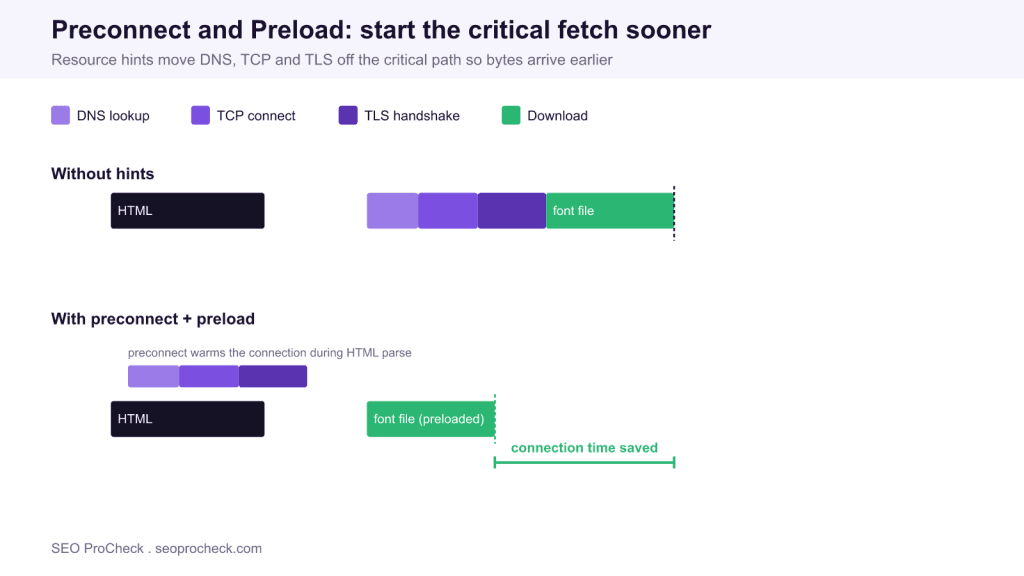
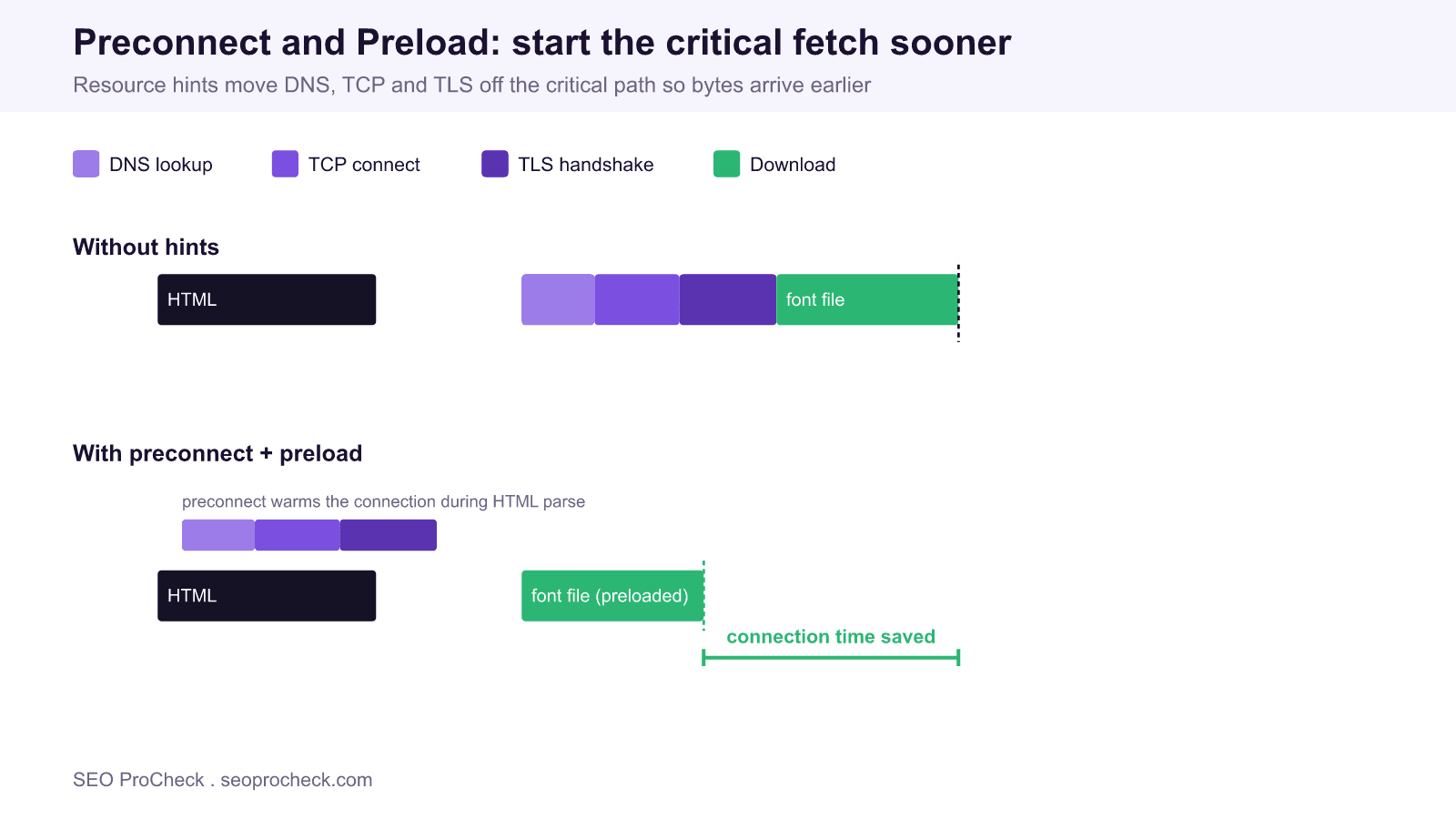
Preconnect tells the browser to open a full connection (DNS, TCP and TLS) to a critical cross origin before the resource is requested, while preload tells the browser to fetch a specific late discovered resource at high priority. Used together on the right origins and files they shorten the critical path and improve Largest Contentful Paint without touching your server.
- preconnect warms a connection: DNS lookup plus TCP handshake plus TLS negotiation, saving roughly 100ms to 300ms per third party origin.
- preload raises the fetch priority of one file (font, LCP image, critical CSS) that the parser would otherwise discover late.
- Fonts need the
crossoriginattribute on both hints or the browser opens a second, wasted connection. - Keep preconnect to the three or four origins that actually block rendering; every extra hint costs a socket and CPU.
What resource hints actually do
Resource hints are one line <link> tags in the document head that let you tell the browser about work it can start early. The four you will use for performance are dns-prefetch, preconnect, preload and prefetch. They are easy to confuse because they all look similar, but they operate at different stages of the loading pipeline and solving the wrong stage wastes effort.
Every request to a new origin pays a fixed setup cost before a single byte of content moves: a DNS lookup to resolve the hostname, a TCP handshake to open the socket, and a TLS handshake to secure it. On a mobile connection that setup can add 100ms to 300ms per origin. preconnect pays that cost in advance, in parallel with HTML parsing, so the connection is already warm when the real request fires. preload solves a different problem: a resource that is critical but referenced deep inside a stylesheet or script, so the browser does not discover it until late. Preload declares it up front at high priority.
Preconnect: warm the connection early
Add a preconnect for each cross origin host that serves render blocking or Largest Contentful Paint resources: your font host, your image CDN, a headless commerce API. The tag goes as high in the <head> as possible, before the stylesheet that will trigger the request.
<link rel="preconnect" href="https://fonts.gstatic.com" crossorigin>
<link rel="dns-prefetch" href="https://fonts.gstatic.com">
Two details matter. First, the crossorigin attribute is required whenever the eventual request is made in CORS mode, which is the case for fonts and for fetch() calls. A preconnect without crossorigin opens an anonymous connection that the font request cannot reuse, so the browser opens a second connection and you gained nothing. Second, pair preconnect with dns-prefetch as a cheap fallback: browsers that ignore preconnect still get the DNS resolution, and the socket cost of an unused preconnect on browsers that honour both is small.
Do not preconnect to everything. Each hint opens and holds a socket, and connections you never use compete for bandwidth and CPU during the most sensitive part of the load. Three or four origins that genuinely block the first paint is the practical ceiling.
Preload: fetch the critical file sooner
Preload is for a specific file, not an origin. The classic case is a web font: the browser cannot see the font URL until it has downloaded the CSS, parsed it, and matched a rule to a rendered element. That chain delays text rendering. A preload short circuits it.
<link rel="preload" href="/fonts/inter-var.woff2" as="font" type="font/woff2" crossorigin>
<link rel="preload" href="/img/hero.avif" as="image" fetchpriority="high">
The as attribute is not optional. It tells the browser the resource type so it can set the correct priority, apply the right Accept header, and, critically, match the preload to the later request. Omit as or set it wrong and the browser cannot match them, so the file downloads twice. For the Largest Contentful Paint image, add fetchpriority="high" so it is not deprioritised behind scripts.
You can also preload from the server with an HTTP response header, which fires even earlier than the parser reaches the head:
Link: </fonts/inter-var.woff2>; rel=preload; as=font; type="font/woff2"; crossoriginWhich hint for which job
| Hint | What it starts early | Use it for | Main cost if misused |
|---|---|---|---|
dns-prefetch | DNS lookup only | Low priority third party origins, fallback for preconnect | Negligible |
preconnect | DNS plus TCP plus TLS | Render blocking cross origin hosts (fonts, CDN, API) | Idle sockets, wasted bandwidth |
preload | One specific file at high priority | Late discovered fonts, LCP image, critical CSS | Double downloads, displaced critical fetch |
prefetch | A file for the next navigation | Resources the user will likely need on the following page | Bandwidth spent on pages never visited |
Verifying the effect
Do not trust the tags blindly, confirm they help. Run Lighthouse and watch two audits: Preconnect to required origins flags hosts that should be warmed, and the LCP guidance flags a Largest Contentful Paint image that should be preloaded. In Chrome DevTools open the Network panel, sort by the waterfall, and check that the connection setup bars (the coloured segments before the download) for your font host now sit near the start of the timeline rather than after the CSS. WebPageTest gives the clearest picture: compare the connection view before and after and confirm the critical download moved left.
Watch the console too. Chrome logs a warning when a preloaded resource is not used within a few seconds, which almost always means a mismatched as value or a URL that differs from the one the page actually requests. Treat that warning as a hard failure, not a suggestion.
Common mistakes
The most frequent failure is preconnecting to a font host without crossorigin, which silently doubles connections. The second is over preloading: teams preload every font weight and the hero image and three scripts, all at high priority, so nothing is actually prioritised and the real Largest Contentful Paint resource is pushed back. Preload only what blocks the first meaningful paint, usually one font file and one image. The third is preloading a resource that is already discovered early by the parser, which adds a duplicate request for no benefit. If a resource is referenced directly in the HTML with a normal <img> or <script> tag, it usually does not need a preload.
Frequently asked questions
What is the difference between preconnect and preload?
Preconnect warms a connection to an origin by doing the DNS, TCP and TLS work early, but it does not request any file. Preload fetches one specific file at high priority. Use preconnect for a cross origin host and preload for a single critical resource on it.
Do I need the crossorigin attribute on preconnect for fonts?
Yes. Fonts are fetched in CORS mode, so a preconnect without crossorigin opens a connection the font request cannot reuse and the browser opens a second one. Add crossorigin to both the preconnect and the font preload.
How many preconnect hints is too many?
Each preconnect opens and holds a socket, so limit them to the three or four origins that actually block rendering. Preconnecting to every third party origin wastes bandwidth and CPU during the most fragile part of the load.
Why is my preloaded resource downloaded twice?
Almost always a mismatch. Either the as attribute is missing or wrong, the crossorigin mode differs between the preload and the real request, or the URL is not byte for byte identical. Chrome logs a console warning when this happens.
Does preload improve Largest Contentful Paint?
It can, when the LCP element is an image or background that the parser discovers late. Preloading it with fetchpriority="high" starts the download sooner. It does not help if the LCP resource is already referenced directly in the initial HTML.
Should I use dns-prefetch or preconnect?
Preconnect for critical origins because it removes the whole connection setup, and dns-prefetch as a lightweight companion or fallback for lower priority hosts and older browsers. They are complementary, not alternatives.
Related reading
Preconnect and preload sit inside the wider practice of Core Web Vitals and performance, and they are one of the more actionable entries in the technical SEO glossary.
Take this with you
The assistant links open with a question about this page already written. Nothing is sent until you press enter.
Claude Vincent is a technical SEO consultant focused on crawlability, rendering, and AI-search visibility. He writes the field guides and case studies at SEO ProCheck, with a bias toward the durable, unglamorous work that decides whether search engines and AI answer engines can actually read and cite a site.
About SEO ProCheck
Technical SEO consulting and GEO strategy with 20 years of enterprise experience. Case studies, resources, and tools for search and AI visibility.
Work With Me
Technical SEO audits, GEO strategy, site migrations, and international SEO. Hourly consulting for teams who need hands-on support, not just reports.
Subscribe to our newsletter!








Recent Posts
- Most Top Sites Never Say Who They Are in Structured Data October 14, 2026
- Homepage Titles Are Mostly Too Short, Not Too Long October 8, 2026
- Who Actually Serves an llms.txt? 184 Top Sites Measured September 29, 2026