

QUIC Protocol Impact on Page Speed
- January 20, 2025
- Core Web Vitals and Performance, Technical SEO
AI Summary
QUIC is the transport protocol underneath HTTP/3, built on UDP with encryption and stream multiplexing baked in. It speeds up page loads by cutting handshake round trips, removing transport level head of line blocking, and surviving network changes, all of which lower load time and improve Core Web Vitals field data.
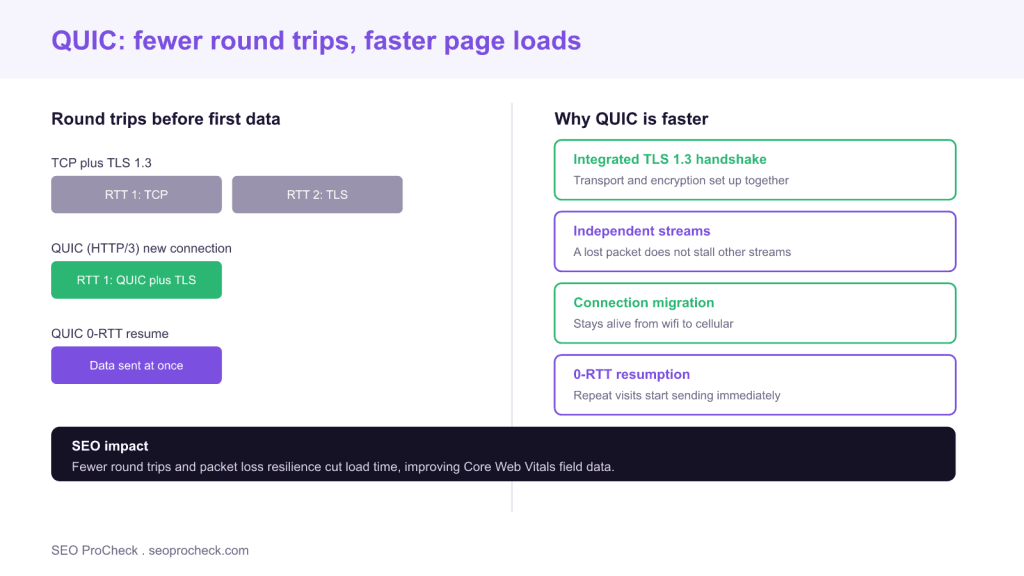
- QUIC merges the transport and TLS 1.3 handshake, so a new connection needs one round trip instead of two, and 0-RTT on resume.
- Independent streams mean a single lost packet does not stall the rest of the page, unlike TCP.
- Connection migration keeps a session alive when a user moves from wifi to cellular, avoiding a reconnect.
- Lower latency and packet loss resilience improve real user metrics like Largest Contentful Paint.

QUIC is the modern transport protocol that carries HTTP/3. Where classic web traffic runs on TCP, QUIC runs on UDP and folds in encryption, stream multiplexing and smarter connection handling. The reason it matters for SEO is page speed: QUIC removes several sources of delay that TCP cannot avoid, and faster real world loading feeds directly into the Core Web Vitals that Google measures from real users. This guide explains what QUIC changes at the transport layer, how each change translates into a faster page, and how to confirm your site is serving it.
What QUIC is, in plain terms
TCP has carried the web for decades, but it was not designed for today's encrypted, latency sensitive traffic. Setting up a secure TCP connection takes two separate handshakes, the TCP handshake and then the TLS handshake, before any real data flows. TCP also enforces strict in order delivery, so one lost packet holds up everything behind it. QUIC was built to fix both. It runs on UDP, which is connectionless and lightweight, and it implements its own reliability, ordering, encryption and congestion control on top. Crucially, encryption with TLS 1.3 is not bolted on afterward; it is part of the protocol, so security and transport are established together.
How QUIC makes pages load faster
Four properties do the work.
Fewer handshake round trips. A fresh QUIC connection completes the transport and TLS setup in a single round trip, versus the two that TCP plus TLS 1.3 require. On a repeat visit, QUIC supports 0-RTT resumption, letting the browser send its first request immediately with no waiting handshake at all. Every round trip removed is one full network latency saved before the page can even start, which is most noticeable on high latency mobile connections.
No transport head of line blocking. TCP delivers bytes in strict order, so a single dropped packet stalls every stream sharing the connection until it is retransmitted. QUIC treats each stream independently, so a lost packet only pauses its own stream while the rest of the page keeps arriving. On lossy networks this is a large, tangible speedup.
Connection migration. QUIC identifies a connection by a connection ID rather than by the IP and port pair TCP uses. When a user walks out of wifi range onto cellular, the connection survives instead of dropping and reconnecting, so an in progress load does not stall. This directly helps the mobile sessions that dominate real user data.
Better congestion control. Because QUIC runs in user space rather than the operating system kernel, its congestion control can improve without waiting for operating system updates, and it recovers from loss more intelligently than legacy TCP stacks.
The connection to Core Web Vitals and SEO
QUIC does not rank you directly. It lowers the time before content starts arriving and the time to deliver the resources that build the page, which improves the loading and interactivity metrics Google measures. A faster connection setup and quicker resource delivery help Largest Contentful Paint in particular, since the largest element cannot paint until its bytes arrive; our LCP guide covers that relationship in depth. Because Google assesses Core Web Vitals from field data collected on real devices and networks, protocol level gains on mobile show up where the assessment actually looks. The difference between that field data and lab tests is worth understanding, and we explain it in our guide to field versus lab data.
QUIC, HTTP/3 and how they relate
It is easy to confuse the terms. HTTP/3 is the version of HTTP that defines how requests and responses are structured; QUIC is the transport it runs on. You cannot have HTTP/3 without QUIC, and enabling one enables the other. If you want the wider comparison of how the protocol versions differ and what each brought, see our guide to HTTP/2 and HTTP/3 SEO benefits. For this page the point is narrower: QUIC is the piece responsible for the transport speed gains.
How to check whether your site uses QUIC
Open your browser DevTools, go to the Network tab, enable the Protocol column, and reload. A value of h3 means the response came over HTTP/3, which means QUIC. You can also test with a recent curl that supports HTTP/3, or use an online HTTP/3 and QUIC tester that reports the negotiated protocol. Remember that browsers first connect over TCP and then upgrade to QUIC after learning the server supports it, often via the Alt-Svc response header, so the very first request in a session may show h2 before later requests show h3.
Practical notes and caveats
QUIC needs UDP traffic on port 443 to be allowed; some restrictive corporate or mobile networks block or throttle UDP, in which case the browser falls back to HTTP/2 over TCP, so you always keep a TCP path as a safety net. Enabling QUIC is almost always a CDN or server setting rather than an application change: Cloudflare, Fastly and the major clouds offer an HTTP/3 toggle, and recent Nginx builds support it with a configuration directive. And as with any transport upgrade, QUIC accelerates delivery but does not shrink your payload; pair it with image optimization, code splitting and the other wins in our guide to speeding up WordPress for the full effect.
What has changed recently
QUIC is now a finalized standard and is enabled by default across current versions of Chrome, Edge, Firefox and Safari, as well as on the major CDNs, so a large and growing share of real traffic already negotiates it automatically. For SEO the guidance is settled: serve HTTPS, enable HTTP/3 and therefore QUIC through your CDN or server, keep the TCP fallback in place, and continue optimizing your actual page weight. QUIC removes the handshake and packet loss penalties that TCP could never shed, and on mobile that translates into the faster field metrics that matter for ranking.
| Property | TCP plus TLS | QUIC (HTTP/3) | Page speed effect |
|---|---|---|---|
| New connection handshake | Two round trips | One round trip | Starts loading sooner |
| Repeat visit | One round trip | 0-RTT resume | Near instant reconnect |
| Packet loss on one stream | Stalls all streams | Stalls only that stream | Steadier load on lossy links |
| Network change | Connection drops | Connection migrates | No stall moving to cellular |
| Encryption | Added after transport | Built in, TLS 1.3 | Fewer setup steps |
Frequently asked questions
What is QUIC and how does it relate to HTTP/3?
QUIC is a transport protocol built on UDP that includes encryption, stream multiplexing and reliability. HTTP/3 is the version of HTTP that runs on top of QUIC. Enabling HTTP/3 means using QUIC, so the two go together.
Does QUIC actually make pages faster?
Yes, mainly by cutting handshake round trips, removing transport head of line blocking, and surviving network changes. The gains are largest on mobile and high latency or lossy connections, where saving even one round trip is noticeable.
Is QUIC good for SEO?
Indirectly. QUIC lowers load times, which improves the Core Web Vitals field data Google collects from real users. It is not a direct ranking factor, but faster real world performance supports better metrics and user engagement.
What is 0-RTT in QUIC?
0-RTT lets a returning browser send its first request immediately using cached connection parameters, with no waiting handshake. This makes repeat visits start almost instantly, though it applies to resumed connections rather than brand new ones.
How do I know if my site is using QUIC?
Enable the Protocol column in the DevTools Network tab and reload; an h3 value means the response used HTTP/3 over QUIC. You can also use a modern curl or an online HTTP/3 tester. The first request may show h2 before the browser upgrades to h3.
Can QUIC be blocked?
Yes. QUIC uses UDP on port 443, and some corporate or mobile networks block or throttle UDP. When that happens the browser falls back to HTTP/2 over TCP, so you keep a working TCP path as a safety net.
Take this with you
The assistant links open with a question about this page already written. Nothing is sent until you press enter.
Claude Vincent is a technical SEO consultant focused on crawlability, rendering, and AI-search visibility. He writes the field guides and case studies at SEO ProCheck, with a bias toward the durable, unglamorous work that decides whether search engines and AI answer engines can actually read and cite a site.
About SEO ProCheck
Technical SEO consulting and GEO strategy with 20 years of enterprise experience. Case studies, resources, and tools for search and AI visibility.
Work With Me
Technical SEO audits, GEO strategy, site migrations, and international SEO. Hourly consulting for teams who need hands-on support, not just reports.
Subscribe to our newsletter!








Recent Posts
- Most Top Sites Never Say Who They Are in Structured Data October 14, 2026
- Homepage Titles Are Mostly Too Short, Not Too Long October 8, 2026
- Who Actually Serves an llms.txt? 184 Top Sites Measured September 29, 2026