

ProfilePage Schema for Author Bios
- January 20, 2025
- Schema and Structured Data, Technical SEO
AI Summary
ProfilePage schema wraps an author archive in a machine readable Person entity so search engines and AI answer engines can tie a byline to a real, verifiable individual. You place it on the dedicated author URL, populate name, url, jobTitle, sameAs, knowsAbout and worksFor, then reference that same Person by @id from every Article the author writes.
- ProfilePage belongs on the author archive URL, not on every article page.
- The Person name must match the visible byline character for character.
- sameAs should list only profiles the author genuinely controls.
- Articles link to the author with a Person @id reference, avoiding duplicate profiles.
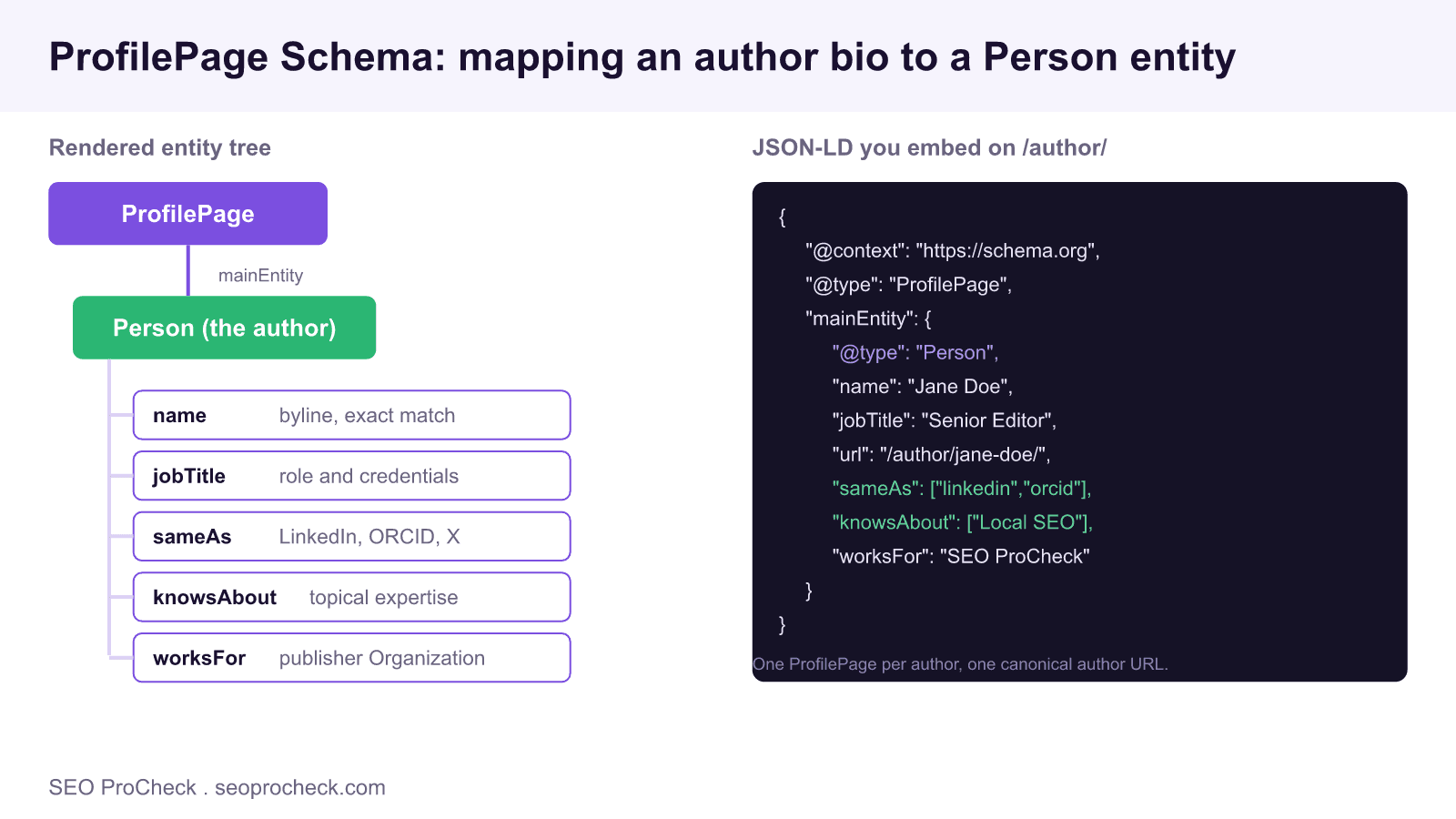
An author bio that a human reads as authoritative is invisible to a machine unless you describe it in structured data. ProfilePage is the schema.org type Google names specifically for pages that exist to present one person or organization, and the author archive is the textbook case. Marking it up turns a byline into an addressable entity that Google, Bing, and AI answer engines can connect to credentials, publications, and off site profiles.
What ProfilePage actually declares
ProfilePage is a page level type. It says this URL is the canonical description of a subject, and the subject sits inside mainEntity. For author bios that subject is a Person. The distinction matters: you are not adding Person schema in isolation, you are declaring that the whole page is a profile of that Person. That framing is what lets an answer engine treat the URL as the identity record for the author rather than as just another content page.
Use it on any page whose primary purpose is describing an individual: a WordPress author archive at /author/jane-doe/, a standalone contributor bio, or a forum member profile. Do not put a full ProfilePage on each article. On articles you reference the Person, you do not redescribe the page as a profile.
The minimal valid markup
Embed this JSON-LD on the author archive template. Every field maps to something a reader can already see on the page, which is the rule that keeps you inside Google structured data policy.
<script type="application/ld+json">
{
  "@context": "https://schema.org",
  "@type": "ProfilePage",
  "@id": "https://example.com/author/jane-doe/#profilepage",
  "url": "https://example.com/author/jane-doe/",
  "dateModified": "2026-07-21",
  "mainEntity": {
    "@type": "Person",
    "@id": "https://example.com/#person-jane-doe",
    "name": "Jane Doe",
    "jobTitle": "Senior Editor",
    "description": "Twelve years auditing local and technical SEO.",
    "url": "https://example.com/author/jane-doe/",
    "image": "https://example.com/img/jane-doe.jpg",
    "knowsAbout": ["Local SEO", "Structured Data", "Site Audits"],
    "sameAs": [
      "https://www.linkedin.com/in/janedoe",
      "https://orcid.org/0000-0002-1825-0097"
    ],
    "worksFor": { "@id": "https://example.com/#organization" }
  }
}
</script>
The @id on the Person is the load bearing detail. It is a stable identifier you reuse everywhere the author appears. Define it once here, then point at it from articles instead of pasting a second copy of the profile.
Wiring the author into every Article
On each post, your Article schema should not embed a fresh Person block. It should reference the canonical Person by @id, so search engines resolve one entity across the whole site:
"author": {
  "@type": "Person",
  "@id": "https://example.com/#person-jane-doe"
}
This is the difference between a site that has fifty disconnected author snippets and a site that has one consolidated author entity cited by fifty articles. The second pattern is what builds a durable authorship signal and what feeds a Knowledge Graph style understanding of who stands behind your content.
Property reference
Populate these fields on the Person inside mainEntity. The right column is where most implementations quietly break.
| Property | Required? | What to feed it | Common mistake |
|---|---|---|---|
name | Yes | Exact visible byline | Nickname that differs from the byline |
url | Yes | Canonical author archive URL | Pointing at the homepage |
jobTitle | Recommended | Role plus a credential | Left blank |
sameAs | Recommended | Profiles the person controls | Dead or unrelated URLs |
knowsAbout | Optional | Two to five topic strings | Keyword stuffing twenty terms |
worksFor | Optional | Organization referenced by @id | Redeclaring the whole org inline |
sameAs is where trust is earned or lost
The sameAs array is your verification chain. Each URL should be a profile the author controls and that ideally links back to your site, closing the loop. A LinkedIn profile, an ORCID record, a personal site, a verified X account, or a Google Scholar page are strong entries. A random Pinterest board or a dead link is noise that weakens the entity. Before you ship, open every sameAs URL and confirm it resolves and belongs to the right person, because broken sameAs targets are the single most common silent failure in author markup.
Rendering and placement
The JSON-LD must be present in the server rendered HTML of the author URL. If your theme injects it only after client side hydration, some crawlers and most lightweight AI fetchers will miss it. Confirm by viewing source, not by inspecting the live DOM. Keep the markup in a single <script type="application/ld+json"> block and let your SEO plugin handle sitewide Organization so you can reference it by @id rather than duplicating it.
Validation workflow
Run the author URL through the Google Rich Results Test and confirm the Person parses with zero errors and zero warnings on the required fields. Then do the manual pass that automated testers skip: check that name equals the byline, that url is the canonical author archive and not a redirect, and that every sameAs entry returns a live page for the correct person. Re run the test after any theme or plugin update, since author templates are a frequent casualty of updates.
Common mistakes to avoid
Do not mark up a Person who does not appear visibly on the page. Do not stuff knowsAbout with twenty keywords, keep it to the handful of topics the author truly covers. Do not let two plugins each emit a Person for the same author, which creates conflicting entities. And never invent credentials in jobTitle or description, since fabricated expertise is both a policy risk and a trust failure once a reader cross checks it.
Where this fits in your entity strategy
ProfilePage is one node in a larger machine readable identity for your brand and its people. For the wider picture of how entities, sameAs, and Knowledge Graph signals fit together, see our guide to entity HTML and becoming a machine readable brand, our broader schema and structured data resources, and our walkthrough on how to become a cited source in AI answers, where verifiable authorship carries real weight.
Frequently asked questions
Is ProfilePage schema only for social profiles?
No. Google documents ProfilePage for any page that centers on one person or organization, which includes an author archive, a contributor bio page, or a forum profile. If the page exists to describe who someone is, ProfilePage fits.
Should the ProfilePage go on the author archive or on every article?
Put ProfilePage on the dedicated author URL such as /author/jane-doe/. On article pages use Article schema and reference the same Person by @id so both markups point at one canonical entity instead of duplicating a full profile.
Does ProfilePage improve E-E-A-T directly?
The markup itself is not a ranking boost. It makes authorship machine readable so search engines and AI answer engines can connect a byline to a real person with verifiable credentials, which supports the experience and expertise signals Google evaluates.
What is the single most important property to get right?
The name must match the visible byline exactly, and sameAs must list profiles the person actually controls. A mismatched name or a sameAs pointing at an unrelated account breaks the entity link and can trigger a spam or accuracy flag.
How do I connect ProfilePage to my Organization?
Give the Person a worksFor value that references your Organization node by @id. If the Organization is defined site wide in your schema, reuse that @id rather than redeclaring the full organization inside the Person block.
How do I test that it works?
Paste the author URL into the Google Rich Results Test and confirm the Person entity parses with no errors. Then check that name, url, and sameAs resolve to live pages, because broken sameAs URLs are the most common silent failure.
Take this with you
The assistant links open with a question about this page already written. Nothing is sent until you press enter.
Claude Vincent is a technical SEO consultant focused on crawlability, rendering, and AI-search visibility. He writes the field guides and case studies at SEO ProCheck, with a bias toward the durable, unglamorous work that decides whether search engines and AI answer engines can actually read and cite a site.
About SEO ProCheck
Technical SEO consulting and GEO strategy with 20 years of enterprise experience. Case studies, resources, and tools for search and AI visibility.
Work With Me
Technical SEO audits, GEO strategy, site migrations, and international SEO. Hourly consulting for teams who need hands-on support, not just reports.
Subscribe to our newsletter!








Recent Posts
- Most Top Sites Never Say Who They Are in Structured Data October 14, 2026
- Homepage Titles Are Mostly Too Short, Not Too Long October 8, 2026
- Who Actually Serves an llms.txt? 184 Top Sites Measured September 29, 2026