

AI Summary
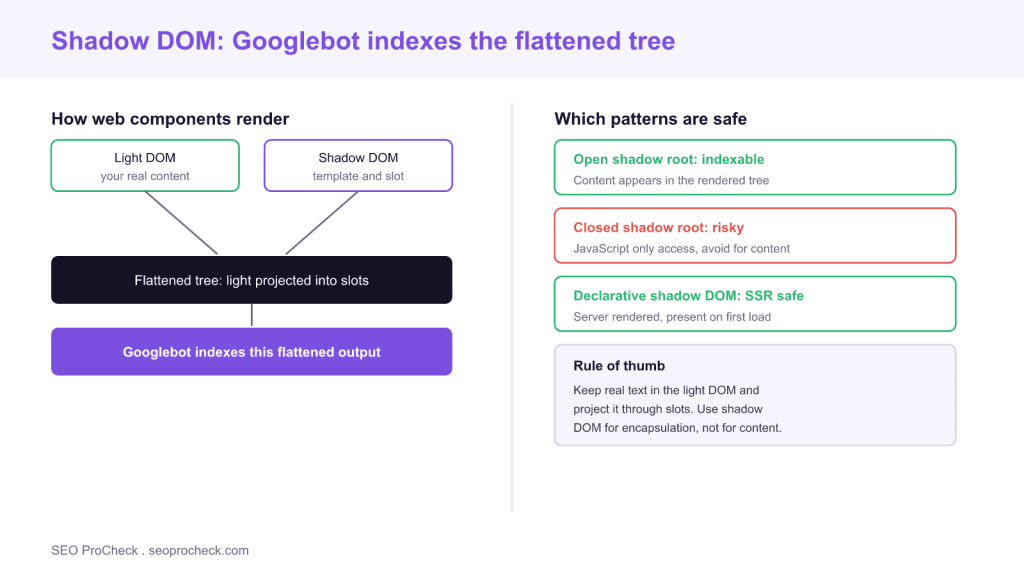
The Shadow DOM lets web components encapsulate their markup and styles in a separate tree, and Googlebot indexes the flattened result where light DOM content is projected into slots. Content is safe when you keep real text in the light DOM and use open or declarative shadow DOM, but it can be hidden if you bury text in a closed shadow root or inject it only with client side JavaScript.
- Googlebot renders web components and indexes the flattened tree, so slotted light DOM content is visible to search.
- Use open shadow roots, not closed ones, for anything that carries meaningful content.
- Declarative shadow DOM lets components render server side, so their content exists in the first HTML.
- Keep primary text, headings and links in the light DOM and project them through slots for encapsulation without hiding content.
The Shadow DOM is the browser feature that lets a custom element hide its internal markup and styles inside a separate, encapsulated tree. It is the backbone of Web Components, the standard way to build reusable UI like a <product-card> or <site-header> element without leaking styles across your page. For SEO the question is straightforward: can search engines see the content inside these components, and the answer is yes, provided you use the right patterns. This guide explains how the Shadow DOM renders, when it hides content from crawlers, and the exact conventions that keep your web components fully indexable.
How the Shadow DOM renders for search engines
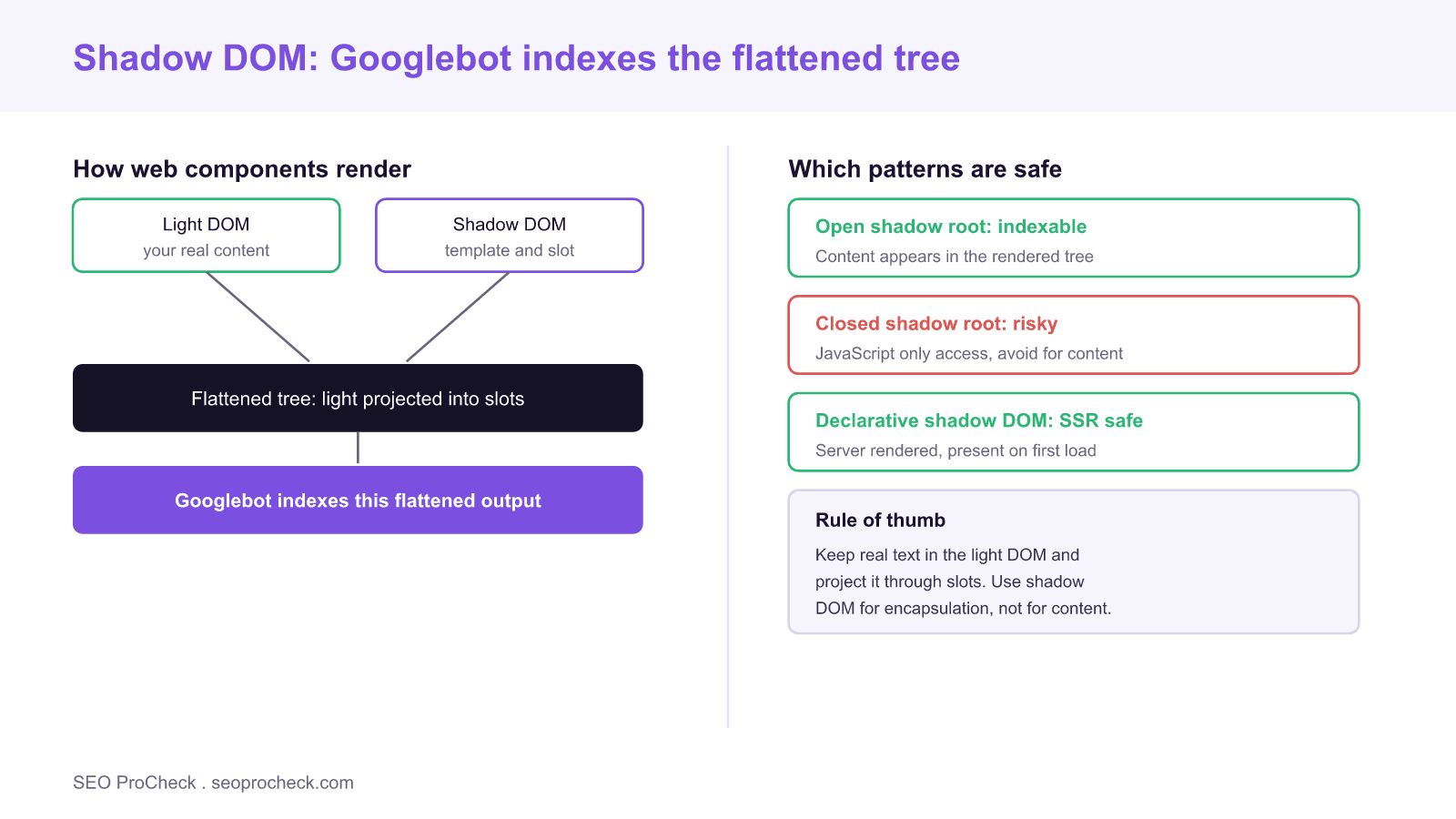
A web component has two relevant trees. The light DOM is the ordinary markup you write between the element tags, for example the text you place inside <product-card>...</product-card>. The shadow DOM is the internal template the component attaches with attachShadow, which usually contains structure, styles and one or more <slot> elements. When the browser paints the page, it composes these into a single flattened tree: the light DOM content is projected into the slots defined by the shadow template.
Googlebot runs a current Chromium in its renderer, so it composes that flattened tree exactly as a browser does and indexes the result. This means slotted content, the text you wrote in the light DOM, is visible to search. The risk is not the Shadow DOM itself; it is the specific pattern you choose for putting content into it.
Open versus closed shadow roots
When you attach a shadow root you pick a mode. An open shadow root, attachShadow({mode: "open"}), exposes the shadow tree to JavaScript through element.shadowRoot and composes normally into the rendered tree. A closed shadow root, mode: "closed", hides the tree from outside scripts and is intended for strong encapsulation. Content inside either mode is painted, but closed roots are harder to inspect, harder to debug, and are a signal that you are treating the internals as private. For anything that carries meaningful content, use open mode. Reserve closed mode for genuinely internal widgets that hold no indexable text.
The pattern that keeps content indexable
The reliable approach is to keep your real content in the light DOM and let the component project it through slots. Write the heading, paragraph and links as ordinary HTML inside the custom element, then define a <slot> in the shadow template where that content should appear. Because the text lives in the light DOM, it exists in the source HTML before any component logic runs, and it is projected into place when the component upgrades. This is the same principle that governs all rendering work: search engines index what is in the HTML, a point we cover in the forgotten HTML. Content that a component fetches and injects only with client side JavaScript, by contrast, depends on the render phase and can be delayed or missed.
Declarative Shadow DOM and server rendering
Historically the Shadow DOM could only be created with JavaScript, which made server side rendering of web components awkward. Declarative Shadow DOM changed that. By writing <template shadowrootmode="open"> in your server HTML, you can serialize a component and its shadow tree directly in the response, so the content is present on the first load with no JavaScript required. For SEO this is the best of both worlds: full component encapsulation and content that exists in the initial HTML. If you are choosing between rendering strategies for a component heavy site, weigh the same trade offs described in our guide to server versus client rendering for AI crawlers.
Links and headings inside components
Two details deserve attention. First, links: an anchor placed in the light DOM and slotted into a component is a normal crawlable link and passes signals like any other. Links generated only inside a closed shadow root by script are far less reliable, so keep your navigation and contextual links in the light DOM. Good internal linking matters just as much inside components as anywhere else, as we detail in the internal linking guide. Second, headings: a heading slotted from the light DOM keeps its place in the document outline, while a heading buried in shadow markup can be harder for tooling to associate with the page structure. Slot your headings.
How to test a web component for SEO
Run the URL Inspection live test in Search Console and open the rendered HTML; confirm your component content appears. Load the page with JavaScript disabled to see what exists before components upgrade, which tells you whether the content is in the light DOM or injected later. Inspect the element in DevTools and confirm the shadow root is open and that light DOM nodes are assigned to slots rather than replaced. Finally, view source and check that your headings, paragraphs and links are present as plain HTML inside the custom element tags.
What has changed recently
Two developments make web components safer for SEO than they used to be. Declarative Shadow DOM is now supported across major browsers, so server rendering a component with its shadow tree is a first class option rather than a hack. And frameworks that build on web components increasingly default to slotting light DOM content and to server rendering, which aligns the ergonomic path with the SEO safe path. The advice has not changed in spirit: encapsulate structure and styles with the Shadow DOM, keep your meaningful text and links in the light DOM, and make sure the flattened tree a crawler indexes contains everything you want to rank for.
| Pattern | Where content lives | Indexable | Recommendation |
|---|---|---|---|
| Light DOM slotted | Source HTML | Yes, in phase one | Preferred for content |
| Open shadow root | Composed tree | Yes, after render | Fine, prefer slotting |
| Closed shadow root | Hidden internal tree | Painted but risky | Avoid for content |
| Declarative shadow DOM | Server HTML | Yes, in phase one | Best for SSR components |
| Client injected only | JavaScript runtime | Delayed or missed | Avoid for key content |
Frequently asked questions
Can Google index content inside the Shadow DOM?
Yes. Googlebot renders web components with a current Chromium and indexes the flattened tree, so content projected from the light DOM into slots is visible. The safest pattern is to keep your real text in the light DOM and slot it into the component.
What is the difference between light DOM and shadow DOM?
The light DOM is the ordinary markup you write between a custom element's tags. The shadow DOM is the component's internal, encapsulated tree with its own styles and slots. The browser composes them into one flattened tree for rendering and indexing.
Should I use open or closed shadow roots for SEO?
Use open shadow roots for anything with meaningful content. Closed roots hide the tree from scripts and tooling and signal that the internals are private, which makes them a poor choice for indexable text or links.
Does declarative Shadow DOM help SEO?
Yes. Declarative Shadow DOM serializes a component and its shadow tree in the server HTML, so the content exists on the first load without JavaScript. That puts component content into the initial indexing phase rather than the render queue.
Are links inside web components crawlable?
Links written in the light DOM and slotted into a component are normal crawlable anchors that pass signals. Links generated only inside a closed shadow root by script are unreliable, so keep navigation and contextual links in the light DOM.
How do I check what Google sees in a web component?
Run the URL Inspection live test in Search Console and review the rendered HTML, load the page with JavaScript disabled to see the pre upgrade state, and inspect the element in DevTools to confirm the shadow root is open and light DOM nodes are slotted.
Take this with you
The assistant links open with a question about this page already written. Nothing is sent until you press enter.
Claude Vincent is a technical SEO consultant focused on crawlability, rendering, and AI-search visibility. He writes the field guides and case studies at SEO ProCheck, with a bias toward the durable, unglamorous work that decides whether search engines and AI answer engines can actually read and cite a site.
About SEO ProCheck
Technical SEO consulting and GEO strategy with 20 years of enterprise experience. Case studies, resources, and tools for search and AI visibility.
Work With Me
Technical SEO audits, GEO strategy, site migrations, and international SEO. Hourly consulting for teams who need hands-on support, not just reports.
Subscribe to our newsletter!








Recent Posts
- Most Top Sites Never Say Who They Are in Structured Data October 14, 2026
- Homepage Titles Are Mostly Too Short, Not Too Long October 8, 2026
- Who Actually Serves an llms.txt? 184 Top Sites Measured September 29, 2026