

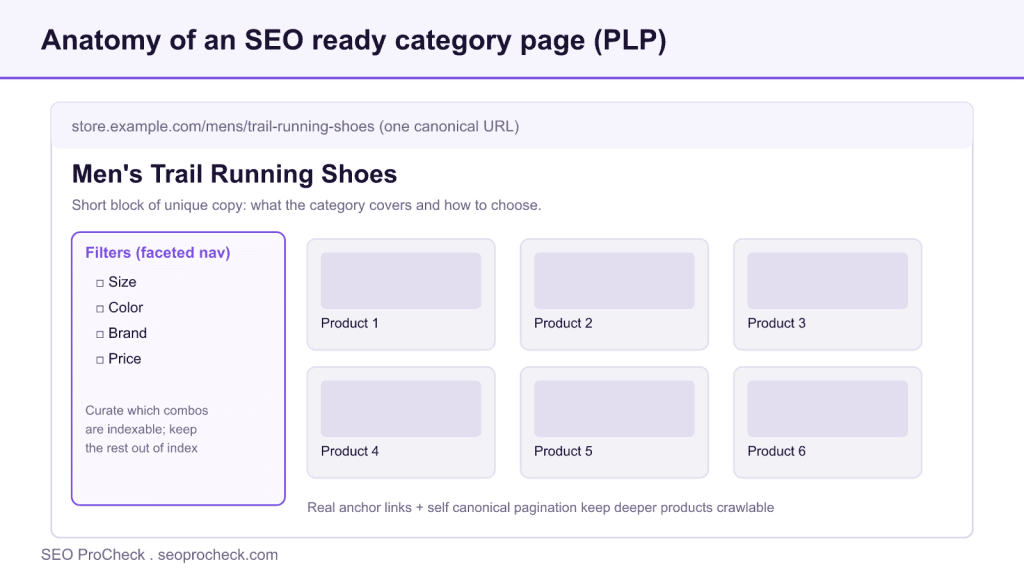
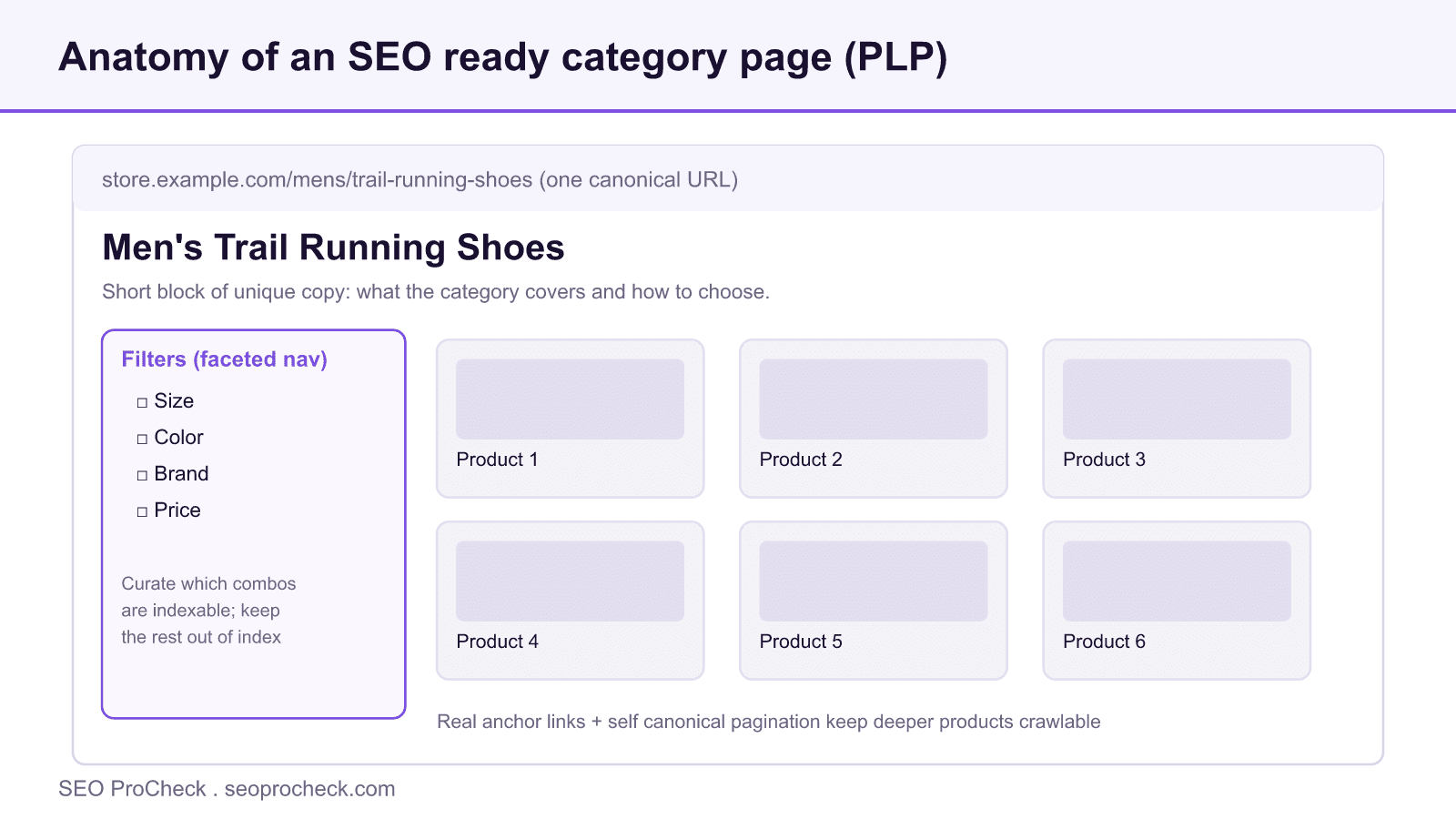
Category pages, also called product listing pages or PLPs, map to high intent commercial queries and are usually a store's strongest SEO asset. You win them with a clear H1, a short block of unique copy, sensible internal links, and disciplined faceted navigation so filters do not spawn thousands of near duplicate URLs.
- PLPs often outrank product pages for broad, plural queries like running shoes or standing desks.
- Faceted filters can generate tens of thousands of URL permutations; curate which combinations are indexable and keep the rest out.
- Keep paginated pages self canonical so products on deeper pages stay discoverable.
- Add a short intro plus optional supporting copy, never a wall of text pushed above the product grid.
Why category pages matter
When someone searches for a product type rather than a specific item, they are usually close to buying. Queries like "wireless headphones" or "leather office chairs" are commercial and often plural, and the result they reward is a page showing a range of relevant options, not a single product. That page is your category page.
This is why PLPs frequently outperform product pages for the broad terms that drive revenue. A product page targets one item; a category page can rank for the head term, capture shoppers who have not yet chosen a model, and funnel them toward products that convert. The way plural and singular phrasing shifts intent is worth understanding, which we cover in how plural keywords impact search intent in e-commerce.
The catch is that most stores treat category pages as a template filled by the product feed, leaving the highest-leverage page type on the site thin, generic, and easy to outrank.
How to optimize them
Optimization here is less about clever tricks and more about giving search engines and shoppers a clear, fast, well-structured page:
- One clear H1. Use the category name as a descriptive heading, for example "Men's Trail Running Shoes." Keep it specific and avoid keyword stuffing.
- A short block of unique copy. A few sentences on what the category covers and how to choose, placed where it helps rather than above the products.
- Logical internal linking. Link to relevant subcategories, siblings, and a few flagship products with descriptive anchor text to spread authority and aid navigation.
- A sensible canonical strategy. Each distinct category should have one canonical URL, and parameters that do not change the content should canonicalize to the clean base URL.
- Pagination handling. Keep each paginated URL crawlable and self-canonical (do not point page 2 back to page 1), so products on deeper pages stay discoverable.
- Speed. Lazy-load below-the-fold images, compress assets, and keep Core Web Vitals healthy, since these pages carry your most competitive queries.
- Structured data where relevant. Breadcrumb markup helps the hierarchy show in results, and where products are listed, product-level markup can apply; see our product schema guide.
- Useful, crawlable filtering. Filters should help shoppers without generating an unbounded set of indexable URLs.
Handling faceted navigation
Faceted navigation, the filters for size, color, brand, and price, is where category SEO most often goes wrong. Each combination can generate a unique URL, so a handful of facets can produce tens of thousands of permutations. Left unmanaged, this creates crawl traps and floods the index with near-duplicate pages competing against your real category page.
The goal is to let shoppers filter freely while keeping only intentional URLs available to crawlers:
- Decide which facets deserve indexing. A few high-demand combinations (for example "blue running shoes" if people search it) may justify their own indexable landing page with unique copy.
- Keep the rest out of the index. For low-value combinations, avoid crawlable links and canonicalize to the base category. Robots.txt can stop crawling of parameter patterns, but disallowed URLs can still be indexed if linked, so combine signals thoughtfully.
- Avoid duplicate variants. Sort order, view toggles, and session parameters should canonicalize to the clean URL, not create separate indexable pages.
Filters are a UX feature; only a curated subset should rank as a landing page.
How to handle each facet and parameter type
| Facet or parameter | Example | Search demand | Recommended handling |
|---|---|---|---|
| Core category | /mens/trail-running-shoes | High | Indexable, unique H1 and copy, self canonical |
| High demand combination | trail shoes, waterproof | Medium | Give it its own indexable landing page with unique copy |
| Low demand combination | size 10, teal, one brand | Low | Canonicalize to the base category, avoid crawlable links |
| Sort and view toggles | ?sort=price, ?view=grid | None | Self canonical to the clean category URL |
| Session and tracking | ?sid=, ?utm= | None | Canonicalize and keep out of the index |
Content versus clutter
Category pages need enough copy to establish relevance and help shoppers, but they are not articles. A long essay pushed above the product grid buries what people came for. Aim for a concise introduction and optional supporting text lower down, and let the products, filters, and navigation do the work. If copy does not help a shopper decide or clarify the category, it is clutter.
Common mistakes
- Thin or no copy. A bare product grid with a generic heading gives search engines little reason to rank it over a competitor that explains the category.
- Indexable filter combinations. Letting every facet permutation become a crawlable, indexable URL dilutes signals and burns crawl budget.
- Duplicate category variants. Multiple URLs for the same listing split equity and confuse canonicalization.
- Canonicalizing paginated pages to page one. This can hide deeper products from discovery; let paginated pages be self-canonical.
- Walls of keyword-stuffed text. Copy written for crawlers rather than shoppers degrades experience and results.
Frequently asked questions
Usually category pages. They show a range of options, matching the intent behind broad, often plural, commercial queries. Reserve product pages for specific brand-plus-model searches.
Enough to clarify what the category covers and help shoppers choose, typically a short intro plus optional supporting text. Prioritize usefulness over length, and never push products far below the fold for it.
Yes. Filtering is good for users. The fix is controlling which filtered URLs search engines can crawl and index, not removing filters. Curate a few high-demand combinations as landing pages and keep the rest out of the index.
Faceted navigation is the set of filters for size, color, brand, and price. Each combination can generate a unique URL, so a handful of facets can spawn tens of thousands of near duplicate pages that dilute signals and burn crawl budget. Control which filtered URLs are crawlable and indexable rather than removing the filters.
No. Point each paginated URL at itself so it stays self canonical. Canonicalizing page two back to page one can hide deeper products from discovery, since crawlers may treat those pages as duplicates and skip the items only listed there.
Breadcrumb markup helps your hierarchy show in results, and where products are listed, product level markup can apply. Add schema that reflects what is genuinely on the page rather than marking up items that are not visible to shoppers.
Find the category pages costing you traffic
An audit can pinpoint thin PLPs, runaway faceted URLs, and canonicalization gaps holding back your most commercial pages, then map the fixes in priority order.
Take this with you
The assistant links open with a question about this page already written. Nothing is sent until you press enter.
Claude Vincent is a technical SEO consultant focused on crawlability, rendering, and AI-search visibility. He writes the field guides and case studies at SEO ProCheck, with a bias toward the durable, unglamorous work that decides whether search engines and AI answer engines can actually read and cite a site.
About SEO ProCheck
Technical SEO consulting and GEO strategy with 20 years of enterprise experience. Case studies, resources, and tools for search and AI visibility.
Work With Me
Technical SEO audits, GEO strategy, site migrations, and international SEO. Hourly consulting for teams who need hands-on support, not just reports.
Subscribe to our newsletter!








Recent Posts
- Most Top Sites Never Say Who They Are in Structured Data October 14, 2026
- Homepage Titles Are Mostly Too Short, Not Too Long October 8, 2026
- Who Actually Serves an llms.txt? 184 Top Sites Measured September 29, 2026