

AI Summary
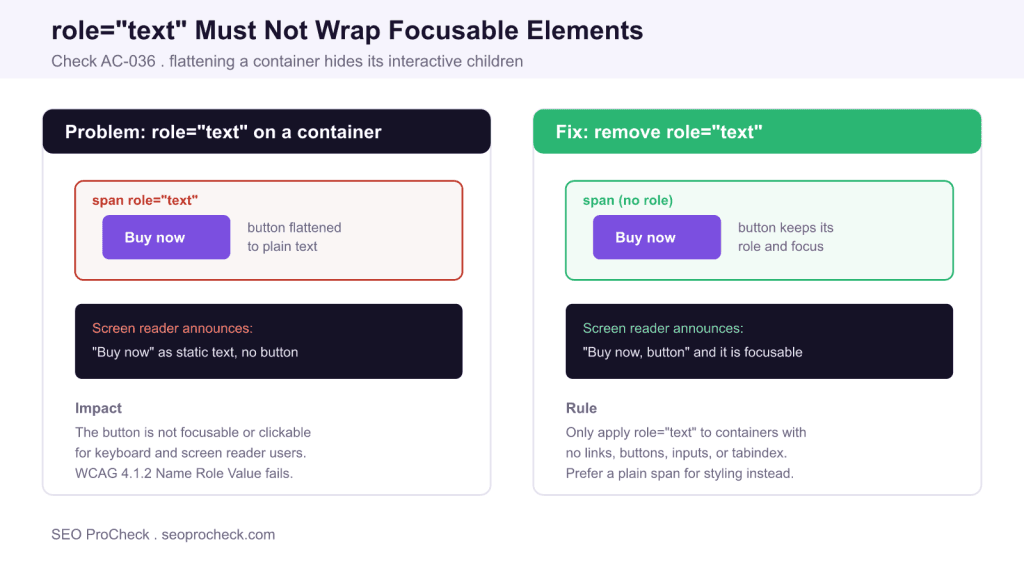
The AC-036 check flags any element with role="text" that contains focusable children such as links, buttons, or inputs. That ARIA role collapses everything inside it into a single flat string, so assistive technology can no longer reach the interactive elements, which fails WCAG 4.1.2.
- role="text" tells screen readers to treat the whole container as one static text node.
- Any button, link, or input inside it loses its role, name, and keyboard focus.
- Only use role="text" on containers that hold no interactive content.
- The fix is almost always to remove role="text" and use a plain span for styling.
Quick Reference
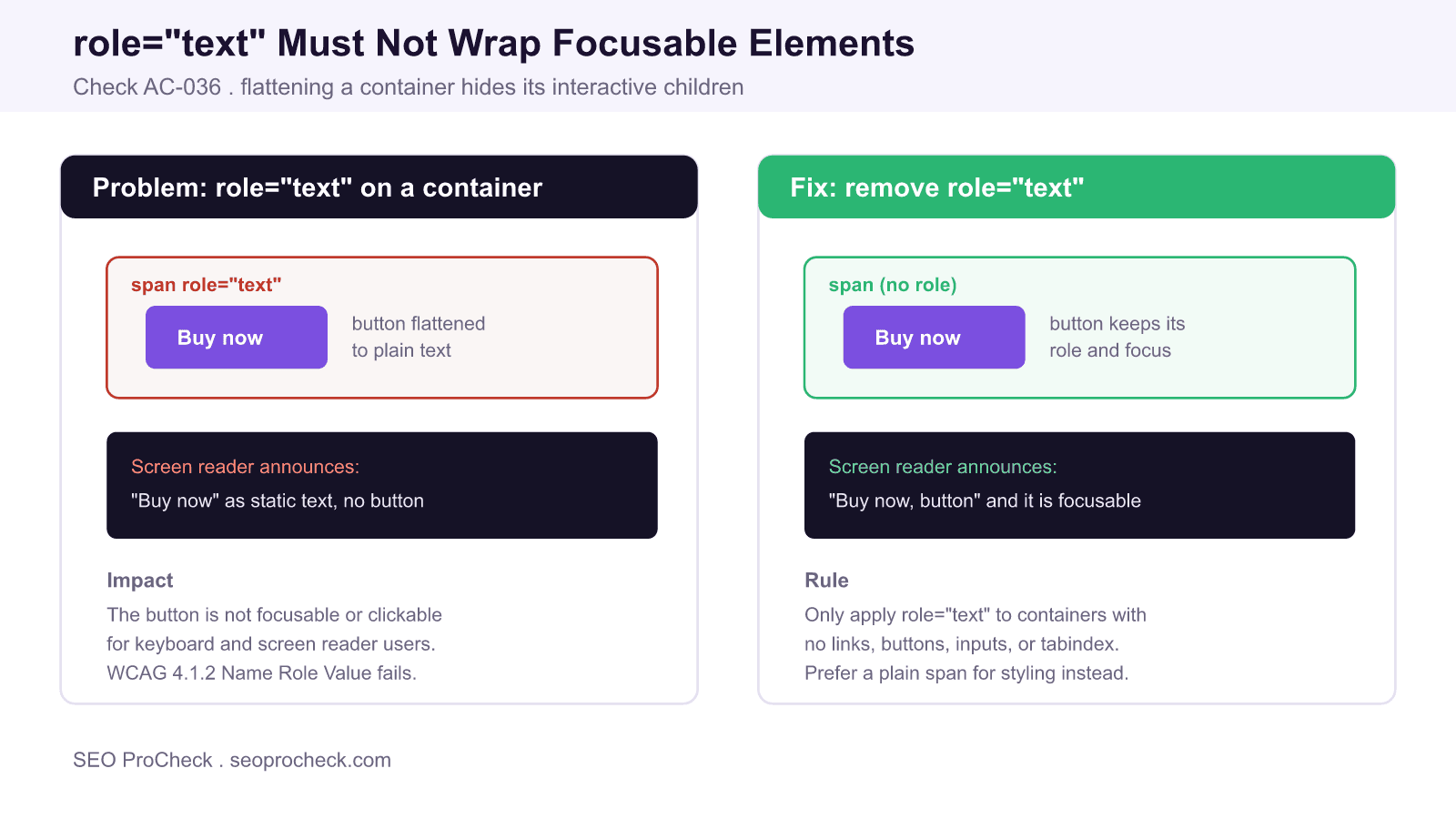
Element Code: AC-036
Issue: role="text" on containers with interactive children
Impact: Focusable elements are hidden from assistive technology
Fix: Remove role="text" or move interactive elements outside it
Detection: axe DevTools, Accessibility Insights
What Is This Issue?
ARIA defines a role called text whose purpose is to tell assistive technology that an element and everything inside it should be exposed as a single, unbroken string of text. It exists mostly to work around a specific screen reader problem: sometimes visual line breaks or inline styling cause a phrase to be read as several disconnected fragments, and role="text" forces it back into one coherent announcement.
The AC-036 check fires when that role is placed on a container that also holds focusable elements: a link, a button, a form input, or anything with a tabindex. Because role="text" flattens the subtree, those interactive controls lose their own role and, critically, their place in the accessibility tree. A screen reader user hears the words but is never told there is a button, and cannot operate it. That is a serious barrier, not a cosmetic warning.
Why This Matters
Success Criterion 4.1.2 Name, Role, Value in WCAG requires that for every user interface component the name and role can be programmatically determined and that states and values can be set. When role="text" swallows a button, the button no longer reports its role of "button" to assistive technology, so 4.1.2 fails at Level A. Keyboard focus behaviour also breaks: many screen reader and voice control workflows navigate by element type, and a flattened control is invisible to those commands even when it is technically still in the tab order.
The practical result is that a sighted mouse user can click the control while a keyboard or screen reader user cannot perceive or reach it. That gap is exactly what accessibility conformance is meant to close, and it commonly appears on styled call-to-action blocks, pricing cards, and marketing hero sections where a designer wrapped a whole unit to control how it reads.
Valid Versus Invalid Uses of role="text"
The role is not banned. It is safe on a purely presentational container of words. It becomes a defect the moment an interactive descendant is present.
| Markup | Contains focusable child? | Valid? | Why |
|---|---|---|---|
<span role="text">5 star rating</span> | No | Yes | Reads as one clean phrase |
<div role="text"><a>Learn more</a></div> | Yes (link) | No | Link role and focus are lost |
<h2 role="text"><button>Buy</button></h2> | Yes (button) | No | Button becomes unreachable |
<span><button>Buy</button></span> | Yes (button) | Yes | No flattening role applied |
How to Detect
Automated tools catch this reliably because the rule is deterministic. Run axe DevTools or Accessibility Insights and look for the rule identifier aria-text, which reports elements with role="text" that have focusable descendants. You can also search the DOM directly.
- In the browser console, run a query for the role:
document.querySelectorAll('[role="text"]'). - For each match, check whether it contains
a[href],button,input,select,textarea, or any element withtabindex. - Tab through the component with the keyboard and confirm each control still receives a visible focus ring.
- Verify with a screen reader that each control announces its role, not just its label text.
How to Fix
- Remove the
role="text"attribute from any container that holds an interactive element. - If you only needed it for styling, keep the element and drop the role, or swap in a plain
<span>. - If a genuine reading-order problem prompted the role, move the interactive control out of the flattened container and apply
role="text"only to the static text that surrounds it. - Give each control an accessible name through its visible label,
aria-label, oraria-labelledby. - Re-test with axe and a screen reader to confirm the role and focus are restored.
What Has Changed
role="text" was never part of the formal ARIA specification as a documented role for authors; it started as a Safari and VoiceOver behaviour and was later recognised by other engines. Because support and semantics vary, the safest modern approach is to avoid it entirely on anything interactive and to solve reading-order issues with correct HTML structure and aria-label instead. Automated checkers now treat a focusable child inside role="text" as a hard failure, which is why this check exists.
Related reading on SEO ProCheck: the full accessibility checks library, the guide to links that must have discernible text, and why form inputs need visible labels.
Frequently Asked Questions
What does role="text" actually do?
It tells assistive technology to treat an element and all of its contents as a single flat string of text. This is sometimes used to fix cases where a phrase is read as broken fragments, but it removes the semantics of anything inside the container.
Why is a button inside role="text" a problem?
The role flattens the whole subtree, so the button loses its button role and its position in the accessibility tree. Screen reader and voice control users can no longer perceive or operate it, which fails WCAG 4.1.2 Name, Role, Value at Level A.
Is role="text" ever allowed?
Yes, on containers that hold only static text and no interactive descendants. Used that way it can produce a cleaner single announcement. It becomes a defect only when it wraps a link, button, input, or any element with a tabindex.
How do I fix this without breaking my layout?
Remove the role attribute and keep the same element for styling, or replace it with a plain span. If you added the role to solve a reading-order issue, move the interactive control outside the flattened text and apply the role only to the surrounding static words.
Which tools detect role="text" on focusable elements?
axe DevTools and Accessibility Insights both flag it through the aria-text rule. You can also run document.querySelectorAll on the role in the browser console and check each match for focusable children.
Does this affect SEO or only accessibility?
It is primarily an accessibility conformance issue under WCAG 4.1.2, but accessible, semantically correct markup also helps search engines and assistive agents parse interactive elements. Fixing it improves usability for keyboard and screen reader users without any ranking downside.
TL;DR
Never place role="text" on a container that holds a link, button, input, or any focusable element. The role flattens the subtree and hides those controls from assistive technology, failing WCAG 4.1.2. Remove the role, or apply it only to purely static text.
Take this with you
The assistant links open with a question about this page already written. Nothing is sent until you press enter.
Claude Vincent is a technical SEO consultant focused on crawlability, rendering, and AI-search visibility. He writes the field guides and case studies at SEO ProCheck, with a bias toward the durable, unglamorous work that decides whether search engines and AI answer engines can actually read and cite a site.
About SEO ProCheck
Technical SEO consulting and GEO strategy with 20 years of enterprise experience. Case studies, resources, and tools for search and AI visibility.
Work With Me
Technical SEO audits, GEO strategy, site migrations, and international SEO. Hourly consulting for teams who need hands-on support, not just reports.
Subscribe to our newsletter!








Recent Posts
- Most Top Sites Never Say Who They Are in Structured Data October 14, 2026
- Homepage Titles Are Mostly Too Short, Not Too Long October 8, 2026
- Who Actually Serves an llms.txt? 184 Top Sites Measured September 29, 2026