

AI Summary
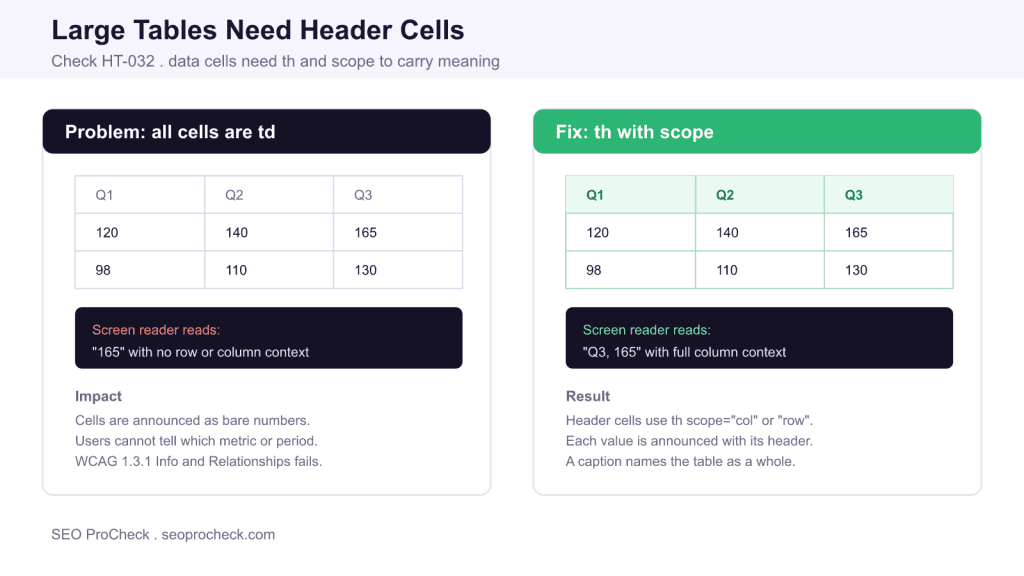
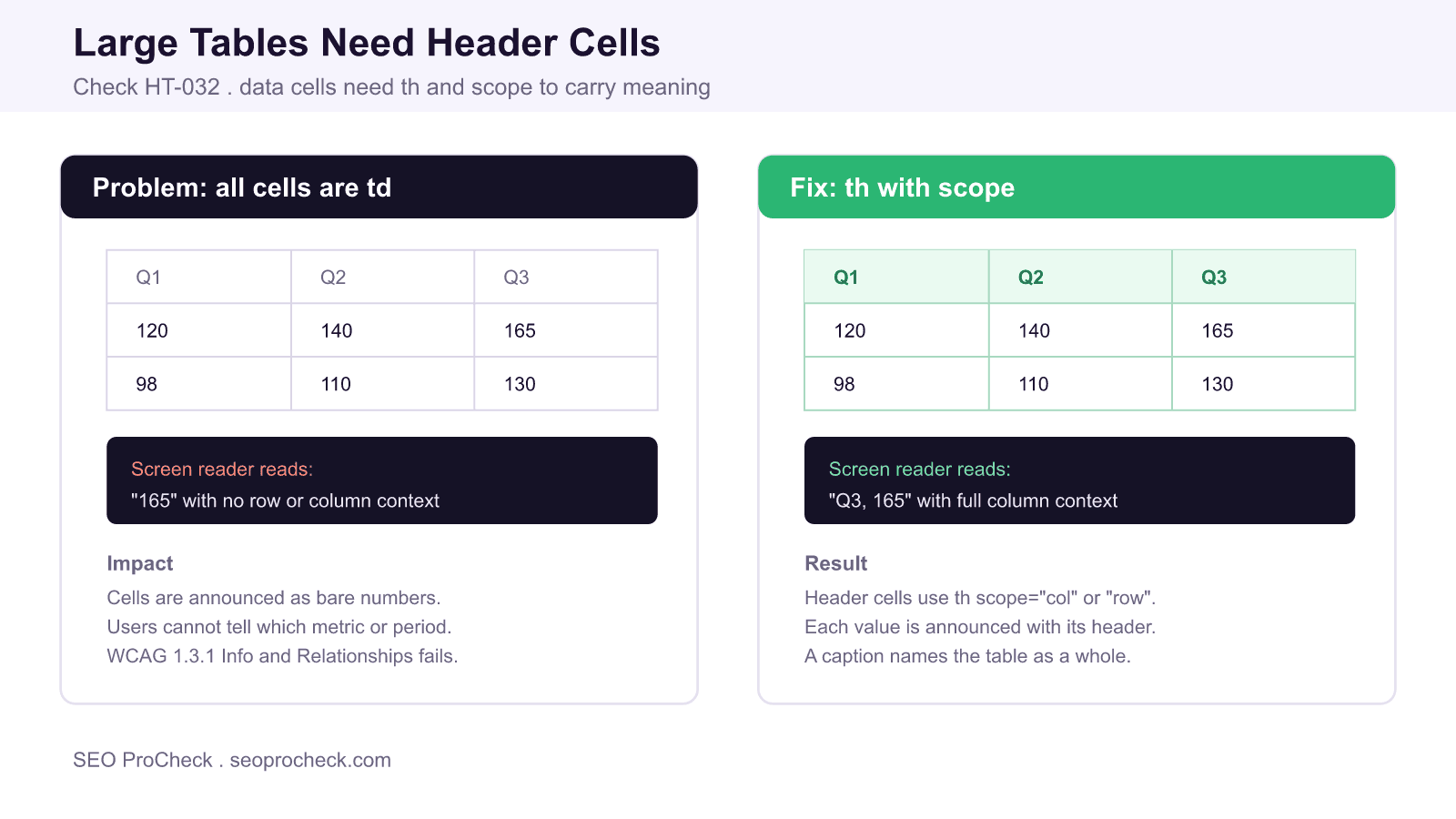
The HT-032 check flags data tables, typically anything larger than roughly three rows by three columns, whose cells are all <td> with no header associations. Without <th> cells and a scope attribute, a screen reader reads each value as a bare number with no row or column context, which fails WCAG 1.3.1.
- Header cells must use
<th>, not styled<td>. - Add
scope="col"orscope="row"so each value maps to its header. - Use a
<caption>to name the table as a whole. - Complex tables can associate cells with
headersandidattributes.
Quick Reference
Element Code: HT-032
Issue: Large tables lack header associations
Impact: Screen readers cannot tie a value to its row or column
Fix: Use <th> with a scope attribute and a caption
Detection: axe DevTools, screen reader table navigation
What Is This Issue?
An HTML table communicates meaning through the relationship between a value and its headers. A sighted reader sees that 165 sits in the Q3 column and the Revenue row and instantly understands it. A screen reader user gets that relationship only if the markup declares it. This check, HT-032, fires when a data table, usually one larger than about three rows by three columns, uses <td> for every cell and never marks its headers with <th>.
When there are no header cells, assistive technology has nothing to associate values with. As the user arrows through the grid, each cell is announced as a lone value: "165", "130", "98". The larger the table, the faster that context evaporates, which is why the rule targets bigger tables where memory alone cannot bridge the gap.
Why This Matters
WCAG Success Criterion 1.3.1 Info and Relationships requires that information and relationships conveyed through presentation can also be determined programmatically. In a table, the visual relationship between a cell and its column or row heading is exactly that kind of information. Marking headers with <th> and a scope attribute makes the relationship available to software, so a screen reader can announce "Q3, Revenue, 165" as the user lands on the cell.
This is not only a screen reader concern. Correct table semantics help browsers, reading-mode tools, and data extraction agents parse your content, and a clear <caption> gives everyone a quick summary of what the table represents. Using real header cells also lets you style headers consistently without faking them through bold <td> cells that carry no meaning.
Header Association Methods
There are three levels of table markup. Pick the simplest one that fully describes your data.
| Table type | Markup needed | Example |
|---|---|---|
| Simple, one header row | th scope="col" | A quarterly revenue table |
| Row and column headers | th scope="col" and th scope="row" | Metrics by quarter with labelled rows |
| Complex, multi level | headers and id on each cell | Grouped or spanning headers |
Correct Markup Example
A table with a single header row needs a caption and a header row of <th scope="col"> cells:
<table>
  <caption>Revenue by quarter (thousands)</caption>
  <thead>
    <tr>
      <th scope="col">Metric</th>
      <th scope="col">Q1</th>
      <th scope="col">Q2</th>
      <th scope="col">Q3</th>
    </tr>
  </thead>
  <tbody>
    <tr>
      <th scope="row">Revenue</th>
      <td>120</td><td>140</td><td>165</td>
    </tr>
  </tbody>
</table>
How to Detect
- Run axe DevTools and review any rule about data tables missing header cells or scope.
- Navigate the table with a screen reader in table mode and listen for whether each value is announced with its headers.
- In the console, compare the count of header cells to data cells:
table.querySelectorAll('th').lengthversustable.querySelectorAll('td').length. A large table with zero th cells is a red flag. - Check that headers use
<th>and not<td>styled to look like headers.
How to Fix
- Change the header row cells from
<td>to<th>and addscope="col". - If the first cell of each row labels that row, make it a
<th scope="row">. - Add a
<caption>that names the table. - For tables with grouped or spanning headers, give each header an
idand reference them from data cells with theheadersattribute. - Reserve tables for tabular data; do not use them for visual layout, and split a genuinely two dimensional dataset rather than nesting tables.
Related reading on SEO ProCheck: the full HTML structure checks library, the accessibility checks library, and why links must have discernible text.
Frequently Asked Questions
When does a table need th header cells?
Any table that presents data with rows and columns needs header cells, and this check specifically targets larger tables, roughly three by three or bigger, where a reader cannot hold the context in memory. Layout tables, which you should avoid anyway, are the only exception.
What is the difference between td and th?
A td is a generic data cell with no special meaning, while a th is a header cell that labels a row or column. Only th cells, combined with a scope attribute, tell assistive technology which values they describe.
What does the scope attribute do?
Scope declares whether a th labels a column or a row. Use scope="col" on column headers and scope="row" on row headers. This lets a screen reader announce each data value together with the correct header.
How do I handle tables with grouped or spanning headers?
For complex tables, give each header cell an id and reference the relevant header ids from every data cell using the headers attribute. This explicit association handles multi level headers that a simple scope cannot express.
Do I still need a caption if I have headers?
A caption is recommended because it names the table as a whole, which headers alone do not. It gives every user, and especially screen reader users, a quick summary of what the table contains before they navigate its cells.
Is this an SEO problem or an accessibility problem?
It is primarily an accessibility issue under WCAG 1.3.1, but well structured tables with real header cells and a caption are also easier for search engines and data extraction agents to parse, so fixing it helps both audiences.
TL;DR
Give data tables real header cells: use <th> with scope="col" or scope="row" and add a caption so screen readers announce each value with its header. Tables of all td cells fail WCAG 1.3.1 because values carry no context.
Take this with you
The assistant links open with a question about this page already written. Nothing is sent until you press enter.
Claude Vincent is a technical SEO consultant focused on crawlability, rendering, and AI-search visibility. He writes the field guides and case studies at SEO ProCheck, with a bias toward the durable, unglamorous work that decides whether search engines and AI answer engines can actually read and cite a site.
About SEO ProCheck
Technical SEO consulting and GEO strategy with 20 years of enterprise experience. Case studies, resources, and tools for search and AI visibility.
Work With Me
Technical SEO audits, GEO strategy, site migrations, and international SEO. Hourly consulting for teams who need hands-on support, not just reports.
Subscribe to our newsletter!








Recent Posts
- Most Top Sites Never Say Who They Are in Structured Data October 14, 2026
- Homepage Titles Are Mostly Too Short, Not Too Long October 8, 2026
- Who Actually Serves an llms.txt? 184 Top Sites Measured September 29, 2026