

AI Summary
A page with a very high number of outgoing internal links splits its internal PageRank across all of them, so each link passes less value. There is no fixed limit, but hundreds of links on a normal content page usually points to bloated navigation or over linking that dilutes your priorities.
- Google dropped its old advice to keep pages under 100 links, but every link still divides internal equity.
- Sitewide menus and footers count toward a page's outlink total.
- Crawl the site with Screaming Frog or Sitebulb and sort by outlinks to find offenders.
- Nofollow no longer sculpts internal PageRank, so prune or consolidate links instead.

Element Code: LI-015
Quick Reference
Issue: Page has an unusually high number of outgoing internal links
Impact: Dilutes link equity, may appear as link farm behavior
Fix: Review if all links are necessary and valuable
Detection: Screaming Frog, Sitebulb
What Is This Issue?
Pages with hundreds of outgoing links dilute the value of each link. While acceptable for legitimate navigation or resource pages, excessive links on content pages may be problematic.
Why This Matters for Your Website
Link equity is divided among outgoing links. Too many links means each one passes minimal value.
How to Fix This Issue
- Review link necessity: Is every link valuable?
- Context matters: Category pages can have many links
- Reduce if excessive: Focus on most important links
Tools for Detection
- Screaming Frog: Shows outlink counts
TL;DR (The Simple Version)
This page has many outgoing links. While okay for navigation pages, content pages should focus on fewer, more valuable links.
Is there really a limit on outgoing links?
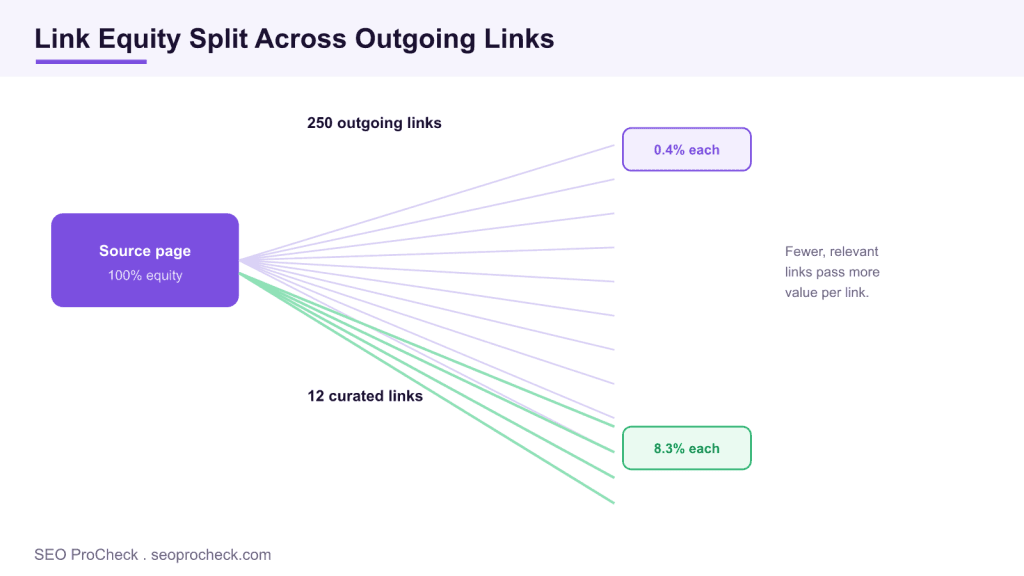
For years Google published advice to keep the number of links on a page to a reasonable number, phrased at one point as under 100. That specific figure was removed from the guidelines because it reflected an old indexing constraint rather than a modern ranking rule. Today there is no hard cap, and Google will happily crawl a page with many links. The real cost is different: internal PageRank is a finite pool, and every crawlable link on the page takes a share of it. Put 250 links on a page and each one carries a thin slice of authority; keep a dozen focused links and each carries far more.
How link equity actually flows
Think of each page as holding a budget of authority that it distributes across its outgoing links. The math is not perfectly even in the real algorithm, but the direction holds: fewer, more relevant links concentrate value on the pages you want to rank, while sprawling mega menus and giant footers leak equity to low priority URLs on every page they appear on. Because those sitewide links render on thousands of pages, they are often the single biggest reason a template shows a very high outlink count.
| Page type | Typical healthy range | Notes |
|---|---|---|
| Standard article or product page | 10 to 40 contextual links | Concentrate equity on a few key targets |
| Category or hub page | 40 to 120 links | A navigation role justifies a higher count |
| Sitemap or index page | 100 or more links | Expected, but keep it crawlable and paginated |
What actually counts as an outgoing internal link
A crawler counts every unique, crawlable internal URL in the rendered HTML of the page, not just the links you placed inside the article body. That total folds together four very different groups: primary navigation and mega menus, the footer, in body contextual links, and template widgets such as related posts, tag clouds, breadcrumb trails, and pagination. When a tool flags a page for a high outlink count, the first job is to separate boilerplate links that repeat on every template from the editorial links that are unique to this page. The boilerplate group is usually where the bloat lives, and fixing it once in the template quietly improves thousands of URLs at the same time.
One nuance trips people up: links injected by JavaScript are counted once the page is rendered, so a faceted filter menu or an infinite tag list that hydrates on load still adds to the outlink total that Google sees. Crawl with JavaScript rendering enabled if your navigation is script driven, otherwise the audit will undercount the real figure.
Auditing outlinks in Screaming Frog, step by step
Screaming Frog is the fastest way to quantify the problem. Run a normal crawl, open the Internal tab, and add the Outlinks column, then sort it high to low so the worst offenders float to the top. To see how internal authority pools rather than just raw counts, run Crawl Analysis so the Link Score column populates, then compare Outlinks against Link Score: a template with a huge outlink number and a thin Link Score is leaking equity. For a link level view, select a URL and open the Outlinks tab in the lower pane, or use Bulk Export, then Links, then All Outlinks to dump every source and target pair into a spreadsheet you can pivot by link position. Sitebulb reports the same idea through its internal link Hints and a per URL link equity score, which is handy when you want a second opinion or a client friendly chart.
A worked example
Say a product page reports 320 outgoing internal links. You export the outlinks and bucket them by position: 210 come from the mega menu, 44 from the footer, 18 from a related products widget, and only 48 are genuine in body links to specifications, guides, and the category. Roughly 80 percent of the equity this page could pass is spread across boilerplate that already appears on every URL, so those links do almost nothing to promote the 48 targets that matter for this product. Trimming the mega menu to its top level sections and collapsing the footer link dump to the pages that earn clicks might cut the total to about 120, which more than doubles the share of authority reaching each editorial link without touching a word of the copy.
A remediation checklist
- Separate boilerplate from editorial: tag each link by position before you cut anything.
- Trim sitewide templates first: shrinking a mega menu or footer improves every page at once.
- Consolidate duplicates: if three links on the page point at the same URL, keep the single most useful one.
- Paginate long index pages: break a 400 link archive into crawlable pages rather than one wall of links.
- Skip nofollow sculpting: nofollow on internal links wastes equity instead of redirecting it.
- Recrawl and compare: confirm the outlink counts dropped and Link Score on priority pages rose.
There is also a crawl budget angle on very large sites. Every extra low value link is another URL a bot may queue, so pages that fan out to hundreds of thin or near duplicate targets can slow the discovery of the URLs you actually want indexed. Concentrating links on a smaller, more deliberate set keeps both equity and crawl attention pointed at your priorities.
Finding and fixing over linked pages
Crawl the site with Screaming Frog or Sitebulb, then sort the internal report by outlinks and review the Link Score column to see how authority pools. Export the outliers and ask a blunt question of each link: does it help the reader or move them toward a conversion? If not, remove it. Consolidate near duplicate links, trim mega menus to the sections that matter, and paginate long index pages instead of dumping every URL onto one screen. Resist the temptation to sculpt with nofollow, because nofollow on internal links no longer preserves or redirects PageRank and simply wastes it. For the strategy behind purposeful linking, read our internal linking guide, compare it with the opposite problem in missing internal links, and browse the full set of link checks.
Frequently asked questions
How many internal links per page is too many?
Google dropped its old advice to keep pages under 100 links, and there is no fixed limit today. The practical concern is that every extra link splits internal PageRank and adds crawl overhead, so hundreds of links on a normal content page is usually a signal to prune.
Do outgoing internal links dilute PageRank?
Yes. A page passes a share of its authority across its outgoing links, so the more links you add, the less each one receives. Focused linking sends more value to the pages you care about.
Are navigation and footer links counted?
Yes, crawlers count every crawlable link in the rendered HTML, including sitewide menus and footers. Bloated mega menus are a common reason a page shows a very high outlink count.
How do I find pages with too many internal links?
Crawl the site with Screaming Frog or Sitebulb and sort by outlinks, or check the Link Score and outlink columns. Export the outliers and review whether each link earns its place.
Should I use nofollow to sculpt PageRank?
No. Nofollow no longer preserves or redirects internal PageRank, so sculpting with it just wastes the equity. Remove or consolidate unnecessary links instead.
Does trimming navigation links hurt users?
Not if you keep the links people actually use. Cutting a bloated mega menu down to the sections visitors click improves both usability and equity flow, because a shorter, clearer menu is easier to scan and passes more authority to each remaining destination.
Take this with you
The assistant links open with a question about this page already written. Nothing is sent until you press enter.
Claude Vincent is a technical SEO consultant focused on crawlability, rendering, and AI-search visibility. He writes the field guides and case studies at SEO ProCheck, with a bias toward the durable, unglamorous work that decides whether search engines and AI answer engines can actually read and cite a site.
About SEO ProCheck
Technical SEO consulting and GEO strategy with 20 years of enterprise experience. Case studies, resources, and tools for search and AI visibility.
Work With Me
Technical SEO audits, GEO strategy, site migrations, and international SEO. Hourly consulting for teams who need hands-on support, not just reports.
Subscribe to our newsletter!








Recent Posts
- Most Top Sites Never Say Who They Are in Structured Data October 14, 2026
- Homepage Titles Are Mostly Too Short, Not Too Long October 8, 2026
- Who Actually Serves an llms.txt? 184 Top Sites Measured September 29, 2026