

AI Summary
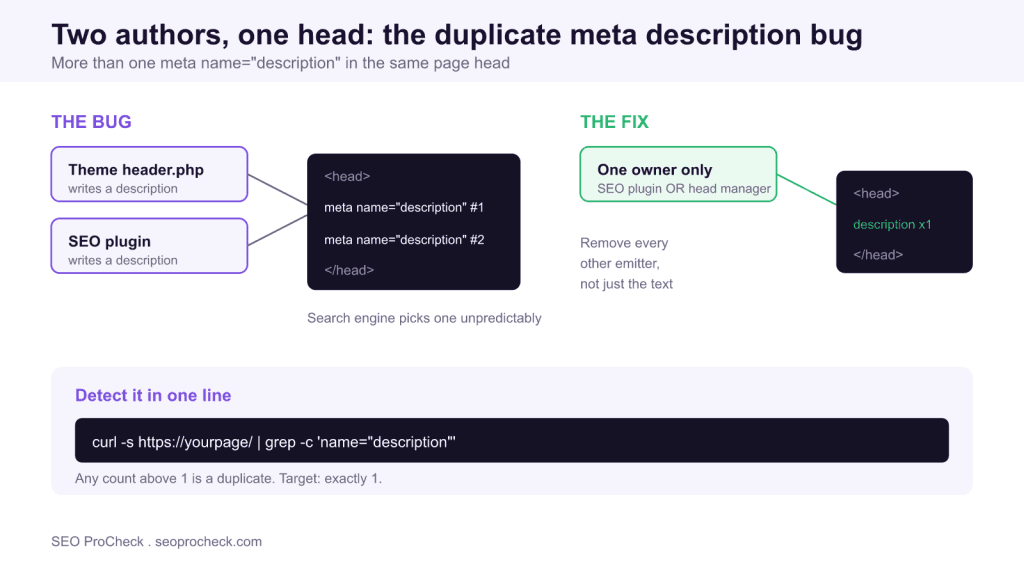
A page should carry exactly one <meta name="description"> tag. When two or more appear in the same <head>, search engines choose one unpredictably or write their own, so you quietly lose control of your snippet.
- Root cause is two emitters (authors), usually a theme plus an SEO plugin, not one bad string of text.
- Detect it fast:
curl -s https://yourpage/ | grep -c 'name="description"'should return1. - The fix is to remove the extra emitter at its source, then re-count until the head holds a single tag.
- There is no ranking penalty, but a scrambled or ignored snippet costs click-through.
What "multiple meta descriptions" means
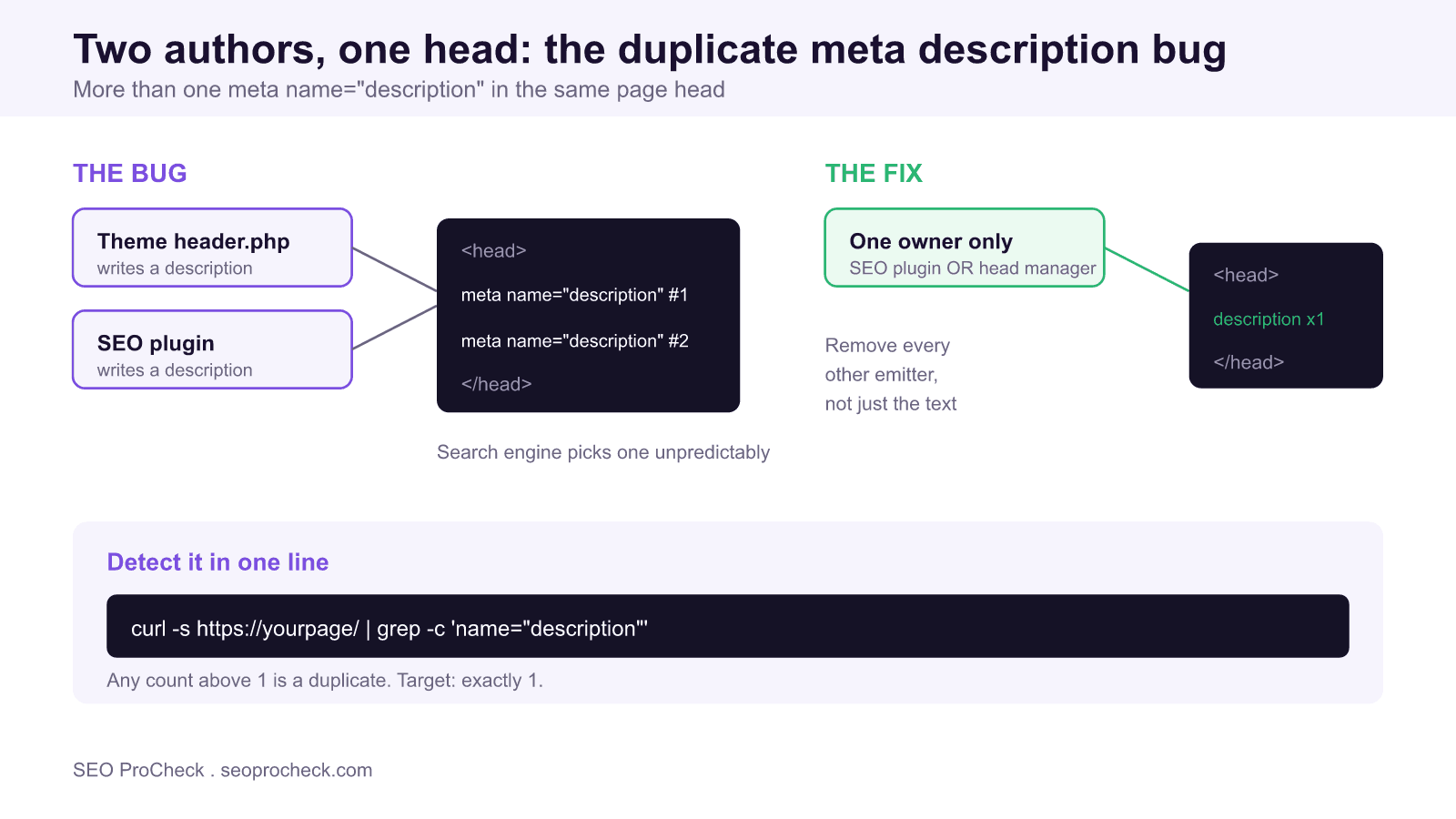
This check fires when a single page's <head> contains more than one <meta name="description"> tag. The stakes: you've handed a search engine two or more competing pitches for the same page, and you don't get to pick which one it keeps, because it may take the first, the last, concatenate them, or ignore all of them and write its own.
A page is allowed exactly one description. Two is a bug, not a feature, and it usually means two systems are both trying to own the tag without knowing about each other. The description does not feed rankings directly, but it is the sales line under your title in the results, and a duplicated or truncated one is the difference between a click and a scroll past.
A real example: two tags, one head
Here's the mess an audit flags, where the theme prints one description and an SEO plugin prints another:
<head>
  <title>Cast Iron Skillets | Acme Kitchen</title>
  <!-- printed by the theme header.php -->
  <meta name="description" content="Welcome to Acme Kitchen,
  your home for quality cookware since 2004.">
  ...
  <!-- printed by the SEO plugin -->
  <meta name="description" content="Shop pre-seasoned cast iron
  skillets built to last generations. Free shipping over $50.">
</head>
The corrected head has exactly one, and it's the one you actually want to rank with:
<head>
  <title>Cast Iron Skillets | Acme Kitchen</title>
  <meta name="description" content="Shop pre-seasoned cast iron
  skillets built to last generations. Free shipping over $50.">
</head>
Notice that the generic theme line ("Welcome to Acme Kitchen") is the weaker of the two: it is the same on every page. That is a strong tell in practice. When you see one description that reads like a site-wide boilerplate and another that is page-specific, the boilerplate one is almost always the stray emitter you want to kill.
Where the duplicate comes from
| Source of the duplicate | How it sneaks in | Fix |
|---|---|---|
| Theme + SEO plugin | The theme's header.php hard-codes a description and the plugin adds its own | Remove the theme's hard-coded tag; let the plugin be the sole author |
| Two SEO plugins | Yoast and another SEO plugin both active, each emitting meta | Deactivate one; never run two meta-writing SEO plugins together |
| Hard-coded in a static template | A base layout includes a default description and the page adds a specific one | Delete the layout default; set description per page only |
| Injected by a tag manager | A GTM custom HTML tag writes a description on top of the server one | Remove the GTM meta injection; meta belongs in the page, not the tag manager |
| CMS field + component both output | A headless CMS field and a hard-coded component both render the tag | Pick one owner in code; strip the other |
The order-of-output problem
Duplicate descriptions almost always come down to output order in the head. WordPress builds the <head> by firing everything hooked to wp_head in priority order: the theme might print its tag at priority 1, the SEO plugin at priority 10. Both run, both write, and you end up with two. The same pattern shows up in framework layouts where a base template and a page component each render meta. The lesson: it's not that one tag is "wrong," it's that two authors exist. Removing the extra author, not editing its text, is the actual fix.
On WordPress specifically, the cleanest kill is to stop the stray emitter at the hook rather than hunting through template markup. If a theme registers its description on wp_head, a child theme or a small snippet can pull it: remove_action('wp_head', 'theme_meta_description', 1); using the exact callback name and priority the theme used. If the theme hard-codes the tag straight into header.php with no hook, you delete that one line in a child theme copy of the file. Either way you touch the emitter, never the surviving plugin tag. Editing the plugin text while a second author still runs just changes which duplicate you are looking at.
How to detect it on your own site
- curl and count:
curl -s https://yourpage/ | grep -c 'name="description"'. Anything above1is a duplicate. - Screaming Frog: crawl, open the Meta Description tab, and switch to the Multiple filter. Frog lists every URL carrying more than one.
- View source: open
view-source:and Ctrl-F forname="description"; the match counter tells you instantly how many are present. - GSC URL Inspection: View crawled page shows the HTML Google fetched; search it for a second description tag.
- Browser devtools: in the Console run
document.querySelectorAll('meta[name="description"]').length, so a number above 1 confirms it in the rendered DOM.
The curl count and the devtools count answer two different questions, and both matter. Curl sees the raw HTML the server sent, which is what most crawlers parse. The devtools query counts what exists after JavaScript has run, which catches a client-side script or tag manager that injects a second tag the raw source never showed. If curl says 1 but devtools says 2, a script is adding the extra one after load.
| Detection method | Sees | Best for |
|---|---|---|
| curl + grep -c | Raw server HTML | Fast single-URL check and CI scripts |
| Screaming Frog Multiple filter | Raw HTML at scale | Finding every affected URL on the site |
| Devtools querySelectorAll | Rendered DOM | Catching JavaScript or tag-manager injections |
| GSC URL Inspection | Google's fetched HTML | Confirming what the search engine actually saw |
How to fix it
- Decide which system should own the description, usually your SEO plugin or your framework's head manager.
- Find and remove every other emitter: hard-coded theme tags, layout defaults, tag-manager injections, second plugins.
- If a theme hard-codes it, edit the template (or use a child theme) to delete that line rather than leaving the plugin to fight it.
- Reload and re-run the
grep -ccount until it returns exactly1. - Re-crawl with Screaming Frog to confirm the "multiple" filter is empty.
Don't assume "Google just takes the first one" and move on. Behavior isn't guaranteed, it varies by crawler, and Bing or an AI crawler may resolve the conflict differently than Google does. One tag removes all doubt.
What has changed lately
The description tag has quietly gained a second job. Beyond the classic blue-link snippet, AI answer surfaces and large language model crawlers read the same <head>, and they are even less forgiving of ambiguity than a traditional crawler. When two descriptions disagree, an answer engine has no principled way to decide which one represents the page, so it may quote the boilerplate, blend the two, or skip the tag and summarize the body instead. The remediation has not changed, but the cost of leaving a duplicate in place is now spread across more surfaces than it was a few years ago. Shipping a single, page-specific description is the one move that reads correctly everywhere.
FAQ
Which description does Google use when there are two?
There's no reliable rule, because Google may pick the first, the last, or ignore both and generate its own. Because the outcome is unpredictable and differs across search engines, the only safe answer is to ship a single tag.
Does having two descriptions cause a penalty?
No penalty, but it's a self-inflicted quality bug. You lose control of your snippet, which quietly costs click-through even without any ranking impact.
How do I know which tag is "winning" right now?
You can't count on it, which is the whole point. Rather than reverse-engineer crawler behavior, remove the duplicate so there's nothing to resolve.
My plugin and theme both add one: which do I keep?
Keep the SEO plugin's tag; it gives you per-page control and previews. Remove the theme's hard-coded description by editing the template or child theme.
Do duplicate meta descriptions affect AI search and LLM answers?
They can. Answer engines and LLM crawlers read the same head tags, and conflicting descriptions give them no clean signal, so they may quote the wrong one or ignore both. A single accurate description is the safest input for every surface.
Is this related to multiple title tags?
Same class of bug, different element, both caused by duplicate emitters in the head. If you've got two descriptions, check for two titles too: Multiple Title Tags.
Related: Head Contains Invalid Elements, WordPress SEO Setup Checklist, and Title Tags and Meta Descriptions: The Complete Guide.
Take this with you
The assistant links open with a question about this page already written. Nothing is sent until you press enter.
Claude Vincent is a technical SEO consultant focused on crawlability, rendering, and AI-search visibility. He writes the field guides and case studies at SEO ProCheck, with a bias toward the durable, unglamorous work that decides whether search engines and AI answer engines can actually read and cite a site.
About SEO ProCheck
Technical SEO consulting and GEO strategy with 20 years of enterprise experience. Case studies, resources, and tools for search and AI visibility.
Work With Me
Technical SEO audits, GEO strategy, site migrations, and international SEO. Hourly consulting for teams who need hands-on support, not just reports.
Subscribe to our newsletter!








Recent Posts
- Most Top Sites Never Say Who They Are in Structured Data October 14, 2026
- Homepage Titles Are Mostly Too Short, Not Too Long October 8, 2026
- Who Actually Serves an llms.txt? 184 Top Sites Measured September 29, 2026