

AI Summary
A structured data validation error means your schema markup is missing a required field, uses a wrong value type, or has a syntax mistake, so Google ignores it and shows no rich result. Fix it by finding the exact error in the Rich Results Test, supplying the required properties in the correct format, and revalidating until the item is error free.
- Errors block rich results, warnings do not: fix errors first, treat warnings as optional improvements.
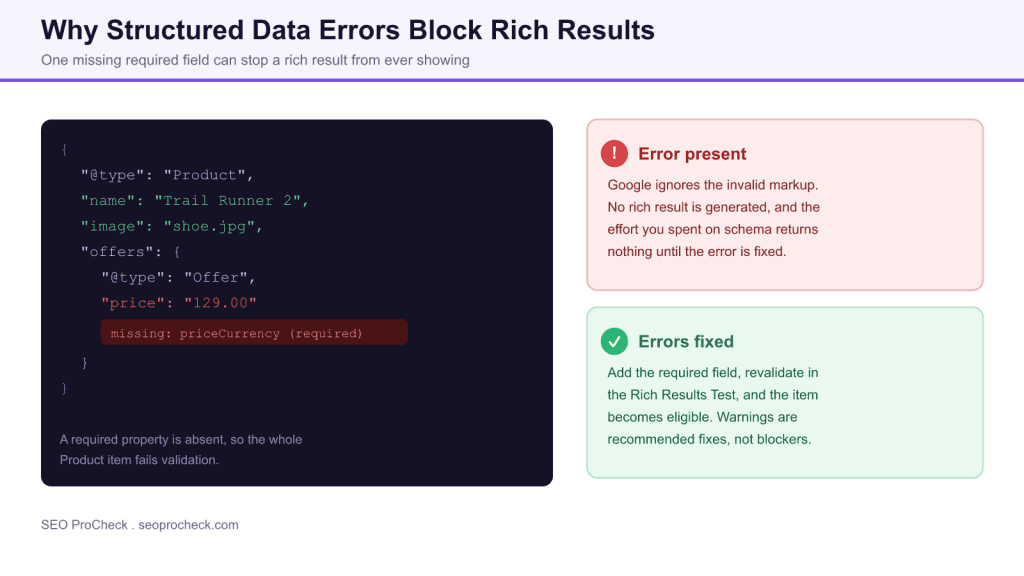
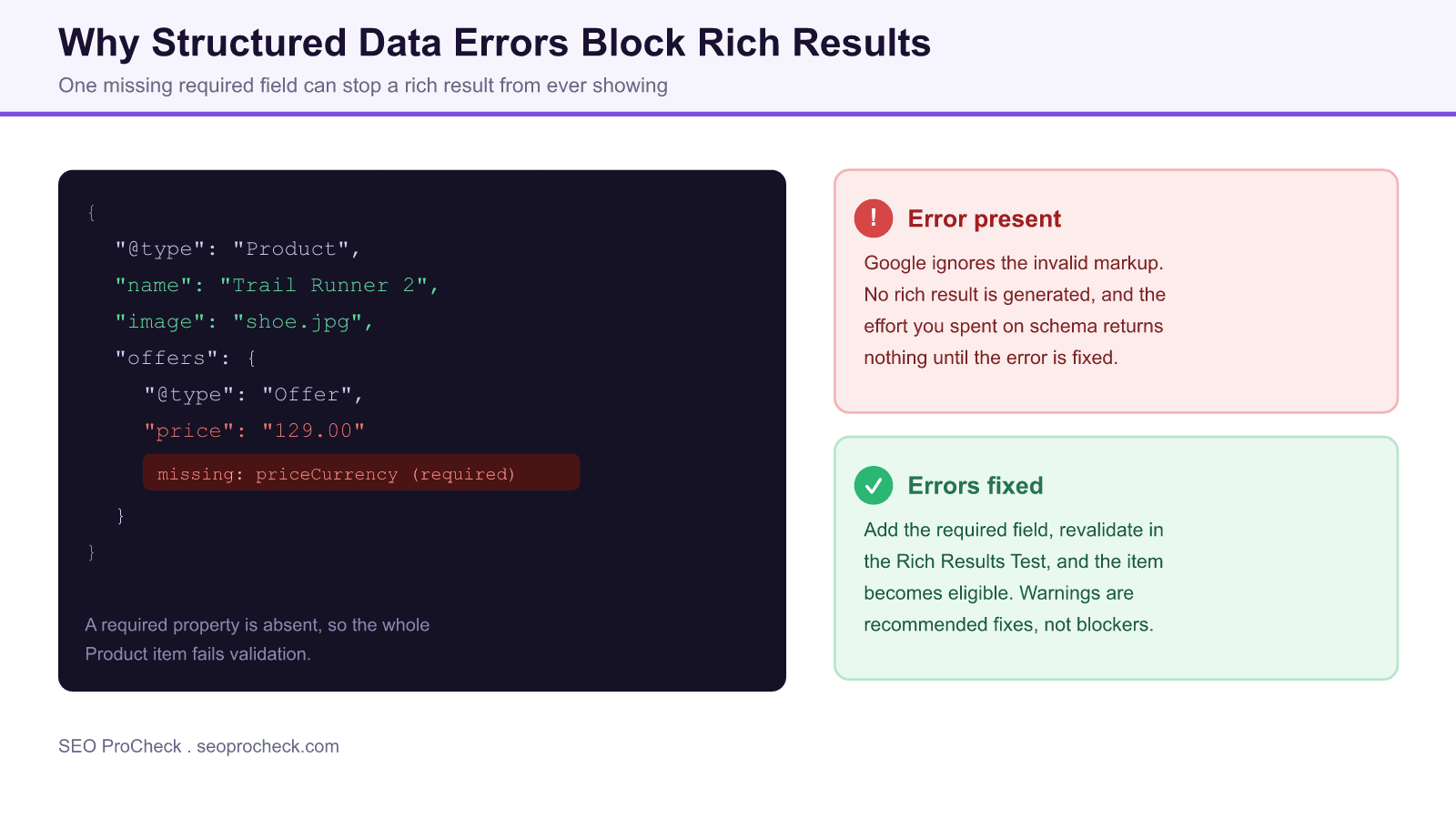
- The most common cause is a missing required property, such as priceCurrency on an Offer.
- Diagnose with the Rich Results Test and the Schema Markup Validator, then monitor at scale in Search Console.
- Invalid markup gives zero benefit, so validation is the step that turns schema into rich results.
Quick Reference
Element Code: RI-002
Issue: Structured data markup has errors preventing rich results
Impact: Rich results will not be displayed until errors are fixed
Fix: Fix validation errors in structured data markup
Detection: Google Search Console, Rich Results Test
What Is This Issue?
Schema markup with errors is ignored by Google. Missing required fields, incorrect values, or syntax errors prevent rich results from appearing.
Structured data is a machine readable description of your page, usually written as JSON-LD, that tells search engines what an item is: a product, a recipe, an FAQ, an article. Google validates that markup against the requirements for each type. An item that is missing a required property, uses the wrong value type, or breaks JSON syntax is judged invalid, and invalid items are dropped rather than partially used.
Errors versus warnings
The single most useful distinction when reading a validation report is error versus warning. An error means a required property is missing or malformed, and it disqualifies the item from rich results entirely. A warning means a recommended property is absent: the item can still be eligible, but adding the field usually produces a richer, more complete result. Fix every error first. Warnings are a second pass for squeezing out more value.
Why This Matters for Your Website
Invalid structured data provides no benefit. You have done the work of adding markup but get none of the advantages.
Rich results, star ratings, prices, recipe cards, drive higher visibility and click-through than a plain blue link. When markup fails validation you lose that entire upside while still carrying the maintenance cost of the code. Worse, a required field that silently breaks after a template change can remove rich results you already had, which is why ongoing monitoring matters as much as the initial fix.
How to Fix This Issue
- Identify errors: Use Rich Results Test
- Fix required fields: Add missing required properties
- Correct values: Use proper formats and types
- Revalidate: Test until error-free
Work from the exact message the validator gives you. If it reports a missing priceCurrency, add it inside the Offer as a currency code, then re-run the test:
"offers": {
  "@type": "Offer",
  "price": "129.00",
  "priceCurrency": "USD"
}
Common fixes follow the same pattern: supply the required field, use the correct data type (a number where a number is expected, a valid ISO date for dates), and make sure the markup describes content that is actually visible on the page, since Google requires the two to match.
Tools for Detection
- Rich Results Test: Shows specific errors
- Search Console: Site-wide structured data issues
Use the Rich Results Test to debug one URL at a time and the Schema Markup Validator at validator.schema.org for general schema.org conformance. For scale, the Search Console enhancement reports group errors by type across the whole site and let you validate a fix and track recovery as Google re-crawls.
Common validation errors and how to fix them
| Error message | Typical cause | Fix |
|---|---|---|
| Missing field priceCurrency | Offer has a price but no currency | Add priceCurrency with an ISO code such as USD |
| Missing field aggregateRating or review | Product markup with no rating data | Add valid rating data or remove the claim |
| Invalid value type | Text supplied where a number or date is expected | Match the type, use a number or ISO date |
| Parsing error | Broken JSON, trailing comma, unquoted key | Fix the JSON syntax and revalidate |
| Content mismatch | Markup describes data not on the page | Ensure marked-up content is visible to users |
AI Search and GEO Considerations
Error-free structured data is more likely to be used by AI systems for understanding content relationships and entities.
Clean schema helps generative search too. AI Overviews and answer engines lean on structured data to identify entities, attributes, and relationships, so valid markup improves the odds of being represented accurately in a generated answer. Invalid markup is simply skipped, which means a validation error costs you visibility in both classic rich results and AI driven surfaces at once.
TL;DR (The Simple Version)
Your structured data has errors that prevent rich results. Use the Rich Results Test to find and fix all validation errors.
Frequently asked questions
What causes structured data validation errors?
The usual causes are a missing required property, a value in the wrong format or type, or a JSON syntax mistake such as a trailing comma. Any of these makes Google judge the item invalid and skip it.
What is the difference between an error and a warning?
An error is a missing or malformed required property and it blocks rich results entirely. A warning is a missing recommended property: the item stays eligible, but adding the field usually produces a richer result. Fix errors first.
How do I find structured data errors on my site?
Use the Rich Results Test to debug individual URLs and the Schema Markup Validator for general conformance. In Search Console, the enhancement reports group errors by type across the whole site and let you validate a fix.
Do validation errors hurt my rankings?
They do not directly lower rankings, but they remove your eligibility for rich results, so you lose the extra visibility and click-through those enhanced listings provide. The cost is missed opportunity rather than a penalty.
How long until rich results return after I fix errors?
Google must re-crawl the page to see the corrected markup, which typically takes days to a few weeks. You can speed it up by requesting indexing and by using the validate fix option in the Search Console report.
Does structured data need to match the visible page?
Yes. Google requires that marked-up content is present and visible to users. Describing data that does not appear on the page is a policy issue and can lead to the markup being ignored or the site losing rich result eligibility.
Related reading on SEO ProCheck:
- More structured data SEO checks
- Browse the full SEO checks library
- Get an advanced SEO audit of your schema markup
Take this with you
The assistant links open with a question about this page already written. Nothing is sent until you press enter.
Claude Vincent is a technical SEO consultant focused on crawlability, rendering, and AI-search visibility. He writes the field guides and case studies at SEO ProCheck, with a bias toward the durable, unglamorous work that decides whether search engines and AI answer engines can actually read and cite a site.
About SEO ProCheck
Technical SEO consulting and GEO strategy with 20 years of enterprise experience. Case studies, resources, and tools for search and AI visibility.
Work With Me
Technical SEO audits, GEO strategy, site migrations, and international SEO. Hourly consulting for teams who need hands-on support, not just reports.
Subscribe to our newsletter!








Recent Posts
- Most Top Sites Never Say Who They Are in Structured Data October 14, 2026
- Homepage Titles Are Mostly Too Short, Not Too Long October 8, 2026
- Who Actually Serves an llms.txt? 184 Top Sites Measured September 29, 2026