

AI Summary
A low content page is one that does not cover the intent it targets, which is a different thing from a page that is simply short. The reliable fix order is to consolidate pages no query needs, enrich pages that stop short of the answer, and repair the template that generated the problem, in that order.
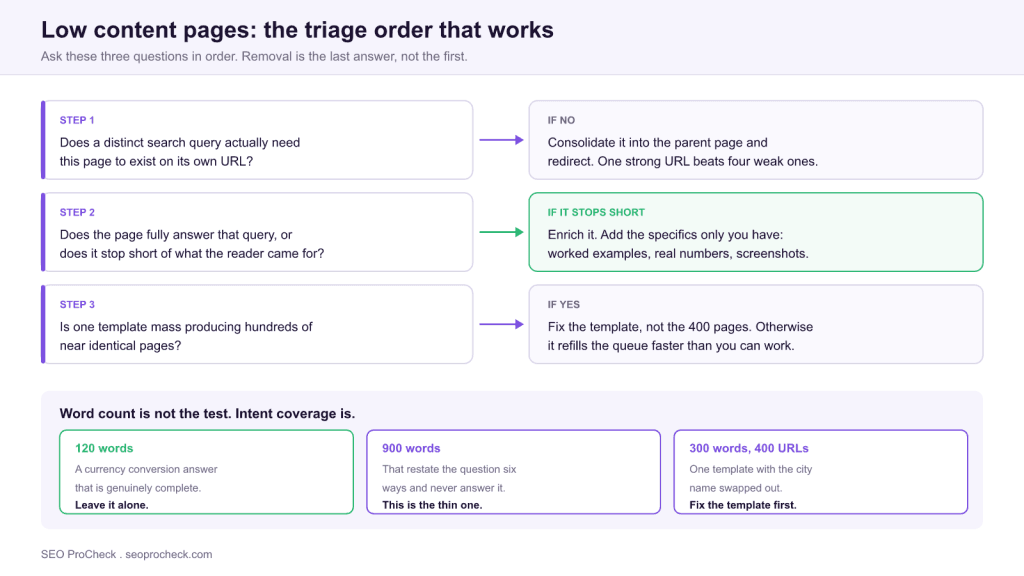
- There is no minimum word count. A complete 150 word answer is fine; a padded 900 word page that never answers the question is not.
- The clearest signal is the Search Console status "Crawled: currently not indexed" on pages that were submitted and fetched but judged not worth storing.
- Quality is assessed partly at site level, so a mass of thin URLs can hold back the strong pages around them.
- Enrichment beats deletion in most cases: removal throws away any equity and any query coverage the URL already had.

- Element Code: CQ
- Issue: See below
- Impact: Quality / trust / clarity
- Fix: See steps
- Detection: Crawler, manual review
What this issue means
Pages with very little substantive content relative to what the query needs. Not every short page is a problem, but a page that fails to satisfy the intent it targets usually is.
That phrasing carries the whole idea, so it is worth sitting with. "Thin" is a ratio, not an absolute. The denominator is what the query demands. A page answering "what time does the London Stock Exchange open" needs one line and a timezone note; padding it to a thousand words makes it worse, not better. A page targeting "how to migrate from Universal Analytics to GA4" needs configuration steps, screenshots, and edge cases, and a three paragraph overview is thin no matter how well written.
This is why word count thresholds fail as a diagnostic. Run a crawl, sort by word count, and the top of that list will contain perfectly good reference pages while genuinely thin content hides at 800 words because someone padded it. The word count is a place to start looking, not a verdict.
Why it matters
Low-content pages struggle to rank, often end up "Crawled: currently not indexed," and in volume they dilute your site's overall quality signal. Google evaluates quality at the site level, so thin pages drag down the strong ones around them.
The Search Console status deserves attention because it is the most direct feedback Google gives you. "Crawled: currently not indexed" means the crawler fetched the page, read it, and decided not to store it. That is a quality judgement rather than a technical error, which is why there is no configuration change that fixes it. Contrast it with "Discovered: currently not indexed," which usually points at crawl budget or internal linking instead, and needs a completely different response.
The site level element is the part that catches people out. A page can be individually acceptable and still be part of a pattern that costs you. If a section of the site consists of hundreds of near identical URLs generated from one template, the assessment is made against that pattern, and improving one of those pages changes nothing. That is the reasoning behind step three in the triage above: the template is the unit of work, not the page.
Finding them without guessing
Three data sources, cross referenced, will produce a defensible list. Any one of them alone produces noise.
| Source | Exact path | What it tells you |
|---|---|---|
| Search Console | Indexing → Pages → "Crawled: currently not indexed" | Pages Google fetched and declined to index |
| Performance report | Performance → Pages, filter to zero clicks over 6 months | Indexed pages earning nothing at all |
| Site crawl | Screaming Frog → Content tab → Word Count, plus Near Duplicates | Candidates and, more usefully, clusters of similar pages |
| Internal links | Crawl → Inlinks column, sort ascending | Orphans and near orphans, often the same URLs |
The Near Duplicates report is the one that changes the shape of the project. Set the similarity threshold to around 90 percent and it will group your templated pages into clusters, which converts a list of 400 individual tickets into one template fix. Enable "Store HTML" and "Near Duplicates" in the crawl configuration before you run it, because neither is on by default and neither can be computed retroactively.
How to fix it
- Expand the page with genuine value (original detail, examples, data) if the topic deserves it.
- Consolidate several thin pages on one topic into a single strong resource and redirect the rest.
- Remove or noindex pages that will never deserve to rank.
- Fix the source: templates or processes that mass-produce thin pages.
A note on the order of those four
Those options are listed by type, not by preference, and the order you apply them matters more than the list itself. In practice, expansion and consolidation resolve the large majority of cases, and removal should be the last resort rather than the opening move. Deleting a URL discards whatever query coverage, internal link equity, and external links it had accumulated, and none of that comes back. A page that ranks for nothing today may still be receiving impressions for long tail queries that never surface in a clicks report.
Before removing anything, check three things: whether the URL has any external links pointing at it, whether it has impressions for any query in the last twelve months, and whether it is the only page covering a subtopic your competitors do cover. If any of those is true, enrich or merge instead. Reserve removal for URLs that are genuinely artefacts: expired inventory with no successor, test pages, tag archives created by accident.
What enrichment actually means
Adding words is not enrichment. The test is whether a reader who arrives with the target query leaves without needing another tab. Practically, that means adding the things a general purpose summary cannot contain:
- Specifics you can only get from doing the work: the exact menu path, the actual header value, the error message as it really appears.
- A worked example with real inputs and real outputs, rather than a description of what an example would look like.
- Decision criteria: when this approach applies and when it does not. The boundary conditions are usually the most valuable part and the most commonly missing.
- A table or diagram that reorganizes the information rather than restating it, which is also what tends to get quoted by AI answer engines.
- The failure modes: what breaks, what it looks like when it breaks, and how to tell it apart from a similar looking problem.
When consolidating, redirect with a 301 from every merged URL to the survivor, and make sure the survivor genuinely absorbs the unique content from each source rather than just being the longest of them. A merge that quietly drops the one useful paragraph from each of five pages produces a sixth thin page.
Related: Duplicate Content FAQ
Two further references worth having open while you work: the thin content definition covers how the concept is assessed, and the Search Console page indexing report guide explains how to read each exclusion status so you do not treat a quality problem as a crawling one. If you are working through a large backlog, the content audit process gives the sequence for prioritizing at volume.
FAQ
There is no threshold, and any specific number you have been given is invented. Google has repeatedly stated there is no minimum word count. The real test is whether the page fully answers the query it targets, which for some queries is two sentences and for others is two thousand words.
Google fetched the page, evaluated it, and decided not to add it to the index. It is a quality judgement rather than a technical fault, so there is no setting to change. The response is to make the page substantially more useful, merge it into a stronger page, or accept that the URL does not need to exist.
Improve or consolidate them in almost all cases. Deletion permanently discards any external links, query coverage, and internal link equity the URL had. Reserve removal for genuine artefacts such as expired inventory with no successor or accidentally published test pages, and check for backlinks and residual impressions first.
In volume, yes. Google assesses quality partly at the site level, so a large body of low value URLs can suppress pages that would otherwise perform. A handful of short pages is not a problem. Hundreds of near identical templated pages is a pattern, and the pattern is what gets evaluated.
Cross reference three sources: the "Crawled: currently not indexed" list in Search Console, pages with zero clicks over six months in the Performance report, and a crawl sorted by word count with the Near Duplicates report enabled. Anything appearing in two of the three is a real candidate. The Near Duplicates clusters will also reveal which template is generating them.
Not by definition, but it fails in the characteristic way. Generated text is fluent and structurally complete while containing no specifics that could only come from having done the work, which is exactly the profile of a thin page. If the output could have been written without access to the product, the data, or the client, it will read as thin regardless of length.
Want a second set of eyes on your content quality?
Content quality is half of technical SEO. See how an advanced SEO audit works →
Take this with you
The assistant links open with a question about this page already written. Nothing is sent until you press enter.
Claude Vincent is a technical SEO consultant focused on crawlability, rendering, and AI-search visibility. He writes the field guides and case studies at SEO ProCheck, with a bias toward the durable, unglamorous work that decides whether search engines and AI answer engines can actually read and cite a site.
About SEO ProCheck
Technical SEO consulting and GEO strategy with 20 years of enterprise experience. Case studies, resources, and tools for search and AI visibility.
Work With Me
Technical SEO audits, GEO strategy, site migrations, and international SEO. Hourly consulting for teams who need hands-on support, not just reports.
Subscribe to our newsletter!








Recent Posts
- Most Top Sites Never Say Who They Are in Structured Data October 14, 2026
- Homepage Titles Are Mostly Too Short, Not Too Long October 8, 2026
- Who Actually Serves an llms.txt? 184 Top Sites Measured September 29, 2026