

AI Summary
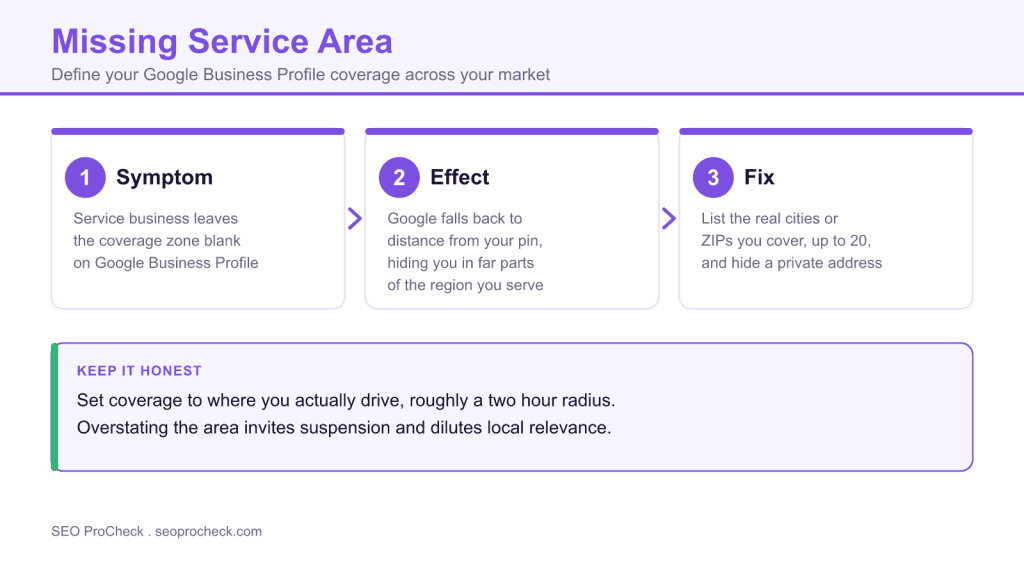
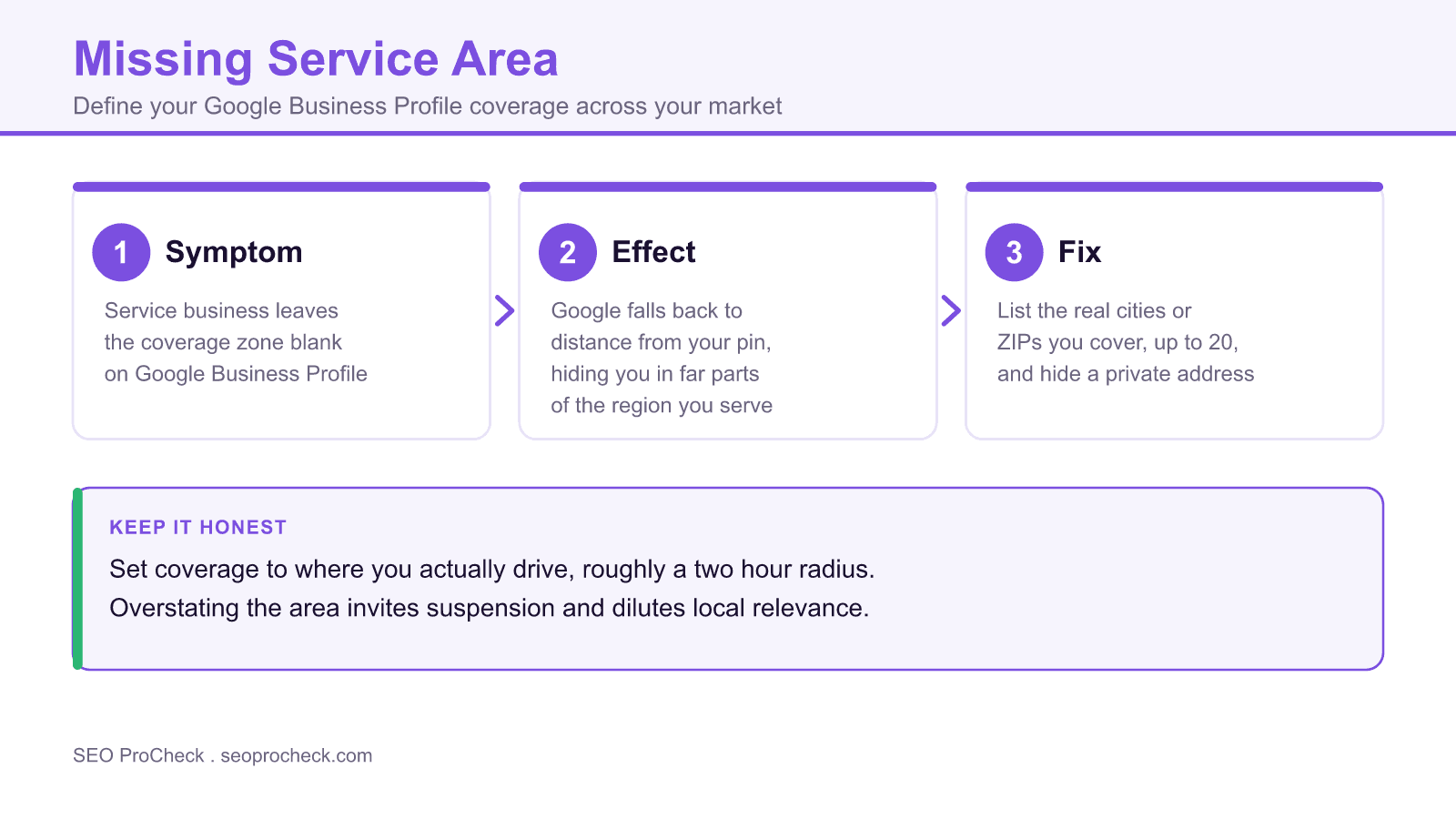
A missing service area means a service-area business has left its Google Business Profile coverage zone blank. Google then guesses your reach from your address, quietly shrinking the map area where you can appear.
- Service-area businesses travel to customers, so they should hide the address and define a coverage zone.
- List the real cities, ZIP codes, or regions you serve, up to 20 areas per profile.
- Keep coverage honest, roughly a two hour drive, since overstating it invites suspension.
- Mirror the same regions on your website so the signals reinforce each other.
Element Code: LO-008
What "missing service area" means
Google splits local businesses into two shapes. A storefront where customers come to you (a cafe, a dentist) uses a physical address that shows on the map. A service-area business, or SAB, goes to the customer instead: plumbers, electricians, mobile detailers, house cleaners, tow trucks, caterers, HVAC techs. For an SAB, the address is often a home or a small office you do not want the public visiting, so you hide it and instead tell Google the geographic zone you actually cover.
This check flags a service business that has left that service area blank. When it is empty, Google falls back to proximity from your listed address to decide where you are relevant. A plumber based on the edge of a metro who serves the whole city ends up looking, to the algorithm, like a plumber who only serves the three neighborhoods nearest home. The other two thirds of your market never see you in the local pack.
Why an empty service area costs you jobs
Local ranking has always leaned heavily on distance between the searcher and the business. Google's own guidance names three factors for local results: relevance, distance, and prominence. For a storefront, distance is measured to your door. For an SAB with a defined service area, Google can weigh whether the searcher sits inside your stated coverage, which is the whole point of telling it.
Skip that step and you get three problems at once. You lose visibility in the parts of your region that are far from your pin. You send a mixed signal, because a "we come to you" business with no coverage zone reads as incomplete. And you miss the chance to hide your address cleanly, which SABs are allowed and often required to do to stay compliant with Google's guidelines. An incomplete profile also tends to convert worse, since searchers cannot tell at a glance whether you even reach them.
Storefront versus service-area setup
How to detect the gap
- Open your Google Business Profile (via the profile itself on Search or the Business Profile Manager) and check Edit profile, Location, Service area. Empty is your answer.
- Run a geo-grid rank check with a tool like Local Falcon or BrightLocal. If your pins go dark the moment you move a few miles from your address, a missing or too-tight service area is a prime suspect.
- Search from the far edge of your real coverage using an incognito window and a location override for a town you serve. If you vanish, Google does not know you go there.
- Read your own profile as a customer would. If it shows a public address you do not want, you likely should be an SAB with the address hidden and a service area set.
How to fix it, step by step
- Open Business Profile settings and go to the service area field. In the profile editor, find Location and then Service area.
- Add the cities, postal codes, or regions you genuinely serve. Google lets you list up to 20 areas. Use real place names, not a made-up label.
- Decide whether to hide the address. If you have no public storefront, clear the address so only the service area shows. If you have both a storefront and travel to customers, you can keep the address and add a service area.
- Keep the area honest. Google's guidelines say your service area should reflect where you actually go, and a common ceiling is roughly a two hour drive from your base. Do not spray the whole state to look bigger; that invites suspension and dilutes relevance.
- Match the website to the profile. Name the same regions on your site, ideally on clear location or service pages, so the signals reinforce each other.
- Save, then verify. Confirm the address behaves the way you intended and re-run your geo-grid check after Google reprocesses the profile.
Reference: how to define your area
| Situation | Address setting | Service area setting |
|---|---|---|
| Mobile only, no public location | Hide address | List the cities or ZIPs you cover |
| Storefront plus you travel out | Keep public address | Add areas you visit on top |
| Multiple crews, wide region | Hide or keep per location | Up to 20 areas, split by real coverage |
| Tempted to list the whole state | Not applicable | Do not. Stay near a two hour drive |
- List the exact cities, ZIPs, or regions you actually serve
- Hide the address if you have no public storefront
- Keep the area realistic, roughly a two hour drive out
- Mirror the same regions on your website pages
- Recheck rankings with a geo-grid tool after saving
- Leave the service area blank on a mobile business
- List an entire state or country to look bigger
- Show a home address you do not want customers visiting
- Invent coverage in places you never actually drive to
- Set it once and never revisit as your routes change
FAQ
Do I lose my map pin if I set a service area?
How many areas can I list?
Will a bigger service area rank me in more towns?
Can I have both a storefront and a service area?
How long until the change takes effect?
Not sure your local footprint is set up right?
An advanced audit reviews your Business Profile, service-area setup, and on-site local signals, then hands you a prioritized fix list so you show up everywhere you actually work.
More service area questions
What is a service-area business?
A service-area business, or SAB, travels to the customer instead of having customers come to a storefront. Plumbers, electricians, mobile detailers, cleaners, and caterers are typical examples. Because the base is often a home, an SAB usually hides the address and defines a coverage zone instead.
Should I hide my address?
If you have no public storefront that customers visit, yes, clear the address so only your service area shows. If you run both a storefront and travel to customers, keep the address visible and add a service area on top of it.
How do I know my service area is too small?
Run a geo-grid rank check with a tool like Local Falcon or BrightLocal. If your pins go dark a few miles from your address, or you vanish when you search from the edge of your real coverage, your service area is missing or too tight.
Does the website need to match the profile?
Yes. Name the same regions on your site, ideally on clear location or service pages, so your Google Business Profile and your website reinforce the same coverage signals. Our guide to Google Business Profile optimization walks through the full setup.
How far can a service area realistically extend?
Google's guidance is that your service area should reflect where you actually go, and a common ceiling is roughly a two hour drive from your base. Listing an entire state to look bigger does not force rankings there and can trip Google's guidelines.
Take this with you
The assistant links open with a question about this page already written. Nothing is sent until you press enter.
Claude Vincent is a technical SEO consultant focused on crawlability, rendering, and AI-search visibility. He writes the field guides and case studies at SEO ProCheck, with a bias toward the durable, unglamorous work that decides whether search engines and AI answer engines can actually read and cite a site.
About SEO ProCheck
Technical SEO consulting and GEO strategy with 20 years of enterprise experience. Case studies, resources, and tools for search and AI visibility.
Work With Me
Technical SEO audits, GEO strategy, site migrations, and international SEO. Hourly consulting for teams who need hands-on support, not just reports.
Subscribe to our newsletter!








Recent Posts
- Most Top Sites Never Say Who They Are in Structured Data October 14, 2026
- Homepage Titles Are Mostly Too Short, Not Too Long October 8, 2026
- Who Actually Serves an llms.txt? 184 Top Sites Measured September 29, 2026